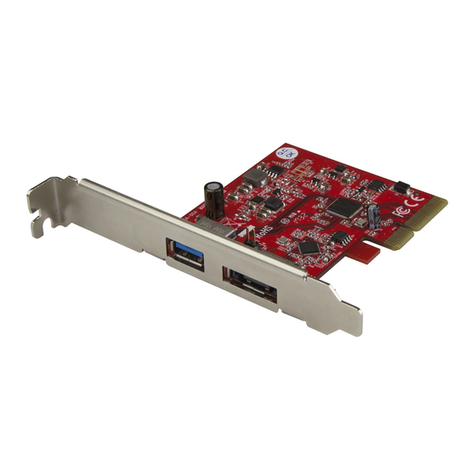
StarTech.com CBESAT2 Bedienungsanleitung

Manual Revision: 01/25/2012
DE: Bedienungsanleitung - de.startech.com
FR: Guide de l'utilisateur - fr.startech.com
ES: Guía del usuario - es.startech.com
IT: Guida per l'uso - it.startech.com
NL: Gebruiksaanwijzing - nl.startech.com
PT: Guia do usuário - pt.startech.com
For the most up-to-date information, please visit: www.startech.com
CBESAT2
2 Port CardBus eSATA Controller
*actual product may vary from photos

FCC Compliance Statement
This equipment has been tested and found to comply with the limits for a Class B digital device,
pursuant to part 15 of the FCC Rules. These limits are designed to provide reasonable protection
against harmful interference in a residential installation. This equipment generates, uses and can
radiate radio frequency energy and, if not installed and used in accordance with the instructions,
may cause harmful interference to radio communications. However, there is no guarantee that
interference will not occur in a particular installation. If this equipment does cause harmful
interference to radio or television reception, which can be determined by turning the equipment
o and on, the user is encouraged to try to correct the interference by one or more of the
following measures:
Reorient or relocate the receiving antenna.
Increase the separation between the equipment and receiver.
Connect the equipment into an outlet on a circuit dierent from that to which the receiver is
connected.
Consult the dealer or an experienced radio/TV technician for help.
Use of Trademarks, Registered Trademarks, and other Protected Names and Symbols
This manual may make reference to trademarks, registered trademarks, and other protected
names and/or symbols of third-party companies not related in any way to StarTech.com.
Where they occur these references are for illustrative purposes only and do not represent an
endorsement of a product or service by StarTech.com, or an endorsement of the product(s) to
which this manual applies by the third-party company in question. Regardless of any direct
acknowledgement elsewhere in the body of this document, StarTech.com hereby acknowledges
that all trademarks, registered trademarks, service marks, and other protected names and/or
symbols contained in this manual and related documents are the property of their respective
holders.

Instruction Manual i
Table of Contents
Introduction........................................................................................................................................................1
Packaging Contents ................................................................................................................................1
System Requirements ............................................................................................................................1
Installation............................................................................................................................................................2
Hardware Installation..............................................................................................................................2
Driver Installation......................................................................................................................................2
Verifying Installation................................................................................................................................2
Specications.....................................................................................................................................................3
Technical Support ...........................................................................................................................................4
Warranty Information....................................................................................................................................4

Instruction Manual 1
Introduction
This 2 port CardBus eSATA Adapter oers a cost-eective external storage solution that allows
eSATA laptop connections to external SATA devices.
The eSATA laptop CardBus adapter is ideal for making routine backups or dumping data to SATA
hard drives. The eSATA CardBus Adapter presents a convenient way to protect your valuable
data, with full external SATA data transfer speeds of up to 150 MBps
Packaging Contents
• 1 x CardBus eSATA card
• 1 x Driver CD
• 1 x Instruction Manual
System Requirements
• CardBus compatible computer system
• Windows 2000/ XP(32/64-bit)/ Server 2003(32/64-bit)/ Vista(32/64-bit)/ 7(32/64-bit)/
Server 2008 R2, or Linux

Instruction Manual 2
Installation
Hardware Installation
1. Slide the adapter card into the PCMCIA/CardBus on the computer system. Push the card in as
far as it will go. This can be done either when the computer is turned o, or when it’s already
turned on.
2. Plug the eSATA cables into the ports on the card, and then into your eSATA enabled device.
Driver Installation
Windows 2000/XP/Server 2003
1. When the Found New Hardware wizard appears on the screen, insert the Driver CD into your
CD-ROM drive. If you are prompted to connect to Windows Update, please select the “No, not
this time”option and click Next.
2. Select the option “Install Drivers Automatically (Recommended)”and then click the Next
button.
3. Windows should now start searching for the drivers. Once this has completed, click the Finish
button.
Windows Vista/7
1. When the Found New Hardware window appears on the screen, click on the “Locate and
install drivers software (recommended)”option. If prompted to search online, select the
“Don’t search online” option.
2. When prompted to insert the disc, insert the Driver CD that came with the card, into your
CD-ROM drive and Windows will automatically proceed to search the CD.
3. If a Windows Security dialog window appears, click the “Install this driver software anyway”
option to proceed.
4. Once the driver is installed, click the Close button.
Verifying Installation
From the main desktop, right-click on “My Computer”(“Computer” in Vista), then select Manage.
In the new Computer Management window, select Device Manager from the left window panel.
Double-click on the“SCSI & RAID Controllers”category (“Storage Controllers“ in Vista) and you
should nd “Silicon Image Sil 3512 SATALink Controller” or similar. The RAID card is now ready
to use.

Instruction Manual 3
Specications
Bus Interface CardBus (32-bit)
SATA rev 1.1
External Connectors 2 x eSATA
Chipset Silicon Image SiI3512
Maximum Data Transfer Rate eSATA: 1.5 Gbps
Compatible Operating Systems Windows2000/ XP/ Server 2003/ Vista/
Server 2008 R2/ 7 (32/64-bit)

Instruction Manual 4
Technical Support
StarTech.com’s lifetime technical support is an integral part of our commitment to provide
industry-leading solutions. If you ever need help with your product, visit www.startech.
com/support and access our comprehensive selection of online tools, documentation,
and downloads.
Warranty Information
This product is backed by a lifetime warranty.
In addition, StarTech.com warrants its products against defects in materials and workmanship for
the periods noted, following the initial date of purchase. During this period, the products may
be returned for repair, or replacement with equivalent products at our discretion. The warranty
covers parts and labor costs only. StarTech.com does not warrant its products from defects or
damages arising from misuse, abuse, alteration, or normal wear and tear.
Limitation of Liability
In no event shall the liability of StarTech.com Ltd. and StarTech.com USA LLP (or their ocers,
directors, employees or agents) for any damages (whether direct or indirect, special, punitive,
incidental, consequential, or otherwise), loss of prots, loss of business, or any pecuniary loss,
arising out of or related to the use of the product exceed the actual price paid for the product.
Some states do not allow the exclusion or limitation of incidental or consequential damages. If
such laws apply, the limitations or exclusions contained in this statement may not apply to you.

Hard-to-nd made easy. At StarTech.com, that isn’t a slogan. It’s a promise.
StarTech.com is your one-stop source for every connectivity part you need. From
the latest technology to legacy products — and all the parts that bridge the old and
new — we can help you nd the parts that connect your solutions.
We make it easy to locate the parts, and we quickly deliver them wherever they need
to go. Just talk to one of our tech advisors or visit our website. You’ll be connected to
the products you need in no time.
Visit www.startech.com for complete information on all StarTech.com products and
to access exclusive resources and time-saving tools.
StarTech.com is an ISO 9001 Registered manufacturer of connectivity and technology
parts. StarTech.com was founded in 1985 and has operations in the United States,
Canada, the United Kingdom and Taiwan servicing a worldwide market.
Inhaltsverzeichnis
Andere StarTech.com Controller Handbücher