
Sun Oracle Sun Network QDR InfiniBand Gateway Switch Bedienungsanleitung
1
This document describes the minimum steps you must perform to bring the Sun Network QDR InfiniBand
Gateway Switch from Oracle online for the first time.
Detailed installation information about all tasks in this document can be found in the Sun Network QDR
InfiniBand Gateway Switch Installation Guide or Sun Network QDR InfiniBand Gateway Switch Installation Guide for
Firmware Version 2.0. For information about these documents, see “Related Documentation” on page 6.
Note – You must read the installation information before installing your switch.
Contents
Safety and Compliance Information
Before performing an installation, refer to the following documents for safety information:
■Important Safety Information for Sun Hardware Systems – Printed document included in the shipping kit.
■Sun Network QDR InfiniBand Gateway Switch Safety and Compliance Guide – Available at the Oracle
documentation website.
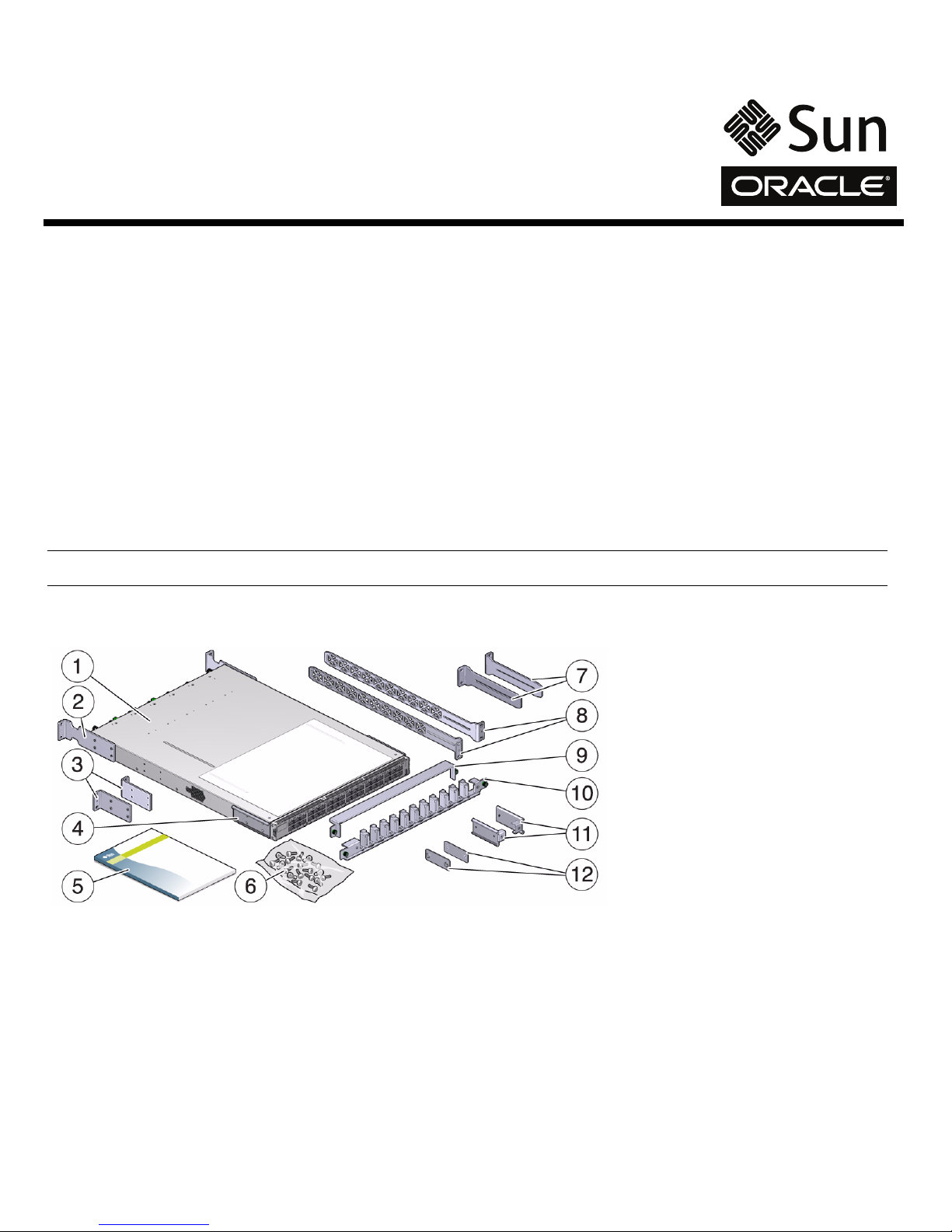
3 Front mounting brackets, short
4 C-bracket
5 Documentation
6 Hardware
7 Extenders
8 Long rails
1 Gateway switch
2 Front mounting bracket, long
9 Cable management cover
10 Cable management assembly
11 Attachment brackets
12 Attachment plates
Sun Network QDR InfiniBand Gateway Switch
Getting Started Guide

2
▼Mount the Gateway Chassis in a Rack
Caution – The front of the gateway chassis (fan end) intakes from the cold aisle, and the rear of the
gateway chassis (connector end) exhausts to the hot aisle. This flow direction requires you to install
the gateway in an orientation that is opposite of what you might assume.
1. Open the rack doors.
2. Assemble the cable management extenders. Perform Steps 2a to 2d for each extender.
a. Slide the attachment bracket over the extender, so that the tab on the bracket is opposite the flange on
the extender.
The open end of the tab is toward the flange. The flat end of the tab is toward the rear of the extender.
b. Place the attachment plate on the flange side of the extender, opposite the attachment bracket.
c. Use two screws to sandwich the bracket and plate to the extender, in the position farthest from the
flange.
d. Using a No. 2 Phillips screwdriver, tighten the two screws.
3. Attach the cable management extenders and long rails to the rear of the rack. Perform Steps 3a to 3c for
each side of the rack.
a. Place the long rail at the mounting location on the rear rack post.
b. Butt the flange of the extender to the flange of the long rail.
c. Secure the assembly to the post with two captive nuts and two screws.
4. Attach the long front brackets to the front of the gateway with four screws on each side and the C-
brackets to the rear of the gateway with four screws on each side.
5. Route the power cords through the rack with the female end at the front of the rack where the switch will
install.
Ensure that there is 24 in. (610 mm) of power cord slack at the front of the rack to provide an adequate
service loop when you remove the gateway from the rack.
6. Carefully lift the gateway into the front of the rack and slide the rear of the gateway onto the long rails.
Ensure that the ends of the long rails slide into the C-brackets at the rear of the gateway chassis and that the
power cords lie in the cut-outs of the long front mounting brackets.
7. Mount the front of the gateway chassis to the rack posts with two captive nuts and two screws at each
side.
Tighten the screws securely.
8. Install the cable management bracket to the tabs of the attachment brackets, tightening the thumbscrews
on each side of the cable management bracket.

3
▼Connect the Management Cables
1. Route the management cables to the gateway so that they do not interfere with other cables, with
servicing the gateway, or with other systems.
2. Connect an Ethernet cable between the gateway NET0 port and the network that is configured with a
DHCP server.
Connections to the management controller are made through DHCP.
3. Configure your DHCP server to provide a host name and address to the gateway.
Note – If a DHCP server is unavailable, the gateway will default to static IP 169.254.0.36/16. Alternatively,
you can connect a USB-to-serial adapter cable between the gateway’s USB port and a terminal device. This
connection also provides communication with the management controller. The terminal device must be
configured 115200 baud, 8 bit, no parity, 1 stop bit.
▼Power On the Gateway
1. Route the power cords so that they do not interfere with other cables, with servicing the gateway, or with
other systems.
2. Plug the power cords into the receptacles at the rear of the gateway chassis and into separate power
sources.
Note – To provide redundancy, connect each power supply to a separate power source. The system can operate
with only one power connection, but there is no redundancy in that case.
The AC LED on each power supply lights green. In a moment, the OK LED lights green, power is supplied,
the fans spin up, and the management controller boots.
■If the AC LED does not light, there is something wrong with supplied power.
■If the OK LED does not light, there is something wrong with the power supply.
■If the Attention LED on a power supply lights amber, there is a fault in the power supply.
■If the Attention LED on a fan lights amber, there is a fault with that fan.
3. Begin network communication with the management controller.
where gateway_name is the host name provided by DHCP. The gateway-name might be the IP address.
If you do not see this output or prompt, there is a problem with the DHCP configuration, network
communication, or the management controller.
%ssh -l ilom-admin gateway_name
ilom-admin@gateway_name’s password: ilom-admin
->

4
4. (Optional) Begin serial communication with the management controller.
If you do not see this output or prompt, there is a problem with the serial configuration, the USB-to-serial
adapter, or the management controller.
5. Change to the restricted Linux shell.
6. Check the status of the management controller, power supplies, fans, and switch chip. Verify that the
gateway voltage and temperature values are within specification.
7. Look for OK in the showunhealthy command output and PASSED in the last line of the env_test
command output.
An unfavorable output from these commands means a hardware fault with that particular component. A
voltage or temperature deviating more than 10% from the provided specification means a problem with the
respective component.
▼Start the Subnet Manager
Note – If your InfiniBand fabric is already active from a Subnet Manager external to the gateway, set that
Subnet Manager’s priority to higher than 0. You do not have to start another Subnet Manager.
1. Start the Subnet Manager.
2. (Optional) Set the Subnet Manager Priority.
where priority is 0(lowest) to 13 (highest).
...
CentOS release 5.2 (Final)
Kernel 2.6.27.13-nm2 on an i686
gateway_name login:ilom-admin
Password: ilom-admin
->
-> show /SYS/Fabric_Mgmt
Fabman@gateway_name->
Fabman@gateway_name-> showunhealthy
Fabman@gateway_name-> env_test
Fabman@gateway_name-> enablesm
Fabman@gateway_name-> setsmpriority priority
Fabman@gateway_name-> disablesm
Fabman@gateway_name-> enablesm

5
▼Connect the Cables
1. Route the InfiniBand cables and Ethernet cables so that they do not interfere with other cables, with
servicing the gateway, or with other systems.
2. Loosen the two thumbscrews that secure the cover to the cable management bracket and lift the cover off.
3. Connect InfiniBand cables to ports 0A - 15A (top row) and 0B - 15B (bottom row) as necessary. Perform
Steps 2a to 2e for each InfiniBand cable.
As you connect InfiniBand cables, the Subnet Manager begins establishing links within and routes through
the gateway.
Caution – Do not allow any InfiniBand cable to bend tighter than a 5 in. (127 mm) radius. Tight bends
can damage the cable internally.
a. Remove the protective cap from the connector and visually inspect the InfiniBand cable.
If the QSFP connector is bent or damaged, use a different cable.
b. Orient the cable’s QSFP connector to the horizontal, ensuring that the L-groove or cut-out at the tip is
up for the top row of receptacles (0A - 15A) or is down for the bottom row of receptacles (0B - 15B).
c. Slowly slide the connector into the receptacle.
d. Continue to push the connector in until you feel a detent.
e. Place the cable into the open slot on the cable management bar.
4. (Optional) Install QSPF transceivers in Eth ports 0A - 1A (top row) and connect the optical splitter cables
into the transceivers.
Place the cables into the open slot on the cable management bar.
5. Replace the cover for the cable management bracket and tighten the thumbscrews.
6. Check that the Link LEDs for cabled links are lit green.
If the Link LED is dark, the link is down. If the Link LED flashes, there are symbol errors.
7. Check the link status of the cables.
■If the link for a connector is reported as Not present, there is no cable attached or the link at either end
of the cable is down.
■If a port is down, use the enableswitchport 0 portnumber command to bring the port up.
8. Close the rack doors, if possible. Remove doors if necessary.
Fabman@gateway_name-> listlinkup

6
▼Verify the InfiniBand Fabric
♦Perform diagnostics on the InfiniBand fabric and report the fabric’s status.
▼Configure the Gateway
♦Refer to the Sun Network QDR InfiniBand Gateway Switch Administration Guide.
Related Documentation
Feedback
Provide feedback on this documentation at: http://www.oracle.com/goto/docfeedback
Support and Accessibility
Fabman@gateway_name-> ibdiagnet
Documentation Links
All Oracle products http://www.oracle.com/documentation
Sun Network QDR InfiniBand Gateway Switch http://docs.oracle.com/cd/E19671-01
Sun Network QDR InfiniBand Gateway Switch Firmware
Version 2.0
http://docs.oracle.com/cd/E26699_01
Oracle ILOM 3.0 http://docs.oracle.com/cd/E19860-01
Documentation Links
Access electronic support through My Oracle
Support
http://support.oracle.com/
For hearing impaired:
http://www.oracle.com/accessibility/support.html
Learn about Oracle’s commitment to accessibility. http://www.oracle.com/us/corporate/accessibility
Copyright © 2010, 2012, Oracle and/or its affiliates. All rights reserved.
Copyright © 2010, 2012, Oracle et/ou ses affiliés. Tous droits réservés.
Part No.: E26704-02,
Mfg No.: 7041952
May 2012
Andere Handbücher für Sun Network QDR InfiniBand Gateway Switch
1
Dieses Handbuch passt für folgende Modelle
1
Inhaltsverzeichnis
Andere Sun Oracle Schalten Handbücher

Sun Oracle
Sun Oracle Sun Datacenter InfiniBand Switch 36 Bedienungsanleitung

Sun Oracle
Sun Oracle Datacenter InfiniBand Switch 72 Installationshandbuch

Sun Oracle
Sun Oracle Sun Datacenter InfiniBand Switch 36 Bedienungsanleitung

Sun Oracle
Sun Oracle ES1-24 Installations- und Betriebsanleitung

Sun Oracle
Sun Oracle Switch 72 Bedienungsanleitung


