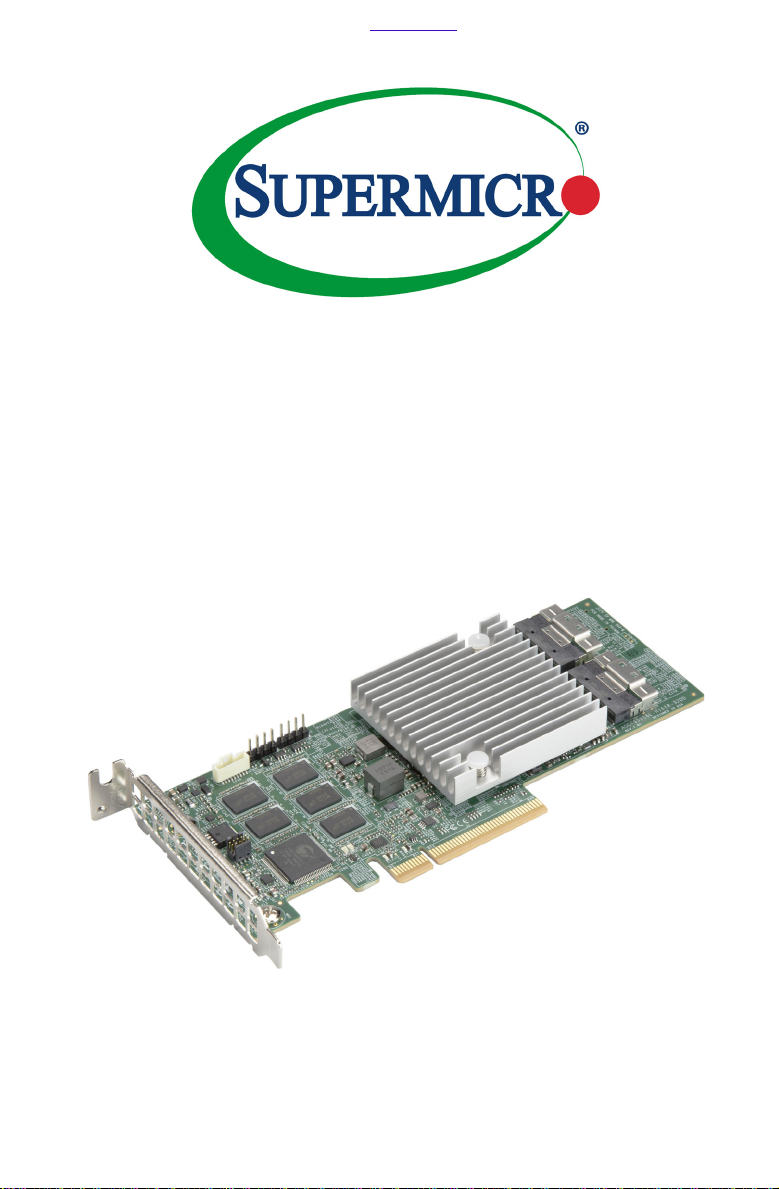
Supermicro AOC-S3908L-H8iR Bedienungsanleitung

User's Guide
Revision 1.0
AOC-S3908L-H8iR
AOC-S3908L-H8iR-32DD
AOC-S3908L-H8iR-16DD
AOC-S3916L-H16iR
AOC-S3916L-H16iR-32DD
Проконсультироваться икупить данное оборудование вы можете вкомпании «АНД-Системс»
адрес: 125480, г.Москва, ул.Туристская, д.33/1; site: https://andpro.ru тел: +7 (495) 545-4870 email: [email protected]
При обращении используйте промокод AND-PDF иполучите скидку.

The information in this User's Guide has been carefully reviewed and is believed to be accurate.
The vendor assumes no responsibility for any inaccuracies that may be contained in this document,
and makes no commitment to update or to keep current the information in this user's guide, or to
notify any person or organization of the updates. Please Note: For the most up-to-date version
of this user's guide, please see our Website at www.supermicro.com.
Super Micro Computer, Inc. ("Supermicro") reserves the right to make changes to the product
described in this user's guide at any time and without notice. This product, including software and
documentation, is the property of Supermicro and/or its licensors, and is supplied only under a
license. Any use or reproduction of this product is not allowed, except as expressly permitted by
the terms of said license.
IN NO EVENT WILL SUPER MICRO COMPUTER, INC. BE LIABLE FOR DIRECT, INDIRECT,
SPECIAL, INCIDENTAL, SPECULATIVE OR CONSEQUENTIAL DAMAGES ARISING FROM THE
USE OR INABILITY TO USE THIS PRODUCT OR DOCUMENTATION, EVEN IF ADVISED OF
THE POSSIBILITY OF SUCH DAMAGES. IN PARTICULAR, SUPER MICRO COMPUTER, INC.
SHALL NOT HAVE LIABILITY FOR ANY HARDWARE, SOFTWARE, OR DATA STORED OR USED
WITH THE PRODUCT, INCLUDING THE COSTS OF REPAIRING, REPLACING, INTEGRATING,
INSTALLING OR RECOVERING SUCH HARDWARE, SOFTWARE, OR DATA.
Any disputes arising between the manufacturer and the customer shall be governed by the laws of
Santa Clara County in the State of California, USA. The State of California, County of Santa Clara
shall be the exclusive venue for the resolution of any such disputes. Supermicro's total liability for
all claims will not exceed the price paid for the hardware product.
FCC Statement: This equipment has been tested and found to comply with the limits for a Class
A or Class B digital device pursuant to Part 15 of the FCC Rules. These limits are designed to
provide reasonable protection against harmful interference when the equipment is operated in
industrial environment for Class A device or in residential environment for Class B device. This
equipment generates, uses, and can radiate radio frequency energy and, if not installed and used
in accordance with the manufacturer’s instruction manual, may cause harmful interference with
radio communications. Operation of this equipment in a residential area is likely to cause harmful
interference, in which case you will be required to correct the interference at your own expense.
California Best Management Practices Regulations for Perchlorate Materials: This Perchlorate
warning applies only to products containing CR (Manganese Dioxide) Lithium coin cells. “Perchlorate
Material-special handling may apply. See www.dtsc.ca.gov/hazardouswaste/perchlorate”.
WARNING: This product can expose you to chemicals including
lead, known to the State of California to cause cancer and birth
defects or other reproductive harm. For more information, go
to www.P65Warnings.ca.gov.
!
The products sold by Supermicro are not intended for and will not be used in life support systems,
medical equipment, nuclear facilities or systems, aircraft, aircraft devices, aircraft/emergency
communication devices or other critical systems whose failure to perform be reasonably expected
to result in signicant injury or loss of life or catastrophic property damage. Accordingly, Supermicro
disclaims any and all liability, and should buyer use or sell such products for use in such ultra-
hazardous applications, it does so entirely at its own risk. Furthermore, buyer agrees to fully
indemnify, defend and hold Supermicro harmless for and against any and all claims, demands,
actions, litigation, and proceedings of any kind arising out of or related to such ultra-hazardous
use or sale.
User's Guide Revision 1.0
Release Date: February 24, 2021
Unless you request and receive written permission from Super Micro Computer, Inc., you may not
copy any part of this document.
Information in this document is subject to change without notice. Other products and companies
referred to herein are trademarks or registered trademarks of their respective companies or mark
holders.
Copyright © 2021 by Super Micro Computer, Inc.
All rights reserved.
Printed in the United States of America

Preface
About this User's Guide
This user's guide is written for system integrators, IT professionals, and
knowledgeable end users. It provides information for the installation and use of the
AOC-S3908L-H8iR, AOC-S3908L-H8iR-32DD, AOC-S3908L-H8iR-16DD, AOC-
S3916L-H16iR, and AOC-S3916L-H16iR-32DD add-on cards.
An Important Note to the User
All images and layouts shown in this user's guide are based upon the latest PCB
revision available at the time of publishing of this user guide. The add-on card you
have received may or may not look exactly the same as the graphics shown in
this user's guide.
Returning Merchandise for Service
A receipt or copy of your invoice marked with the date of purchase is required be-
fore any warranty service will be rendered. You can obtain service by calling your
vendor for a Returned Merchandise Authorization (RMA) number. When returning to
the manufacturer, the RMA number should be prominently displayed on the outside
of the shipping carton and mailed prepaid or hand-carried. Shipping and handling
charges will be applied for all orders that must be mailed when service is complete.
For faster service, RMA authorizations may be requested online (http://www.super-
micro.com/support/rma/).
This warranty only covers normal consumer use and does not cover damages in-
curred in shipping or from failure due to the alteration, misuse, abuse or improper
maintenance of products.
During the warranty period, contact your distributor rst for any product problems.
Conventions Used in the User's Guide
Pay special attention to the following symbols for proper system installation:
Warning: Important information given to ensure proper system installation and to
avoid causing damage to the components or causing injury to yourself.
Note: Additional information given for proper system setup.
Preface
iii

iv
AOC-S3908L-H8iR(-32DD/16DD)/AOC-S3916L-H16iR(-32DD) User's Guide
Important Links
For your system to work properly, please follow the links below to download all
necessary drivers/utilities and the user’s manual for your server.
• Supermicro product manuals: http://www.supermicro.com/support/manuals/
• Product drivers and utilities: https://www.supermicro.com/wftp/driver
• Product safety info: http://www.supermicro.com/about/policies/safety_informa-
tion.cfm
• If you have any questions, please contact our support team at: support@
supermicro.com
This manual may be periodically updated without notice. Please check the
Supermicro website for possible updates to the manual revision level.

v
Preface
Contacting Supermicro
Headquarters
Address: Super Micro Computer, Inc.
980 Rock Ave.
San Jose, CA 95131 U.S.A.
Tel: +1 (408) 503-8000
Fax: +1 (408) 503-8008
Web Site: www.supermicro.com
Europe
Address: Super Micro Computer B.V.
Het Sterrenbeeld 28, 5215 ML
's-Hertogenbosch, The Netherlands
Tel: +31 (0) 73-6400390
Fax: +31 (0) 73-6416525
Web Site: www.supermicro.nl
Address: Super Micro Computer, Inc.
3F, No. 150, Jian 1st Rd.
Zhonghe Dist., New Taipei City 235
Taiwan (R.O.C)
Tel: +886-(2) 8226-3990
Fax: +886-(2) 8226-3992
Email: [email protected]
Web Site: www.supermicro.com.tw

Table of Contents
Preface
About this User's Guide ................................................................................................ 3
An Important Note to the User...................................................................................... 3
Returning Merchandise for Service............................................................................... 3
Conventions Used in the User's Guide......................................................................... 3
Important Links.............................................................................................................. 4
Contacting Supermicro.................................................................................................. 5
Chapter 1 Introduction
1-1 Overview ......................................................................................................... 1-1
1-2 About this Add-on Card................................................................................... 1-1
1-3 Key Features................................................................................................... 1-1
Chapter 2 Hardware Components
2-1 Add-On Card Image and Layout..................................................................... 2-1
2-2 Major Onboard Components........................................................................... 2-2
2-3 SAS 3.0 Ports and Headers............................................................................ 2-3
SAS Ports................................................................................................... 2-3
Serial Debug UART Header....................................................................... 2-5
UART0 Header........................................................................................... 2-5
SBL_Disable Jumper.................................................................................. 2-5
SuperCap 9-pin Connector ........................................................................ 2-5
2-4 Front LED Indicators ....................................................................................... 2-6
PSoC Heartbeat LED ................................................................................. 2-6
ONFI Activity LED ...................................................................................... 2-6
2-5 Rear LED Indicators........................................................................................ 2-7
System Error LED ...................................................................................... 2-7
Overtemp LED............................................................................................ 2-7
EPAK_FLT LED .......................................................................................... 2-7
System Heartbeat LED .............................................................................. 2-8
Chapter 3 Installation
3-1 Static-Sensitive Devices.................................................................................. 3-1
Precautions ..................................................................................................... 3-1
3-2 Before Installation ........................................................................................... 3-2
3-3 Installing the Add-on Card .............................................................................. 3-2
Chapter 4 Conguring the Broadcom MegaRAID Setting
4-1 RAID Minimum Drive Requirements ............................................................... 4-1
4-2 Using the Broadcom MegaRAID Conguration Utility .................................... 4-2
AOC-S3908L-H8iR(-32DD/16DD)/AOC-S3916L-H16iR(-32DD) User's Guide
vi

Table of Contents
4-3 The Broadcom MegaRAID Main Screen ........................................................ 4-4
4-4 Creating a Virtual Drive................................................................................... 4-6
4-5 Drive Management........................................................................................ 4-12
4-6 Controller Management................................................................................. 4-14
4-7 Properties ...................................................................................................... 4-17
4-8 Foreign Conguration Management.............................................................. 4-19
Chapter 5 MegaRAID Controller Firmware Update Procedures
5-1 Flashing Firmware Using StorCLI under DOS................................................ 5-1
5-2 Flashing Firmware Using MegaRAID Storage Manager ................................ 5-3
vi

vi
AOC-S3908L-H8iR(-32DD/16DD)/AOC-S3916L-H16iR(-32DD) User's Guide
Notes

Chapter 1: Overview
1-1
Chapter 1
Introduction
1-1 Overview
Congratulations on purchasing your add-on card from an acknowledged leader in
the industry. Supermicro products are designed with the utmost attention to detail
to provide you with the highest standards in quality and performance.
1-2 About this Add-on Card
The Supermicro AOC-S3908L-H8iR, AOC-S3908L-H8iR-16DD, AOC-S3908L-
H8iR-32DD, AOC-S3916L-H16iR and AOC-S3916L-H16iR-32DD are the most
technologically-advanced, cost-eective, and reliable SAS MegaRAID adapters in
today's market. With the Broadcom 3908 or 3916 SAS controller, eight or 16 12Gb/s
SAS connectors, and a low-prole PCIe Gen4 x8 slot built in, these add-on cards
oer high-performance connectivity with enormous storage capacity to meet the
growing needs of enterprise server platforms.
With the optional SuperCap/TFM unit built-in, the add-on cards support 8GB DDR4
on-card cache at a speed of 2666MHz (maximum), providing cached data protection
during catastrophic system failures.
In addition, the embedded Broadcom SAS 3908/3916 I/O processor oers optimal
RAID performance and a PCI-Express host interface for increased I/O bandwidth.
The AOC-S3908L-H8iR, AOC-S3908L-H8iR-16DD, AOC-S3908L-H8iR-32DD,
AOC-S3916L-H16iR and AOC-S3916L-H16iR-32DD adapters deliver an intelligent
and robust RAID solution to the market.
1-3 Key Features
The key features of this add-on card include the following:
• Low prole x8 PCIe Gen4 controller
• Eight internal SAS3 ports with one SlimSAS HD connector (AOC-S3908L-H8iR,
AOC-S3908L-H8iR-16DD, and AOC-S3908L-H8iR-32DD) or 16 internal SAS3
ports with two SlimSAS HD connectors (AOC-S3916L-H16iR and AOC-S3916L-
H16iR-32DD)
• Hardware RAID 0, 1, 5, 6,10, 50, and 60 supported

1-2
AOC-S3908L-H8iR(-32DD/16DD)/AOC-S3916L-H16iR(-32DD) User's Guide
• Supports up to 16 (AOC-S3908L-H8iR-16DD), 32 (AOC-S3908L-H8iR-32DD
and AOC-S3916L-H16iR-32DD), or 240 (AOC-S3908L-H8iR and AOC-S3916L-
H16iR) physical devices with expander
• 8GB DDR4 on-card cache with a speed of up to 2666MHz for cached data
protection
• 1x (AOC-S3908L-H8iR, AOC-S3908L-H8iR-16DD, and AOC-S3908L-H8iR-
32DD) or 2x (AOC-S3916L-H16iR and AOC-S3916L-H16iR-32DD) SlimSAS x8
black (100 Ohm) connector(s)
• Supports MCTP over PCIe
• On-board TFM Included
• CacheVault to protect onboard cache memory
• Optional SuperCap BTR-CVPM05
• Supports MegaRAID Storage Manager software and secure boot
• Supports included advanced software encryption
• Supports 3.0, 6.0, and 12.0 Gb/s SAS, and 3.0 & 6.0 Gb SATA data transfer rates
• OS support: Windows and Linux
• UEFI mode support only
• Power consumption: 14 (AOC-S3908L-H8iR, AOC-S3908L-H8iR-16DD, and
AOC-S3908L-H8iR-32DD) or 18 (AOC-S3916L-H16iR and AOC-S3916L-H16iR-
32DD) watts
• Thermal operating range: system-dependent (55°C or higher with sucient
airow)
• Dimensions 2.71" (H) x 6.6" (L) (68.83cm (H) x 167.64cm (L))
Dieses Handbuch passt für folgende Modelle
4
Inhaltsverzeichnis
Andere Supermicro Controller Handbücher

Supermicro
Supermicro AOC-M25G-i2S Bedienungsanleitung

Supermicro
Supermicro AOC-MTG-i2T Bedienungsanleitung

Supermicro
Supermicro AOC-S3616L-L16iT Bedienungsanleitung

Supermicro
Supermicro AOC-MHIBF-m2Q2G Bedienungsanleitung

Supermicro
Supermicro AOC-2UR68G4-m2TS Bedienungsanleitung

Supermicro
Supermicro AOC-STGS-i1T Bedienungsanleitung

Supermicro
Supermicro AOC-S25G-m2S Bedienungsanleitung

Supermicro
Supermicro AOC-M25G-m4S Bedienungsanleitung

Supermicro
Supermicro AOC-S3216L-L16iT Bedienungsanleitung