
Synergy Science Echo H2 MACHINE Gebrauchsanweisung

Echo H2Machine Owner’s Operation Manual
The Premier H2Enriched Water Purification System
Warning: Incorrect installation and/or operation could void your valuable warranty.
Please protect your investment! READ THIS MANUAL CAREFULLY
H2
02
Safety precautions
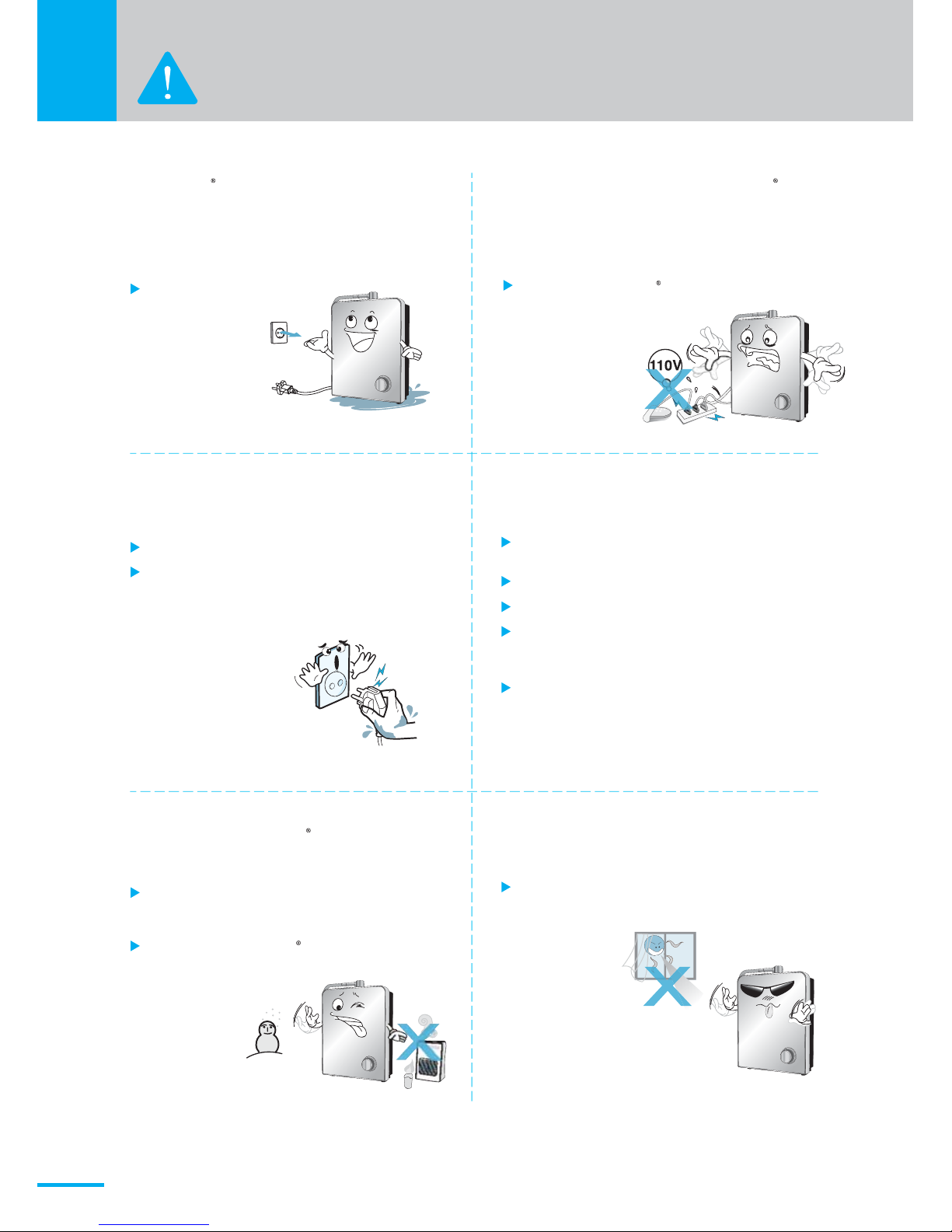
If the Echo H2 Machine is immersed in
water by accident, remove the plug
from the socket and remove the Machine
from water.
Contact the Customer Support.
Always set the voltage of the Echo H2
Machine to match the voltage of
the power supply.
Any power other than the proper
voltage MUST NOT be used.
It may cause
electric shock.
Do not use the Echo H2 Machine
with other electric devices
at the same time
as it may cause
fire.
Do not pull on the power cord.
Do not touch the plug with wet hand.
Insert the plug completely into the
power supply.
Do not install the Echo H2 Machine
in an area exposed to extreme
temperatures.
Keep away from excessive humidity
or dust, water splashes or direct sunlight.
Ambient temperature : 5~104 F,
Water temperature: 41~86 F
Never install the Echo H2 Machine
in a location where it may be
subject to freezing
temperatures.
It may cause fire or electric shock.
It may cause electric shock.
Remove excess dust from the plug on
a regular basis using a dry cloth.
Failure to due so may cause fir
Loose connection may cause electric
shock or heat generation leading to fire.
Do not use a defective plug or loose socket.
Do not bend the power cord by force.
Do not damage or deform the cord by
placing a heavy object over it.
(It may cause fire or electric shock.)
Wipe off dust or water from the plug pins
and the connection parts.
(It may cause fire or electric shock.)

03
Connect the Echo H2 Machine to the cold
water source line.
Connection to the hot water source
line may damage the filter
and /or machine.
Hot
Water
Do not use the Echo H2 Machine
with any water source that is
not already drinkable.
Do not block the Water Output.
Do not bend, twist or press the hose.
It may cause water leak, incorrect
pH level in water or Echo H2 Machine
malfunction.
Remove the plug from the socket
immediately if there is abnormal
noise or smell from the Echo H2 Machine,
and contact the Customer Support.
It may cause fire or electric
shock.
Before using the Echo H2 Machine that has been out of use for over 2weeks,
let water flow for 2-3 minutes to ensure proper operation of the Echo H2 Machine.
Do not un-assemble, repair or alter
the Echo H2 Machine.
It may cause fire or electric shock.
Please contact the retailer or the
Customer Support for repair.
Do not splash water on the
Echo H2 Machine or wash the Machine
with water.
It may cause short, electric
shock or breakdown.
Any alterations to the
Echo H2 Machine not
done by the
corporate office
will VOID YOUR
WARRANTY.

04
Source Water
Connection
Filter Cover
Master Power Switch
Input Voltage Selector
Fuse Holder
Faucet cable
Harness port
Hydrogen
Water Selector
On/ Off Knob
Key-hole Slots For
Wall Mounting
Hydrogen Water Spout
Speaker
Names And Functions
Front
Back

05
Indicators and controls
Setting button
Setting indicator
Filter life Indicator
Filter replace indicator
"Filtered" button
Filtered indicator
Low water pressure indicator
"H2" button and Indicator
Water Flow Indicator
Water SpoutDiverter
Valve Source
Water Hose
Qwner’s
Manual
Accessories
H2
Quick Connect
Removal Tool
Elbow Teflon tape

06
1.Turn the master power switch on the
back of the Echo H2 Machine to the
ON position.
2.When the ON/OFF knob is turned ON, a voice announcement will
be heard announcing the water type that is currently flowing,
Filter life indicator will track the amount of water flowing
and show the remaining filter life left.
How to use
Initial operation
H2H2H2

07
Turn on the machine by rotating ON/OFF knob to ON position: the large round
Hydrogen button should be illuminated. If not illuminated, press the
Hydrogen button and this will initiate hydrogen water production
You will hear hydrogen water is dispensed with voice message.
(You can use the hydrogen water by pressing the hydrogen water button(H2)
Turn on the machine by rotating the ON/OFF knob to On position.
Press the filtered button. The H2 Hydrogen button will no longer be illuminated.
Filtered water is dispensed with voice message “Filtered water”.
In this mode, Hydrogen is not being produced.
(You can use the filtered water by pressing the filtered water button even
if the hydrogen water is being dispensed.)
hydrogen
water
Filtered
How to Choose Hydrogen Water
H2
H2
How to Choose Filtered Water

08
Settings Button
How to use
Rotate the ON/OFF knob to the OFF
position. The LED Display will no
longer be illuminated and the machine
will go into standby mode.
How to turn off water flow
H2
H2
The 'Setting function' can be operated only when machine is powered on.
It has language and volume settings.
<English>
<Korean>
<Language setting><Filter life setting>
1) How to set the language
※ The default setting is English.
① Touch and hold the Mode button for a few seconds until the ring sound is heard.
The screen will appear as follows.
② Press the H2 button to switch to the language setting (LAn0_ English) mode.
③ Press the Filtered button to change the setting value as follows.
(LAn0 → LAn1 → LAn0) LAn1 is set to Korean Language.
④ Press the Mode button to save the setting value.

09
twice~
<volume 3> <volume 4> <volume 5>
<volume 0>
<volume 1><volume 2>
<Language setting><Filter life setting>
2) How to set the volume
※ The default setting is VoL3.
① Touch and hold the Mode button for a few seconds until the ring
sound is heard. The screen will appear as follows.
H2
② Press the H2 button twice to switch to volume setting (VoL3) mode.
③ Press Filtered button to change the setting value as follows.
④ Press the Mode button to save the setting value.
10
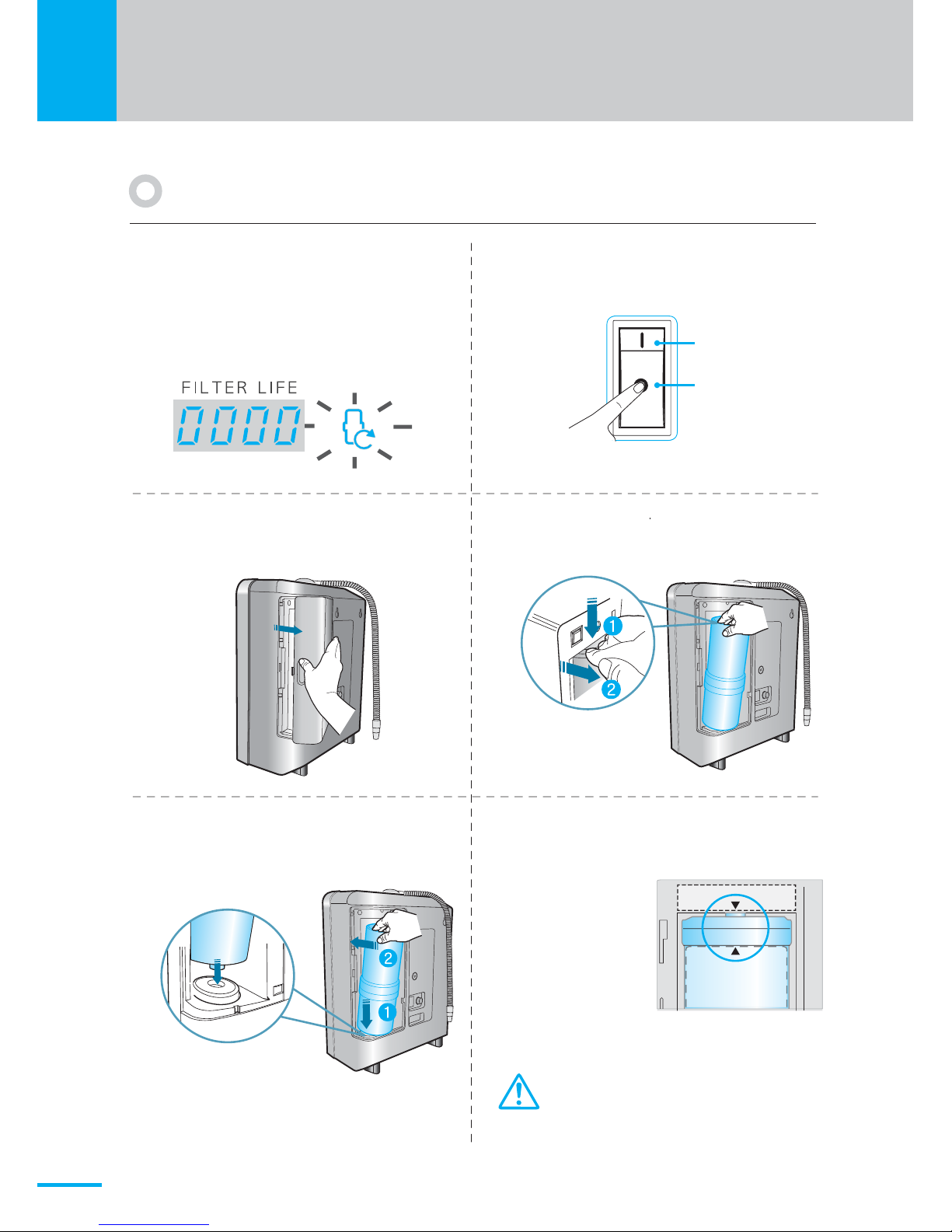
Change of genuine filter
OFF
ON
1
When the filter reaches the end of
its life, the filter life indicator shows
0000, the filter replace icon will then
light up, and the voice message will
say "Replace filter"
2
Turn off the power switch on the back
of the machine and shut off the water.
34
5
Place the genuine filter with the arrow
pointing toward the front, fit it into the
groove below, and push it in.
- Check for leaks after replacing the filter.
If there is a leak, check the “O”ring to
verify it is not damaged, cracked, or needing
to be lubricated.
Pull the filter cover forward to
remove it Push down on the top of the filter, then
pull it out. to words you.
6
Match the direction of the arrow shown
at the top to the direction of the arrow
on the filter
How to replace the filter
If the arrows are not lined up, the machine
will not recognize the filter genuine.
Filter Sticker
Inhaltsverzeichnis
Beliebte Wasserfiltersystem Handbücher anderer Marken


Gaggenau
Gaggenau BRITA INTENZA 467873 Bedienungsanleitung

Brita
Brita SAFF-100 Bedienungsanleitung

HEISSNER
HEISSNER FPU24000-00 Bedienungsanleitung

BGS technic
BGS technic 1518 Bedienungsanleitung

Reverse Osmosis
Reverse Osmosis RF Series Bedienungsanleitung

ubbink
ubbink Filtramax Series Bedienungsanleitung