
Systems With Intelligence DVS500 Bedienungsanleitung

© 2018 Systems With Intelligence. All rights reserved.
DVS500
INSTALLATION GUIDE
Version 1.0
SUBSTATION HARDENED DIGITAL VIDEO SERVER
Note: Please read this manual thoroughly before operating this unit and retain it for future reference.

INSTALLATION
DVS500 Installation Guide - V1.0
2www.SystemsWithIntelligence.com support SystemsWithIntelligence.com
© 2018 Systems With Intelligence. All rights reserved.
Copyright
COPYRIGHT © 2017 Systems With Intelligence Inc. ALL RIGHTS RESERVED
Dissemination or reproduction of this document, or evaluation and communication of its contents, is
not authorized except where expressly permitted. Violations are liable for damages. All rights reserved,
particularly for the purposes of patent application or trademark registration.
This document contains proprietary information, which is protected by copyright. All rights are reserved.
No part of this document may be photocopied, reproduced or translated to another language without
the prior written consent of Systems With Intelligence Inc.
Disclaimer of Liability
We have checked the contents of this manual against the hardware and software described. However,
deviations from the description cannot be completely ruled out.
Systems With Intelligence shall not be liable for any errors or omissions contained herein or for
consequential damages in connection with the furnishing, performance, or use of this material.
The information given in this document is reviewed regularly and any necessary corrections will be
included in subsequent editions. We appreciate any suggested improvements. We reserve the right to
make technical improvements without notice.
Contacting Systems With Intelligence
6889 Rexwood Road, Unit #9, Mississauga, Ontario, L4V 1R2 Canada
Phone: +1-289-562-0126 Email: info@SystemsWithIntelligence.com
www.SystemsWithIntelligence.com
Technical Support
International +1-289-562-0126 Fax: +1-289-562-0152
Email: support @SystemsWithIntelligence.com

DVS500 Installation Guide - V1.0
www.SystemsWithIntelligence.com support SystemsWithIntelligence.com
© 2018 Systems With Intelligence. All rights reserved.
3
INSTALLATION
Federal Communications Commission
Radio Frequency Interference Statement
This equipment has been tested and found to comply with the limits for a Class A digital device pursuant
to Part 15 of the FCC Rules. These limits are designed to provide reasonable protection against harmful
interference when the equipment is operated in a commercial environment. This equipment generates,
uses and can radiate radio frequency energy and, if not installed and used in accordance with the
instruction manual, may cause harmful interference to radio communications. Operation of this equipment
in a residential area is likely to cause harmful interference in which case the user will be required to correct
the interference on his own expense.
CAUTION
This product contains a laser system and is classied as a
“CLASS 1 LASER PRODUCT”
CAUTION
Use of controls or adjustments or performance of procedures other than those specied herein may result
in hazardous radiation exposure. This product contains no user-serviceable parts. Attempted service by
unauthorized personnel shall render all warranties null and void.
Changes or modications not expressly approved by Systems With Intelligence Inc. could void the user’s
authority to operate the equipment.
Should this device require service please contact Systems With Intelligence Inc.
IMPORTANT
The DVS500 family of products should be installed in a restricted access location where access can only
be gained by service personnel or users who have been instructed about the reasons for the restrictions
applied to the location and about any precautions that shall be taken; and access is through the use of
a tool or lock and key, or other means of security, and is controlled by the authority responsible for the
location.

INSTALLATION
DVS500 Installation Guide - V1.0
4www.SystemsWithIntelligence.com support SystemsWithIntelligence.com
© 2018 Systems With Intelligence. All rights reserved.
Table of Contents
Federal Communications Commission Radio Frequency Interference Statement.....................................3
TableofContents..................................................................................................................................................4
1: Product Overview ..............................................................................................................................................5
1.1 From & Rear Diagram ..................................................................................................................................................5
1.2 Technical Specications Overview............................................. .............................................................................6
2: Dimensions ....................................................................................................................................................... 7
3: Power Supply .................................................................................................................................................. 8
3.1 Power Supply Wiring................................................................................................................................................. 9
3.2 Dual Redundant Power Supply.............................................................................................................................. 9
4: Failsafe Relay ............................................................................................................................................... 10
5: IP Camera Input .............................................................................................................................................. 11
6: Serial Interface .............................................................................................................................................. 12
6.1 Dry Contact Input Interface Connector .............................................................................................................. 12
6.2 Relay Output Interface Connectors...................................................................................................................... 13
7: Ethernet Ports................................................................................................................................................ 14
7.1 Copper Ports........................................................................................................................................................... 14
7.2 Copper Gigabit Ethernet 1000Base-TX Cabling Recommendations................................................................. 14
8: Environmental Specications....................................................................................................................... 15
8.1 Temperature & Humidity....................................................................................................................................... 15
8.2 EMC/EMI/ESD......................................................................................................................................................... 15
EMI TYPE TESTS ............................................................................................................................................ 16
EMI IMMUNITY TYPE TESTS ......................................................................................................................... 17

DVS500 Installation Guide - V1.0
www.SystemsWithIntelligence.com support@SystemsWithIntelligence.com
© 2017 Systems With Intelligence. All rights reserved.
5
INSTALLATION
1 Product Overview
1.1 Front & Rear Diagram
Dimensions (HxWxD):
•6.34in (161mm) x 3.72in
(94.5mm) x 5.44in (138.2mm)
HDMI
•HDMI Interface
USB
•2 x USB 2.0 Ports
Digital Inputs
•4 x Digital Inputs
Digital Outputs
• 4 x Digital Outputs
Mounting
•DIN rail mounts
Substation Hardened
•IEC 61850-3, IEEE 1613, C37.90
•-400C to +750C
*Future option available soon.
3.72 in.
94.5 mm
6.34 in.
161 mm
Ethernet
•2 x 10/100/1000 BaseTX
Ethernet Ports
Ethernet Ports
•Ethernet Ports for IP Camera
Support
Wide Area Network
•10/100/1000 BaseFX
Ethernet Port
•WiFi Interface*
•Cellular Interface*
FAIL SAFE
•Fail Safe Relay
5.44 in.
138.2 mm
Redundant Power Input
•20VDC-60VDC

INSTALLATION
DVS500 Installation Guide - V1.0
6www.SystemsWithIntelligence.com support@SystemsWithIntelligence.com
© 2017 Systems With Intelligence. All rights reserved.
1.2 Technical Specications Overview
SPECIFICATIONS
IP Cameras
• Up to 4 IP cameras can be connected to the DVS
• IP Camera support for leading manufacturers (Contact Systems With Intelligence for
the latest list of supported IP Cameras)
• H.264videostreaming
• Resolution and frame rate dependant on IP camera used
• HD and megapixel images supported
• ONVIF IP Camera Support
CPU • Atom E3845, 1.91GHz**
RAM • 4GB DDR3L**
Power • 30W Max.
Video Output • 1 HDMI interface for computer monitor
USB • 2 USB 2.0 Ports
Storage • Up to 1TB
LAN Interface • Included: 2-port 10/100/1000TX RJ45 Interface
• Optional: 4-ports 10/100TX RJ45 or 100FX Fiber Interface
Optional Modules • Ethernet: 1-port 1000FX Fiber Interface
• Wireless: 802.11 b/g*, Cellular Modem*
Power Supply • 20VDC - 60VDC
Operating Temperature • -40˚Cto+75˚C;nocoolingfans
EMC/EMI • IEC61850-3;IEEE1613;IEC61000-6-2;IEC61800-3
Mounting/Dimensions • DIN mountable
Warranty • 2 Years
* Future option available soon.
** Other CPU models and RAM are available. Please contact Systems with Intelligence for more information.

DVS500 Installation Guide - V1.0
www.SystemsWithIntelligence.com support@SystemsWithIntelligence.com
© 2017 Systems With Intelligence. All rights reserved.
7
INSTALLATION
2 Dimensions
* Note: Units in Imperial (Metric).
3.72 in
(94.5 mm)
6.34 in
(161 mm)
2.94 in
(74.8 mm)
5.44 in
(138.2 mm)
INSTALLATION
DVS500 Installation Guide - V1.0
8www.SystemsWithIntelligence.com support@SystemsWithIntelligence.com
© 2017 Systems With Intelligence. All rights reserved.
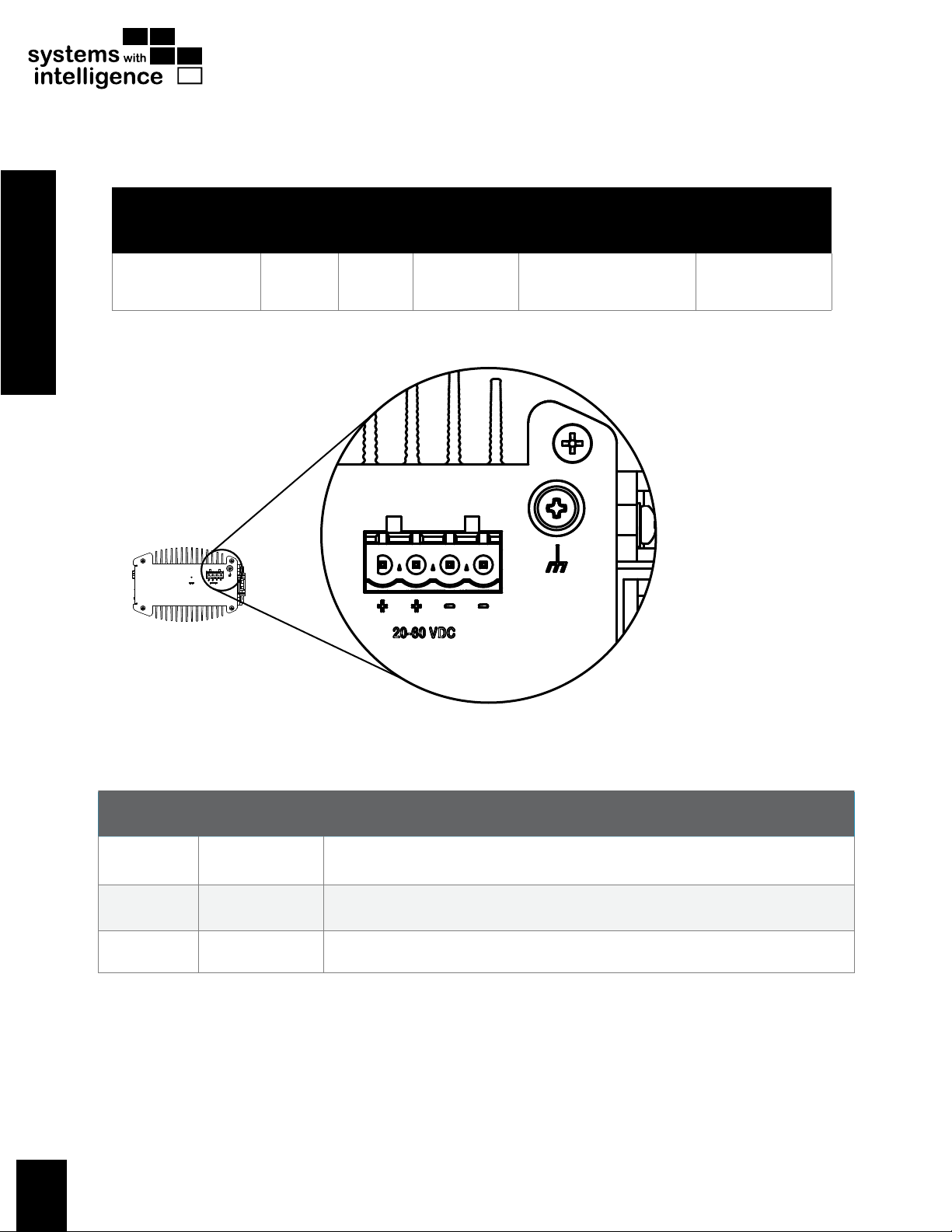
3 Power Supply
POWER SUPPLY
TYPE
INPUT RANGE INTERNAL
FUSE
RATING
POWER CONSUMPTION
MIN MAX TYPICAL WORST CASE
24/48 VDC 20 VDC 60 VDC 5A(T) 15 W - 20 W 25 W - 30 W
TERMINAL
NUMBER DESCRIPTION USAGE
Screw
Chassis
Ground Chassis Ground is connected to the equipment ground bus.
+Positive / + Positive / + is connected to the positive (+) terminal.
-Negative / - Negative / - is connected to the negative (-) terminal.
DVS500 OVERALL DIMENSION
DVS500 OVERALL DIMENSION

DVS500 Installation Guide - V1.0
www.SystemsWithIntelligence.com support@SystemsWithIntelligence.com
© 2017 Systems With Intelligence. All rights reserved.
9
INSTALLATION
3.1 Power Supply Wiring
Notes:
• Equipment must be installed according to
the applicable country wiring codes.
• Connect the ground terminal on the
power source to the chassis ground
terminal on the DVS500
3.2 Dual Redundant Power Supply Wiring
Notes:
• Equipment must be installed according to
the applicable country wiring codes.
• AConnect the ground terminal on the
power source to the chassis ground
terminal on the DVS500.

INSTALLATION
DVS500 Installation Guide - V1.0
10 www.SystemsWithIntelligence.com support@SystemsWithIntelligence.com
© 2017 Systems With Intelligence. All rights reserved.
4 Failsafe Relay
The failsafe relay is a digital output contact that can be used to communicate an alarm to another system
(e.g. remote terminal unit) if the server stops working. The failsafe relay is in open state (normally open)
when the server is powered down, and it is latched by the system when the server is powered up. An open
state will indicate that the server has no power or that something is wrong with the software running in the
server.
DVS500 OVERALL DIMENSION
Inhaltsverzeichnis
Beliebte Server Handbücher anderer Marken


iRobo
iRobo IPC2U Bedienungsanleitung

Nortel
Nortel 1000 Con?guration guide Bedienungsanleitung

Asus
Asus AP7500 Bedienungs- und Wartungshandbuch

Avid Technology
Avid Technology AirSpeed 5000 Bedienungsanleitung

HP
HP Integrity rx2600 Installationsanleitung

Milestone
Milestone Husky IVO 350T Bedienungsanleitung