Tech4o Accelerator Pulse Bedienungsanleitung

Accelerator Pulse
Owner's Manual

2
ACCELERATOR PULSE OWNER'S MANUAL
TABLE OF CONTENT
Introduction pg. 3
Buttons pg. 3
Chest strap pg. 4
Menu System pg. 4
Major Functions Modes: pg. 4
Home Time Display pg. 5
Dual Time View pg. 5
Chronograph Mode pg. 6
Countdown Timer Mode pg. 7
Exercise Mode pg. 8
Maximum Heart Rate pg. 10
Exercise Settings Menu pg. 12
1 of 5 Memory Save/Clear pg. 12
2 of 5 Exercise History pg. 13
3 of 5 Exercise Schedule pg. 14
4 of 5 Pedometer Setting pg. 15
5 of 5 Heart Rate Setting pg. 16
Main Settings Menu pg. 17
1 of 11 Home Time Setting pg. 17
2 of 11 Alarm Setting pg. 18
3 of 11 Exercise Schedule pg. 19
4 of 11 Pedometer Setting pg. 20
5 of 11 Memory Save/Clear pg. 21
6 of 11 Exercise History pg. 22
7 of 11 Timer Setting pg. 23
8 0f 11 Personal Profile pg. 24
9 of 11 System Setting pg. 25
10 of 11 Heart Rate Setting pg. 26
11 of 11 Dual Time Setting pg. 30
Power Saving Mode pg. 30
Battery pg. 31
Trouble Shooting pg. 32
Warranty pg. 33
Contacts pg. 34

3
Buttons
INTRODUCTION
Thank you for purchasing a Tech4O
Accelerator Pulse Watch. Your watch
uses an advanced accelerometer sensor
technology to accurately measure speed,
distance, heart rate and calories
Although your Accelerator watch has a
pre-programmed profile, it is extremely
important to enter your own profile in
the MAIN SETTINGS MENU – 8 of 11
Personal Profile.
Accurate measurement and input of your
weight, age, gender and walking/run-
ning stride lengths is crucial to achieving
accurate results. For help with measuring
your average strides, visit www.tech4o.
com and use the stride length calculator
on the Accelerator product pages
Your new Accelerator watch uses a menu
system navigation to access, display and
adjust its various modes. Understanding
how this system works is important to
enjoying your new watch. Please take the
time to read and follow this manual
Buttons:
LIGHT • Turns on an electroluminescent
backlight
MODE • Enters/Exits setting modes
• Selects among major functions
• Moves among different items in
setting modes
ST/STP • Activates Start /Stop in several modes
• Scrolls to previous menu items
• Increases values in setting modes
LAP/RESET
• Enters/Exits Exercise Mode
• Resets/loads values in several modes
• Scrolls to next menu item
• Decreases values in setting modes
MAJOR F See fig.1
fig.1
LIGHT
MODE LAP/RESET
ST/STP

4
To Wear Heart Rate Chest Strap: see fig.2
The Accelerator Pulse has two primary menus:
Exercise Mode and Home Time Mode each
have their own menu system. See fig.3
Note: For your
convenience, these
two menus share 5
features that can be
accessed through
either menu
Chest Strap Information:
The chest strap will allow your watch to capture,
display and save heart rate data. This strap must be
worn with good contact on your bare skin. Moisture
between the strap and your skin aids in conductivity
and allows the heart rate feature to work properly.
ExERcISE MENU
1 of 5 Memory Save/Clear
2 of 5 Exercise History
3 of 5 Exercise Schedule
4 of 5 Pedometer Setting
5 of 5 Heart Rate Setting
MAIN SETTING MENU
1 of 11 Home Time Setting
2 of 11 Alarm Setting
3 of 11 Exercise Schedule
4 of 11 Pedometer Setting
5 of 11 Memory Save/Clear
6 of 11 Exercise History
7 of 11 Timer Setting
8 0f 11 Personal Profile
9 of 11 System Setting
10 of 11 Heart Rate Setting
11 of 11 Dual Time Setting
fig.2 fig.3

5
Home Time Mode
The Accelerator Pulse has 4 major functions:
• Home Time/Dual Time • Chronograph
• Countdown Timer • Exercise Mode
See fig. 4
Home Time Mode:
The Home Time display is the default display.
In any settings mode, if no button is pressed
for one minute, the watch will automatically
and continually revert to the previous
display, until it returns to Home Time
Home Time Display:
Top line: day of week, month, and date
Bottom line: current
hours, minutes and
seconds
or Top Line: Dual Time
Center line: Current Home Time
Bottom line: Current Dual
hours, minutes
and seconds
To set home time: see MAIN SETTINGS
MENU– Home Time Setting: 1 of 11
Dual Time View:
Your accelerator watch is capable of storing an
alternate time zone. There are 2 ways to
view Dual Time zones
• QUICK VIEW- PRESS ST/STP in the
Home Time display. The Dual Time zone
will appear for 3 seconds. After 3 seconds
the Home Time display will return
• DUAL VIEW- HOLD ST/STP FOR 3
SECONDS in the Home Time display.
Home Time will appear in the top line.
The Dual Time zone time will show in the
bottom line
HOLD ST/STP FOR 3 SECONDS to
return the view to home time display
To set dual time: see MAIN SETTINGS
MENU - Dual Time Setting: 11 of 11
hold S/S to toggle between
L/R
M
M
M
fig.4

6
Chronograph Mode: See fig. 5
• PRESS MODE ONCE from the Home Time
display to access the Chronograph
Chronograph Mode displays:
T
op line: CHRONO
Bottom line: running time- minutes, seconds, and
hundredth seconds for the first hour
OR hours, minutes and seconds thereafter
To Use the Chronograph Mode:
• PRESS ST/STP to start the Chronograph
•PRESS ST/STP again to stop the
Chronograph
To Record Lap Times: See fig. 6
• PRESS ST/STP or start the Chronograph
•PRESS LAP/RESET to record a lap time
The recorded lap time will display in the top
fig.5 fig.6

7
Countdown Timer
line for 10 seconds. After 10 seconds the
current lap time will display in the top line
and the current total elapsed time will
display in the bottom line
Repeat the above steps to record additional
lap times. A total of 50 lap times can be
recorded
•PRESS ST/STP to stop the Chronograph
To View the Recorded Lap Times: See fig.6
HOLD MODE FOR 3 SECONDS
• PRESS ST/STP to view first lap time
(REC–01
) Recorded lap time will display
in top line and Total elapsed time will
display in the bottom line
• PRESS ST/STP again to view additional
recorded lap times
HOLD MODE FOR 3 SECONDS to exit the
Chronograph memory
• PRESS MODE to exit Chronograph Mode
To Clear the Chronograph:
HOLD LAP/RESET FOR 3 SECONDS to
clear the chronograph memory
Countdown Timer Mode: See fig.7
Your Accelerator watch has a convenient
Countdown Timer. The timer can be
used for advanced training or as a quick
reminder. The timer counts backwards
from your programed time and beeps at
critical intervals. See the following to set the
Countdown Timer
Countdown Timer Mode Displays:
Top line: TIMER RUN PAUSE FINISH
Bottom line: hours, minutes, seconds
fig.7

8
• PRESS MODE TWICE from the Home Time
display to access Countdown Timer
To Use the Countdown Timer: See fig.8
• PRESS ST/STP to start Countdown Timer
• PRESS ST/STP to stop Countdown Timer
The Countdown Timer will beep:
On the minute for the last 10 minutes.
Every 10 seconds during the last minute.
Every second for the last 5 seconds.
For 10 seconds at expiration
To Set the Countdown Timer: See fig.8
HOLD MODE FOR 3 SECONDS in the
Countdown Timer display to access the
settings menu
• PRESS ST/STP or LAP/RESET to adjust
the hours
• PRESS MODE to confirm
• PRESS ST/STP or LAP/RESET to adjust
the minutes
• PRESS MODE to confirm
• PRESS ST/STP or LAP/RESET to adjust
the seconds
• PRESS MODE to confirm
HOLD MODE FOR 3 SECONDS to return
to the Countdown Timer display
To Re-Set the Countdown Timer:
• PRESS LAP/RESET when the
countdown timer is stopped or at
expiration to reset
• PRESS MODE to exit Countdown Timer
Mode
Exercise Mode:
Your Accelerator’s Exercise Mode accurately
measures your speed, distance, calories,
steps and heart rate
fig.8

9
To Use the Exercise Mode: See fig.9
Important: Although Exercise Mode will
automatically record information once
it has been accessed, the sensors still
need time to initialize. The watch will
beep when the sensors are ready. It is
extremely important that you wait for
the beep. If you begin your exercise
before initialization, the results will be
grossly inaccurate.
Although this watch has a pre-programmed
profile, it is extremely important to enter
your personal profile in the MAIN
SETTINGS
MENU – Personal Profile: 8 of 11
Correct age, weight and gender are important
to establish heart rate parameters. Correct
measure of your weight and walking/
running stride lengths is crucial to achieving
accurate speed and distance info. For help
with measuring your average stride lengths,
visit www.tech4o.com and use the stride
length calculator on the Accelerator product
page. See the following on how to access
and navigate the five Exercise Mode displays
Exercise Mode Displays:
• PRESS LAP/RESET from the Home Time
display to access Exercise Mode
• PRESS MODE to scroll through the
exercise data displays
Top line: various exercise mode data
(see following sections for details)
Bottom line: current heart rate,
percentage of maximum heart rate,
pedometer and heart rate icons
Exercise Mode Displays
fig.9

10
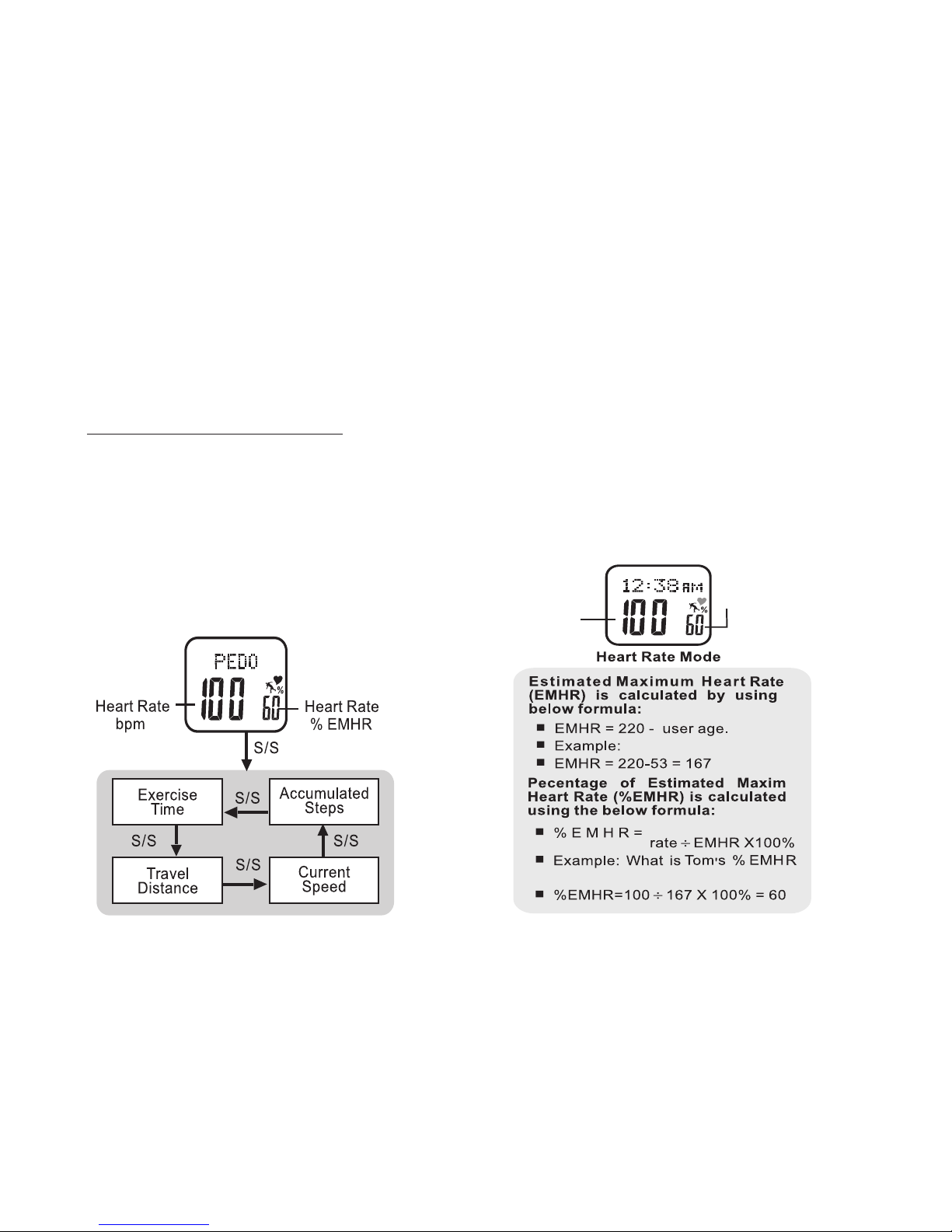
Estimated Maximum Heart Rate and
Percentage of Maximum Heart Rate:
Your Accelerator watch records and calculates
various heart rate data. Much of this data is
based on your estimated maximum heart
rate which is determined by the information
entered in your personal profile. See fig 11
for an explanation of your watch's calculation
of estimated maximum hear rate
percent of
maximum
heart rate
heart rate
in BPM
Tom is 53
Current heart
if his current heart rate is 100
Your accelerator watch automatically distinguishes
between walking and running and adjusts its calcula-
tions accordingly
• PRESS
LAP/RESET
at any time to exit Exercise
Mode. It will continue to record exercise data as
you navigate elsewhere in the watch
• HOLD ST/STP FOR 3 SECONDS to manually
start or stop recording
To View Pedometer Exercise Data: See fig.10
While in Exercise Mode:
• PRESS MODE to scroll PEDO display
• PRESS ST/STP to view pedometer data
• PRESS LAP/RESET to exit Exercise Mode
fig.11fig.10
Dieses Handbuch passt für folgende Modelle
1
Inhaltsverzeichnis
Andere Tech4o Betrachten Handbücher