Technology Solutions AcuraGlobal BTL-1000 Bedienungsanleitung

USER
GUIDE:
BTL-1000 2D
BLUETOOTH
®
UHF RFID
READER
www.ACURA.com
Design
•
Development
• Manufacture

www
.tsl.com
TERMS & CONDITIONS
© 2015 TSL. All rights reserved.
No part of this publication may be reproduced or used in any form, or by any electrical or mechanical means,
without permission in writing from Technology Solutions (UK) Ltd. This includes electronic or mechanical means,
such as photocopying, recording, or information storage and retrieval systems. The material in this manual is
subject to change without
notice.
Technology Solutions (UK) Ltd
(TSL)
reserves the right to make changes to any product to improve r
eliability
,
function, or design.
TSL
does not assume any product liability arising out of, or in connection with, the
application
or use of any product, circuit, or application described herein. No license is granted, either expressly or
by
implication, estoppel, or otherwise under any patent right or patent, covering or relating to any
combination,
system, apparatus, machine, material, method, or process in which
TSL
products might be used. An
implied
license exists only for equipment, circuits, and subsystems contained in
TSL
products.
TSL
and the
TSL
logo are
registered trademarks of
TSL.
Other product names mentioned in this manual may be trademarks or r
egister
ed
trademarks of their respective companies and are hereby
acknowledged.
All software is provided strictly on an “as is” basis. All software, including firmware, furnished to the user is on a
licensed basis.
TSL
grants to the user a non-transferable and non-exclusive license to use each software or
firmware program delivered hereunder (licensed program). Except as noted below, such license may not
be
assigned, sublicensed, or otherwise transferred by the user without prior written consent of
TSL.
No right to
copy
a licensed program in whole or in part is granted, except as permitted under copyright law. The user shall
not modify, merge, or incorporate any form or portion of a licensed program with other program material,
cr
eate
a derivative work from a licensed program, or use a licensed program in a network without written
per
mission
from
TSL.
The user agrees to maintain
TSL’s
copyright notice on the licensed programs delivered hereunder,
and
to include the same on any authorized copies it makes, in whole or in part. The user agrees not to
decompile,
disassemble, decode, or reverse engineer any licensed program delivered to the user or any portion thereof.
TSL
reserves the right to make changes to any software or product to improve reliability, function, or
design.
TSL
does not assume any product liability arising out of, or in connection with, the application or use of any
product, circuit, or application described herein.
iPad, iPhone, iPod, iPod classic, iPod nano, iPod shuffle, and iPod touch are trademarks of Apple Inc., r
egister
ed
in the U.S. and other countries. iOS is a registered trademark of Apple
Inc.
“Made for iPod,” “Made for iPhone,” and “Made for iPad” mean that an electronic accessory has been
designed
to connect specifically to iPod, iPhone, or iPad, respectively, and has been certified by the developer to meet
Apple performance standards. Apple is not responsible for the operation of this device or its compliance with
safety and regulatory standards. Please note that the use of this accessory with iPod, iPhone, or iPad may
affect
wireless
per
for
mance.
The Bluetooth® word mark and logos are registered trademarks owned by Bluetooth SIG, Inc. and any use of
such marks by Technology Solutions (UK) Ltd is under license. Other trademarks and trade names are those of
their respective owners.
©
Technology Solutions (UK) Ltd 2015
2
BTL-1000 2D UHF Reader
User Guide V1.16

www
.ACURA.com
CONTENT
Introduction 4
Parts
of the BTL-1000 2D
UHF
Reader 4
Alternative configuration of the BTL-1000 2D
UHF
Reader 5
Using the BTL-1000 2D
UHF
Reader 6
Battery Installation or Removal 6
Antenna Installation or Removal 10
Locking the antenna 11
Charging and Micro
USB
Connection 12
Connecting the Micro
USB
cable 12
Reader orientation when using Micro
USB
cable 13
Button Operation 14
Primary button Click and Hold 14
Secondary Button Double Click and Hold 14
Reading Transponders 15
Status LED 16
Connections 17
Bluetooth
® wireless technology connection 17
Compatible Apple product models 17
Other compatible products 17
Setting up a Bluetooth
® connection with an Apple product 17
View
list of Bluetooth
® Devices (iOS 7) 18
Pair
with
TSL Bluetooth
® device 19
Micro
SD
Card 23
Location, Installation and Removal 23
Auto Run
File
(AUTO.TXT) 23
Log
File
(LOG.TXT) 24
Software
Development 25
Troubleshooting and Maintenance 26
Maintenance 26
Troubleshooting 26
Regulatory information 27
Information to the user – FCC 27
RF
Exposure Guidelines 27
Canadian Warning Statements 27
Korea Warning
Statement
for Class B ITE 28
Laser Warning 29
Health and
Safety
Recommendations 30
Waste
Electrical and Electronic Equipment (wEEE) 31
Warranty 31
About TSL 33
Histor
y
Version
Date
Modifications
1.00 20/02/2
0
13 Document c
r
eation
1. 0 2
0
1/03/2
0
13 Gene
r
al
r
evisions
t
o con
t
ent
1.03 11/03/2
0
13 Gene
r
al
r
evisions
t
o con
t
ent
1.04 02/04/2
0
13 App
r
o
v
al information added, LED functions upda
t
ed
1.05 18/08/2
0
13 Gene
r
al
r
evisions
t
o con
t
ent
1.06 20/05/2
0
13
R
egula
t
ory information upda
t
ed.
1. 0 7
0
1/10/2
0
13 Added ‘Communication
s
’ section
1.08 27/03/2
0
14 Added ‘Mic
r
o SD Ca
r
d’ section
1.09 04/08/2
0
14 Gene
r
al
r
evisions
t
o con
t
ent
1.1 27/08/2
0
14 iOS 5/6 sections
r
emo
v
ed and
r
eplaced with iOS7
1.11 20/11/2
0
14 Sc
r
eenshot outlines added
1. 1 3 1 6 / 0 4 / 2
0
15 Canadian Warning S
t
a
t
ements
1. 1 6 1 4 / 1 0 / 2
0
15 Compatibility List upda
t
ed
©
Technology Solutions (UK) Ltd 2015
3
BTL-1000 2D UHF Reader
User Guide V1.16

www
.ACURA.com
INTRODUCTION
Technology Solutions’ BTL-1000 2D UHF Reader provides Ultra High Frequency (UHF) Radio Frequency
Identification
(RFID),
with optional barcode scanning functionality. The unit can be used stand alone or paired with
a Bluetooth® wireless technology enabled host device. It can be used with UHF transponders including the
EPC
Global Class 1
Generation 2
transponders.
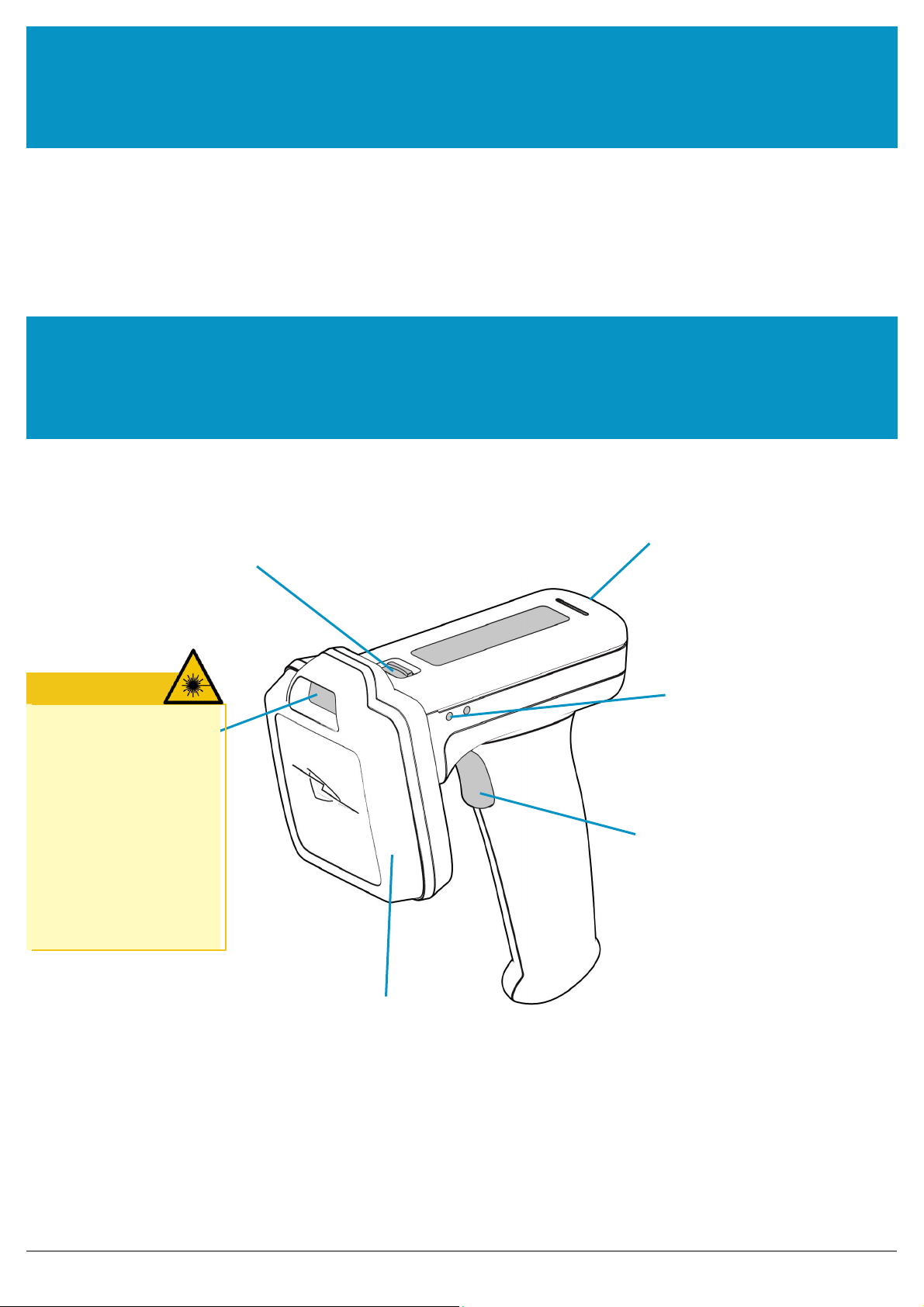
PARTS OF THE BTL-1000 2D UHF
REA
D
E
R
WARNING
Antenna release
latch
Micro USB
connector
Status
LEDs
LASER
LIGHT.
DO NOT STARE INTO
BEAM.
CLASS
2
LASER
PRODUCT
.
LASERSTRAHLUNG
NICHT
IN
DEN STRAHL BLICKEN.
LASER KLASSE
2.
LUMIÈRE
LASER NE PAS REGARDER
DANS LE FAISCEAU. APP
AREIL
À LASER DE CLASSE
2.
630-670nm
1mW
Trigger
Button
UHF Antenna with
2D Imager
FIGURE 1:
Parts
of
the BTL-1000 2D UHF Reader
©
Technology Solutions (UK) Ltd 2015
4
BTL-1000 2D UHF Reader
User Guide V1.16

www
.tsl.com
ALTERNATIVE
CONFIGUR
A
TION
OF THE BTL-1000 2D UHF READER
Antenna Release
Latch
Micro USB
connector
Status LEDs
Slimline
Grip
UHF
Antenna
Trigger
Button
FIGURE 2:
Parts
of
the BTL-1000 2D UHF Reader
©
Technology Solutions (UK) Ltd 2015
5
BTL-1000 2D UHF Reader
User Guide V1.16

www
.tsl.com
USING THE BTL-1000 2D UHF READER
BATTERY INSTALLATION OR
REMOV
AL
The battery is charged using the supplied micro USB lead and therefore is unlikely to need to be changed
once
installed. To access the battery compartment the grip handle must first be r
emoved.
Handle release
slider
FIGURE
3:
Remove handle
The battery compartment has a release latch. The direction to push is shown in the diagram
below
.
FIGURE 4:
Handle release
latch operation
©
Technology Solutions (UK) Ltd 2015
6
BTL-1000 2D UHF Reader
User Guide
V1.16

USING THE BTL-1000 2D UHF
www
.ACURA.com
FIGURE 5:
Slide handle
off
FIGURE
6:
Remove battery cover
©
Technology Solutions (UK) Ltd 2015
7
BTL-1000 2D UHF Reader
User Guide
V1.16

USING THE BTL-1000 2D UHF
www
.ACURA.com
The battery contacts need to be face down at the top of the battery to meet the contacts shown in the image
below
.
Battery
contacts
FIGURE
7:
Battery placement
FIGURE 8:
Battery
in
position
©
Technology Solutions (UK) Ltd 2015
8
BTL-1000 2D UHF Reader
User Guide
V1.16

USING THE BTL-1000 2D UHF
www
.ACURA.com
Once the battery is installed the actions to replace the cover are:
●Align the battery cover using the indents in the cover to the pips on the
case
●Push the battery cover down into
position
●Slide the grip handle back onto the main unit
●The release latches will audibly ‘click’ to indicate the grip handle is securely in
place
FIGURE 9:
Replace
battery cover
FIGURE 10:
Slide handle
into position
©
Technology Solutions (UK) Ltd 2015
9
BTL-1000 2D UHF Reader
User Guide
V1.16

USING THE BTL-1000 2D UHF
www
.ACURA.com
ANTENNA INSTALLATION OR
REMOV
AL
The antenna can be detached from the main body of the reader. To remove the antenna, ensure that the reader is
powered off, then move the release latch and antenna in the directions indicated in the diagrams
below
.
FIGURE 11:
Antenna release latch
operation
Antenna release
latch
Detach antenna
in
this direction
FIGURE 12:
Antenna release latch
location
©
Technology Solutions (UK) Ltd 2015
10
BTL-1000 2D UHF Reader
User Guide
V1.16
Inhaltsverzeichnis
Andere Technology Solutions Kartenleser Handbücher
Beliebte Kartenleser Handbücher anderer Marken

Rosslare
Rosslare DR-6255 Bedienungsanleitung

Lindy
Lindy 51541 Bedienungsanleitung

Diapro T?bbi Ürünler
Diapro T?bbi Ürünler Across System Bedienungsanleitung

Johnson Controls
Johnson Controls Kantech tyco ioSmart Bedienungsanleitung

ACS
ACS ACR122L Bedienungsanleitung

Secukey
Secukey S2-MF Bedienungsanleitung