
Telecom 2 Global connect GR-121 Bedienungsanleitung

GR-121 User Guide
GR-121 User Guide

GR-121 User GuideGR-121 User Guide
2
Table of content
conguration
conguration
Table of content
conguration
conguration
conguration
conguration
PAGE SECTION SUBJECT
3 1 ProductDescription
4 2 Specications
5 3 LightIndicators
6 4 QuickStart
8 5 FAQ - Frequentlyaskedquestions
9 6 DeviceCongurationWebsite
14 7 Appendix A -Advancednetwork
15 8 Appendix B -Howto
17 9 Appendix C-WarningNotices

GR-121 User GuideGR-121 User Guide
3
1: Product description
Thank you
forchoosing
Global Connect
ThisdeviceiaaHSPA+pockethotspot,whichprovidesupto21.6Mbpsdownlink,
andupto5.76Mbpsuplink.
Youcansurftheinternetanywhereandanytimewhena3Gnetworkisavailable
Thepowerfulrouterfunctionwhichsupportsupto10Wi-Fidevicescanhelp
userstoenjoyasharednetwork.

GR-121 User GuideGR-121 User Guide
4
2: Specications
1. SupportforHSPA/UMTSDual-bandHSPA/UMTS2100/1900/850MHz
2. Quad-bandEDGE/GPRS/GSM850/900/1800/1900MHz
3. AccessHSPA+(21.6Mbpsdownloadand5.76Mbpsupload)intelligentpock-
ethotspot.Userscansharethehighspeednetworkanywhereandanytime
whena3Gnetworkisavailable.
4. Allowsupto10Wi-Fienableddevicestoconnecttotheinternet.
5. Quickandeasycharge.ThedevicecanbechargedbyUSB.
6. Batterycansupport5hourscontinuoususingand150hoursstandby.
7. Integratedhigh-capacitymicroSDHCslot.Providestoragecapacityofupto
332GB.
8. WIFICoverageisupto30m.
9. Supports802.11b/g/nmode.
10. SupportsWEP,WPA,andWPA2(personal).
11. SupportsVPNpassthroughL2TP/PPTP/IPSEC.
12. SupportsWLANModeandDataCardMode.

GR-121 User GuideGR-121 User Guide
5
3: Light Indicators
Indicator Status Description
Power LED Bluesolidfor30sec Poweron
thenoff
Redashing Lowpower
Redsolid Lowpower,andwill
power-offsoon
Greenashing Batteryischarging
Greensolid Fullycharged
Blueashingslowly WIFISleeping
Wi Signal Bluesolid WIFIisactive
Blueashingtwice Linkedwithwirelessnetwork
LEDOff WIFISleeping
3G Signal Greenashing Connectingto2Gnetwork
Greenashingslowly Registeredto2Gnetwork
Greensolid Dataconnectionestablished/
transferringin2Gnetwork
Blueashing Connectingto3Gnetwork
Blueashingslowly Registeredto3Gnetwork
Bluesolid Dataconnectionestablished/
transferingin3Gnetwork
Blueandgreenashing Can’tregistertoanetwork,
cardisnotreadyorinvalid
PINcode
LEDOff Sleeping
Power Button (On / Off)
Pressandholdthenbuttonmorethan3secondstopower
on/off.
Pressthebuttonbrieytowake-upwheninsleepmode.
Micro USB Port
ThedevicewillchargewhenitisconnectedviaUSBcable.
AccesstheT-ashCardwhenitisconnected
viaUSBcable.
Power LED
Wi Signal
3G Signal
Power Button Micro USB Port

GR-121 User GuideGR-121 User Guide
6
4: Quick Start
4.1: Before using the device:
MakeanoteofyourWiFiKeyonthestickerinside
thedevice.i.e.gr121XXXX
InserttheGlobalConnectSIMcard.
Insertthebattery.
HoldthePowerbuttontopoweron.
4.2: From your laptop, mobile phone or wi device:
Choosethenetwork(SSID)namedGlobalConnect.
Typethepassword(yourWikey).
Youshouldnowbeconnectedtotheinternet.Pleasecheckthelightindicators
asdescribedinthepreviouspageformoreinformationaboutthedevicestatus.
SIM slot
5: Quick start
continued
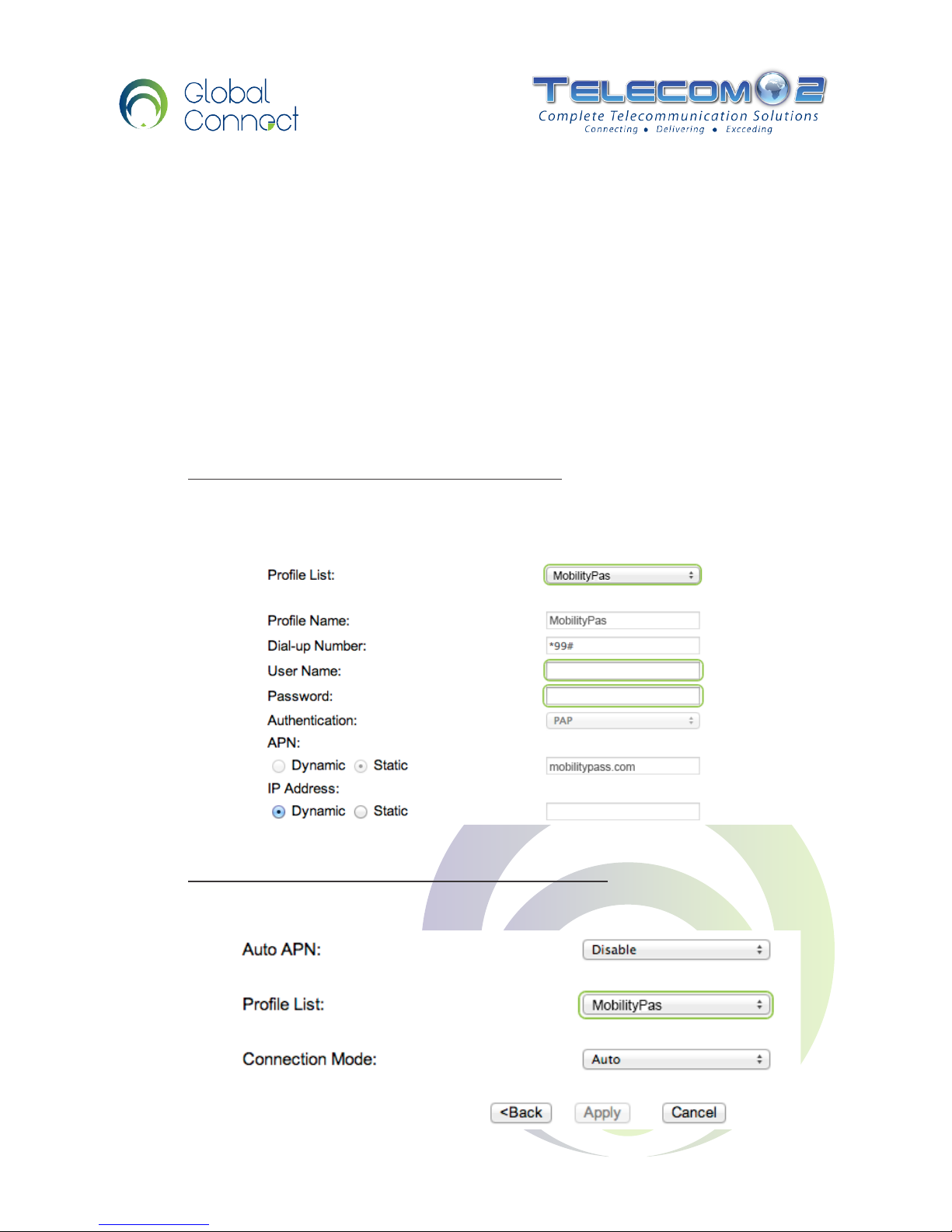
5.3: The main conguration page
IfthisisyourrsttimeusingyourGlobalConnectdevice,youwillneedtocom-
pletesomeadditionalstepsbeforeusingthedevice.WhilstconnectedtotheDe-
vice Conguration Website (seesection6.1ofthisguide):
GotoSettings>3GSettings>ProleSettings
EnsurethemobilitypassproleisselectedandenteryourGlobalConnectuser
nameandpassword.Clicksave.
GotoSettings>3GSettings>ConnectionSettings
Ensurethedefaultproletomobilitypassandclicksave.
7
GR-121 User Guide

GR-121 User GuideGR-121 User Guide
8
5: FAQ - Frequently asked questions
The device is connected with the router but cannot access
the Internet.
CheckandensurethatthedeviceisconnectedtotheGlobalConnect
router.
Checkthepowerstatustoensurethattherouterispoweredon.
Checkthesignalstrengthtoensurethattheareaiscoveredby3Gnetwork.
Checkwhetherthenetworkadapterofyourdeviceisrunningnormally.
Iftheprecedingmethodscannotsolvetheproblem,
Contactyourhelpdeskon+44(0) 207 058 1300
The Device cannot access the Wi-Fi?
Youmayhaveinterferencesbetweenthedeviceandtherouter.
Trytokeepyourdeviceawayfromotherelectricaldevicessuchasmicrowave.
CheckthepasswordandtheSSIDoftherouter.

GR-121 User GuideGR-121 User Guide
9
6: Device Conguration website
6.1: Connect to the Device Conguration Website
Toaccessthecongurationwebsite,youneedtoconnecttotherouterwirelessly.
Network name (SSID): GlobalConnect
Password: GR121XXXX
XXXX represents4charactersinuppercasespecictoyourdevice,youcannd
thepassword,whenremovingthebatteryofthedevice.
Accessing the interface using your Web Browser
Useyourpreferredwebbrowserandpointtothefollowingaddress:
http://192.168.1.1
User name:admin
Password:admin
IfyouareconnectedtotheWi-butyouarenotabletoaccessthispage,you
mayneedtoadjustyourcomputernetworksettings.PleaseseeoutAppendixA.

GR-121 User GuideGR-121 User Guide
10
6: Device Conguration website
continued
6.2: The main conguration page
Quick Status
Thequickstatusbarislocatedonthetoprightofthescreen.
1. Signal strength
Iftheantennaisred,youarenotconnectedtoanynetwork.
2. Connection mode
GPRS/EDGEindicatea2Gconnectionspeed,
UTMSindicatesa3Gconnection.
3. Win status
Indicatesthenumberofconnecteddevices(inthelowerrightoftheicon)
Connection page
Theconnectionpageshowsthecurrentparameterofthedevice.
Themostimportantinformationis:“ConnectionStatus.”
Connected:MeansyouareconnectedtotheInternet.
Disconnected: MeansyouarenotconnectedtotheInternet.
Signal
Strength
Connection
mode
Current
network
Wi
Status
Battery
Status
Inhaltsverzeichnis


