Telular SX6P Bedienungsanleitung

08/18/04 Part Number 56031601
PHONECELL®SX6P
CDMA2000 1X
• Fixed Wireless Phone
800 MHZCDMA
1900 MHZCDMA
USER MANUAL

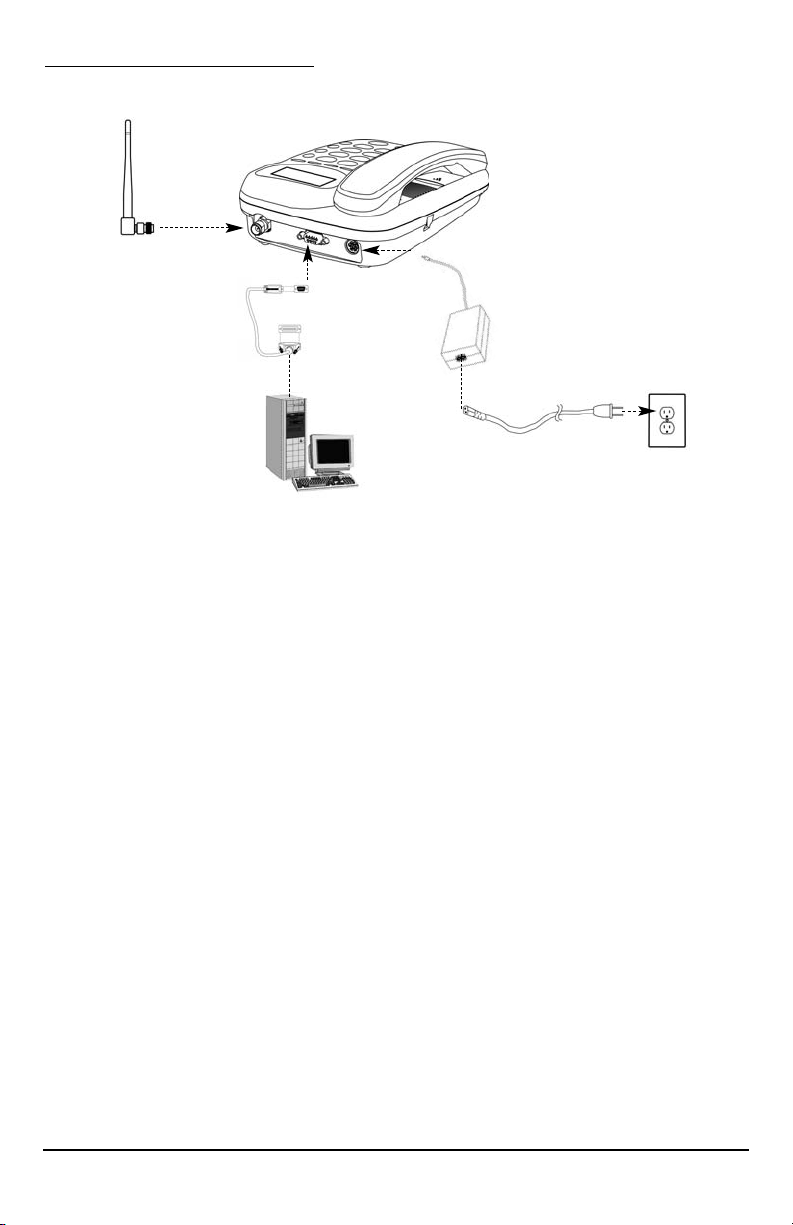
QUICK CONNECTION GUIDE
Phonecell®SX6P CDMA i User Manual
Fixed Wireless Phone
Serial Cable
or USB Cable
(SX6P-300C
series only)
Spike Antenna
This manual is for use with all SX6P-200C and SX6P-300C series deskphones
only. To determine which model of phone you have, pick up the phone and view
the label underneath for verification.

Phonecell®SX6P CDMA ii User Manual
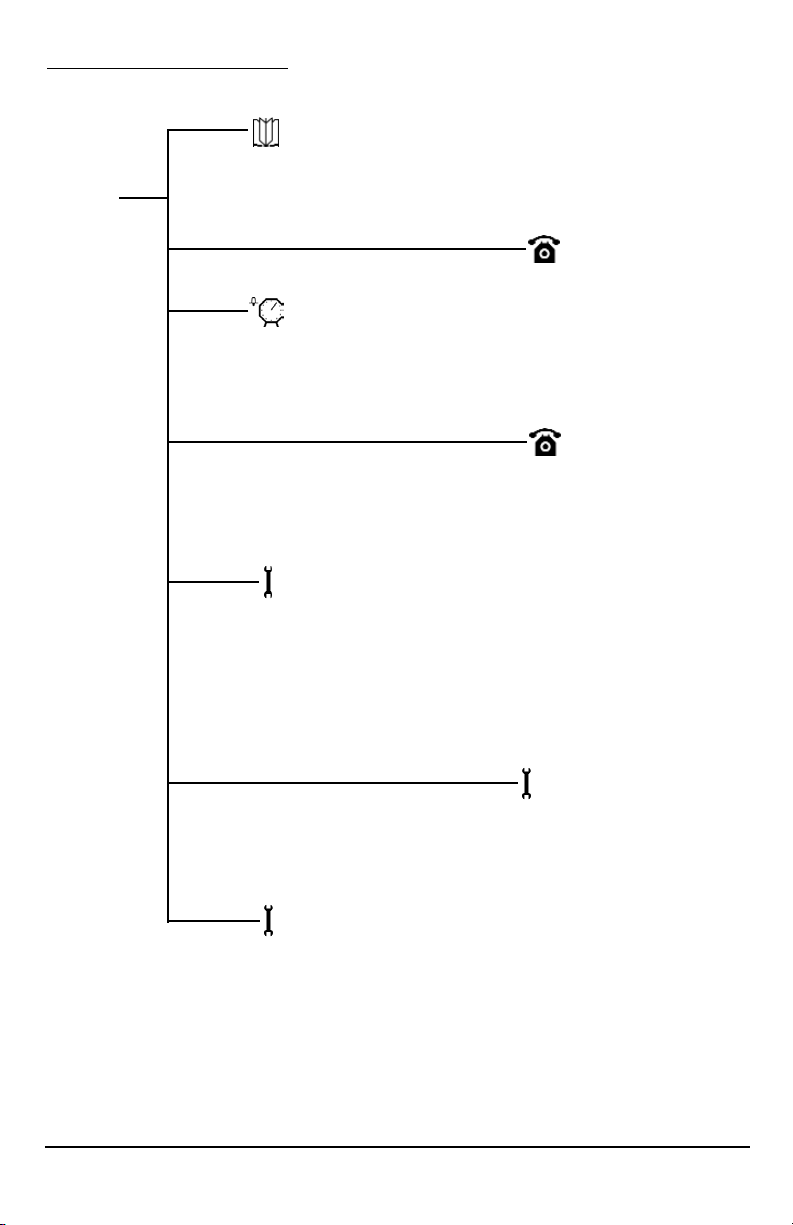
SX6P MENU STRUCTURE
Phonebook
View
Add
Edit
Erase
Time/Alarm
Alarm
Time Format
Date Format
Phone Settings
Banner
My Phone Number
DTMF Length
Key Volume
Auto Send Delay
Freq. Dial Number
Language
Dial Tone Type
LCD Control
Call Log
Missed
Outgoing
Incoming
Erase Logs
Call Time
Air Time
Clear Air Time
Menu
Ring/Alert
Ring Tone
Ring Volume
1 Min Alert
Service Alert
Alarm Tone
Data Settings
Baud Rate
Selftest Cycle
RX Data Mode
Tech Mode
Security
New Lock Code
Restrict
Voice Privacy
RUIM CHV1 (RUIM Models Only)
Auto Lock
User Defaults
SW Version Info
Hotline

Before installing your Phonecell®SX6P, carefully remove the contents from the shipping carton
and check for evidence of shipping damage. If damage is found, contact your Authorized
Telular Distributor or shipping agent immediately.
SAFE OPERATION INSTRUCTIONS
IMPORTANT! Before installing or operating this product, read the SAFETY INFORMATION
section of this manual.
••Install unit indoors.
••Install unit on hard, flat surface for proper ventilation.
••Do not expose unit to rain or moisture.
••Do not place unit on or close to sources of heat
IMPORTANT NOTICES
TERMS AND CONDITIONS FOR USE OF PHONECELL®PRODUCTS ("Product")
These Terms and Conditions are a legal contract between you and Telular Corporation for the title to and use of the Product.
BY RETAINING AND USING THE PRODUCT AFTER RECEIPT OF IT, YOU AGREE TO THE TERMS AND CONDITIONS
INCLUDING WARRANTY DISCLAIMERS, LIMITATIONS OF LIABILITY AND INDEMNIFICATION PROVISIONS BELOW. IF
YOU DO NOT AGREE TO THE TERMS AND CONDITIONS, DO NOT USE THE PRODUCT AND IMMEDIATELY RETURN
THE UNUSED PRODUCT FOR A COMPLETE REFUND. You agree to accept sole responsibility for any misuse of the Product
by you; and, in addition, any negligent or illegal act or omission of your or your agents, contractors, servants, employees, or
other users of the Product so long as the Product was obtained from you, in the use and operation of the Product.
INDEMNIFICATION OF TELULAR CORPORATION ("TELULAR")
YOU SHALL INDEMNIFY, DEFEND AND HOLD HARMLESS TELULAR FOR ANY OF THE COST, INCLUDING REASON-
ABLE ATTORNEYS' FEES, AND FROM CLAIMS ARISING OUT OF YOU, YOUR CLIENTS' OR OTHER THIRD PARTIES'
USE OR OPERATION OF THE PRODUCT: (i) FOR MISUSE OR IN A MANNER NOT CONTEMPLATED BY YOU AND
TELULAR OR INCONSISTENT WITH THE PROVISIONS OF THIS MANUAL; (ii) IN AN ILLEGAL MANNER OR AGAINST
PUBLIC POLICY; (iii) IN A MANNER SPECIFICALLY UNAUTHORIZED IN THIS MANUAL; (iv) IN A MANNER HARMFUL
OR DANGEROUS TO THIRD PARTIES; (v) FROM CLAIMS BY ANYONE RESPECTING PROBLEMS, ERRORS OR MIS-
TAKES OF THE PRODUCT; OR (vi) COMBINATION OF THE PRODUCT WITH MATERIAL, MODIFICATION OF THE
PRODUCT OR USE OF THE PRODUCT IN AN ENVIRONMENT NOT PROVIDED, OR PERMITTED, BY TELULAR IN WRIT-
ING. THE PARTIES SHALL GIVE EACH OTHER PROMPT NOTICE OF ANY SUCH COST OR CLAIMS AND COOPER-
ATE, EACH WITH THE OTHER, TO EFFECTUATE THIS INDEMNIFICATION, DEFENSE AND HOLD HARMLESS.
TELULAR CORPORATION
Corporate Headquarters
647 North Lakeview Parkway
Vernon Hills, Illinois 60061, USA
Technical Support
Tel: 847-247-9400 • Fax: 847-247-0021
E-mail: support@telular.com • http://www.telular.com
Power Supply
Phonecell®SX6P
Desktop Phone
Spike Antenna
PLEASE SEE THE IMPORTANT NOTICES SECTION OF THIS MANUAL FOR
IMPORTANT INFORMATION ON USE, WARRANTY AND INDEMNIFICATION
LIST OF COMPONENTS
AC Power Cord
Part Number 56031601 ©2004 Telular Corporation, All Rights Reserved
Phonecell®SX6P CDMA iii User Manual

TABLE OF CONTENTS
QUICK CONNECTION GUIDE .......................................................................................i
SX6P MENU STRUCTURE............................................................................................ii
LIST OF COMPONENTS ..............................................................................................iii
SAFE OPERATION INSTRUCTIONS...........................................................................iii
IMPORTANT NOTICES.................................................................................................iii
TABLE OF CONTENTS ................................................................................................iv
SX6P SETUP..................................................................................................................1
RUIM Card Installation...............................................................................................1
Install Batteries ..........................................................................................................1
Battery Operation.......................................................................................................2
Location and Setup....................................................................................................2
Connect the Handset .................................................................................................2
Wall Mounting ............................................................................................................3
Connect the SX6P to AC Power ................................................................................4
RUIM Usage ..............................................................................................................5
GETTING TO KNOW YOUR SX6 ..................................................................................6
Function Keys ............................................................................................................6
LCD Screen Icons......................................................................................................7
Service Indication ......................................................................................................7
CALL FUNCTIONS ........................................................................................................8
Making Calls ..............................................................................................................8
Receiving Calls ..........................................................................................................8
Ending Calls...............................................................................................................8
In-Call Functions........................................................................................................8
Voice Mail Access ......................................................................................................9
Reading Text (SMS) Messages ................................................................................9
Sending a Text Message ..........................................................................................9
Delete All Text Messages...........................................................................................9
Message Lock..........................................................................................................10
Message Alert ..........................................................................................................10
PHONE BOOK ............................................................................................................11
Speed Dial by Location ............................................................................................11
Searching the Phone Book and Dialing a Phone Book Entry .................................11
Adding an Entry into the Phone Book......................................................................11
Edit a Phone Book Entry .........................................................................................12
Erase a Phone Book Entry ......................................................................................12
CALL LOGS .................................................................................................................12
View Missed Calls....................................................................................................12
View Outgoing Calls ................................................................................................13
View Incoming Calls ................................................................................................13
Erase All Call Logs ..................................................................................................13
View Last Call Time .................................................................................................13
View Total Air Time ..................................................................................................13
Clear Air Time ..........................................................................................................14
Phonecell®SX6P CDMA iv User Manual

TIME / ALARM ............................................................................................................14
Alarm........................................................................................................................14
Time Format.............................................................................................................14
Date Format.............................................................................................................14
RING / ALERT .............................................................................................................15
Ring Type.................................................................................................................15
Ring Tone.................................................................................................................15
Ring Volume ............................................................................................................15
One Minute Alert ......................................................................................................15
Service Alert.............................................................................................................15
Alarm Tone...............................................................................................................15
PHONE SETTINGS......................................................................................................16
Banner .....................................................................................................................16
My Phone # (Display Only)......................................................................................16
DTMF Length...........................................................................................................16
Key Volume..............................................................................................................16
Auto Send Delay......................................................................................................16
Frequently Dialed Number.......................................................................................16
Change Language Displayed on LCD .....................................................................17
Dial Tone Type .........................................................................................................17
LCD Contrast ...........................................................................................................17
DATA SETTINGS .........................................................................................................17
Baud Rate................................................................................................................18
Self Test Cycle .........................................................................................................18
RX Data Mode .........................................................................................................18
SECURITY SETTINGS.................................................................................................18
New Lock Code .......................................................................................................18
Restrict Calls............................................................................................................18
Voice Privacy ...........................................................................................................19
RUIM CHV1 (RUIM Models Only) ...........................................................................19
Auto Lock.................................................................................................................19
User Defaults ...........................................................................................................19
SW Version Information ..........................................................................................19
BONDING A SX6 TO A RUIM......................................................................................20
WINDOWS XP/WINDOWS 2000 SETUP ....................................................................21
SENDING/RECEIVING A PC FAX ...............................................................................27
SENDING/RECEIVING 1X DATA.................................................................................28
SENDING/RECEIVING CIRCUIT SWITCHED DATA ..................................................29
SX6P TROUBLESHOOTING .......................................................................................30
CONFORMANCE STATEMENTS ................................................................................31
SAFETY INFORMATION .............................................................................................31
WARRANTY .................................................................................................................33
Phonecell®SX6P CDMA v User Manual
SX6P SETUP
RUIM Card Installation (RUIM Model Only)
Consult your service provider to determine if your unit is a RUIM model. If so, your SX6P will
only be able to make emergency calls until you install a RUIM card. It will not receive calls or
allow non-emergency outgoing calls. For an explanation of how to configure your RUIM once
your SX6P is set up, see RUIM Usage (page 6).
1. Remove the power supply if it has already been connected. The power supply must be
removed whenever a RUIM Card is removed or installed.
2. Remove the RUIM compartment cover. - see Figure 1.
3. Open the RUIM compartment holder.
4. Line up the RUIM card with the arrow on the RUIM card holder - see Figure 2.
5. Gently insert the RUIM card in the slot of the RUIM card holder.
6. Close the RUIM card holder.
NOTE: Do not force the RUIM card holder shut. Make sure the RUIM card is aligned properly
with the directional arrow on the holder.
7. Reattach the RUIM compartment cover, closing it with the separate cover screw provided.
Install Batteries (Optional)
1. If necessary, remove the screw that may be holding the battery access door located on the
bottom of the unit - see Figure 3.
2. Press the battery access door tabs and remove the battery access door.
3. Install the Telular rechargeable battery pack into the battery pack area and connect wires.
4. Reinstall the battery access door using the screw - see Figure 4.
RUIM Compartment Cover
RUIM Card
Holder RUIM Card
Figure 1 - RUIM compartment cover.
Cover Screw
Figure 3 –
Battery access door.
Battery Access
Door Tab And
Screw
Figure 2 - RUIM card installation.
WARNING!
Do not use batteries other than the included Telular battery pack with the SX6P.
Using any other batteries may result in fire and/or other damage to the unit.
!
Phonecell®SX6P CDMA 1 User Manual
Battery Access Door
Figure 4 - Battery installation.
Battery Pack Area

Battery Operation
The SX6P will recharge its battery pack when connected to AC power. If AC power is interrupted,
the SX6P will continue to operate, using power from the battery.
Location and Setup
The SX6P comes with a standard spike antenna (TNC).
1. Attach and finger-tighten the antenna - see Figure 5. Do not over-tighten the antenna.
2. Select a location that is above ground and as close to windows (or exterior walls) as possible
to get the best signal - see Figure 6.
Connect the Handset
Before you can use the SX6P, you must connect the handset cable.
1. Connect the handset cable to the phone jack - see Figure 7.
2. Connect the handset cable to the handset - see Figure 7.
Phone jack
Handset cable
Figure 5 - Attach the antenna. Figure 6 - SX6P location.
Handset
Figure 7 – SX6P handset connection.
Phonecell®SX6P CDMA 2 User Manual

Wall Mounting
1. Remove the mounting clip from the cradle and re-insert it with the tab pointing up - see
Figures 8 and 9.
2. Mark two hole locations 83 mm (3-1/4 inches) vertically apart and drill two holes into the wall.
3. Install the screws (not supplied) into the wall, leaving a gap of approximately 3 mm
(1/8 inches) between the screw head and the wall.
4. Align the mounting holes with the screws and mount the SX6P onto the screws - see Figures
10 and 11.
Phonecell®SX6P CDMA 3 User Manual
Insert
Mounting
Clip into
the Cradle
(tab up)
Mounting Clip in
Cradle (tab up)
Figure 9 –
Handset mounting clip for wall-mount.
Remove
Mounting Clip
from the Cradle
(tab down)
Figure 8 –
Handset mounting clip assembly.
Figure 11 – Mount the SX6P onto the screws.
83 mm (3-1/4 inches)
Figure 10 – SX6P mounting hooks.
Mounting
Holes

Phonecell®SX6P CDMA 4User Manual
Connect the SX6P to AC Power
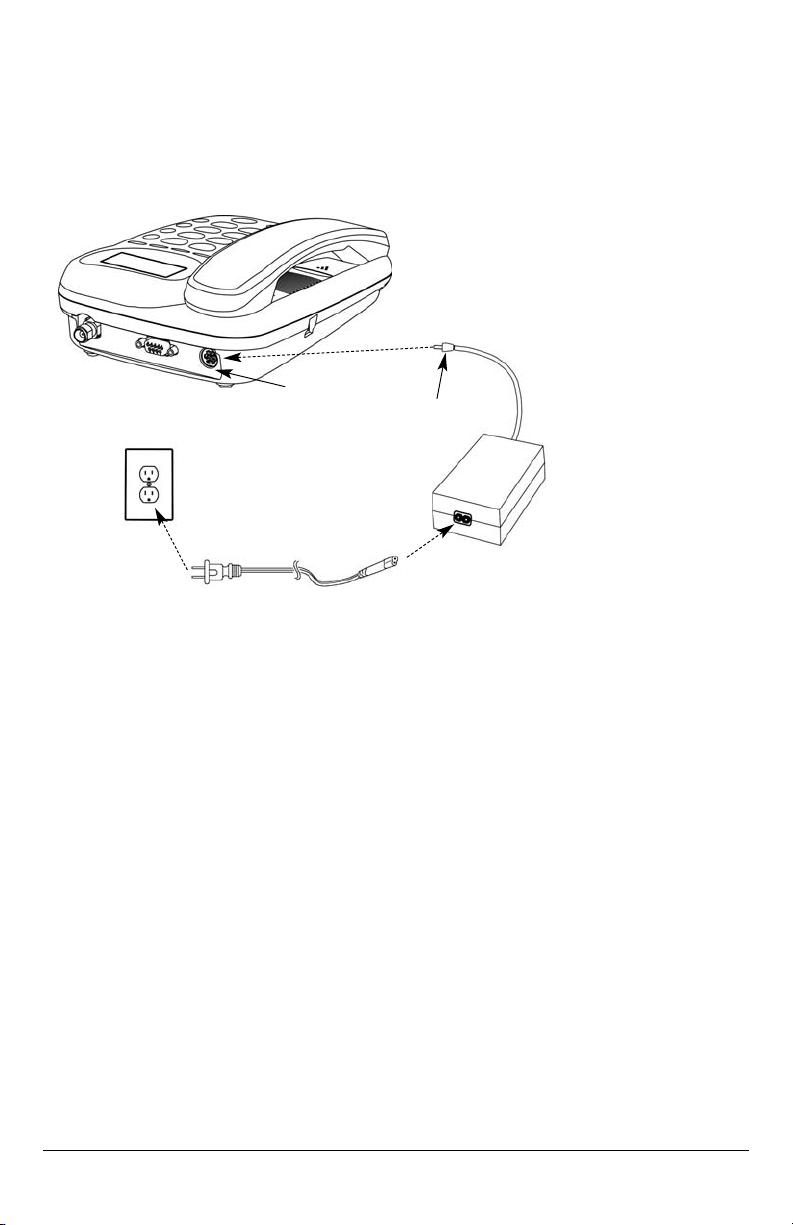
1 Connect the barrel connector of the power supply to the AC power input on the rear panel of
the SX6P - see Figure 12.
2. Plug the AC power cord into the power supply.
3. Plug the AC power cord into the wall socket.
4. Check the cellular signal strength and move the unit until the best signal possible is
achieved - see the Service Indication section of this manual.
AC Power Cord
Wall Socket
Power Supply
AC Power
Input Barrel
Connector
Figure 12 –
SX6P AC power connection.
Dieses Handbuch passt für folgende Modelle
1
Inhaltsverzeichnis
Andere Telular Handy Handbücher

Telular
Telular PHONECELL SX5D Bedienungsanleitung

Telular
Telular PHONECELL SX6P-200C CDMA Bedienungsanleitung

Telular
Telular Telguard Digital TG-9 Bedienungsanleitung

Telular
Telular TG-1 Express Bedienungsanleitung

Telular
Telular TG-1 Express Bedienungsanleitung

Telular
Telular TELGUARD DIGITAL TG-1 Bedienungsanleitung
Beliebte Handy Handbücher anderer Marken

Point Mobile
Point Mobile PM60 Bedienungsanleitung

Blackbe;rry
Blackbe;rry Q10 Bedienungsanleitung

Blackbe;rry
Blackbe;rry Bold 9900 Bedienungsanleitung

Blackbe;rry
Blackbe;rry STORM 9500 - VERSION 5.0 Bedienungsanleitung

LG
LG LM-K420EMW Bedienungsanleitung

ISAFE MOBILE
ISAFE MOBILE IS655.2 Bedienungsanleitung