
Thermo Scientific DeviceLink DLH-HP-100-TTL Bedienungsanleitung

For Research Use Only. Not for use in diagnostic procedures.
DeviceLink™Hub
USER GUIDE
Catalog Numbers DLH-HP-100-TTL , DLH-ULT-100-RS , DLH-CO2-100-RS , and DLH-CO2-100-USB
Publication Number MAN0017657
Revision A.0

Manufacturer: Thermo Fisher Scientific | 275 Aiken Road | Asheville, NC 28804
The information in this guide is subject to change without notice.
DISCLAIMER: TO THE EXTENT ALLOWED BY LAW, THERMO FISHER SCIENTIFIC INC. AND/OR ITS AFFILIATE(S) WILL NOT BE LIABLE FOR SPECIAL,
INCIDENTAL, INDIRECT, PUNITIVE, MULTIPLE, OR CONSEQUENTIAL DAMAGES IN CONNECTION WITH OR ARISING FROM THIS DOCUMENT,
INCLUDING YOUR USE OF IT.
Revision history: Pub. No. MAN0017657
Revision Date Description
A.0 18 June 2018 New document.
Important Licensing Information: These products may be covered by one or more Limited Use Label Licenses. By use of these products, you accept
the terms and conditions of all applicable Limited Use Label Licenses.
TRADEMARKS: All trademarks are the property of Thermo Fisher Scientific and its subsidiaries unless otherwise specified.
©2018 Thermo Fisher Scientific Inc. All rights reserved.

Contents
About this guide ............................................................ 5
■CHAPTER 1 Product information ....................................... 6
Product description ............................................................. 6
Intended Use ................................................................... 6
Contents ....................................................................... 6
Product specifications ........................................................... 7
Required materials not supplied .................................................. 8
Site requirements ............................................................... 8
Electrical requirements .......................................................... 8
Environmental requirements ..................................................... 9
■CHAPTER 2 DeviceLink™Hub setup and operation .................. 10
Before first use ................................................................ 10
Unpack the device .............................................................. 10
Prepare the power supply ....................................................... 11
Power-on and set up the DeviceLink™Hub ........................................ 12
Mount the DeviceLink™Hub to the laboratory equipment or instrument
using magnets ................................................................. 14
Connect the DeviceLink™Hub to a network and link to Thermo Fisher Cloud .......... 18
View sensor data and alerts on Thermo Fisher Connect ............................. 23
■APPENDIX A Troubleshooting ......................................... 24
■APPENDIX B Supplemental procedures .............................. 25
Update network configuration ................................................... 25
Reset the DeviceLink™Hub ...................................................... 26
DeviceLink
™
Hub User Guide
3

■Safety ...................................................................... 32
Symbols on this instrument ..................................................... 32
Conformity symbols ........................................................ 33
FCC and ISED compliance statements ........................................ 34
Safety information for instruments not manufactured by Thermo Fisher Scientific ..... 35
Instrument safety .............................................................. 35
General .................................................................. 35
Electrical ................................................................. 35
Cleaning and decontamination ............................................... 36
Instrument component and accessory disposal ................................ 36
Safety and electromagnetic compatibility (EMC) standards .......................... 36
Safety .................................................................... 36
EMC ...................................................................... 37
Environmental design ...................................................... 37
■Documentation and support ............................................. 38
Customer and technical support ................................................. 38
Warranty ...................................................................... 38
Contents
4
DeviceLink
™
Hub User Guide
About this guide
CAUTION! ABBREVIATED SAFETY ALERTS. Hazard symbols and hazard
types specied in procedures may be abbreviated in this document. For the
complete safety information, see the “Safety” appendix in this document.
IMPORTANT! Before using this product, read and understand the information in the
“Safety” appendix in this document.
DeviceLink
™
Hub User Guide
5
Product information
Product description
The DeviceLink™ Hub enables users to remotely monitor sensors and alarms for
laboratory equipment and instruments using the Thermo Fisher Cloud. The
laboratory equipment or instrument alarms and notications are sent to the user by
email and mobile push notication.
Intended Use
This product is intended for use as a monitoring device for laboratory equipment.
This product is not intended for use with medical devices, as the unit does not comply
with FDA 21CFR Part 11 for electronic records.
Contents
Cat. No. Contents
DLH-HP-100-TTL
• DeviceLink™Hub Remote Monitoring Module
• High Performance Refrigerator/Freezer data cable
Note: For use with HP units equipped with data port.
DLH-ULT-100-RS
• DeviceLink™Hub Remote Monitoring Module
• Legacy ULT data cable
Note: for use with PEEK ULT units equipped with data port.
DLH-CO2-100-RS
• DeviceLink™Hub Remote Monitoring Module
• Heracell CO2Incubator data cable
Note: For use with Heracell CO2Incubators with RS232 data port.
DLH-CO2-100-USB
• DeviceLink™Hub Remote Monitoring Module
• VIOS CO2Incubator data cable
Note: For use with VIOS incubators with USB data port.
1
6
DeviceLink
™
Hub User Guide
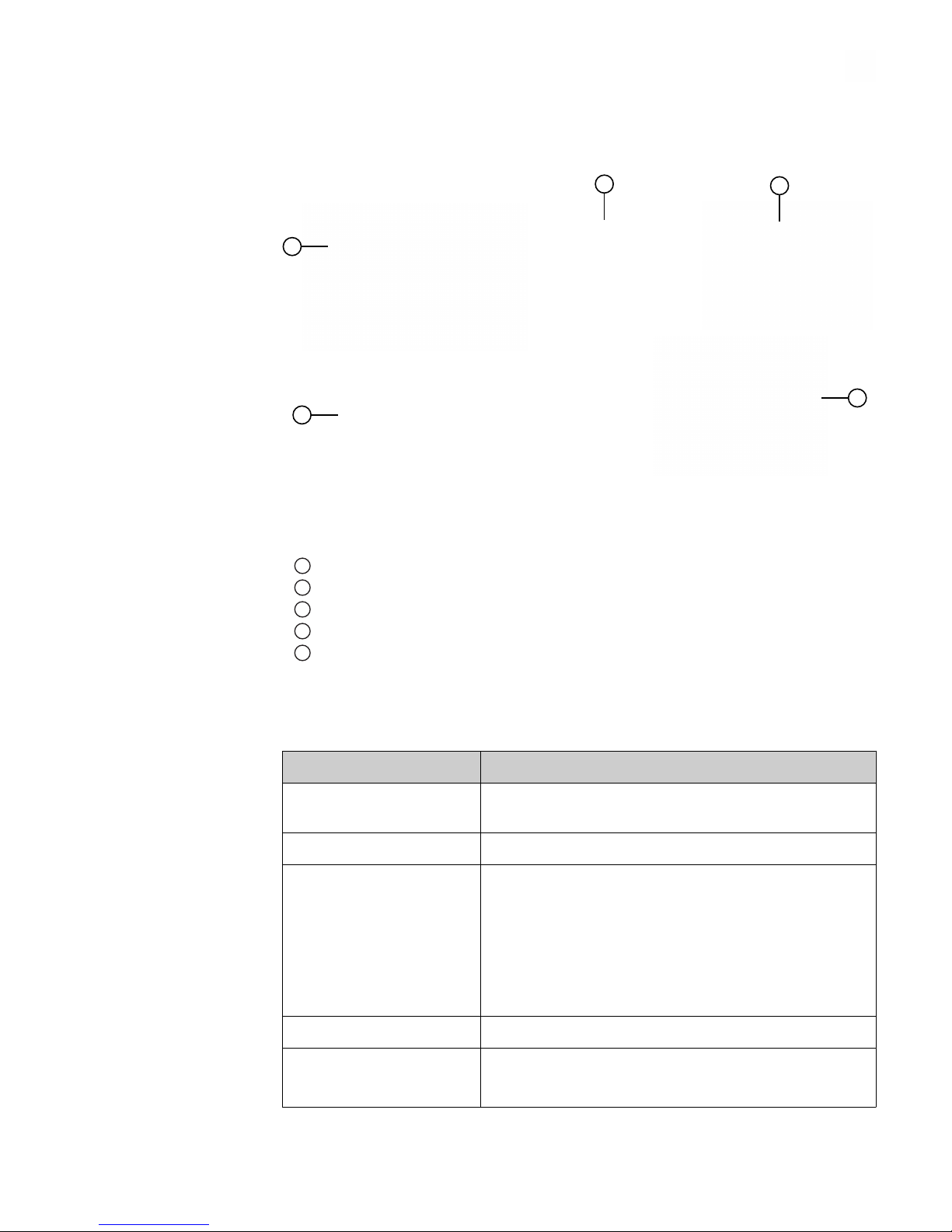
The contents of the DeviceLink™ Hub Remote Monitoring Module are shown in the
following gure.
1
5
23
4
1DeviceLink™Hub with Wi-Fi extender dongle and wire clip
24 adhesive mounts and adjustable tie wraps
3Cleaning swabs
4Ethernet cable
5Power supply with adapter plugs
Product specifications
Parameter Specification
Device operating electrical
rating
5.1 VDC, 2.5 A
Category Class A
Power supply
(Cat. No. T5989DV)
• Wall mounted power adapter
• Input: AC 90-264 VAC 50/60 Hz 0.5 A
• Output: 5.1 VDC, 2.5 A
• 2 pin prong type A, 1.5 meter cable
• AC Inlet: UI, Euro, Aus, US changeable
• 1.5M micro USB B lead
Local storage 8 GB
Default Wi‑iFi transmission
frequency to Cloud
• Every 5 minutes for sensor data transmission
• Real‑time for alarm events
Chapter 1 Product information
Product specifications
1
DeviceLink
™
Hub User Guide
7
Parameter Specification
Wi‑Fi protocol 802.11ac
Wi‑-Fi security • WEP
• WPA/WPA2‑PSK
• WPA/WPA2‑EAP
• PEAP
Note: Proxy servers are not supported.
Wi‑Fi data rate 1–65 Mbps
Wi‑Fi range (indoor) • Built-in Wi‑Fi: up to 30 meters
• With Wi‑Fi Extender dongle (included): up to 70
meters
RSSI (Wireless Network
Strength)
> −70 dBm
Required materials not supplied
Wi-Fi enabled device (phone, tablet, or laptop)
Site requirements
Internet access (Wi-Fi or Ethernet)
Electrical requirements
Parameter Specification
Input Voltage 100–240 VAC
Frequency 50/60 Hz
Rated Current 0.5 A
Chapter 1 Product information
Required materials not supplied
1
8
DeviceLink
™
Hub User Guide
Environmental requirements
Parameter Specification
Operating Temperature • 0–40°C (32–104°F)
Relative humidity • 85% non-condensing
Operating Environment
Conditions
• Non-corrosive
•Non-flammable
• Non-explosive
Chapter 1 Product information
Environmental requirements
1
DeviceLink
™
Hub User Guide
9

DeviceLink™Hub setup and
operation
IMPORTANT! The DeviceLink™ Hub requires a Thermo Fisher Cloud account. See
“Before rst use“.
Before first use
If you do not have a Thermo Fisher Connect account, create an account. See
thermosher.com/cloud for instructions.
Unpack the device
1. At the time of delivery, inspect the product packaging for damage before signing
for the shipment.
Note: Packaging damage does not denote that the product is also damaged.
2. Remove the product from its shipping carton, then inspect for damage.
3. If you nd any damage, keep the packing material and report the damage to the
carrier immediately.
• Do not return goods to the manufacturer without wrien authorization.
• When submiing a claim for shipping damage, request that the carrier
inspect the shipping container and equipment.
2
10
DeviceLink
™
Hub User Guide
Dieses Handbuch passt für folgende Modelle
3
Inhaltsverzeichnis


