Three PUPILLO Bedienungsanleitung

3Customer Services, Hutchison 3G UK Ltd,
PO Box 333, Glasgow, G2 9AG United Kingdom.
three.co.uk
All rights in this publication are reserved and
no part may be reproduced without the prior
written permission of the publisher.
© 2005 Hutchison 3G UK Limited. A Hutchison
Whampoa company.
Compal Electronics, Inc. is the manufacturer of
the Pupillo UMTS U110 and has provided the
information on its features and use set out in
this user guide.
The provision of any products and services by
Hutchison 3G UK Limited is subject to 3’s
customer terms (available at three.co.uk).
Designed by Dutton Merrifield Ltd, Bristol.
This publication is printed on fully recyclable
paper. DM05526 Nov05
Pupillo
User Guide
3services user guide
Mobile Video Eye
05526 PUPILLO MAGIC EYE.AW8.qxd 12/12/05 2:52 pm Page 1

Get started 2
What is it? 2
How to insert your USIM card 3
Getting to know your Pupillo 4
Charge the battery 6
General functions 7
Battery and network signal indicators 7
Get the right angle 8
Switch the camera on 9
Activate the service 10
Add more users 11
Managing your Pupillo 12
Accessories 16
Mounting kit 16
Troubleshooting 18
Important safety information 22
General precautions 22
Battery and adaptor precautions 22
Third party equipment 23
Repair precaution 23
Declaration of conformity 24
Caring for the environment 24
Glossary 25
Pupillo 1
Table of Contents
05526 PUPILLO MAGIC EYE.AW8.qxd 12/12/05 2:52 pm Page 3

O
n
O
ff
O
n
O
ff
O
n
O
f
f
O
n
O
f
f
What is it?
Pupillo is the first 3G mobile video camera
that allows you to keep an eye on what’s
important to you. So you don’t need to be in
two places at once to know what’s going on.
It is totally portable and can see in the dark
too. It works within the 3video service area.
Get started
Pupillo
2
Get started
Pupillo 3
Move the power
switch to on with
a paper clip.
Push the USIM lock
to secure the USIM
as indicated.
How to insert your USIM card and switch the battery on / off
Remove the USIM card
cover at the base of
the Pupillo.
Move the USIM card
holder to the right (a)
insert the USIM card
(b) then move the
USIM card holder back
to the left to lock it.
USIM card
(a)
(b)
(1) (2)
(3) (4)
05526 PUPILLO MAGIC EYE.AW8.qxd 12/12/05 2:52 pm Page 5

Get started
Pupillo
4
Get started
Pupillo 5
Camera switch: rotate the
camera lens upwards to
switch on the Pupillo
Camera
Microphone
Battery
indicator
Network signal
Indicator
Plastic cover
Reset button
Holder hole: to fix the
Pupillo using the mount
kit provided in the box
Buzzer
Battery lock
Battery charging connector
Antenna
Getting to know your Pupillo
05526 PUPILLO MAGIC EYE.AW8.qxd 12/12/05 2:52 pm Page 7

Get started
Pupillo
6
General functions
Pupillo 7
Charge the battery
You’ll need to charge the battery for at least 3 hours. The battery signal indicator will turn green when it’s
charged. When the battery signal indicator starts flashing red, you’ll need to recharge the battery.
VERY LOW
LOW
MEDIUM
FULL
RED
RED
YELLOW
GREEN
High speed blinking (one blink per second)
Low speed blinking (one blink per 3 seconds)
No blinking
Battery indicator lights
Note: Please do not
remove the USIM
card from the Pupillo
when the charger is
connected.
In good coverage/
ready to use
During video call
Searching UMTS
Out of services
GREEN
GREEN
YELLOW /
GREEN
RED
No blinking
High speed blinking (one blink per second)
Both battery and network signal indicator lights
are blinking with high speed (one blink per second)
Network signal indicator lights
When the charger is connected to the Pupillo, the status of battery indicator will change from:
■During a video call to the Pupillo, the call
may be terminated if the battery is very
low (less than 5%).
Battery and network signal indicators
LOW – RED
Approximately 30 minutes to reach
the minimum operating level
FULL – GREEN
Approximately 4 hours to
reach 90% battery capacity
05526 PUPILLO MAGIC EYE.AW8.qxd 12/12/05 2:52 pm Page 9

General functions
Pupillo
8
General functions
Pupillo 9
Switch the camera on
■After the battery has been charged, you need
to rotate the camera lens upwards to activate
the camera.
Switch the camera off
■To switch the camera off, rotate the camera lens
completely down. You’ll hear a beep to notify
that the camera has been switched off.
■Both the battery and network signal indicator
lights will switch off.
■If the charger is connected to the Pupillo,
the battery indicator light will switch on after
a few seconds.
Note: All services
provided by the Pupillo
can only be used after
the network signal
indicator light shows
green with no blinking.
Get the right angle
■In order to avoid over-exposure don’t place the
Pupillo in front of bright light.
■Rotate the camera lens to the position you want.
■Ensure the network signal is good.
■Keep at least 1 metre distance between the
camera and the object you want to see.
■When mounting your Pupillo to a ceiling
using the kit provided, please use the text
message script on page 14 to reverse the
captured image.
05526 PUPILLO MAGIC EYE.AW8.qxd 12/12/05 2:52 pm Page 11

Activate the service
■When you video call the Pupillo for the first time:
1. Enter the Pupillo mobile number on your video
mobile and press the video call key
2. Enter the 4 digit PIN code provided with your Pupillo
on your video mobile
3. If the PIN code is correct, you’ll be connected to the
Pupillo. Your mobile number will automatically be
added onto the Pupillo
4. The first video caller user becomes the Pupillo’s
Manager
5. No PIN code will be needed during subsequent calls
General functions
Pupillo
10
General functions
Pupillo 11
Warning: If you don’t enter the PIN correctly after three
attempts within one minute, the video call will automatically end.
Note: You can let up to 20 different video
mobile numbers access your Pupillo but not at
the same time.
If the video mobile numbers saved on the
Pupillo reaches 20 it will not save or connect
additional callers.
Please do not hide (suppress) your mobile
video mobile number when you make a video
call to the Pupillo.
Pupillo may not accept calls made from outside
the United Kingdom as the video mobile
number might be suppressed and the Pupillo
will be unable to validate the caller.
Add more users
The Manager can add up to 20 different video
mobile numbers to the Pupillo by text message.
See Adding a specific video mobile number on
page 13 for details.
Alternatively follow these instructions if you are not
the Manager.
1. Enter the Pupillo mobile number on your video
mobile and press the video call key
2. Once connected, enter the 4 digit PIN code on
your video mobile provided by the Manager
3. After the correct PIN has been entered you’ll
be connected to the Pupillo
4. No PIN code will be needed during
subsequent calls
All new users’ video mobile numbers will be
automatically saved by the Pupillo once the correct
PIN code is entered during the first video call.
If you don’t enter the PIN correctly after three
attempts within one minute, the video call
will automatically end.
Note: It is the Manager’s responsibility to safeguard the
PIN. If you transfer the Pupillo to another person, you must
register their name and address with 3Customer Services.
This helps Customer Services to provide support to the new
Manager if they contact 3.
05526 PUPILLO MAGIC EYE.AW8.qxd 12/12/05 2:52 pm Page 13

Note: The Manager’s number cannot be deleted by
sending this command.
Managing access to your Pupillo
■The first video caller to the Pupillo becomes its
Manager. The manager can add or delete other
video callers’ access to the Pupillo.
■To add or delete video callers’ access to the
Pupillo, the Manager will need to send a text
message command to the Pupillo.
■There are 7 different text message commands
that can be used by the Manager. (1) Modifying
the video mobile number saved in the Pupillo,
(2) Changing the Manager’s video mobile
number, (3) Deleting a specific video mobile
number, (4) Deleting all video mobile numbers,
(5) Adding a specific video mobile, (6) Changing
the PIN code, (7) Reversing the image view.
1. Modifying the video mobile number saved
in the Pupillo
■You can let up to 20 different video mobile
numbers access your Pupillo but not at the
same time. The Manager can modify the
20 different video mobile numbers’ access
by sending a text message to the Pupillo.
The Manager sends a text message with the
following specific contents:
#modlist*[NUMBER]#[PIN]#
The [NUMBER] should be a digit between
1 and 20.
The [PIN] means the correct 4 digit PIN code.
An example is: #modlist*3#1234#
2. Changing the Manager’s video
mobile number
■The video mobile number of the Manager can
be changed to a new number by sending a text
message to the Pupillo from the Manager’s
video mobile number.
■The Manager sends a text message with the
specific contents as:
#changed*[OLDNUMBER]*
[NEWNUMBER]#[PIN]#
The [OLDNUMBER] means the video mobile
number of the current Manager.
The [NEWNUMBER] means the video mobile
number which you want to use as the new
Manager.
The [PIN] means the correct 4 digit PIN code.
An example is:
[OLDNUMBER]=44310101010
[NEWNUMBER]=44310202020
[PIN]=1234
#changed*44310101010*44310202020#1234#
3. Deleting a specific video mobile number
■A specific video mobile number stored on the
Pupillo can be deleted by sending a text
message to the Pupillo from the Manager’s
video mobile number.
The Manager sends a text message with the
following specific contents:
#del*[NUMBER]#[PIN]#
Note: The [NUMBER] means the video mobile
number of the specific user that you want to delete.
The [PIN] means the correct 4 digit PIN code.
An example is: #del*44310101010#1234#
4. Deleting all video mobile numbers
■The authorised users stored in the Pupillo
can be deleted by sending a text message to the
Pupillo from the Manager’s video mobile number.
The Manager sends a text message with the
following specific contents:
#deluser#[PIN]#
The [PIN] means the correct 4 digit PIN code.
An example is: #deluser#1234#
5. Adding a specific video mobile number
■A specific video mobile number can be added
to the Pupillo by sending a text message to the
Pupillo from the Manager’s video mobile.
The Manager sends a text message with the
specific contents:
#add*[NUMBER]#[PIN]#
The [NUMBER] means the video mobile number
that you want to add into the Pupillo.
Managing your Pupillo
Pupillo
12
Managing your Pupillo
Pupillo 13
Warning: The Manager’s number can only be changed
five times. If you have already changed the number
five times and you still need to change it again, please
call 3Customer Services for help.
Note: After the ‘Deleting Users’ text message has been
received by the Pupillo, all video mobile numbers
saved in the Pupillo will be deleted, except the
Manager’s number.

05526 PUPILLO MAGIC EYE.AW8.qxd 12/12/05 2:52 pm Page 15

The [PIN] means the correct 4 digit PIN code.
An example is: #add*44310101010#1234#
6. Changing the PIN code
■The PIN code can be changed by sending a text
message to the Pupillo from the Manager’s
video mobile number.
The Manager sends a text message with the
following specific contents:
#pin*[PIN_NEW]#[PIN]#
Notice: The [PIN_NEW] means the 4 digits
which you want to use as the new PIN code.
The [PIN] means the correct 4 digits of the
current PIN code.
An example is: #pin*0987#1234#
7. Reversing the image view
■The captured image can be reversed by sending
a text message to the Pupillo. For example, if
you want to mount the Pupillo on the ceiling,
you can send the specific text message to
reverse the captured image so it is shown the
right way round.
The Manager sends a text message with the
following specific contents:
#inverso#[PIN]#
The [PIN] means the correct 4 digit PIN code.
An example is: #inverso#1234#
Managing your Pupillo
Pupillo
14
Managing your Pupillo
Pupillo 15
#modlist*[NUMBER]#[PIN]#
ex. #modlist*3#1234#
#changed*[OLDNUMBER]*[NEWNUMBER]#[PIN]#
ex. #changed*44310101010*44310202020#1234#
#del*[NUMBER]#[PIN]#
ex. #del*44310101010#1234#
#deluser#[PIN]#
ex. #deluser#1234#
#add*[NUMBER]#[PIN]#
ex. #add*44310101010#1234#
#pin*[PIN_NEW]#[PIN]#
ex. #pin*0987#1234#
#inverso#[PIN]#
ex. #inverso#1234#
Modifying the video mobile
number of saved in the Pupillo
Changing the Manager’s video
mobile number
Deleting a specific video
mobile number
Deleting all video mobile
numbers
Adding a specific video mobile
Changing the PIN code
Reversing the image view
Text message commands
The following table gives an overall view of all supported Manager’s text messages:
Note: The text message commands are NOT case sensitive.
Note: Call 3Customer Services if you can’t remember
your PIN.
05526 PUPILLO MAGIC EYE.AW8.qxd 12/12/05 2:52 pm Page 17

Accessories
Pupillo
16
Accessories
Pupillo 17
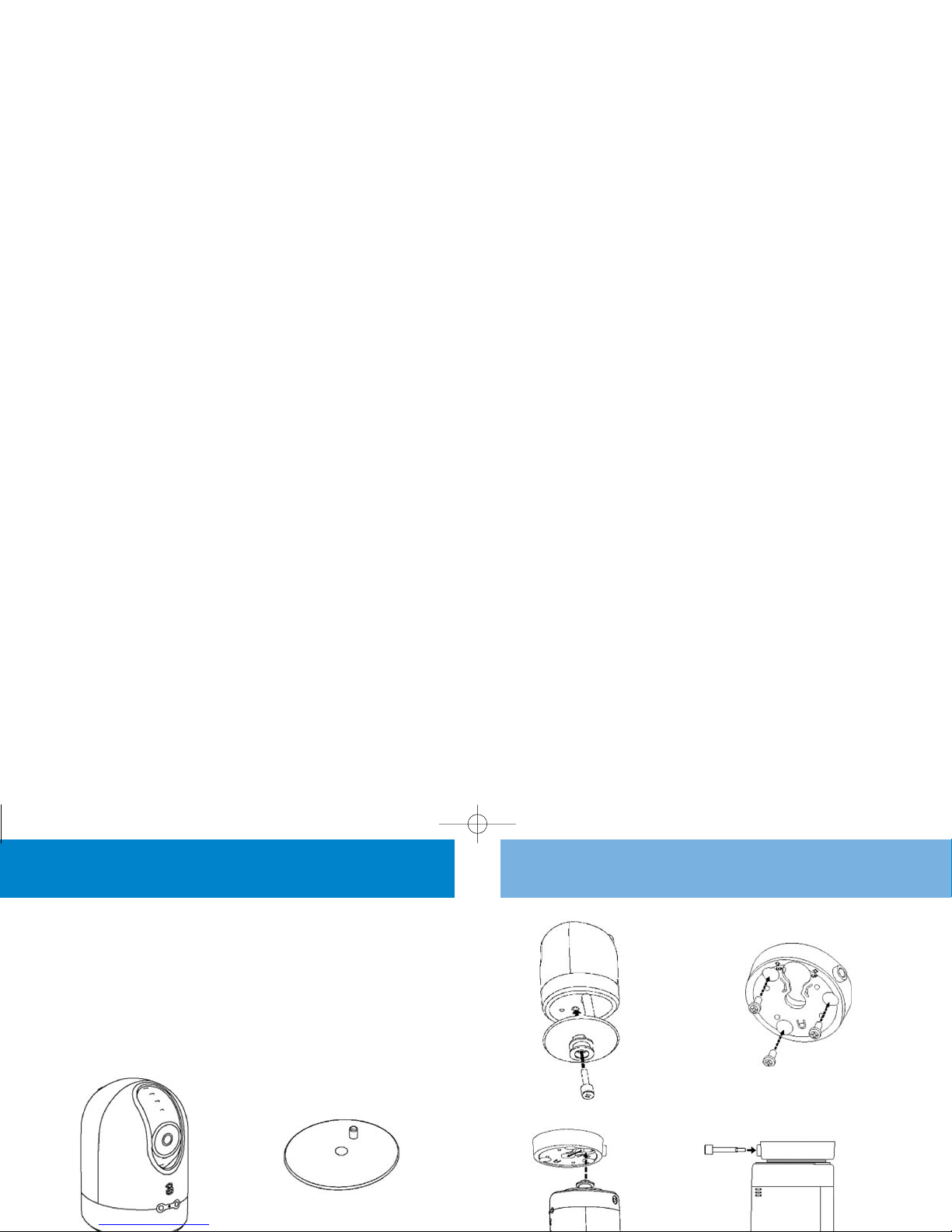
Mounting kit
A mounting accessory is included in the box.
This mounting accessory is designed to mount the
Pupillo on a ceiling or wall. After the Pupillo is
mounted, it can be rotated horizontally.
Please follow the steps to attach the mounting kit
to both your Pupillo and ceiling:
Step 1. Attach the
Pupillo to the base
of the mounting kit
Part A
Step 3. Mount Part B to
the wall or ceiling with
three fixing screws
Step 4. Hang the
Pupillo (Part A is
already mounted in
the Pupillo) on Part B
Step 5. Rotate the Pupillo
to adjust the angle, then
screw it tight using the
fixing screw to secure the
Pupillo in a specific
position
Step 2. Screw Part A
to the base mould of
the Pupillo
Part B
05526 PUPILLO MAGIC EYE.AW8.qxd 12/12/05 2:52 pm Page 19
Inhaltsverzeichnis
Beliebte Camcorder Handbücher anderer Marken

Panasonic
Panasonic AG-HMC152EN Bedienungsanleitung

Insignia
Insignia NS-DCC5HB09 - Camcorder - 720p Bedienungsanleitung

MYDLINK
MYDLINK DCS-6100LH Bedienungsanleitung

Sony
Sony video Hi8 Handycam CCD-TR555 Bedienungsanleitung

SECURECOM
SECURECOM V-5014B Bedienungsanleitung

Panasonic
Panasonic HDC-SD100 Bedienungsanleitung