Twinkly pre-lit-tree Handbuch

pre-lit tree / arbre pré-éclairé / árbol preiluminado
INSTRUCTIONS GUIDE| GUIDED’INSTRUCTIONS | GUÍA DE INSTRUCCIONES

FCC notices:
Warning: Changes or modifications to this unit not expressly approved by the party responsible for
compliance could void the user’s authority to operate the equipment.
NOTE: This equipment has been tested and found to comply with the limits for a Class B digital device,
pursuant to Part 15 of the FCC Rules. These limits are designed to provide reasonable protection against
harmful interference in a residential installation. This equipment generates, uses and can radiate radio
frequency energy and, if not installed and used in accordance with the instructions, may cause harmful
interference to radio communications.
However, there is no guarantee that interference will not occur in a particular installation. If this equipment
does cause harmful interference to radio or television reception, which can be determined by turning the
equipment off and on, the user is encouraged to try to correct the interference by one or more of the following
measures:
nReorient or relocate the receiving antenna.
nIncrease the separation between the equipment and receiver.
nConnect the equipment into an outlet on a circuit different from that to which the receiver is connected.
nConsult the dealer or an experienced radio/TV technician for help.
This device complies with Part 15 of the FCC Rules. Operation is subject to the following two conditions: (1)
this device may not cause harmful interference, and (2) this device must accept any interference received,
including interference that may cause undesired operation.
Avisos FCC:
Aviso: Los cambios o modificaciones realizados en esta unidad que no estén aprobados expresamente por
la parte responsable del cumplimiento podrían anular la autoridad del usuario para utilizar el equipo.
NOTA: Este equipamiento ha sido comprobado y se considera que cumple con los límites para un
dispositivo digital de clase B, según la parte 15 de las Normas FCC. Estos límites se establecen para
proporcionar una protección razonable contra interferencias nocivas en una instalación residencial. Este
equipo genera, utiliza y puede irradiar energía de radiofrecuencia y, si no se instala y utiliza de acuerdo con
las instrucciones, podrá causar interferencias nocivas en las comunicaciones de radio.
No obstante, no existe garantía alguna de que no ocurran interferencias en una instalación en particular. Si
este equipo causa interferencias perjudiciales para la recepción de radio o televisión, lo que puede
determinarse encendido y apagando el equipo, se recomienda al usuario que intente corregir la interferencia
mediante una o más de las siguientes medidas:
nVuelva a orientar o a colocar la antena de recepción.
nAumente la distancia entre el equipo y el receptor.
nConecte el equipo en una base de enchufe de un circuito diferente al que está conectado el recibidor.
nSi necesita ayuda consulte al distribuidor o a un técnico de radio/TV.
This equipment complies with FCC radiation exposure limits set forth for an uncontrolled environment. This equipment should be installed
and operated with minimum distance 20cm between the radiator & your body.

Este dispositivo cumple con la sección 15 de las normas de la FCC. El funcionamiento está sujeto a las
siguientes condiciones:
(1) este dispositivo no causa interferencias dañinas y.
(2) este dispositivo aceptará cualquier interferencia recibida, incluyendo las interferencias que pueden causar
un funcionamiento no deseado.
POLYGROUP SERVICES N.A. INC.
1141 East Main Street Suite 218 East Dundee, IL, 60118
www.polygroupstore.com
POLYGROUP SERVICES N.A. INC.
1141 East Main Street Suite 218 East Dundee, IL, 60118
www.polygroupstore.com
2018.3.14
2018.3.14
checked:
approved:
This equipment complies with FCC radiation exposure limits set forth for an uncontrolled environment. This equipment should be installed
and operated with minimum distance 20cm between the radiator & your body.

2
AVERTISSEMENT!
Ne connectez pas le prise au support dans le packaging. Le câble connecteur ne
peut être remplacé ou réparé. Si le câble est abimé, l’appareil tout entier doit être
remplacé
BULBE NON REMPLAÇABLE
Ne connectez pas le produit à un produit d’un autre fabricant
Attention! Pour usage intérieur seulement
Le symbole de la poubelle barrée indique que l’article doit être éliminé
séparément des ordures ménagères. L’article doit être livré pour recyclage
conformément aux réglementations environnementales locales pour l’élimination
des déchets.
Alimentation: voir l’étiquette
Flux lumineux LED simple: rouge 600 mcd, vert 1500 mcd, bleu 500 mcd
Protection IP: IP20
EN
FR
WARNING!
Do not connect the chain to the supply while it is in the packing.
The connecting cable can not be repaired or replaced. If the cable is damaged the
NON-REPLACEABLE BULB.
Do not connect this chain electrically to devices from another manufacturer.
CAUTION! For indoor use only.
The crossed-out wheeled bin symbol indicates that the item should be
disposed of separately from household waste. The item should be handed in for
recycling in accordance with local environmental regulations for waste disposal.
Power supply: see label
IP protection: IP20
¡ADVERTENCIA!
No conecte la cadena de suministro mientras se encuentra en el embalaje.
El cable de conexión no puede ser reparado o reemplazado.Si el cable está
dañado, se debe desechar todo el accesorio.
BOMBILLA NO REEMPLAZABLE.
No conecte esta cadena eléctricamente a los dispositivos de otro fabricante
¡PRECAUCIÓN! Sólo para uso en interiores!
El símbolo del contenedor con ruedas tachado indica que el artículo
debe desecharse por separado de la basura doméstica. El artículo debe ser
entregado para su reciclaje de acuerdo con las regulaciones ambientales
locales para la eliminación de residuos.
Fuente de alimentación: ver etiqueta
Flujo luminoso único LED: rojo 600 mcd, verde 1500 mcd, azul 500 mcd
Protección IP: IP20
ES

1.
physical setup / configuration physique /
configuración física

4
3.2.
1. Assemblez l’arbre comme indiqué sur les photos
2. Branchez l’adaptateur secteur dans une prise
secteur
3. Voir l’arbre effectuer l’effet par défaut
Bouton: changer les effets / réinitialiser -
LED verte: présence du
LED bleu actuel: (clignotant) opération, (fixe)
Wi-Fi connecté
FR
1. Assemble the tree as shown in pictures
2. Plug the power adapter in an AC outlet
3. See the tree perform the default effect
Button: Change effect/reset
Green LED: Power
Blue LED: (blink) operation, (steady) local
Wi-Fi connected
EN
BUTTON / BOUTON
POWER LED /
LED PRÉSENCE DU
ACT & WI-FI LED /
LED ACT & WIFI
1. Montar el árbol como se muestra en las imágenes
2. Enchufe el adaptador de corriente en una toma
de CA
3. Ver el árbol realizar el efecto predeterminado
Botón: cambiar efecto / restablecer
LED verde: potencia,
LED blu: (parpadear) funcionamiento, (estable) Wi-
Fi local conectado
ES

efectos preestablecidos
Press controller button to switch effects
Appuyez sur le bouton du contrôleur pour changer d’effets
FR
EN
RAINBOWBRIGHT TWINKLE SNAKEWAVESCOLLISION
ARC EN CIEL SCINTILLEMENT
CHASSER VAGUES EXPLOSION
Presione el botón del controlador para cambiar los efectosES

GET
6
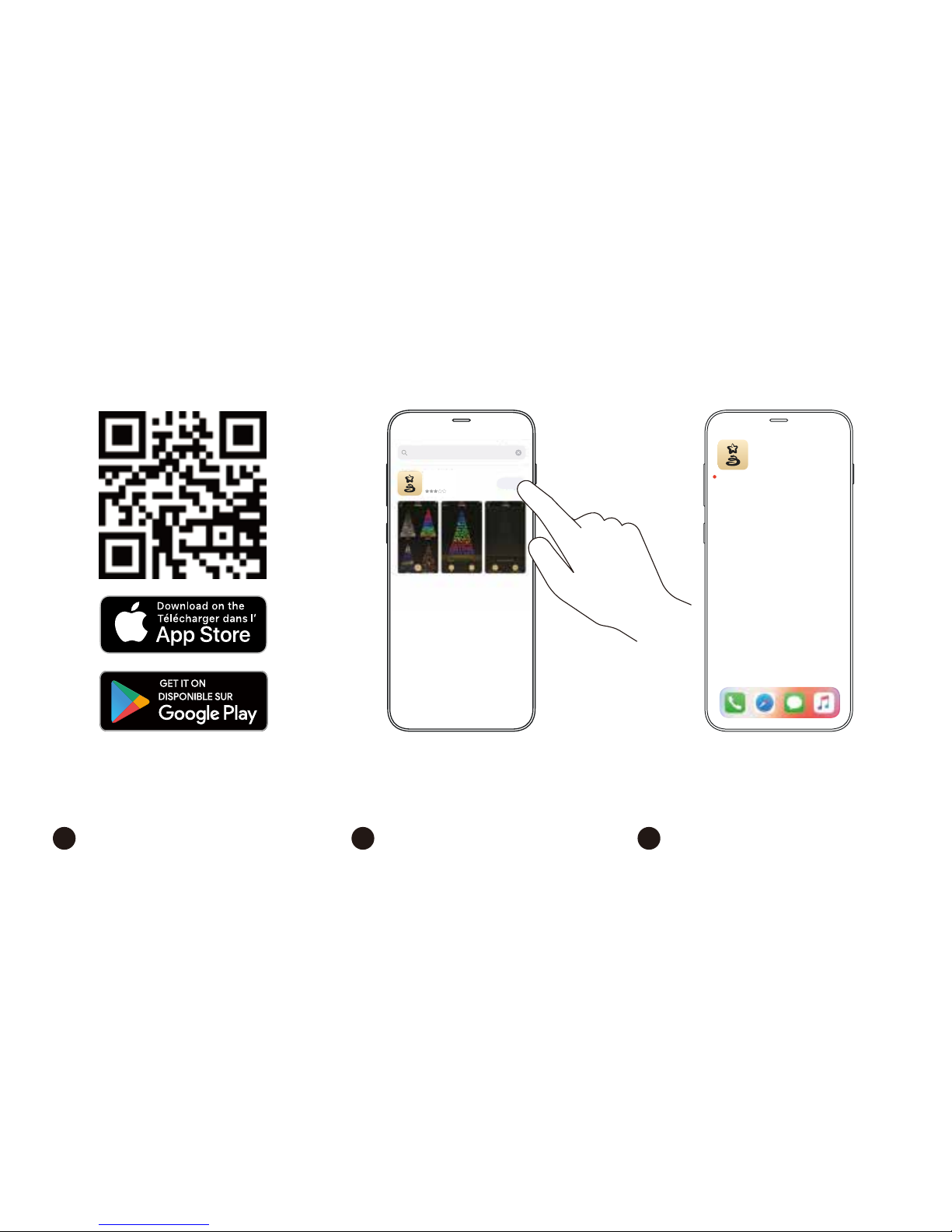
app download / téléchargement d’application /
descarga de la aplicación
Twinkly
1. 3.2.
FR
1. Go to App Store/Google Play (by scanning the
QR code)
2. Download and install “Twinkly” app
3. Ensure that Twinkly app is correctly installed on
your mobile device
1. Allez sur l’app store / google play (en scannant
le qr code)
2. Téléchargez et installez l’application “Twinkly”
3. Assurez vous que l’application soit installée
correctement sur votre téléphone
1. Ir a App Store / Google Play (escaneando el
código QR)
2. Descargue e instale la aplicación “Twinkly”
3. Asegúrese de que la aplicación Twinkly esté
instalada correctamente en su dispositivo móvil
EN ES
twinkly smart decoration
Twinkly
Lifestyle
19

Home Internet
Neighbour Network
Twinkly_xxxxxx
Wi-Fi
Wi-Fi
i
i
i
Home Internet
Neighbour Network
Twinkly_xxxxxx
Wi-Fi
Wi-Fi
i
i
i
connect to twinkly / se connecter à twinkly /
conectarse a twinkly
1. 2.
Home Internet
Neighbour Network
Twinkly_xxxxxx
Wi-Fi
Wi-Fi
Home Internet
Neighbour Network
Twinkly_xxxxxx
Wi-Fi
Wi-Fi
i
i
i
T
Home Internet
Neighbour Network
Twinkly_xxxxxx
Wi-Fi
Wi-Fi
3.
1. Open Wi-Fi settings of your mobile device
2. Find and select “Twinkly_XXXXXX” network
3. Ensure that “Twinkly_XXXXXX” network is
connected
EN
TIP: Twinkly can also be connected to your local
Wi-Fi, see online manual for details
1. Ouvrir les paramètres Wi-Fi de l’appareil portable.
2. Trouver et sélectionner le réseau « Twinkly_xxxxxx ».
3. S’assurer que le réseau Twinkly est connecté.
FR
ASTUCE: Twinkly peut également être connecté à votre
Wi-Fi local, voir le manuel en ligne pour plus de détails
1. Abra la pantalla de configuración de Wi-Fi en su
dispositivo móvil.
2. Localice y seleccione la red “Twinkly_xxxxxx”.
3. Asegúrese de que la red “Twinkly_xxxxxx” esté
conectada.
ES
Un consejo: Twinkly también puede conectarse a su
Wi-Fi local; consulte el manual en línea para obtener
más información

8
play eects / jouer des eets /
reproducir efectos
1. 3.
2. 4.
EDITAPPLYEDITAPPLY
VERTIGO
1. 3.
2. 4.
EDITAPPLY
FR
1. Launch the app and open Effects Gallery
located in the top left corner.
2. Tap to select an effect (detailed view is
shown on the screen and the effects is
played immediately).
3. Browse effects by swiping left or right.
4. Tap “Apply” to store the effect in the
controller and play it continuously.
1. Lancer l’application et ouvrir la galerie d’effets située
dans le coin supérieur gauche de l’écran.
2. Appuyer pour sélectionner un effet (une vue
détaillée montrant immédiatement les effets
s’affiche à l’écran).
3. Parcourir les effets en balayant vers la gauche ou
la droite.
4. Appuyer sur « Appliquer » pour enregistrer l’effet
dans la commande et l’exécuter en continu.
1. Inicie la aplicación y abra la galería de efectos ubicada
en la esquina izquierda superior de la pantalla.
2. Toque para seleccionar un efecto (la vista detallada
se muestra en la pantalla y los efectos empezarán
de inmediato).
3. Explore los efectos deslizando hacia la izquierda o
hacia la derecha.
4. Toque “Aplicar” para guardar el efecto en el control
y activarlo de manera continua.
EN ES
RED WHITE STRIPES RAINBOW
SNOW WARM WTITE
GALLERY

1. 3.
2. 4.
edit eects / modifier les eets /
modificar los efectos
EDIT APPLY
VERTIGO
EDIT APPLY
VERTIGO
EDIT APPLY
VERTIGO
EDIT APPLY
VERTIGO
1. Mientras un efecto está activado, oprima
“Editar” para mostrar los ajustes actuales.
2. Mueva los controles deslizantes para au-
mentar la velocidad e intensidad del efecto.
3. Toque la muestra del color para cambiar
el color o toque el “+” para crear un color
a medida.
4. Toque “Aplicar” para guardar los cambios y
toque “Aplicar” otra vez para confirmarlos.
ES
1. Pendant l’exécution d’un effet, appuyer sur «
Modifi er » pour afficher les paramètres actuels.
2. Déplacer les curseurs pour augmenter la vitesse et
l’intensité de l’effet.
3. Appuyer sur l’échantillon d’une couleur pour
la modifier ou sur « + » pour créer une couleur
personnalisée.
4. Appuyer sur « Appliquer » pour enregistrer
les modifications et appuyer de nouveau sur «
Appliquer » pour confirmer.
FR
1. While playing an effect, press “Edit” to show
current settings.
2. Move sliders to increase speed and intensity of
the effect.
3. Tap color sample to change color or “+” to
create a custom color.
4. Tap “Apply” to store changes and tap “Apply”
again to confirm.
EN
Inhaltsverzeichnis
Andere Twinkly Beleuchtungsausrüstung Handbücher

Twinkly
Twinkly line Handbuch

Twinkly
Twinkly Lumations Generation II Handbuch

Twinkly
Twinkly Strings Handbuch

Twinkly
Twinkly G35 Handbuch

Twinkly
Twinkly ICICLE GENERATION II Handbuch

Twinkly
Twinkly icicle Handbuch

Twinkly
Twinkly Dots Bedienungsanleitung

Twinkly
Twinkly TWFL200STW-WEU Handbuch

Twinkly
Twinkly spritzer Handbuch

Twinkly
Twinkly music Handbuch
Beliebte Beleuchtungsausrüstung Handbücher anderer Marken

Qazqa
Qazqa Suplux SL 3 Black 103062 Bedienungsanleitung

Commercial Electric
Commercial Electric 54568141 Bedienungsanleitung

CREE LIGHTING
CREE LIGHTING 304 Series Bedienungsanleitung

Goobay
Goobay 49867 Bedienungsanleitung

ECOMAN ITALIA
ECOMAN ITALIA LED T8 Bedienungsanleitung

Alkalite
Alkalite Krypton KT-81 Bedienungsanleitung