Viking Electronics FaxJack Bedienungsanleitung

FaxJack - Distinctive Ring and Auto Call Processor
Eliminate the Expense of Dedicated Phone Lines!
The FAXJACK allows any business, large
or small; to enjoy the convenience of
automated data transmission without the
perpetual monthly expense of a dedicated
phone line.
The FAXJACK is a versatile phone/data/fax
switch with the ability to automatically route
calls via fax CNG tone, central office
distinctive ring, or touch tones included in
the dial string by the calling party. In
addition, the FAXJACK offers full manual
transfer capabilities.
The FAXJACK stores and retransmits c
ID information so that it is truly caller ID
compatible.
aller
The FaxJack is the only single line distinctive ring automatic call routing
technology in the whole world that is:
•Fully Caller-Id Compatible
•Supports 1 to 3 distinctive ring numbers plus primary
•Automatically detects and routes fax or modem calls on primary and
distinctive ring numbers
•Provides tone detection and distinctive ring in the same application.
•Supports up to 4 devices
•Includes easy plug-in female RJ-11 jacks installation kit

Features
• Four ports allow any four analog devices to share a single line
• Routes calls via CNG tone, distinctive ringing, touch tones sent by calling device or
manually
• Provides realistic ring-back tones while re-ringing selected device
• Transfer from one port to another as often as may be required during the same call
• Caller ID information is stored and retransmitted during transfer
• Automatic “privacy” eliminates interruptions on both in and outbound calls
• Monitors for calling party control (CPC)
• All in and outbound calls are routed to the phone 1 port during a power failure
• Manual mode will not interfere with C.O. provided voice mail
• Ports are balanced to prevent noise on long runs
• Compatible with high-speed modems
• Surge protection on both power and phone line
• Internal Call Mode
Applications
Fax Machines
• Retail
• Governmental
• Commercial
• Home office
• Industrial
Phone Management
• TDD/ TTY Machines
• Separate Personal from Business Phones
• Multiple Answering Machines
Modem Terminals
• Personal computers
• Vending machines
• Remote access applications
• Satellite Modems
• Fax/Modem
Point-Of-Sale Terminals
• Fast food chains
• Retail stores
• Convenience stores
Specifications
Power: 120V AC/13.8V AC 1.25A, UL listed adapter provided
Dimensions: 133mm x 91mm x 44mm (5.25” x 3.6” x 1.75”)
Shipping Weight: 1.36 kg (3 lbs)
Environmental: 0°C to 32°C (32°F to 90°F) with 5% to 95% non-condensing humidity
CNG Detection: 1100 Hz burst
Maximum Data Speed: 56 Kbps
Minimum CPC Time: 320ms
Ring Output: 4 REN, capable of ringing (8) 0.5 REN phones
REN: 0.7A
Connections: (1) 10-position cage clamp terminal strip

Installation and Applications
A.Fax / Data / Phone Application
Note: The polarity of the connection to the CO Line In terminals shown to the right
should be (+) or Tip to terminal 1 and (-) or Ring to terminal 2. Observing this polarity
helps prevent clicks and dings of connected phones on hang up.
* Note: To increase surge protection, fasten a wire from the screw terminal to Earth
Ground (grounding rod, water pipe, etc.)

B.PABX / KSU Application
* Note: To increase surge protection, fasten a wire from the screw terminal to Earth
Ground (grounding rod, water pipe, etc.)

C.Installing a FAXJACK on a Residential Line
The FAXJACK is designed to be wired at the Demarcation Point (the point where the
phone line comes into the house), but in some cases this may not be possible or
convenient. This section shows a way of hooking up the FAXJ- 1000 to any existing
phone jack, provided the house is wired for at least two lines. A splitter/adapter is
required for each jack in the house (ie: Radio Shack part # 279-402).
Step 1.
The connection of the FAXJACK to the telephone line can be at any extension wall jack.
Unplug anything connected to the selected jack and plug a splitter/adapter into the jack.
Step 2.
Connect the CO LINE IN terminals of the FAXJACK to the Line 1 port of the
splitter/adapter. If the phone line is a DSL line, a DSL filter should be installed as shown
in the diagram below.
Step 3.
Connect the PHONE 1 terminals of the FAXJACK to the Line 2 port of the
splitter/adapter.
Step 4.
Unplug any phones at extension wall jacks located away from the FAXJACK and plug in
splitter/adapters. Reconnect the phones to the Line 2 side of the splitter/adapters.

Note: At any point “down line” from the FAXJACK where it is impractical to insert a
splitter/adapter (ie: a wall mount phone), this type of jack can be converted by:
1. Swapping the GREEN wire with the BLACK wire.
2. Swapping the RED wire with the YELLOW wire.
The phone can then be plugged into the converted jack.
* Note: To increase surge protection, fasten a wire from the screw terminal to Earth
Ground (grounding rod, water pipe, etc.)
D. “Mini Phone System” Application
Inbound callers can touch tone route themselves to any of the 4 phones. Inbound calls ring to the
Phone 1 port if no touch tones are dialed. You can pick up any phone and dial “#1” through “#4”
to call another phone. For outgoing calls, the ports are directly connected to the telephone line (if
available) and outward dialing is normal.
E. “Stand Alone Mini Phone System” or “Selectable
Ringdown Device” Application
In this application, simulated talk voltage is required for the CO Line In of the FAXJ-1000. This
can be provided by a model DLE-200B or a PS-2 power supply with a 470 ohm, ½ watt resistor.
Pick up any phone and dial “#1” to “#4” to call another phone.

Notes: Internal Calls - One Port to Another
The Internal Call mode gives you the ability to create an “internal” call from one
port of the FAXJACK to any other port. This allows the phones behind the
FAXJACK to selectively call any phone on another port and communicate
between the two phones. When the two ports are connected together,
the telephone line is disconnected so you don’t hear busy signals, reorder tones
or intercept messages while talking.
Description
When you go off hook on one of the ports, you are connected to dial tone from the
telephone line. You then dial “#1” through “#4” to ring another port (“#1” = Fax, “#2” =
Modem, “#3” = Phone 1 and “#4” = Phone 2). When the “#1” through “#4” is dialed, the
telephone line is disconnected and you begin to hear a simulated ringback tone (single
frequency ringback tones – 500 Hz – 2 seconds on, 4 seconds off), as the FAXJ-1000
sends ringing to the appropriate port. Interrupted ringing is provided to the appropriate
port until the call is answered or the port that originated the call hangs up (no limit to the
number of rings). When the other port answers the call, the two ports are connected
together and can communicate. Once both phones hang up, the FAXJ-1000 returns
to idle.
During an incoming call on the telephone line (in the automatic mode), the caller is
allowed to route themselves to a given port of the FAXJ-1000 by dialing touch tone “#”
plus the desired port number or a string of digits corresponding to the desired port
number. In standard FAXJ-1000 software, callers can only route themselves to
a port by dialing a string of touch tone digits. The port numbering for the FAXJ-1000 is
“11111” or “#1” for the Fax port, “22222” or “#2” for the Modem port, “33333” or “#3” for
the Phone 1 port and “44444” or “#4” for the Phone 2 port.

Notes About the “Internal Calls”
1. When there is a telephone line connected to the FAXJ-1000, try to limit the duration of these internal
calls. Incoming calls on the CO line are ignored while the internal call is going on (ringing or connected).
2. The following is what happens on the other two ports (the two ports not involved with the internal call), if
they attempt to go off hook during the internal call:
a. While an internal call is taking place, if you go off hook on another port, you get a buzz sound (120 Hz) in
the phone until you hang up.
b. If an internal call has been initiated (but not answered yet) and you go off hook on another port, you are
directly connected to the phone that initiated the internal call and both phones hear ringback tones while the
called phone continues to ring. When the called phone answers, it is connected to the phone that initiated
the call and the other phone is dropped and hears the buzz sound (120 Hz).
c. While an internal call is in progress, if you go off hook on another port and remain off hook through the
conclusion of the internal call and both phones involved in the internal call hang up, you will be instantly
switched from the buzz sound (120 Hz) to the telephone line. If only one of the two phones involved in the
internal call hang up, you will be switched from the buzz sound (120 Hz) to a simulated busy signal and the
phone that remained off hook will instantly be connected to the telephone line. .
F. 4 Modem or 4 Fax Application
Inbound callers can touch tone route themselves to any of the 4 faxes or modems (inbound calls
are routed to the Fax port if CNG tones are detected). Inbound calls ring to the Phone 1 port if no
touch tones are dialed. Any fax/modem can dial “#1” through “#4” to call another fax/modem. For
outgoing calls, the fax/modems are directly connected to the telephone line (if available) and
outward dialing is normal.

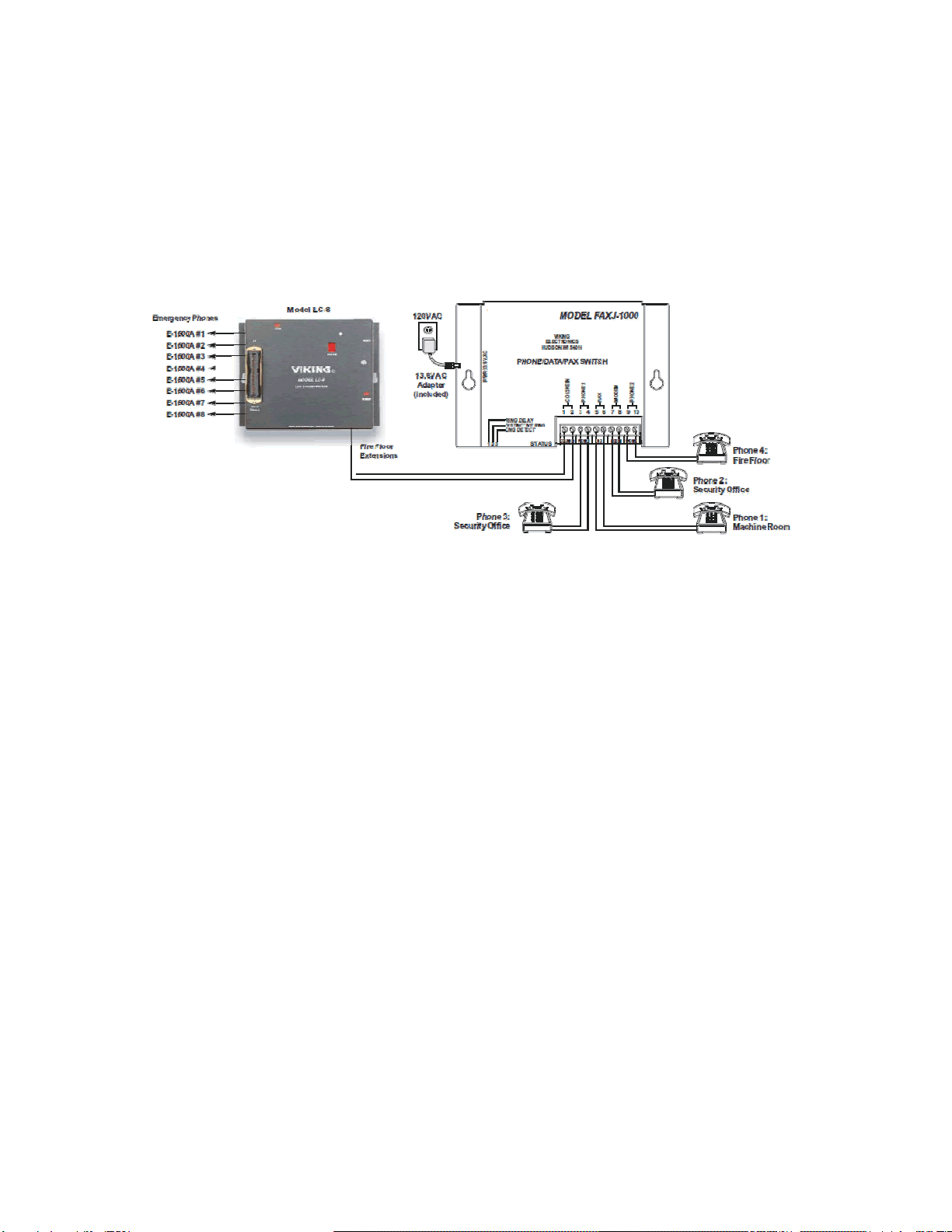
G. Emergency Phone / LC-8 Application
Emergency calls from the 8 emergency phones can dial out on the telephone line (as normal). Any phone
connected to the FAXJACK can call and communicate with any of the (up to) 8 emergency phones
connected to the LC-8 (by dialing “1” through “8”). Any phone on the FAXJ-1000 can dial “#1” through “#4”
to call another “fire floor” phone (for example the “security office” phone can dial “#1” to call the “machine
room” phone). Note: Program the LC-8 with “no touch tone # required on transfers, page and call waiting”
(_4), so the LC-8 ignores the “#1” to “#4” dialing.
H. Emergency Phone Application
Emergency calls from the phone in the elevator cab can dial out on the telephone line (as
normal). If the emergency phone in the cab is not currently on a call, emergency personnel
at the security office or either machine room can call and communicate with the phone in the cab
by dialing “#2”. A phone in a machine room can call the phone in the security room by dialing
“#3”, etc.

Inhaltsverzeichnis
Beliebte Computerhardware Handbücher anderer Marken

EMC2
EMC2 VNX Series Betriebsanleitung

Panasonic
Panasonic DV0PM20105 Bedienungsanleitung

Mitsubishi Electric
Mitsubishi Electric Q81BD-J61BT11 Bedienungsanleitung

Gigabyte
Gigabyte B660M DS3H AX DDR4 Bedienungsanleitung

Raidon
Raidon iT2300 Bedienungsanleitung

National Instruments
National Instruments PXI-8186 Bedienungsanleitung