VK VK4000 Bedienungsanleitung

Hello,
Thank you for purchasing VK cellular phone.
VK4000 is a fabulous slide type camera MP3 phone only for brilliant people. 260K TFT LCD allows you to enjoy
multimedia functions through clear and precise screen. The 64 poly brings you incredible sound that is almost
similar to that of the original sound quality and it will be your take-out audio system. VK4000 is embedded
with cutting edge camera that features 1.3mega pixels, 4x digital zoom, self-timer function, and video clip
recording function.
Thank you again for choosing VK product and we hope you have greatest success in your business with
VK4000.
Please read Safety Precaution prior to use.
The content of this manual and functions of cellular phone are subject to change depending on the
software version and conditions in business.
1

2 3
Contents
6
PRIOR TO USE
Safety Precaution
Unpacking
Phone Layout and Keys Function
Keys Description
LCD Icon Description
Inserting SIM Card and Battery
Charging Battery
Reference About Battery Charging
Handset Power off Status
Handset Power on Status
7
13
14
15
18
19
20
21
21
22
24
BASIC FUNCTIONS
Basic Operation
Switching On/Off
Making a Call
Answering a Call
Hanging up
Options During a Call
Missed Calls
Volume Adjustment
Etiquette Mode
Using Ear-microphone
Standby Screen Function
Contacts
Storing Phone Numbers
Search Phone Number
25
25
26
28
28
29
32
32
33
34
35
36
36
40
BASIC FUNCTIONS
Contacts Menu Function
Menu Function of Selected Items
Character Input Mode
T9 Mode
ABC Mode
Numeric Mode
Symbolic Mode
Changing Text Input Mode
44
49
52
52
55
58
58
59
CONTENTS
60
MENU FUNCTIONS
Menu Tree
Message
Short Message
Multimedia Message
Voice Message
Info. Message
Memory Status
Calls
Call History
Network Services
Gallery
Photo
61
67
67
74
80
81
82
83
83
87
91
91

4 5
CONTENTS
Contents
MENU FUNCTIONS
Sound
Phone Setting
Bluetooth
Security
PC Connection
Organizer
Calendar
Alarm
Memo
Calculator
Unit Converter
World Time
Stop Watch
121
124
128
130
133
135
135
140
144
145
146
146
147
MENU FUNCTIONS
MP3 Player
Music Play
Edit Playlist
Joy World
Internet
Games
148
148
151
153
153
159
160
OTHER FUNCTIONS
PCSync Installation Guide
Safety Information
Using the Batteries
Safety Information
Care and Maintenance
FCC RF EXPOSURE INFORMATION
Radio Frequency (RF) Signals
Glossary
161
163
166
168
173
174
177
179
MENU FUNCTIONS
Video-Clip
Image
Animation
Sound
Music
T-Flash Manager
Memory Status
Camera
Photo
Video Clip
Settings
Settings
Display
95
98
101
104
107
110
112
113
114
115
116
118
118

PRIOR TO USE
Safety Precaution
Unpacking
Phone Layout and Keys Function
Keys Description
LCD Icon Description
Inserting SIM Card and Battery
Charging Battery
Reference About Battery Charging
7
PRIOR TO USE
Safety Precaution
Maintaining Safe Use of and Access to Your Phone
The users manual or instruction manual for an intentional or unintentional radiator shall caution the user that
changes or modifications not expressly approved by the party responsible for compliance could void the user’s
authority to operate the equipment.
Important Information
This user guide contains important information on the use and operation of this phone. Please read all the
information carefully for optimal performance and to prevent any damage to or misuse of the phone. Any changes or
modifications not expressly approved in this user guide could void your warranty for this equipment. FAILURE TO
FOLLOW THE INSTRUCTIONS OUTLINED MAY LEAD TO SERIOUS PERSONAL INJURY AND POSSIBLE PROPERTY
DAMAGE.
Always store your phone away from heat.
Never store your phone in settings that may expose it to temperatures less than 32 F or greater than 104 F, such as
outside during a snowstorm or in your car on a hot day. Exposure to excessive cold or heat will result in malfunction,
damage and/or catastrophic failure.
PRIOR TO USE

9
PRIOR TO USE
8
Be careful when using your phone near other electronic devices.
RF emissions from your mobile phone may affect nearby inadequately shielded electronic equipment. You should
consult with manufacturers of any personal medical devices such as pacemakers and hearing aides to determine if they
are susceptible to interference from your mobile phone. Turn off your phone in a medical facility or at a gas station.
Never place your phone in a microwave oven as this will cause the battery to explode.
IMPORTANT! Please read the TIA SAFETY
INFORMATION on page 137 before using your phone.
Safety Information
Please read and observe the following information for the safe and proper use of your phone and to prevent any
unanticipated damage by accident. Also, keep the user s manual in an accessible place all the times after reading it.
Unplug the power cord and charger during a lightning storm to avoid electric shock or fire.
Do not use your phone in high explosive areas as the phone may generate sparks.
Do not put your phone in a place subject to excessive dust, and keep the minimum required distance between the
power cord and heat sources.
Unplug the power cord prior to cleaning your phone, and clean the power plug pin when it is dirty.
Do not damage the power cord by bending, twisting, pulling, or heating. Do not use the plug if it is loose as it may
cause fire or electric shock.
Hold the power cord plug firmly to plug and unplug the power cord. Ensure the plug is firmly connected. If it is not
firmly connected, it may cause excessive heat or fire.
Do not place any heavy item on the power cord. Do not allow the power cord to be crimped as it may cause fire or
electric shock.
Be careful not to let the battery contact metal conductors such as a necklace or coins. When shorted, it may cause an
explosion.
Do not disassemble or impact to the battery as it may cause electric shock, short-circuit, and fire. Store the battery in
a place out of reach of children.
Using a damaged battery or placing a battery in your mouth may cause serious injury.

11
PRIOR TO USE
10
Do not place items containing magnetic components such as a credit card, phone card, bank book and a subway
ticket, near your phone. The magnetism of the phone may damage the data stored in the magnetic strip.
Do not hold or let the antenna come in contact with your body during a call.
Talking on your phone for a long period of time may reduce the call quality due to heat generated during the use.
Do not allow excessive vibration or impact to the phone.
When you do not use the phone for a long period time, store it in a safe area with the power cord unplugged.
Cautions for Travel Adaptor and Battery
Adoptor (Battery Charger) Cautions
Using the wrong Travel Adaptor could damage your phone and void your warranty.
Ther travel adapter is intended for indoor use only.
Do not expose Travel Adaptor to direct sunlight or use it in places with high humidity, such as the bathroom.
“IMPORTANT SAFETY INSTRUCTIONS - SAVE THESE INSTRUCTIONS and DANGER - TO REDUCE THE RISK
OF FIRE OR ELECTRIC SHOCK, CAREFULLY FOLLOW THESE INSTRUCTIONS”
“For connection to a supply not in the U.S.A., use an attachment plug adaptor of the proper
configuration for the power outlet.”
“This power unit is intended to be correctly orientated in a vertical or floor mount position.”

13
PRIOR TO USE
12
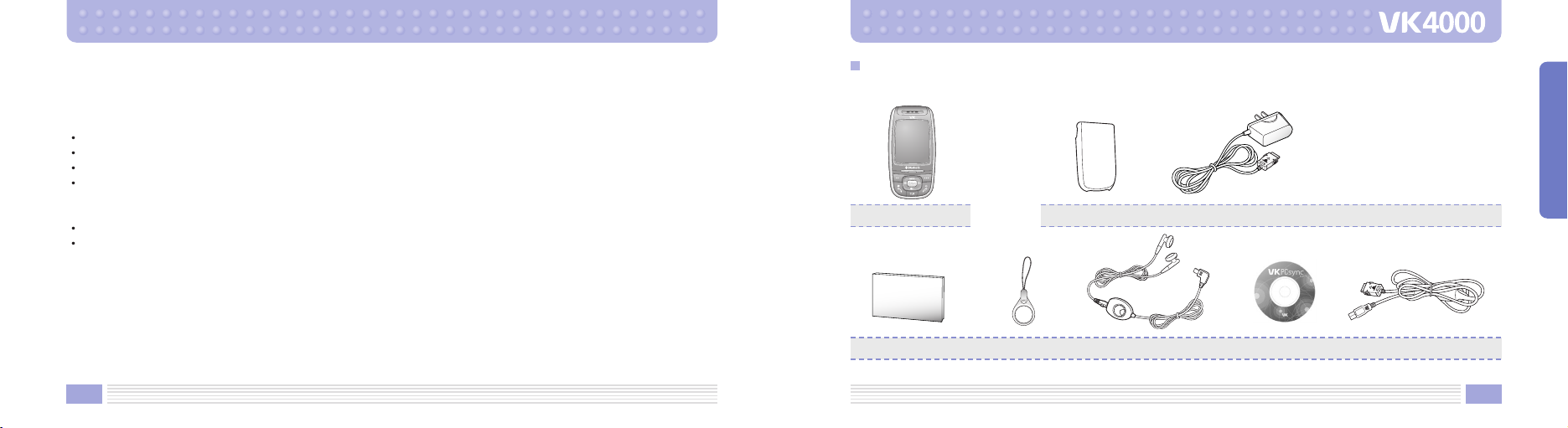
Actual product may look different from the above picture.
Battery Travel adapter
Unpacking
1. Handset
Cellular Phone
2. Battery and Travel Adapter
3. Accessories
Data CableUser’s Manual Hand Strap Ear-microphone PC Sync CD
CAUTION
RISK OF EXPLOSION IF BATTERY IS REPLACED BY AN INCORRECT TYPE.
DISPOSE OF USED BATTERIES ACCORDING TO THE INSTRUCTIONS.
Do not disassemble.
Do not short-circuit.
Do not expose to high temperature : 60 (140 ).
Do not incinerate.
Battery Disposal
Please dispose of your battery properly or bring to your local wireless carrier for recycling.
Do not dispose in fire or with hazardous or flammable materials.

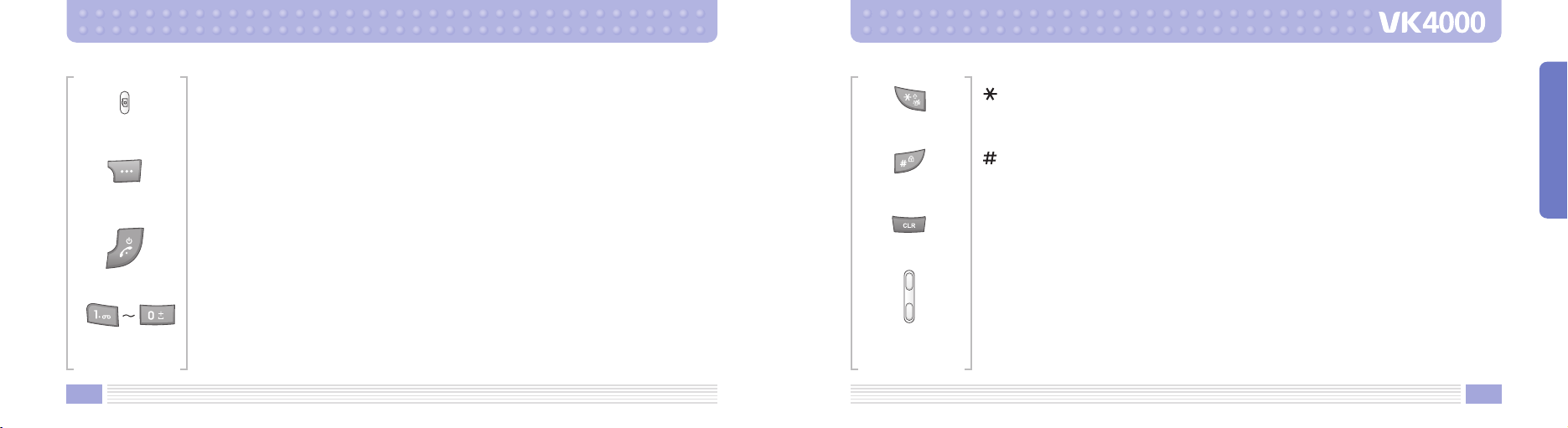
Left soft key
Enter the left bottom menu of the display.
Send/Dial key
Make/Answer a calls.
When this button is pressed in standby mode, the last number you dialed will be
redialed.
Navigation key
Up : MP3 Player Down : Gallery
Left : Message Right : My Favorite
WAP/OK key
Enter WAP from standby mode.
Access function indicated on the bottom of the display.
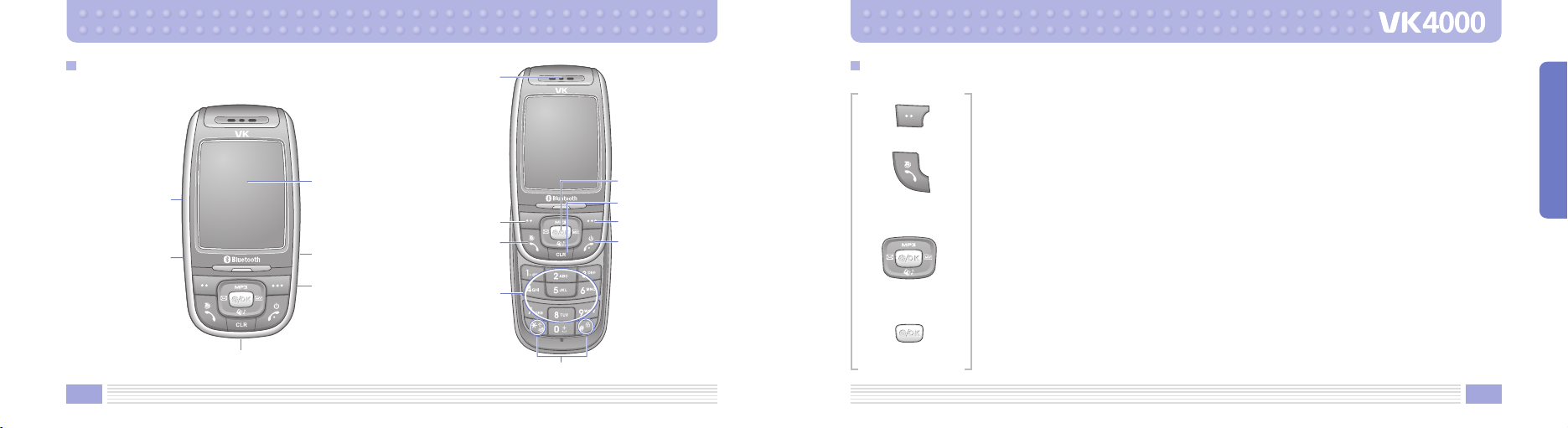
Phone Layout and Keys Function Keys Description
Display
Camera Key
Ear-microphone
Jack
Earpiece
WAP/Ok key
Right soft Key
CLR key
End/Power
on-off key
Left soft Key
Volume Keys
Sand/Dial Key
Alphanumeric
Keys
Special Function Keys
T-Flash card
Cover
Charger connection Cover
15
PRIOR TO USE
14

Camera key
In standby mode enters Camera.
Right soft key
Enter the Right bottom menu of the display.
In standby mode enters Contacts.
End/Power on-off key
End a call. Hold down to switch the phone on and off.
In menu mode, cancels input and returns the phone to standby mode.
Alphanumeric keys
Enter number and characters.
key
Hold down to activate Manner mode on/off.
key
Hold down to activate Lock mode on/off.
CLR key
Delete charaters from the display.
Volume key
Adjust the button volume from standby mode. Conversation volume adjustment while
speaking on the phone. While slide is closed hold down the volume key turns on LCD.
17
PRIOR TO USE
16

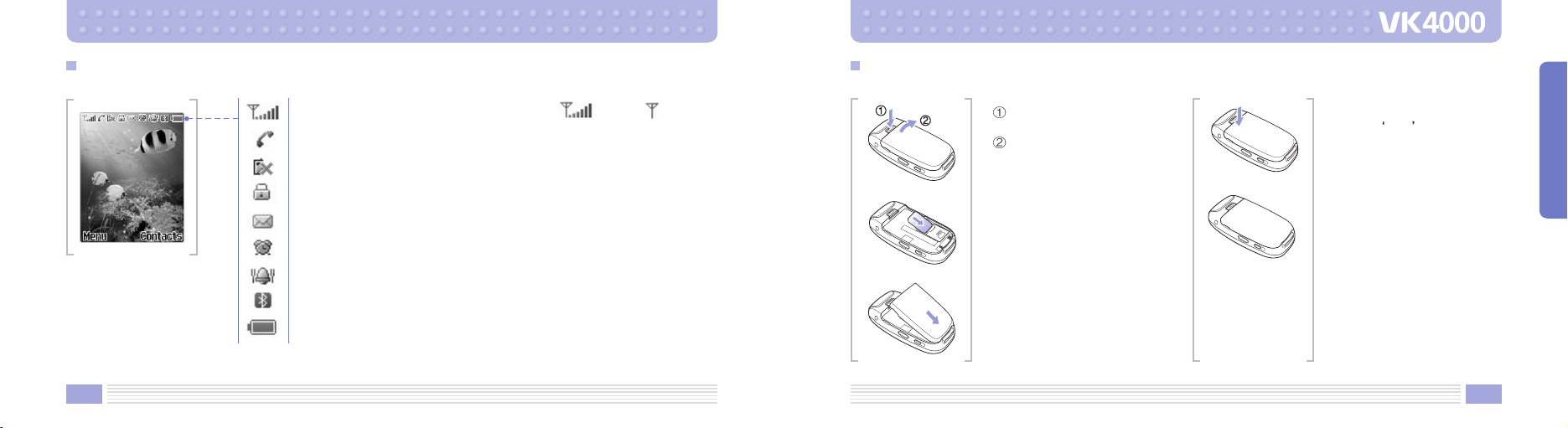
1. Turn off the power of
cellular phone.
Remove battery as
shown in the figure
below.
2. Face the gold color contact
point of SIM card towards
the cellular phone and
push in the SIM card into
the slot.
3. Push in the battery as
shown in the figure below.
Align the battery as shown
in the figure.
4. Push in the battery until it
makes Click sound.
5. Switch on the cellular
phone.
Inserting SIM Card and Battery
19
PRIOR TO USE
18
Shows the received signal strength. [Strong : Weak : ]
Appears when a call is in progress.
Appears when you are out of a service area.
Appears when you set the key pad lock function.
Appears when you have new or unread message.
Appears when you set the alarm to ring at a specific time.
Appears when you set the alert type for incoming calls to vibration.
Appears when you set the Bluetooth function.
Shows the level of your battery.
LCD Icon Description
Inhaltsverzeichnis
Andere VK Handy Handbücher
Beliebte Handy Handbücher anderer Marken

Point Mobile
Point Mobile PM60 Bedienungsanleitung

Blackbe;rry
Blackbe;rry Q10 Bedienungsanleitung

Blackbe;rry
Blackbe;rry Bold 9900 Bedienungsanleitung

Blackbe;rry
Blackbe;rry STORM 9500 - VERSION 5.0 Bedienungsanleitung

LG
LG LM-K420EMW Bedienungsanleitung

ISAFE MOBILE
ISAFE MOBILE IS655.2 Bedienungsanleitung