
Voxoa S70 Bedienungsanleitung
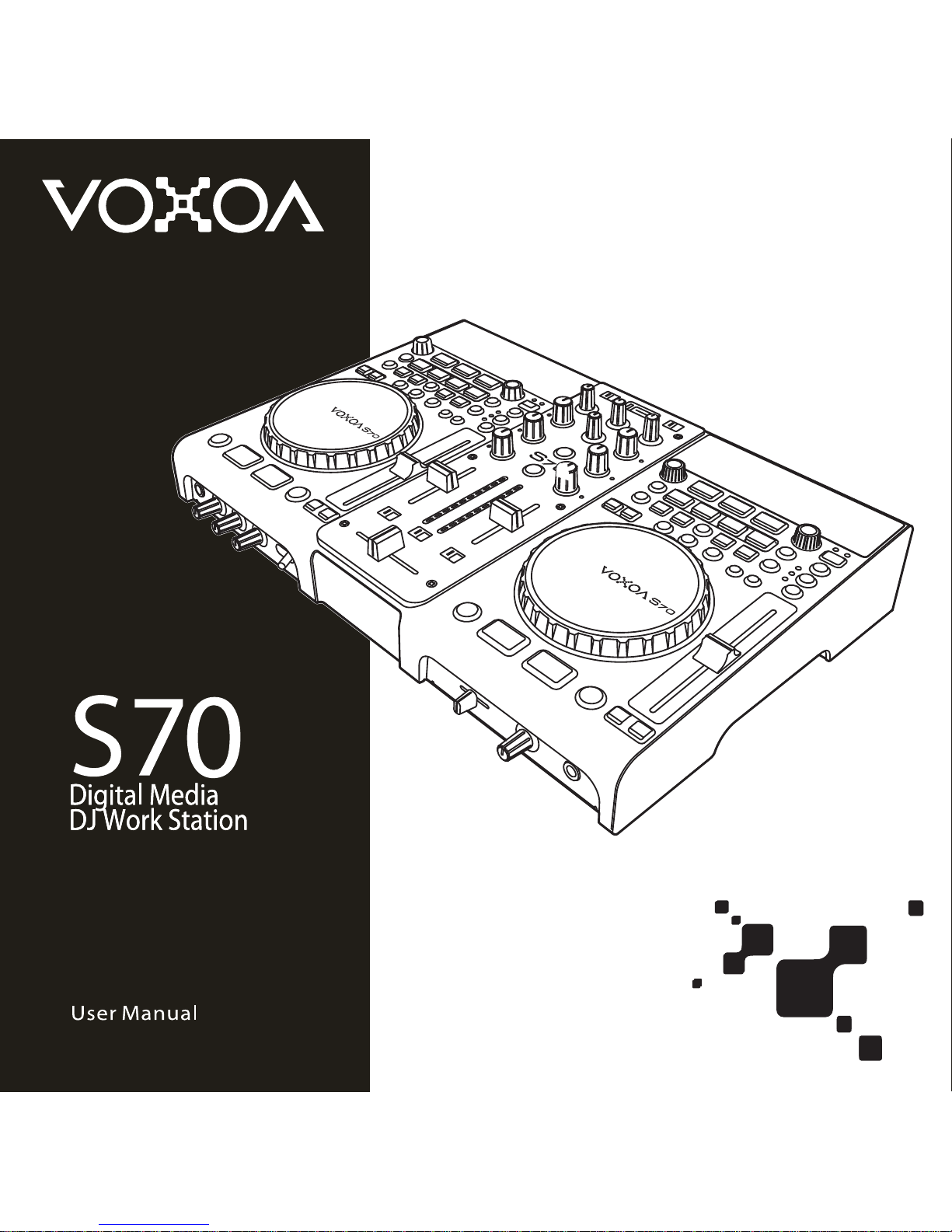

S70
S70
3
Contents
ENGLISH
IMPORTANT SAFETY INSTRUCTIONS ......................................................................... 48
FEATURES ............................................................................................................. 50
MAIN FEATURES ................................................................................................... 50
FEATURES & FUNCTION .......................................................................................... 52
CONNECTIONS ...................................................................................................... 54
PART NAMES AND FUNCTIONS ................................................................................. 56
PLAYER CONTROL PANEL ........................................................................................ 56
DISPLAY SECTION ................................................................................................. 62
TOP PANEL MIXER SECTION ..................................................................................... 64
FRONT PANEL ....................................................................................................... 67
REAR PANEL ........................................................................................................ 68
UTILITY MENU ........................................................................................................ 70
OPERATIONS ......................................................................................................... 72
SOFTWARE INSTALLATION INSTRUCTION .............................................................................. 77
VIRTUALDJ CONTROL AND FUNCTIONS ..................................................................... 80
VOXOA TUNEBOX SOFTWARE..........................................................................................82
MIDI MAP (HEX) ....................................................................................................... 85
SPECIFICATIONS .................................................................................................... 89
48
ENGLISH
IMPORTANT SAFETY INSTRUCTIONS
1. Read these instructions.
2. Keep these instructions.
3. Heed all warnings.
4. Follow all instructions.
5. Do not use the apparatus near water.
6. Clean only with dry cloth.
7. Do not block any ventilation openings. Install in accordance with the manufacturer’s instructions.
8. Do not install near any heat sources such as radiators, heat registers, stoves, or other apparatus (including amplifiers) that
produce heat.
9. Do not defeat the safety purpose of the polarized or grounding-type plug. A polarized plug has two blades with one wider
than the other. A grounding- type plug has two blades and a third grounding prong. The wide blade or the third prong is
provided for your safety. If the provided plug does not fit into your outlet, consult an electrician for replacement of the obsolete
outlet.
10. Protect the power cord from being walked on or pinched particularly at plugs, convenience receptacles, and the point where
they exit from the apparatus.
11. Only use attachments/ accessories specified by the manufacturer.
12. Use only with a cart, stand, tripod, bracket or table specified by the manufacturer, or sold with the apparatus.
When a cart is used, use caution when moving the cart/apparatus combination to avoid injury from tip-over.
13. Unplug this apparatus during lighting storms or when unused for long periods of time.
14. Refer all servicing to qualified service personnel. Servicing is required when the apparatus has been damaged in any way,
such as power-supply cord or plug is damaged, liquid has been spilled or objects have fallen into the apparatus, the
apparatus has been exposed to rain or moisture, does not operate normally, or has been dropped.
15. When the mains plug or appliance coupler used as the disconnect device, it shall remain readily operable.
16. Please keep the unit in a good ventilation environment.
To reduce the risk of fire or electric shock, do not expose this apparatus to rain or moisture. The apparatus shall not be
exposed to dripping or splashing and that no objects filled with liquids, such as vases, shall be placed on the apparatus.
To prevent electric shock, do not use this polarized plug with an extension cord, receptacle or other outlet unless the blades
can be fully inserted to prevent blade exposure.
The lightning flash with arrowhead symbol within the equilateral triangle is intended to alert the use to the presence
of un-insulated “dangerous voltage” within the product’s enclosure that may be of sufficient magnitude to constitute
a risk of electric shock.
CAUTION : To reduce the risk of electric shock, do not remove any cover. No user-
serviceable parts inside. Refer servicing to qualified service personnel only.
The exclamation point within the equilateral triangle is intended to alert the user to the presence of important
operation and maintenance (servicing) instructions in the literature accompanying this appliance.
WARNING
CAUTION

S70
S70
49
ENGLISH
IMPORTANT SAFETY INSTRUCTIONS
17. All warnings on the appliance and in the operating instructions should be adhered to.
18. Heat - The appliance should be situated away from heat sources such as radiators, heat registers, stoves, or other appliances
(including amplifiers) that produce heat.
19 .Power Sources - This product should be operated only from the type of power source indicated on the rating label. If you are
not sure of the type of power supply to your home, consult your product dealer or local power company. For products
intended to operate from battery power, or other sources, refer the operating instructions.
20. Grounding or Polarization - This product may be equipped with a polarized alternation-current line plug (a plug having one
blade wider than the other). This plug will fit into the power outlet only one way. This is a safety feature. If you are unable to
insert the plug fully into the outlet, try reversing the plug. If the plug should still fail to fit, contact your electrician to replace
your obsolete outlet. Do not defeat the safety purpose of the polarized plug.
21. Power-Cord Protection - Power-supply cords should be routed so that they are not likely to be walked on or pinched by items
placed upon or against them, paying particular attention to the cord in correspondence of plugs, convenience receptacles,
and the point where they exit from the appliance.
22. For AC line powered units - Before returning repaired unit to user, use an ohm-meter to measure from both AC plug blades to
all exposed metallic parts. The resistance should be more than 100,000 ohms.
23. Non-use Periods - The power cord of the appliance should be unplugged from the outlet when left unused for a long period
of time.
24. Object and Liquid Entry - Care should be taken so that objects do not fall and liquids are not spilled into the enclosure through
openings.
25. Damage Requiring Service - The appliance should be serviced by qualified service personnel when: A. The power-supply cord
or the plug has been damaged; or B. Objects have fallen, or liquid has been spilled into the appliance; or C. The appliance
has been exposed to rain; or D. The appliance does not appear to operate normally or exhibits a marked change in
performance; or E. The appliance has been dropped, or the enclosure damaged.
26. Servicing - The user should not attempt any service to the appliance beyond that that described in the operating instructions.
All other servicing should be referred to qualified service personnel.
27. Lightning - For added protection for this product during a lightning storm, or when it is left unattended and unused for long
periods of time, unplug it from the wall outlet and disconnect the antenna or cable system. This will prevent damage to the
product due to lightning and power-line surges.
28. Replacement Parts - When replacement parts are required, be sure the service technician has used replacement parts
specified by the manufacturer or have the same characteristics as the original part. Unauthorized substitutions may result in
fire, electric shock, or other hazards.
29. Safety Check - Upon completion of any service or repairs to this product, ask the service technician to perform safety checks
to determine that the product is in proper operating condition.

50
ENGLISH
- MAIN FEATURES
All-in-one Design
The S70 Digital DJ Workstation is a dual USB player and a high performance mixer, all-in-one design in an elegant
unit. Setting the S70 is easy and fast because you don’t need to waste time connecting cables. You just need to
bring the S70 and USB storage and you can DJing. It’s perfect for DJs working events, clubs that need to be able
to pack away their system quickly, and any other DJ on the move. Moreover, the S70 also is a MIDI controller can
fully control any DJ software, the comprehensive MIDI compatibility all of the 98 control elements can be applied
as MIDI control device.
USB Player
In this digital era, USB devices become the most convenient for music collection. The S70 support 2 external
USB mass storage devices. Connect an MP3 player, thumb drive and large hard drives for easy access to small or
extensive MP3/WAV libraries up to 999 folders and each folder 999 files.
VOXOA TUNEBOX Software
Support the VOXOA TUNEBOX software makes reading and searching files much quicker and easier. The VOXOA
TUNEBOX can scan all of music files in your USB mass storage devices and then create database files to locate
the files in your music library.
MIDI Interface Controller (PC/MAC)
In this new era of DJing, more and more DJs utilize computer and DJ software for their performances. In order
to satisfy DJs requirement, the S70 is also designed to interface and control a variety of popular DJ software
applications that support USB MIDI interface. DJs can assign virtually every button to trigger functions of various
DJ software programs.
Memo Points with 4 Trigger Pads
Every track can be saved 4 memo points for Hot Cues and Loops. The S70 can store your Hot Cues and Loops
on any audio track and recall them at a later time when that track is cued in USB drive. The memo points are
unlimited. It is all depend on your USB memory capacity. This memo function can be used like a mini sampler for
vocals, stabs, or breaks, adding that touch of creativity to any DJ set.
Real-time Cutting and Extending Auto Beat Loop Function
You can easy adjust the Auto Beat loop length by half length or double length increments. Every time you can cut
the loop in half to 1/64 loop length or double the loop to 16X loop length.
SLIP Mode
When the SLIP mode is turned on, normal playback continues in the background with the original rhythm during
scratch play, loop playback and loop roll playback.
Loop Roll
Loop Roll function with 4 difference beat length
FEATURES
S70
S70
51
ENGLISH
Seamless Loop
With this function, any section on music can be played repeatedly between in & out points with no break in sound
or limit in length. Once the loop is be set, it can then be looped continuously or until the ReLoop / Exit button is
pressed. The loop can be re-trigged at any time by pressing the ReLoop / Exit button again.
Real-time Loop Out Point Adjustment
The loop-out point can be real time adjusted by pressing the Out point button while in the loop playback and
turning the jog wheel to adjustment.
Hot Loop
Press IN button during loop playback, to return to the Loop In point and to start over the loop playback. You can
repeatedly press the IN button to create a stuttering effect.
Fader Start Play
The mixer’s fader operation can be used to perform back cue and quick start.
DSP Digital Effects
The S70 supplies the DJ with four different types of DSP digital effects to enhance creativity and performance.
Including ECHO, FLANGER, FILTER and SKID. Moreover, DJs can independently adjust effect’s parameters “TIME ”
and “DEPTH” via the JOG WHEEL.
Tempo Control and Range
A 100mm linear high precision slider gives DJs total control and ensures that the tempo adjustment is easy and
accurate. The range of tempo +/- 6%, +/-10%, +/-16% and -100% can be assigned to the TEMPO ADJUST slider.
Key Lock
The Key Lock function locks the pitch of the track even when you adjust the speed of the track. You can speed up
or slow down the beat without any noticeable difference in how the vocal and music sound.
Two Decks Share the Same USB Device
Two decks can share a single external USB mass storage device from just one USB device. DJs don’t need
to have several USB storage devices for different players and can easy manage your music resource from one
storage device.
BUNDLE WITH VIRTUALDJ
It comes bundled with VirtualDJ, Audio/Video/Karaoke mixing software. The S70 is MIDI-mapable and compatible
with other popular DJ programs. The unit interfaces seamlessly with Mac® OSX and Windows XP, Vista and
Windows 7 operating systems.
FEATURES

52
ENGLISH
- FEATURES AND FUNCTIONS
USB Player
• 2 USB sockets for external USB device support
• Two USB player share one external USB Device
• All control elements are MIDI compatible
• Automatic and manual tap beat counter
• Optional rack-mount adaptor
Playback
• Instant playback from cue point
• Fader start to control playback on fader move
• Single and Continuous play modes
Data Search
• Tracks and folders searching system
• Advanced cueing with track searching by frame
• Support VOXOA TUNEBOX software for fast searching massive USB device
• Onboard file and folder browsing
• ID3 TAG support
Cue/Loop
• Auto Cue function cues track to start of music
• Seamless Loop function / reloop function
• Loop Out point adjustment
• Hot Loop function
• Real-time cut and extend l Auto Beat oop
• 4 independent hot cue/loop banks with real-time adjustment
• Every track can save 4 hot cues and unlimited memos for USB drive
Pitch Control
• Adjustable pitch range ±6%, ±10%, ±16% and -100%
• High quality 100 mm long pitch fader
• Micro pitch with a resolution up to 0.02%
• Pitch bend control buttons
• Pitch bend up to +/- 16%
• Key Lock allow a track’s tempo to be changed without affecting the original key of the track
FEATURES

S70
S70
53
ENGLISH
Jog Wheel
• Touch sensitive JOG WHEEL for scratching
• Multifunctional JOG WHEEL for search, pitch bend and effects adjustment
• 3 modes for JOG WHEEL: CDJ, VINYL, AUTO CUE SCRATCH (A. CUE)
• A. CUE Scratch mode – touch WHEEL return-to-cue function
• JOG WHEEL control for pitch bending and frame searching
DSP Effects
• 4 superb beat synchronized DSP effects
• Build-in Effects: ECHO, FLANGER, FILTER and SKID
• Auto beat sync effects
• Effect parameters “TIME” and “DEPTH” adjustable via JOG WHEEL
Display
• Large extra bright dot-matrix VFD display for all functions
• Display playing address
• Display ELAPSED/REMAIN time mode
• Displays text for ID3 tags and folder names for easy navigation
• Text display for navigating folders on USB flash drives
Mixer
• Input: Line x 2 (RCA), Phono x 2 (RCA), MIC x 2 (XLR/1/4 inch Combo x 1, 6.3mm x1),USB x2
• Output: Balanced (XLR) x 1, Unbalanced (RCA) x1, Unbalanced Booth (RCA) x1, USB MIDI x 1
• 3 USB jacks, 2 for USB playback, one for PC MIDI connection
• Three-band EQ with Full output kill for each channel
• 2 MIC with level control, tone adjust and talkover
• Effect auto beat sync function
• Effect X & Y parameter adjustable
• Replaceable Crossfader with 3 curve switch
• Crossfader with fader start function
• Headphone with level control and cue mixing
• Booth Out with level adjust
• Dual 10 LEDs monitor display (selectable PFL or Master output)
FEATURES
54
ENGLISH
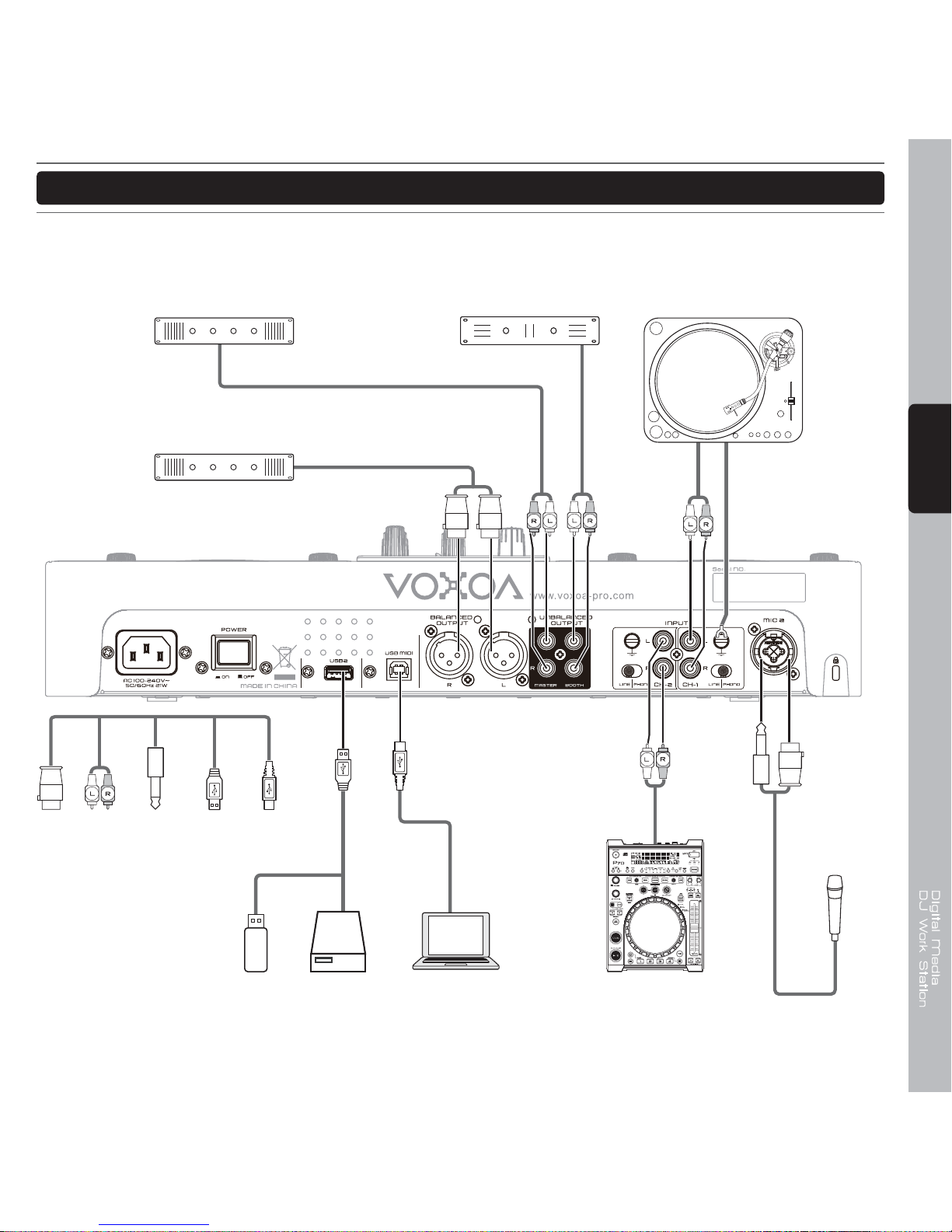
CONNECTIONS
1. Before making or changing connections, switch off the power and disconnect the power cord from the AC
outlet.
2. Quality cables make a big difference in fidelity and punch. Use high-quality, audio cables.
3. Do not use excessively long cables. Be sure plugs and jacks are securely fastened. Loose connections
cause hum, noise, or intermittence that could damage your speakers.
4. Connect the RCA pin cords to the inputs on your amplifer.
CAUTION : Be sure to use the supplied control cord. Using another type of cable may result in damage.
Connecting to a Computer
Support computer operating systems include Windows Vista, Window XP, and MAC OS X or later.
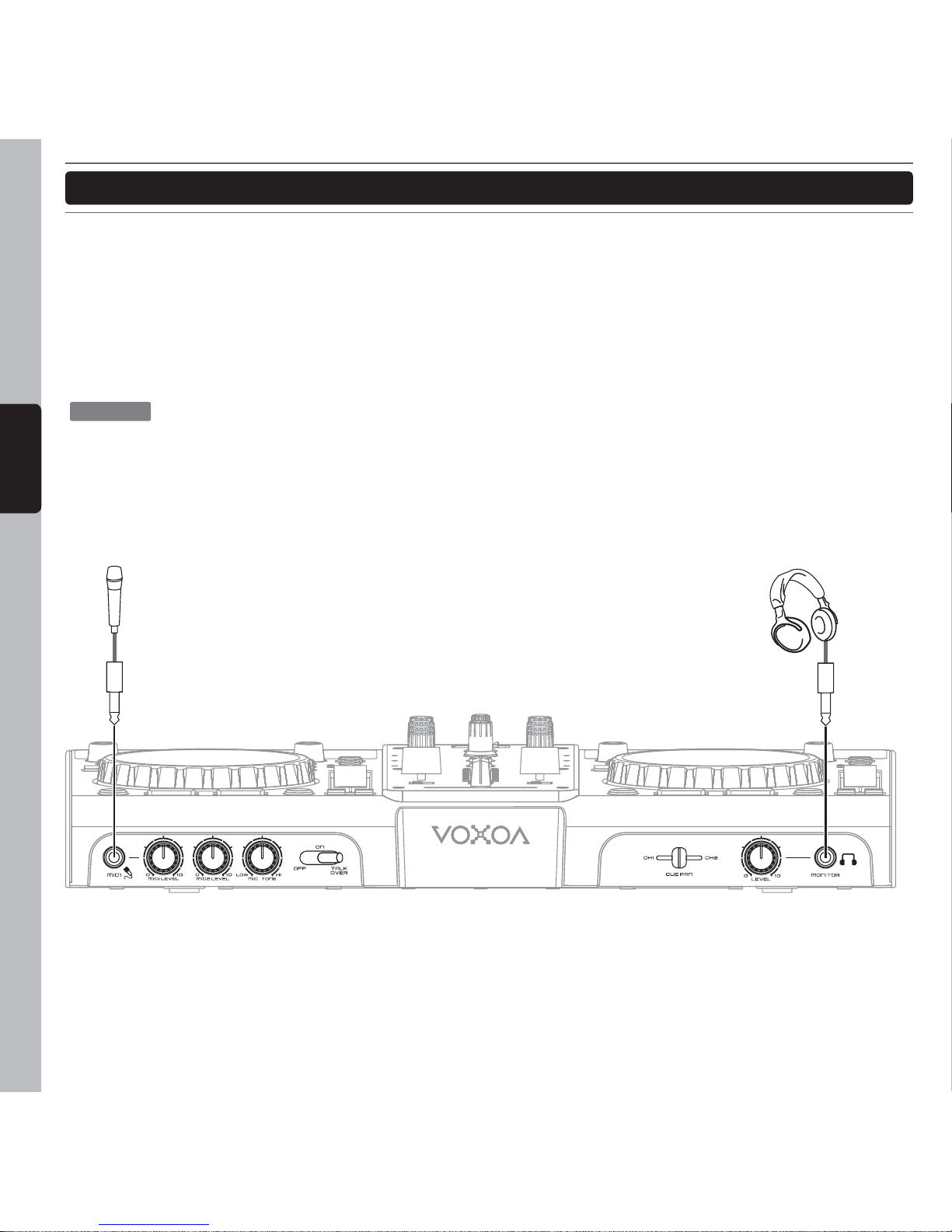
Headphones
Microphone
6.3mm6.3mm
S70
S70
55
ENGLISH
CONNECTIONS
BOOTH
power amplifier
Microphone
Computer
USB Storage Device
CD/MP3 Player
Turntable
Main unbalanced
power amplifier
Main balanced
power amplifier
RCA USB
Type A
USB
Type B
6.3mmXLR
Inhaltsverzeichnis
Andere Voxoa DJ-Equipment Handbücher


Beliebte DJ-Equipment Handbücher anderer Marken


thomann
thomann Stairville DJ Lase 40-G MK-III Bedienungsanleitung

Eagletone
Eagletone 6 Eyes Flower Bedienungsanleitung

EuroLite
EuroLite FLD-1508 Bedienungsanleitung

Technical Pro
Technical Pro LG8xSEA Bedienungsanleitung

JB Systems
JB Systems Lounge Laser DMX Bedienungsanleitung

Lightmaxx
Lightmaxx Vega Halo 90 Bedienungsanleitung

Elation
Elation FUZE WASH Z350 Bedienungsanleitung

Maverick
Maverick MK3 WASH Bedienungsanleitung

Infinity
Infinity TF-260C7 Fresnel Bedienungsanleitung

Chauvet
Chauvet EVE E-50Z Bedienungsanleitung

Eliminator Lighting
Eliminator Lighting E 138 Bedienungsanleitung

EuroLite
EuroLite Mini Multicolor LED Flashing Light SC Bedienungsanleitung