
wingtra WingtraOne Bedienungsanleitung


1.1
2.1
3.1
4.1
4.2
5.1
5.2
5.3
5.4
6.1
6.2
6.3
6.4
TableofContents
Introduction
QuickStartGuide
QuickStartGuide
Package
PackageContent
Safety
No-flyConditions
Li-IonBatteryHandling
HardwareManual
WingtraOne
BatteryCharging
SensorSonyQX1
RemoteControl
WingtraPilot
Overview
Settings
Flight
Geotagging
Workflow
2

7.1
7.2
8.1
8.2
9.1
SurveyMission
ManualFlight
FAQ
Camera
WingtraPilot
Contact
Contactus
3

WingtraOneUserManual
Congratulationsandawarmthankyou!forbeingoneoftheearlyWingtraBetaCustomers!
Wehopeyougetthebestoutofyournewaerialdatacollectiontool.
Togetstarted,makeyourselffamiliarwiththesupportandfeedbacksetup,andhavealook
atourquickstartguide.
SupportandFeedbackSetup
WewantyoutogetthebestexperiencepossiblewithyourWingtraOne!Wingtrawillsupport
youdependingonyourneeds.Thismanualshouldalwaysbeyourfirstpointofcontactand
wehopethatmostquestionsshouldbeansweredherein.
AdhocSupport
Ifyouareonthefieldandnotabletotake-offduetotechnicalreasons,pleasecheckthe
TipsandTrickssectionbelowfirst.Ifyourissuesarestillnotsolved,youcanchatwithus
throughyourpersonalSkypeGroup,whereaWingtraemployeewillrespondimmediately
duringworkinghours(8am-6pm,CET).
GeneralSupportandFeedback
Introduction
4

Forallquestionsthatarenottime-critical,andcan'tbeansweredbythemanual,please
writeanemailtooursupportteamunder[email protected].Wewouldbeveryhappyto
getyourfeedbackaboutourproduct.
EmergencySituations
Pleasecontactusdirectlyincaseofanemergencysituation(crash,injury,physicaldamage,
...).Youcanreachusunder
+41796331001(JulianSurber)
+41767241738(MaximilianBoosfeld)
+41446325776(Office)
TipsandTricks
Tip1:SearchthisManualforHelp
Mostofyourquestionsareprobablyansweredinoneofthemanual'schaptersorinthe
FAQ.Pleasetrydifferentsearchtermsifyoucan'tfindyouranswer.
Tip2:GothroughtheQuickStartGuide
ReassesstheQuickStartGuide.Thetroubleshootingtipsforthespecificcheckpointsinthe
preflightchecklistsolvemostoftheproblemsthatcanbefacedbeforeflying.
Tip3:RepowertheWingtraOne
Especiallyasabetaproduct,therearesomecornercaseswhichcanleadtoanunexpected
situationthatpreventsthedronefromtakingoff.Incaseyoucan'tsolveyourissuewithtip1,
repowertheWingtraOneandtryagain.
StructureofUserManual
Ontheleftsideyoucanseeallthechaptersandsectionsofthismanual.TheQuickStart
Guideshouldhelpyougetstartedandserveasthefirststepintroubleshooting.Manuals
withdetailedhow-to'scanbefoundinHardwareManualandWingtraPilot.TheWorkflow
chapterssummarizethestepsyouhavetogothroughforstandardoperationofthe
WingtraOne,andtheFAQsectionanswersfrequentlyaskedquestions.
Introduction
5

Introduction
6
QuickStartGuide
ThisQuickStartGuidecoversthemostimportantpartoftheofficialWingtraTraining.Please
reconsiderthisguideifyouareunsureabouttheoperationofyourWingtraOne.
Arrivingatthefield,werecommendtosetupandpowertheWingtraOnefirst,bootupthe
groundstation(laptoportablet),startWingtraPilotandconnectthetelemetrytotheground
station.
PreflightChecklist
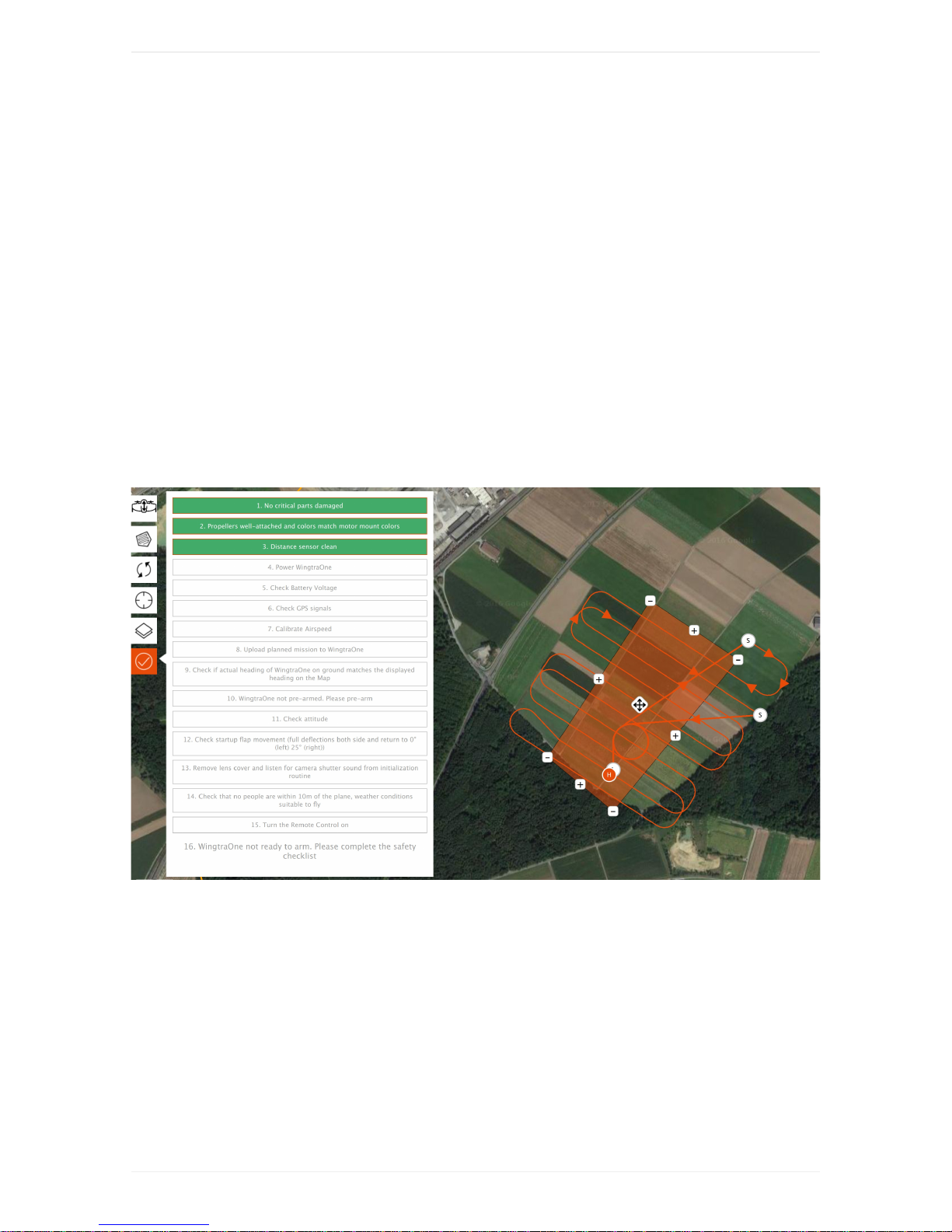
Youareguidedthroughtheprocessofsettingupyourdronebythepreflightchecklistwithin
WingtraPilot.
Astheoperator,youhavetogothroughthepreflightchecklistwithinWingtraPilotbeforeyou
canstartthemission.Ifanyofthepreflightchecksfails(e.g.sensorfailure),therespective
preflightcheckturnsredandstartingthemissionisnotpossible.Belowyoucanfindan
explanationforeverycheckpointinthepreflightchecklistandtroubleshootingadviceifa
checkfails.
Checkthatnocriticalpartsaredamaged.
QuickStartGuide
7

Particularlycheckwhethermotormountsareinagoodconditionandflapscanbemoved.
Confirmbypressingthecheckpointinthechecklist.Donotflyifanypartofthedroneis
damaged.
Checkwhetherpropellersarewell-attachedandcolorsmatchmotormountcolors
Thepropellersturninoppositedirectionsandhavedifferentshapes.Makesurethatthe
propellersareattachedcorrectlybycomparingthecolor(green/red)onthepropellerswith
thecoloronthemotor-mounts(ontheESC's).Confirmbypressingthecheckpointinthe
checklist.
Distancesensorclean
Checkifthedistancesensorisdustyoriscoveredbysomething(snow,tape,...).The
distancesensorislocatedatthetailoftheWingtraOne,nexttothemiddlestand.Ifitisnot
cleanorifyouarenotsureifitisclean,takethetimetocleanitwithacleanblanket.
Confirmbypressingthecheckpointinthechecklist.
PowerWingtraOne
AftertheWingtraOneispowered,itautomaticallytriestoconnecttoWingtraPilot.Thispoint
inthechecklistisanautomatedtest.Connectmanuallyifyoudonotgetconnection
automatically.
CheckifyouhaveinsertedtheautopilotSDcardcorrectlyiftheWingtraOneplaysstrange
tunesandblinksunexpectedly.
CheckBatteryVoltage
Thisisanautomatedtest.WingtraPilotcheckswhetherthebatteryvoltageisabove30V.If
voltageisbelow30Vtake-offispreventedandyouhavetoswitchbatteries.
CheckGPSsignals
Thisisanautomatedtest.Dependingonweather,itcanhappenthatyourdronedoesnot
receiveGPSlockforseveralminutes.IfGPSlockcan'tbeestablishedaftermorethan5
minutes,trytorepowertheWingtraOne.Ifyoustillfailtoestablishconnection,openthefront
coverandseeifthecabletotheGPSmoduleiswellconnected.Ifyoustillfailtoget
reception,chatwiththeWingtraSupport.
CalibrateAirspeed
Takethepitotcoveringoutofthepilotboxandcoverthepitottubewithit.Startairspeed
calibrationbyclickingonthecheckpointinthechecklist.Youwillreceivetheinstruction"Cal,
ensuresensorisnotmeasuringwind".WaituntilyouheartheconfirmationofWingtraPilot:
QuickStartGuide
8

"Cal,blowacrossfrontofpitotwithouttouching".Then,removethepitotcoveringandblow
intothetube.
IfAirspeedcalibrationfails,youcanrestartitbyclickingontotherespectivecheckpoint
again.Youhavetoblowdirectlyintothetube.
UploadplannedmissiontoWingtraOne
Afteryouhaveplannedthemission,makesureyoureviewthemission.Clickonthis
checkpointinthepreflightchecklisttouploadtheplannedmissiontothevehicle.Itisgood
practicetosavethemissionadditionallytofile.
IfyouplanonflyingtheWingtraOnemanually,youcanskipthischeckpoint.
CheckifactualheadingofWingtraOneongroundmatchesthedisplayedheadingin
WingtraPilot
TherecanbedifferentreasonswhyWingtraPilotdisplaysawrongheadingcomparedtothe
actualdrone.Themagneticfieldcouldbedistortedonyourtake-offpoint,connection
betweenthedroneandWingtraPilotcouldbecorruptedorsomethingcouldbeseverely
wrongwiththedrone.IneithercasetrytorepowertheWingtraOneandcheckagain.Ifthe
deviationbetweenactualheadinganddisplayedheadingisstillsignificant(>45degrees)
chatwiththeWingtraSupport.
Pre-armtheWingtraOne
Youpre-armtheWingtraOnebypressingthearmingbuttonfor2seconds.Therewillbea
confirmationsoundandthearmingbuttonwillstarttoblinkwithdoubleblinks(--------).By
pre-armingtheWingtraOne,youallowforsignalstothemotorsandflaps,andstartaroutine
thatchecksthecamerabytakingsometestpictures.Thispointinthechecklistisan
automatedtest.
Ifpre-armingdoesnotwork,tryagainandmakesurethatyouholdthebuttonfor2seconds.
Ifitstilldoesnotwork,repowertheWingtraOne."Un"-pre-armingisnotrecommended.
PleaserepowertheWingtraOneincaseyouwantto"un"-pre-arm.
Checkattitude
Thisisanautomatedtest.Thepitchandrollanglesneedtobenearzeroandstabletobe
surethatthetake-offcanbeperformedsuccessfully.
IftheWingraOneisplacedonevengroundandthischeckfails(remainsred),youcanrotate
thedroneabitaroundpitchandrollaxesandplaceitonthegroundagain.Ifitremainsred,
repowertheWingtraOne.
QuickStartGuide
9

Checkstartupflapmovement(rightafterpre-arming)
Afterpre-arming,theflapsperformastartuproutine(seeGIF"10.Pre-armthe
WingtraOne").Checkifitisruncorrectlyandconfirmbypressingthischeckpoint.
DONOTFLYiftheroutinedoesnotrunproperly(e.g.oneflapisnotmovingatall)and
chatwiththeWingtraSupport.
Removelenscoverandcheckforcamerashuttersoundfrominitializationroutine
(rightafterpre-arming)
Afterpre-arming,theWingtraOnetriggers5testpictureswithinoneminute.Listenifyoucan
hearthecamera'sshutter.Ifyouheartheshutteryoucanbesurethatyougetimages
duringflight.
Ifyoudonotheartheshuttersound,checkiftheSDcardisinsertedcorrectly.Formorehelp
onsensorissuesseealsoourFAQ.
Checkwhethertherearenopeoplewithin10maroundtheplane,weatherconditions
suitabletofly.
SeetheNo-flyConditionsandmakesurenopeopleareclosetothedrone.Confirmby
pressingthischeckpointinthechecklist.
TurntheRemoteControlon
SomesecondsafterturningontheRC,awarning"AlarmWarning"isdisplayed.This
warningappearsbecausewedisabledthesoundfeedback,whichwasdesignedformodel
aircraftpilots.Clickentertogettothehomescreen.Onthetopleftofthisscreen,youcan
seethebatteryremainingoftheRCandthesignalstrengthoftheconnectiontothedrone.
Ifthereisnoconnectiontothedrone,firstcheckiftheWingtraOneispowered.Ifitis
powered,checkifyouhaveconnectioninWingtraPilot.Trytorepowertheremotecontroller.
Ifthereisstillnoconnection,checkthesettingsoftheremotecontrollerandcheckiftheright
modelisselected(4digitnumber).Ifyoucannotconnect,chatwiththeWingtraSupport.
Onceyouhavesuccessfullycompletedallprevioussteps,youcanarmthe
WingtraOne.
Thearmingbuttonwillgosolidgreen(-------)onceyouhavearmedtheWingtraOne.
Ifyou"ArmforMissionMode",themotorswillidlespinfor4secondsandtheWingtraOne
willtakeoffandflytheplannedmission.Checkyouroptionstointeractandthedifferent
failsafescenariosbeforeflying.
QuickStartGuide
10
Andere Handbücher für WingtraOne
3
Inhaltsverzeichnis
Andere wingtra Drohne Handbücher


