Wiznet WizFi630 Bedienungsanleitung

© Copyright 2012 WIZnet Co., Ltd. All rights reserved. 1
WizFi630 사용자 매뉴얼
(Version 1.1)
© 2012 WIZnet Co., Ltd.All Rights Reserved.
For more information, please visit our website at http://www.wiznet.co.kr

© Copyright 2012 WIZnet Co., Ltd. All rights reserved. 2
Certification Information
CE for Class B ITE
INFORMATION TO THE USER
Hereby, WIZnet. Declares that this WizFi630 is in compliance with the essential requirements and other
relevant provisions of directive 1999/5/EC and other relevant provisions of directive 1999/5/EC.
WARNING: This is a class B product. In a domestic environment this product may cause radio
interference in which case the user may be required to take adequate measures
FCC for Class B ITE
INFORMATION TO THE USER
This equipment has been tested and found to comply with the limits for a Class B digital device,
pursuant to part 15 of the FCC Rules. These limits are designed to provide reasonable
protection against harmful interference in a residential installation. This equipment generates,
uses and can radiate radio frequency energy and, if not installed and used in accordance with
the instructions, may cause harmful interference to radio communications. However, there is no
Guarantee that interference will not occur in a particular installation. If this equipment does
cause harmful interference to radio or television reception, which can be determined by turning
the equipment off and on, the user is encouraged to try to correct the interference by one more
of the following measures:
- Reorient or relocate the receiving antenna.
- Increase the separation between the equipment and receiver.
- Connect the equipment into an outlet on a circuit different from that
to which the receiver is connected.
- Consult the dealer or an experienced radio/TV technician for help.
WARNING: This equipment may generate or use radio frequency energy. Changes or
modifications to this equipment may cause harmful interference unless the modifications are
expressly approved in the instruction manual. The user could lose the authority to operate this
equipment if an unauthorized change or modification is made
KCC for Class B ITE
INFORMATION TO THE USER
이기기는 가정용(B급) 으로 전자파 적합등록을 한기기로서 주거지역에서는 물론 모든
지역에서 사용할 수있습니다.
-Trade Name or Applicant : WIZnet Co., Ltd.
-Equipment Name : Wireless LAN Module
-Model Number : WizFi630
-Manufacturer / Country of Origin : WIZnet, Co., Ltd. / KOREA
-Certification Number : KCC-CRM-WWW-WIZ630WI
WARNING: 해당 무선설비는 운용 중전파혼신의 가능성이 있으므로 인명안전과 관련된
서비스는 할수없습니다.

© Copyright 2012 WIZnet Co., Ltd. All rights reserved. 3
Document Revision History
Date Revision Changes
2012-07-02 1.0 Release
2012-07-12 1.1 Change WizFi630’s picture at P10

© Copyright 2012 WIZnet Co., Ltd. All rights reserved. 4
<Contents>
1. 제품 소개 .................................................................................................. 6
1.1. 주요 기능 ......................................................................................................... 7
1.2. 무선 특성 ......................................................................................................... 8
1.3. 하드웨어 특성 .................................................................................................. 9
1.4. 소프트웨어 특성 ............................................................................................ 10
1.5. EVB 구성 ....................................................................................................... 10
1.5.1. Contents ....................................................................................................... 10
1.6. 블록 다이어그램 ............................................................................................ 12
2. 운영 모드 및메뉴 설명.......................................................................... 13
2.1. 운영 모드 ....................................................................................................... 13
2.1.1. 액세스 포인트 모드 ....................................................................................... 13
2.1.2. 게이트웨이 모드 ............................................................................................ 14
2.1.3. 클라이언트(스테이션) .................................................................................... 14
2.1.4. AP-Client 모드 ............................................................................................. 15
2.1.5. 애드혹(ad-hoc) 모드 .................................................................................... 15
2.2. 운영 모드 별 메뉴 목록 ................................................................................ 16
2.2.1. 액세스 포인트 모드 ....................................................................................... 16
2.2.2. 게이트웨이 모드 ............................................................................................ 17
2.2.3. 클라이언트(스테이션) 모드 ............................................................................ 18
2.2.4. AP-Client 모드 ............................................................................................. 19
2.2.5. Ad-hoc 모드 ................................................................................................. 21
2.3. 인터넷 설정 ................................................................................................... 22
2.3.1. 인터넷 연결 설정 .......................................................................................... 22
2.3.2. 내부 네트워크 설정 ....................................................................................... 24
2.3.3. DHCP Client 정보 ......................................................................................... 25
2.3.4. VPN 설정 ...................................................................................................... 25
2.3.5. 라우팅 테이블 수동 설정 .............................................................................. 26
2.3.6. QoS(802.1p) 설정 ......................................................................................... 27
2.3.7. VLAN(802.1p) ................................................................................................ 28
2.4. 무선랜 관리 ................................................................................................... 29
2.4.1. 기본 설정 ...................................................................................................... 29
2.4.2. 고급 설정 ...................................................................................................... 31
2.4.3. 무선 보안 ...................................................................................................... 34
2.4.4. WDS(Wireless Distribution System) 설정 ................................................... 37
2.4.5. WPS 설정 ..................................................................................................... 38
2.4.6. 무선 네트워크 상태 ....................................................................................... 40
2.4.7. 무선 데이터 통계 .......................................................................................... 41
2.4.8. 무선 QoS/DLS(Direct Link Setup) 설정 ....................................................... 43
2.4.9. Profile ........................................................................................................... 44
2.4.10. 링크 상태 ...................................................................................................... 45
2.4.11. Site Survey ................................................................................................... 46
2.4.12. WI-FI Multi-Bridge 설정 ............................................................................. 47
2.5. Serial to LAN(Wired and Wireless) ............................................................. 48
2.5.1. Main Connection 설정 .................................................................................. 49

© Copyright 2012 WIZnet Co., Ltd. All rights reserved. 5
2.5.2. Aux Connection 설정 ................................................................................... 49
2.5.3. Packing Condition (Incoming serial data packing condition) ...................... 50
2.5.4. Ethernet Data Tagging Option ..................................................................... 50
2.6. 방화벽 설정 ................................................................................................... 51
2.6.1. DMZ .............................................................................................................. 51
2.6.2. 포트 포워딩 ................................................................................................... 52
2.6.3. 패킷 필터링 ................................................................................................... 53
2.6.4. 컨텐츠 필터링 ............................................................................................... 54
2.6.5. 시스템 보안 ................................................................................................... 55
2.7. Managements ............................................................................................... 56
2.7.1. System Management .................................................................................... 56
2.7.2. Firmware ...................................................................................................... 57
2.7.3. Config Settings ............................................................................................. 58
2.7.4. Port Setting .................................................................................................. 59
2.7.5. Packet Statistics .......................................................................................... 60
2.7.6. System Status .............................................................................................. 61
2.7.7. System Log .................................................................................................. 62
3. 하드웨어 정보 ......................................................................................... 63
3.1. WizFi630 Pin Map ........................................................................................ 63
3.2. 기구 도면 ....................................................................................................... 65
4. Important Notice.................................................................................... 66

© Copyright 2012 WIZnet Co., Ltd. All rights reserved. 6
1. 제품 소개
WizFi630은 RS-232 프로토콜과 TCP/IP 프로토콜을 IEEE802.11 b/g/n 무선 랜 프로토콜로 변환시키는
게이트웨이 모듈로, RS-232 시리얼 인터페이스가 장착된 장비를 LAN 또는 WLAN 망에 연결하여 원격
측정, 관리 및 제어를 가능케 하는 제품이다. 또한 Embedded Switch를 내장하고 있어 IP
공유기로서의 기능도 수행한다.
Serial(UART), LAN, Wi-Fi(WLAN)로 이루어진 인터페이스들을 이용하여, Serial(UART)-To-Wi-Fi, Serial-To-
Ethernet, Ethernet-To-Wi-Fi 등의 기능을 수행할 수가 있다. 또한 WizFi630에 내장된 웹 서버에
접속하거나 시리얼 명령어를 이용해서도 손쉽게 설정이 가능해서, 시리얼 장비뿐 만 아니라,
8/16/32비트 마이크로 컨트롤러에서도 UART를 통해 쉽게 Wi-Fi 설정을 할 수 있다.
WizFi630을 이용하면 무선 모듈 디자인이나 테스트, 인증 등의 과정을 획기적으로 감소시킬 수 있다.
따라서, 무선 네트워크 경험이 전혀 없거나 제한적인 고객들에게도 최선의 솔루션이 될 수 있다.
WizFi630은 802.11b/g/n 규격을 따르면서, 무선 인터페이스에서 150Mbps의 속도까지 지원한다.
WizFi630은 편리한 테스트 보드와 함께 손쉬운 테스트를 위한 PC 소프트웨어와 문서를 제공하므로
누구든 쉽게 무선 솔루션을 개발 할 수 있는 환경을 제공한다.

© Copyright 2012 WIZnet Co., Ltd. All rights reserved. 7
1.1. 주요 기능
Complies with IEEE802.11b/g/n.
Gateway/AP(Bridge)/AP-Client/Client(Station)/Ad-hoc Mode , WDS/Repeater supports
1T1R RF Interface
Physical link rate up to 150Mpbs
Built-in 3 Ethernet Ports
2 Serial Ports supports
Working as Wi-Fi Router
WEP 64/128bit, WPA/WPA2-PSK TKIP, AES
802.1x (Only in AP mode)
802.11e and WMM (Wi-Fi Multimedia)
Router and Firewall function supports
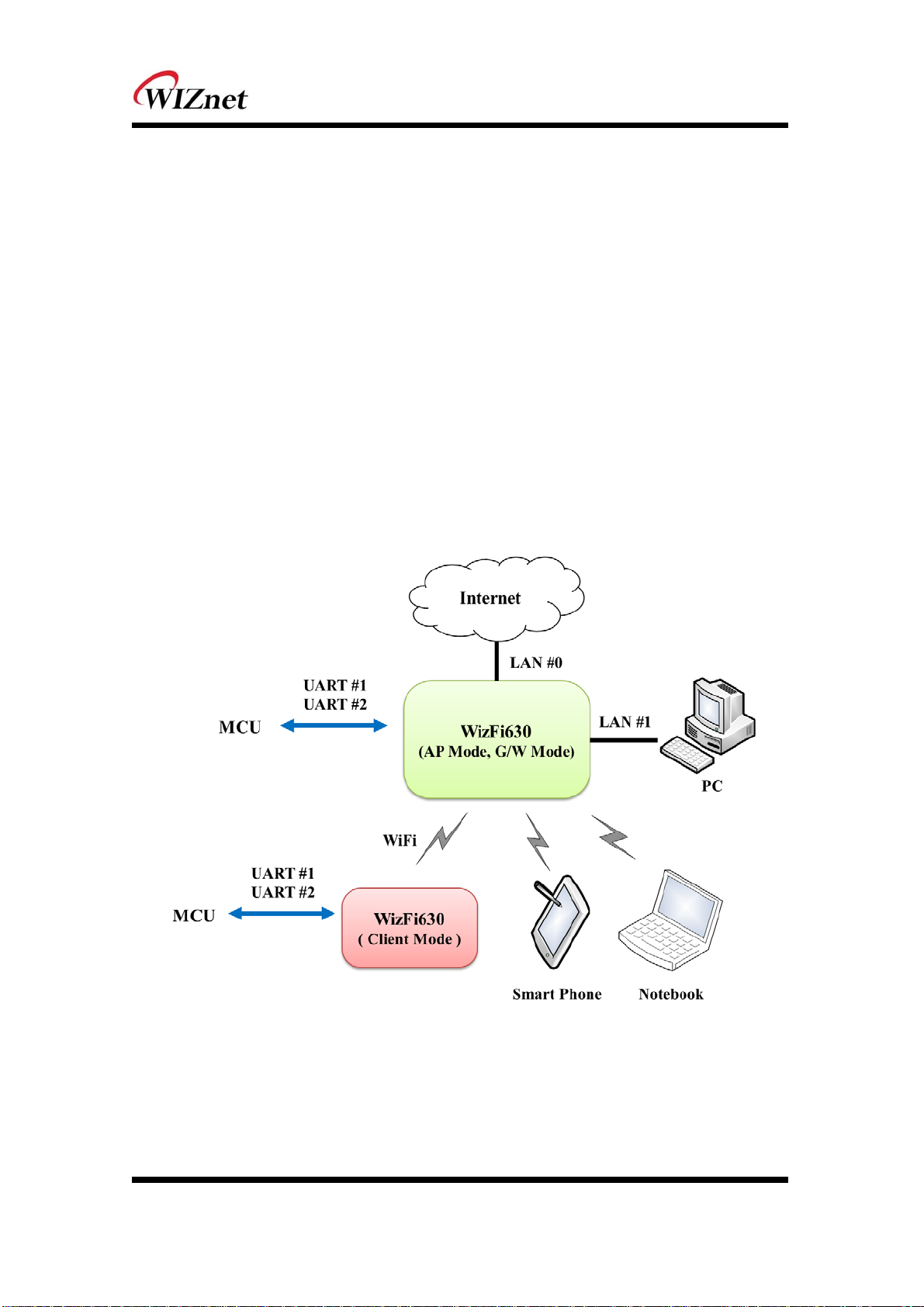
Figure 1. Example of WizFi630’s Application

© Copyright 2012 WIZnet Co., Ltd. All rights reserved. 8
1.2. 무선 특성
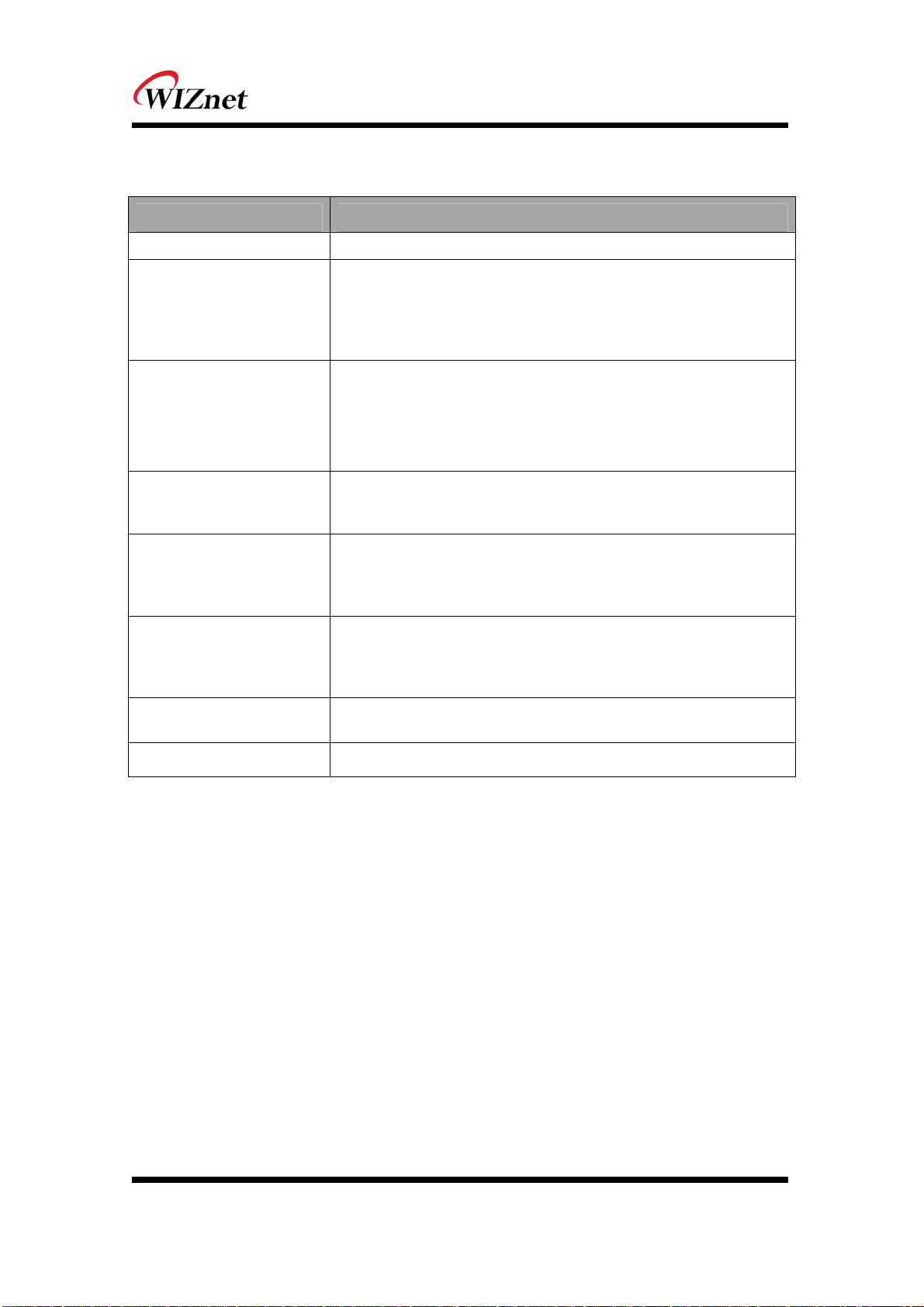
Type Description
Wireless Standard IEEE802.11b/g/n
Frequency Range
USA: 2.400 ~ 2.483GHz
Europe: 2.400 ~ 2.483GHz
Japan: 2.400 ~ 2.497GHz
China: 2.400 ~ 2.483GHz
Operating Channels
USA/Canada: 11(1 ~ 11)
Major Europe Countries: 13(1 ~ 13)
France: 4(10 ~ 13)
Japan: 14 for 802.11b(1 ~ 14), 13 for 802.11g(1 ~ 13)
Korea/China: 13(1 ~ 13)
Output Power
(Tolerance(+/-1dBm)
802.11b: 17dBm@11Mbps
802.11g: 14dBm@54Mbps
802.11n: 14dBm@150Mbps/72Mbps
Receive Sensitivity
802.11b: -89dBm@11Mbps
802.11g: -74dBm@54Mbps
802.11n(40MHz): -66dBm@150Mbps
802.11n(20MHz): -70dBm@72Mbps
Data Rates
802.11b: 1,2,5.5,11Mbps
802.11g: 6,9,12,18,24,36,48,54Mbps
802.11n(20MHz): 7,14.5,21.5,28.5,43.5,57.5,65,72Mbps
802.11n(40MHz): 29.5,86.5,115,130,144,150Mbps
Modulation Type 11g: OFDM(64QAM, 16QAM, QPSK, BPSK)
11b: DSS(CCK, DQPSK, DBPSK)
Antenna u.FL (EVB : 1T1R 2dBi)
Table 1. Wi-Fi Specifications

© Copyright 2012 WIZnet Co., Ltd. All rights reserved. 9
1.3. 하드웨어 특성
Type Description
Interface
Serial port : 2 EA
LAN port : 3EA
USB port : 1 USB Host Port ( Reserved )
U.FL(wireless)
Temperature Operation: -10℃~70℃
Humidity Operation: 10% to 90%, Non-Condensing
Storage: 5% to 90%, Non-Condensing
Serial
Baud Rate : 1200 ~ 921,600bps
Stop bits: 1, 2
Parity: None, Odd, Even
Flow Control:
UART1: XON/XOFF(software), CTS/RTS(hardware), none
UART2: XON/XOFF, none
Input Power DC 3.3V / 1A
Power Consumption Max : 3.3V / 600mA
Dimension 33mm X 43mm X 4.5mm
Weight 6g
Table 2. WizFi630 Module Specifications

© Copyright 2012 WIZnet Co., Ltd. All rights reserved. 10
1.4. 소프트웨어 특성
Type Description
Operation Mode Access Point(Bridge), Client(Station), Gateway, AP-Client, ad-hoc
Protocol TCP, UDP, ARP, ICMP, DHCP, PPPoE, HTTP
Security
WEP 64/128bit
WPA/WPA2-PSK AES/TKIP
802.1x ( Only in AP Mode )
Configuration Web Configuration, Serial Command, Configuration Tool
Notification Event Logging
Serial To Wi-Fi 2 Serial Port supports
Table 3. SW Specifications
1.5. EVB 구성
1.5.1. Contents
Section Qnt. Contents
WizFi630 1ea
WizFi630
WizFi630-
EVB 1ea
WizFi630-EVB
Andere Handbücher für WizFi630
8
Inhaltsverzeichnis
Andere Wiznet WLAN-Router Handbücher

Wiznet
Wiznet WizFi210 Bedienungsanleitung

Wiznet
Wiznet WizFi360 Series Montageanleitung

Wiznet
Wiznet WizFi630S Bedienungsanleitung

Wiznet
Wiznet WizFi360 Series Montageanleitung

Wiznet
Wiznet WIZ630wi Bedienungsanleitung

Wiznet
Wiznet WizFi360 Series Einrichtungshandbuch

Wiznet
Wiznet WizFi360 Series Leitfaden

Wiznet
Wiznet WizFi320 Bedienungsanleitung

Wiznet
Wiznet WizFi360 Series Bedienungsanleitung

Wiznet
Wiznet WizFi630 Montageanleitung