
WowWee Paper Jamz Bedienungsanleitung

User manual
Manuel d’utilisation
Manual del usuario No./ Article Nº/ Artículo Nº 6288
8+
Visit www.paperjamzpro.com
Download the free app
Add your own music

INTRODUCTION
Package contents .......................................................................... 3
Guitar overview ............................................................................. 3
Guitar connections .......................................................................4
Installing or changing batteries in your guitar .................... 4
Important battery information ................................................ 4
GETTING STARTED
Powering Paper Jamz ................................................................... 5
Sleep mode ..................................................................................... 5
Volume control .............................................................................. 5
Strumming ...................................................................................... 5
MODES
Selecting a mode .......................................................................... 6
FREESTYLE MODE
Basic Play in Freestyle mode ..................................................... 6
Selecting Notes or Chords ....................................................... 6
Playing Notes or Chords ........................................................... 7
Performance effects................................................................... 7
Advanced guitar techniques................................................... 7
SONG MODE
Selecting Perfect Play or Rhythm ............................................ 8
Perfect Play ..................................................................................... 8
Rhythm ............................................................................................ 8
Playing Notes and Chords in Rhythm .................................. 8
Basic play in Song mode ............................................................. 9
Selecting a song ......................................................................... 9
Stopping or changing a song .................................................. 9
Adding new songs....................................................................... 9
Music volume control ............................................................... 9
NOTE CHART .....................................................................................11
FURTHER INFORMATION
Contact information ...................................................................11
Important safety information ..................................................11
Warranty ........................................................................................12
INTRODUCTION
Contenu de la boîte .....................................................................14
Aperçu de la guitare ....................................................................14
Connexions de la guitare ...........................................................15
Informations sur les piles ..........................................................15
DÉMARRAGE
Mise sous tension de Paper Jamz ............................................16
Mode veille ....................................................................................16
Contrôle du volume ....................................................................16
Le strumming ................................................................................16
LES MODES
Comment sélectionner un mode ............................................17
MODE FREESTYLE
Jeu simple en mode Freestyle ..................................................17
Sélectionner des notes ou des accords .................................17
Jouer des notes ou des accords ...............................................17
Effets de scène ..............................................................................18
Techniques avancées ...................................................................18
MODE SONG
Comment sélectionner Perfect Play ou Rhythm ................19
Perfect Play ....................................................................................19
Le mode Rhythm ..........................................................................19
Jouer des notes et des accords en mode Rhythm ...........19
.Jeu simple en mode Song ..........................................................19
Sélectionner une chanson .....................................................19
Comment arrêter une chanson ou changer de chanson 2 0
Ajouter des chansons ...............................................................20
Réglage du volume de la musique .......................................20
GUIDES DES NOTES ET DES ACCORDS .....................................21
INFORMATIONS SUPPLÉMENTAIRES
Contactez-nous .................................................................................22
Consignes de sécurité importantes.............................................22
Garantie limitée de 90 jours WowWee .....................................23
INTRODUCCIÓN
Contenido de la caja ...................................................................24
Generalidades de la guitarra .....................................................24
Conexiones de la guitarra ..........................................................25
Datos de las pilas .........................................................................25
COMIENZO
Encender Paper Jamz ..................................................................26
Modo Suspensión .........................................................................26
Control de volumen ....................................................................26
Rasgueo...........................................................................................26
MODOS
Seleccionar un modo ..................................................................27
MODO FREESTYLE
Tocar nociones básicas en el modo Freestyle .....................27
Seleccionar notas o acordes .....................................................27
Tocar notas o acordes .................................................................27
Efectos especiales ........................................................................28
Técnicas avanzadas de guitarra ................................................28
MODO SONG
Seleccionar Perfect Play o Rhythm ........................................29
Perfect Play ....................................................................................29
Rhythm ...........................................................................................29
Tocar notas y acordes en Rhythm ........................................29
Tocar nociones básicas en el modo Song .............................30
Seleccionar una canción ..........................................................30
Parar o cambiar la canción .....................................................30
Agregar nuevas canciones .......................................................30
Control de volumen de la música .........................................30
TABLAS DE NOTAS Y ACORDES ...................................................31
INFORMACIÓN ADICIONAL
Información de contacto ...........................................................32
Información de seguridad importante ..................................32
Garantía limitada de 90 días de WowWee .........................33
LYRICS / PAROLES / LETRAS ..........................................................34
2
Contents / Table des matières / Tabla de contenidos
Thank you for purchasing a WowWee™ Paper Jamz® Pro guitar! Now you’re on the road to
rock stardom—no strings attached!
Take a few minutes to read this user manual so you can learn how to play like a rock star.
Visit www.paperjamzpro.com to download the free Paper Jamz Pro app and learn how to use
it to take full advantage of your guitar’s features.
Package contents
1 x Paper Jamz Pro guitar; 1 x USB to mini-USB cable; 1 x User manual
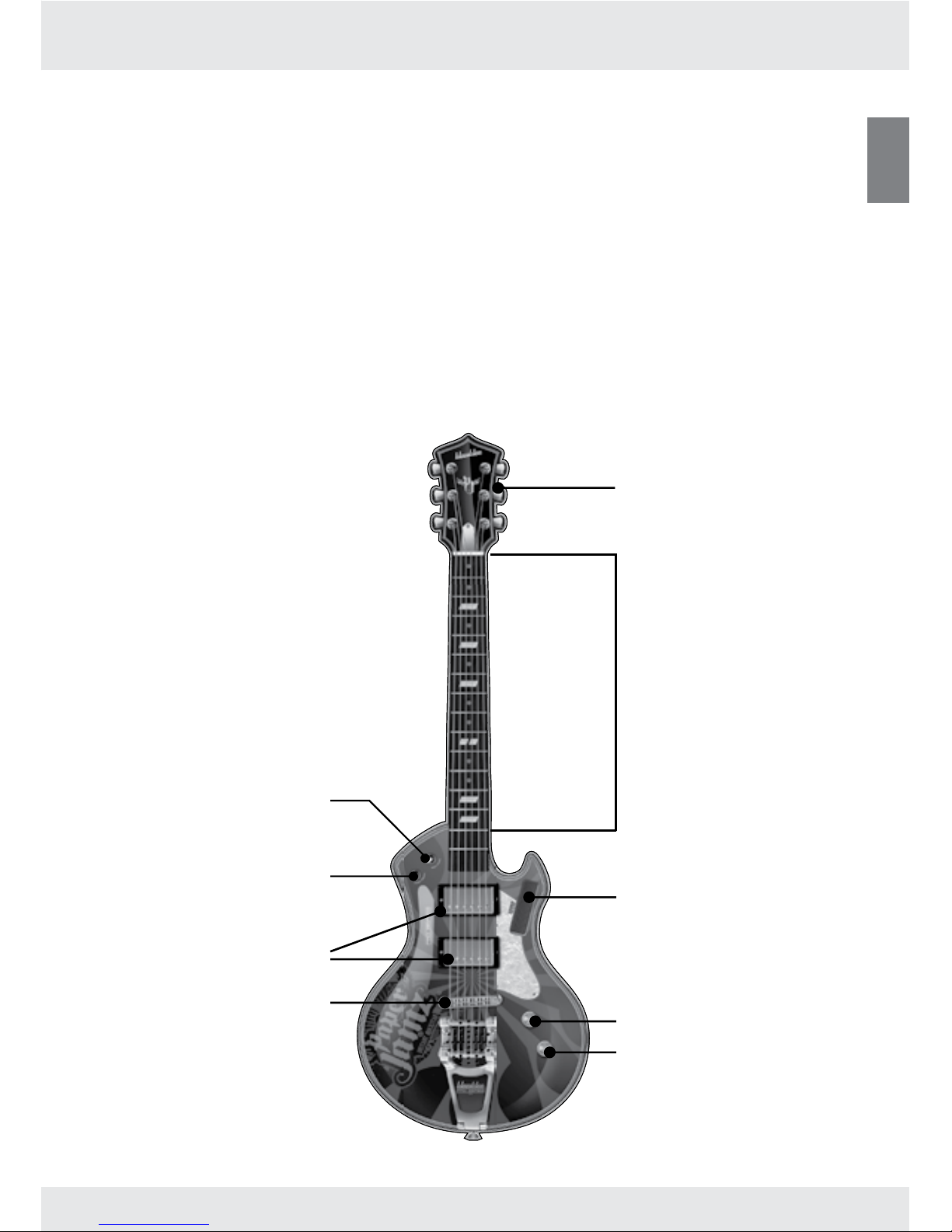
Guitar overview
ENG
3
Introduction
Fretboard (14 active frets)/
neck
Ripstrip
Mode button
Volume button
Notes/Chords button
Perfect Play/Rhythm
mode button
Head
Pickups
Palm mute

Guitar connections
Plug in headphones or an amplier to the audio-out jack. Note: The guitar powers up with the
volume at the highest setting, so lower the volume before using headphones.
Connect the guitar’s mini-USB port to a computer using the included USB to mini-USB cable
and then transfer your music to the guitar with the downloaded Paper Jamz Pro app. The
expansion port is used for compatible Paper Jamz Pro accessories (not included).
Battery details
Installing or changing batteries in your guitar:
The Paper Jamz Pro guitar requires 4 x “AA” size batteries (not included). Insert or replace
batteries according to the diagram.
Open the battery compartment using a 1.
Phillips screwdriver (not included).
Ensure that the positive and negative 2.
polarities match the illustrations inside
the battery compartment.
Replace the battery compartment cover. 3.
Do not over-tighten.
Important battery information
Use only fresh batteries of the required size and recommended type.• Do not mix old and new batteries, different types of batteries [standard (Carbon- zinc), Alkaline or rechargeable] or • rechargeable batteries of different capacities.
Remove rechargeable batteries from the toy before recharging them.• Rechargeable batteries are only to be charged under adult supervision.• Respect the correct polarity, (+) and (-).• Do not try to recharge non-rechargeable batteries.• Do not dispose batteries in a re.• Replace all batteries of the same type/brand at the same time.• The supply terminals are not to be short-circuited.• Remove exhausted batteries from the toy.• Batteries should be replaced by adults.• Remove batteries if the toy is not going to be played with for some time.•
4
1.5V “AA”
LR6/UM3
1.5V “AA”
LR6/UM3
1.5V “AA”
LR6/UM3
1.5V “AA”
LR6/UM3
1.5V “AA”
LR6/UM3
1.5V “AA”
LR6/UM3
1.5V “AA”
LR6/UM3
1.5V “AA”
LR6/UM3
Audio-out
jack
Mini-USB port
Power switch
Expansion
port
Introduction

Powering Paper Jamz
To start jamming with your Paper Jamz Pro guitar, move the power switch
to the ON position.
Now you’re ready to rock!
Sleep mode
If there is no activity for about 5 minutes, your guitar will go into Sleep mode. To wake it,
just turn it OFF for at least 2 seconds and then back ON.
Volume control
Riffs so hot that you need to turn it up? To raise the volume, touch and hold the Volume
button and then slide your ngers along the fretboard toward the pickups.
Jamming so hard that the neighbors can hear you? To lower the volume, touch and hold
the Volume button and then slide your ngers along the fretboard toward the guitar head.
Strumming
To strum, slide your thumb or ngers up and down the strings and pickups.
ENG
5
Getting started

Modes
The Paper Jamz Pro guitar has two main modes: Song and Freestyle.
Selecting a mode
The Paper Jamz Pro guitar starts up in Freestyle mode so you can play like a pro right out of
the box.
To switch to Song mode and play along with a song, press and hold the Mode button until you
hear a chord sound. Then touch one of the rst 3 frets. Each fret plays a different song.
Freestyle mode
Freestyle mode lets you play real chords and notes to create your own hit songs and killer
guitar solos.
If you’re in Song mode and want to switch back to Freestyle mode, touch and hold the Mode
button until you hear a chord sound. Then touch the 4th fret
(Freestyle).
Basic Play in Freestyle mode
The Paper Jamz Pro guitar has 14 active frets that you can
play. Touch one or more frets to play a note or chord while
strumming and make your guitar wail.
Selecting Notes or Chords
Choose between playing chords and notes by touching the
Notes/Chords button until you hear a click sound. You can
switch back and forth at any time while you play.
6
Freestyle mode
4th fret
First 3 frets
Song 1
Song 2
Song 3
Freestyle

Playing Notes or Chords
If you’re playing notes, the guitar will play the note corresponding to the highest fret (closest
to the guitar body) touched. Strumming with no frets touched plays E, and each fret
increases the pitch by a half step.
If you’re playing chords, the guitar plays the chord corresponding to the lowest fret (closest
to the guitar head) you touch. Strumming with no frets touched plays an E major chord. If
you touch two frets together, the guitar will play a minor chord.
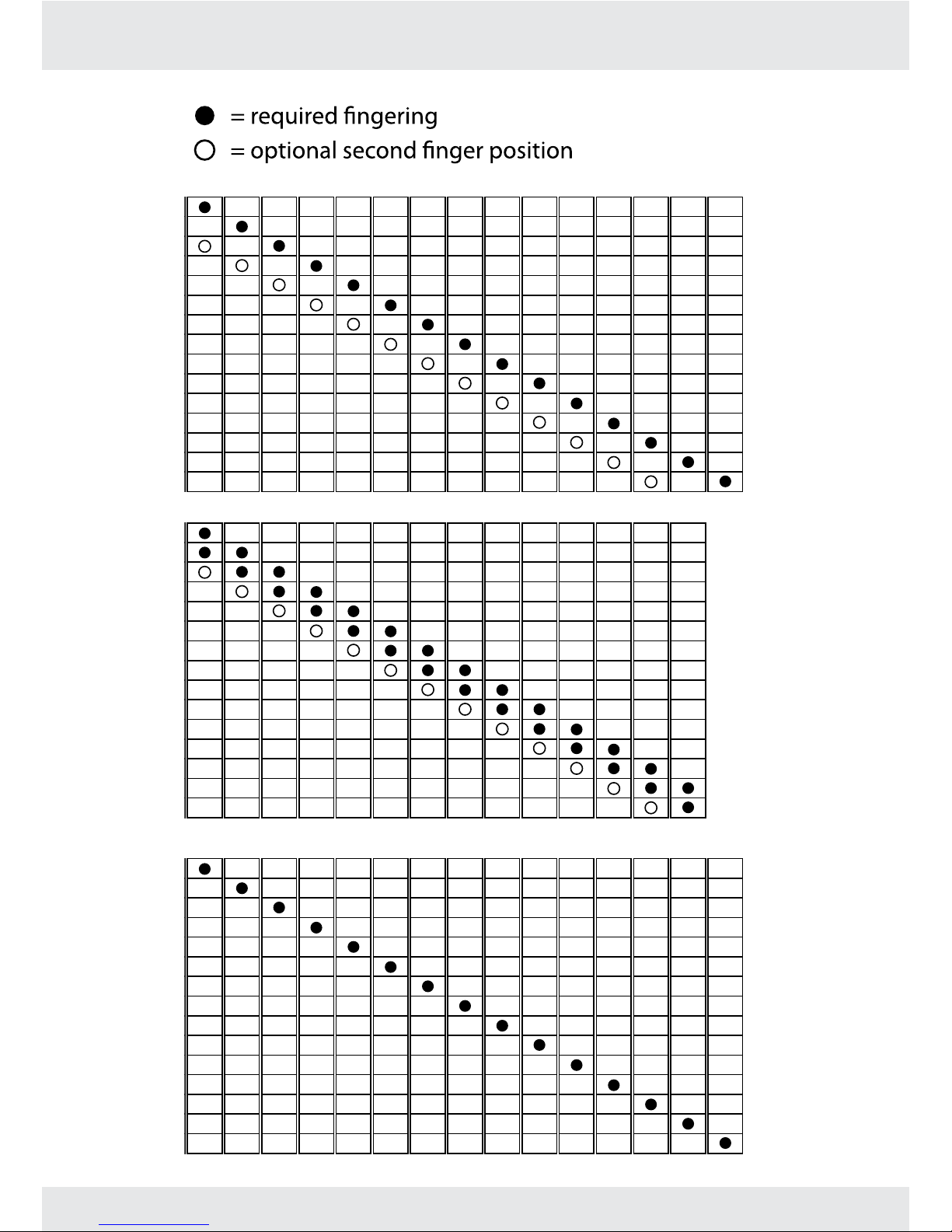
Note: See p. 10 for a chart of notes and major/minor chords.
Performance effects
You can apply performance effects to notes and/or chords to create your own awesome
solos, but effects can only be applied to chords as long as you keep changing fret positions.
Once a chord has played for a bit, the effects cannot be applied to it.
Ripstrip
Slide your nger on the Ripstrip to bend the pitch of notes and chords. Sliding toward the guitar
head bends pitch down and sliding away from the guitar head bends it up. Slide your nger and
hold it before strumming to start a note or chord at a different pitch.
Accelerometer
Point the neck up to play notes an octave higher. Shake the guitar head to add vibrato.
Palm Mute
Touch the palm mute with the base of your palm to stop the note or chord. If you hold the base
of your palm on the palm mute while playing a chord, the chord will have a muted sound.
Advanced guitar techniques
Play your Paper Jamz Pro guitar like the real thing—do hammer-ons, pull-offs, taps and slides!
Just strum a note or chord and then change which frets are touched. You can apply these
techniques to both notes and chords, but like the performance effects, they can only be
performed with chords as long as you keep changing fret positions.
Hammer-on
A hammer-on is when you play a note and while it’s still ringing, you “hammer” your nger on a
fret higher up the neck.
Pull-off
A pull-off is the opposite of a hammer-on. You create a new note by pulling your nger off while
a note is ringing.
Tap
Tapping is when you generate a note by tapping the fretboard with your strumming hand.
Slide
A slide is when you play one note and then slide your nger up or down the fretboard to another fret.
Tip: Go to www.paperjamzpro.com for videos on how to rock out with these effects and techniques!
ENG
7
Freestyle mode

Song mode
Choose Song mode when you want to play along
with a song. To change to this mode, touch the Mode
button until the muted chord plays and then touch
the Perfect/Rhythm button.
There are two ways to rock out to songs with your
guitar in this mode: Perfect Play and Rhythm.
Selecting Perfect Play or Rhythm
When you select Song mode, the guitar starts up in
Perfect Play.
You can switch between Perfect Play and Rhythm at any time, even if the song is playing, by
touching the Perfect/Rhythm button until it makes a sound.
Perfect Play
Look and sound like a guitar legend—without the years of practice! Just strum along to hear
the guitar track. If you stop strumming, you’ll only hear the backing track and vocals.
You can only play along with the pre-installed songs and ofcial downloadable Paper Jamz
Pro songs.
Rhythm
Rhythm gives you full control to play your own chords or notes over a song. You can apply all
of the performance effects and guitar techniques in this mode.
You can play along with the pre-installed songs, ofcial downloadable Paper Jamz Pro songs
and songs from your own music library.
Playing Notes and Chords in Rhythm
Rhythm starts up with chords active when you strum. To switch to notes and play your own
guitar solo notes on top of the original guitar track, touch the Notes/Chords button.
When chords are active, the guitar adjusts the chords you play so that you always sound like
a pro.
When notes are active, the guitar adjusts the notes you play for perfect rock solos.
8
Song mode

Basic play in Song mode
Selecting a song
Two pre-installed songs get you started on the road to rock
stardom.
To choose a song, touch the Mode button and then touch one
of the rst 3 frets (Song 1, Song 2 or Song 3).
Until you add your own music to the guitar, touching the 1st
fret (Song 1) will play the rst pre-installed track and touching
the 2nd fret (Song 2) or 3rd fret (Song 3) will play the second
pre-installed track.
When a song slot is empty, touching its button will play another
loaded song when possible.
Stopping or changing a song
To stop a song and to choose another, touch the Mode button until the muted chord plays
and then touch one of the rst 3 frets (Song 1, Song 2 or Song 3).
To stop a song and to switch to Freestyle mode, touch the Mode button until the muted
chord plays and then touch either the 4th fret (Freestyle) or the palm mute.
Adding new songs
You can store up to three songs on your Paper Jamz Pro guitar depending on song length.
Using the free Paper Jamz Pro app, you can add songs from your own music library. Songs that
have been “Certied Compatible” take advantage of enhanced guitar features (see website for
more information).
Visit www.paperjamzpro.com to download the app and learn more about how to use it to
expand your set list.
Note: Songs from your own collection only work in Rhythm so you can play your favorite
music how you want it to sound.
Music volume control
In Song mode, you can also change the
volume of the music independently of
the guitar chords and notes. Touch and
hold the Volume button and then slide
your nger on the Ripstrip. Moving your
nger toward the guitar head lowers
the volume and moving it toward the
palm mute raises the volume.
ENG
9
Song mode
10
Note/Chords charts
E F F# G G# A A# B C C# D D# E F F# G
Major Chords
E F F# G G# A A# B C C# D D# E F F# G
Notes
E F F# G G# A A# B C C# D D# E F F#
Minor Chords
NOTES MINOR CHORDS MAJOR CHORDS
Dieses Handbuch passt für folgende Modelle
1
Inhaltsverzeichnis
Sprachen:
Beliebte Gitarre Handbücher anderer Marken

Squier
Squier Affinity Jazz Bass V Bedienungsanleitung

Fender
Fender 72 Telecaster Bedienungsanleitung

Gibson
Gibson Firebird X Bedienungsanleitung

CARVIN
CARVIN P-SERIES Bedienungsanleitung

Fender
Fender HEARTFIELD - FOR GUITARS AND BASSES Bedienungsanleitung

Peavey
Peavey Acoustic Guitar Series Bedienungsanleitung


Peavey
Peavey Nitro I Bedienungsanleitung

Squier
Squier Frank Bello J Bass Bedienungsanleitung

Fender
Fender Ritchie Blackmore Stratocaster Bedienungsanleitung

Steinberger
Steinberger ZT3 TransTrem Bedienungsanleitung

Yamaha
Yamaha Electric Acoustic Guitar Bedienungsanleitung

Peavey
Peavey T-45 Bedienungsanleitung