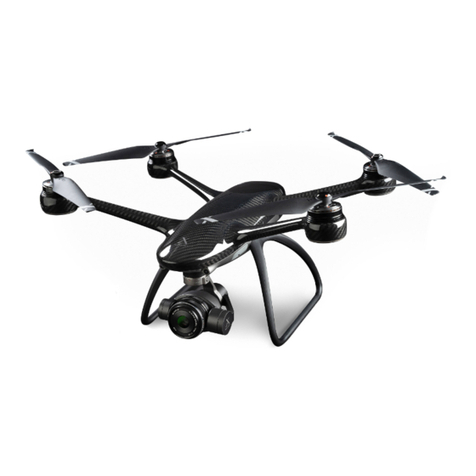
XDynamics EVOLVE Bedienungsanleitung

1Evolve User Manual V1.0 by XDynamics Limited
Body Text
◦Bullet Point
◦Bullet Point
1. Number List
2. Number List
3. Number List Indent
Footer Text
Header 1
Header 2
Header 3
Header 4
Header 5
The Outline
1. Section 1
A. Item 1
B. Item 2
1. sub item 1
2. sub item 2
a. subber item 1
b. subber item 2
c. subber item 3
i. subbest item 1
ii. subbest item 2
iii. subbest item 3
3. sub item 3
2. Section 2
A. sub item 1
B. sub item 2

2Evolve User Manual V1.0 by XDynamics Limited
EVOLVE
User Manual V1.0
BY XDYNAMICS

3Evolve User Manual V1.0 by XDynamics Limited
Using This Manual
Legends within this User Manual
Requirements before First Flight
Website
Within this manual the following Legends are used:
Safety Warning
Important
User Hints and Tips
Reference
1. Evolve User Manual (This document)
2. What’s in the box
3. Quick Start Guide
4. Legal Disclaimer and User Safety Guidelines
5. Battery Safety guidelines
LEGAL NOTICE REQUIRED HERE
Read the following information before using the Evolve Product -
Please visit the safety page and related documentation related to the Evolve Product -
To nd more information, tips, and troubleshooting, please browse our comprehensive articles at -
http://www.xdynamics.com/product/Evolve
http://www.xdynamics.com/product/Evolve/info
For further information we suggest visiting our Evolve website

4Evolve User Manual V1.0 by XDynamics Limited
On-Line Video Tutorials
http://www.xdynamics.com/support/videos
Security Disclaimer
Security of information for drone products has become a major concern for UAS operators that
do not wish for their ight information and collected imagery to be accessed by outside entities
or governments. Most leading drone manufactures do not have the ability to secure this type of
information. A typical consumer drone sends all the Meta data information, such as aircraft position
history and copies of all video and photography les, to unsecured cloud accounts. Some drone
manufactures require the operator/owner of the drone to create an on line cloud account before the
drone can be activated. This cloud account downloads all the information history from the drone every
time the system is connected to the internet or when a rmware update is performed regardless if the
operator/owner gives consent. This raises serious security concerns for UAS operators that y their
drones near security sensitive locations, such as military installations and airports.
XDynamics uniquely oers secure drone products not available by many other drone manufactures.
We understand the need for secure drone systems and will never download secured or private Meta
data information without the consent of our customers. XDynamics believes in guarding our customers
privacy and will continue to strive for more secure drone products in the future.
THIS NEEDS TO BE CONFIRMED.
CHECK WITH LAWYERS IF ANY ADDITIONAL SECURITY INFORMATION FROM A LEGAL
STANDPOINT IS REQUIRED

5Evolve User Manual V1.0 by XDynamics Limited
Contents

6Evolve User Manual V1.0 by XDynamics Limited
About This Manual
What is in the Document
We will get you started quickly by creating an XDynamics account and making sure the Evolve Ground
station and Drone can connect to our server to download any latest updates and get your product
registered before your rst ight.

7Evolve User Manual V1.0 by XDynamics Limited
Product Information Section
Product Description
Key Features
Within this section, the Evolve Drone and Ground Station are explained and the individual components
listed. The Evolve Drone and Ground Station form a powerful system oering a true ultra low latency
FPV video downlink with 4K local video recording, combined with an out the box, ready to use fully
integrated dual screen controller.
Evolve drone delivers incredible wireless live view performance including: 1080p Full HD video at 60
frames per second, with the latency as low as 10 milliseconds. With ultra low latency transmission over
distances up to 600 meters, videographers can capture the intended shots and never miss a critical
shot. It is ideal for video production of TV commercials, documentaries, feature movies and other
applications that require delay-free control of a camera and drone.
Aerial photography and lming experience with XDynamics Evolve begins at your ngertips. Drawing
inspiration from handheld game consoles, the foldable remote controller holds two separate high
brightness screens in the palm of your hand, a 7” FPV viewnder and a 5” multi-touch control panel,
which is complemented with uncluttered buttons and thumbstick stick gimbals.
The Evolve by XDynamics boasts the world’s most advanced dual screen pilot assistant system, an
integrated system which combines all the required assistant functions under a single interface.
◦Drone Radar: know where your drone is.
◦Alert Centre: fully understand your drone status.
◦Map Preloading: ensure you can view your map at ight.
◦Dual Screen Editing: retouch your aerial images and edit your footages more conveniently.
FHD Ultra Low Latency Live View
Dual-Screen Drone Controller
Smart Pilot System (SPS)

8Evolve User Manual V1.0 by XDynamics Limited
Key Features Continued
Combined with algorithms and a comprehensive suite of positioning tools, including a GNSS module
that supports GPS/QZSS, GLONASS, Galileo and BeiDou navigation systems, covering 99% of the
world, as well as advanced optical ow and LiDAR sensors, Evolve provides position tracking with the
higher precision than general drones with ultrasonic or visual sensors.
Flight Battery 6700mAH Lithium Polymer battery providing ight times of up to 16 Minutes.
Equipped with a set of 21mm f/2.8 lens and Sony CMOS image sensor, with eective pixels of
12.4M, Evolve supports video capture at 4K@24fps, 2.7K@60fps, 1080p@120fps and 720p@240fps,
accommodating to various scenarios and themes, from peaceful landscape to dynamic sport shorts. It
supports RAW image le output (DNG format) and records video at 60Mbit/s, preserving sucient data
for post-production.
Ultra-Precise Positioning System
4K Camera with Sony CMOS Sensor

9Evolve User Manual V1.0 by XDynamics Limited
Drone Annotated Diagram
Detailed Schematic of the Evolve Aircraft
1. Propellers – 2 CW and 2 CCW
2. Motor
3. LED Light
4. Gimbal
5. 4K Camera LED Status
6. 4K Camera
7. Battery
8. Battery display
9. Battery release latch (Top)
10. Top Illuminated X Logo
11. Rear LED Indicator
12. FPV RF Heatsink
13. Optical Flow camera
14. USB Connection port
15. Pairing Button
16. Camera SD Data Card
17. Lidar (Altitude sensor)
18. Battery release latch (Lower)

10Evolve User Manual V1.0 by XDynamics Limited
1. Sel Camera
2. FPV Display 7” Screen
3. Proximity and Ambient Light sensor
4. Power Button and LED Indicator
a. Blue = Battery Level is enough
b. Amber = Recharge Battery
5. Control Stick (Left)
6. Control Stick (Right)
7. Land immediately button
8. Camera Exposure Wheel
9. Photo? / Video Button?
10. Customisable user Button B1
11. Customisable user Button B2
12. Gimbal Pan Control Wheel
13. Mode Select Switch
a. G - GPS Mode
b. C - Custom Mode
c. A – Attitude Mode
14. Lanyard points
15. USB Connector
16. HDMI Output
17. Return Home Button
18. 5”Touch Screen
19. Microphone
20. Lanyard points
21. Reset Switch
22. External Power to Battery Charger
23. Battery Connector
24. Tripod Thread, (Standard Camera Thread)
25. Micro SD Storage Card
26. Desk Stand / Carrying Handle
Remote Controller Annotated Diagram
Detailed Schematic of the Evolve Remote Controller
Andere Handbücher für EVOLVE
1
Inhaltsverzeichnis
Andere XDynamics Drohne Handbücher