Aristel AN1603-08 Bedienungsanleitung

ARISTEL NETWORKS
AN1603-08 3G Audio Intercom (E2.2) 1/16
AN1603-08
INTERCOM &ACCESS CONTROL
OPERATING MANUAL
For your protection, read these instructions completely
Keep for future reference.

ARISTEL NETWORKS
AN1603-08 3G Audio Intercom (E2.2) 2/16
TABLE OF CONTENTS
Important Safety Instructions........................................................................................3
Introduction ................................................................................................................... 4
Parts List........................................................................................................................4
Installation.....................................................................................................................5
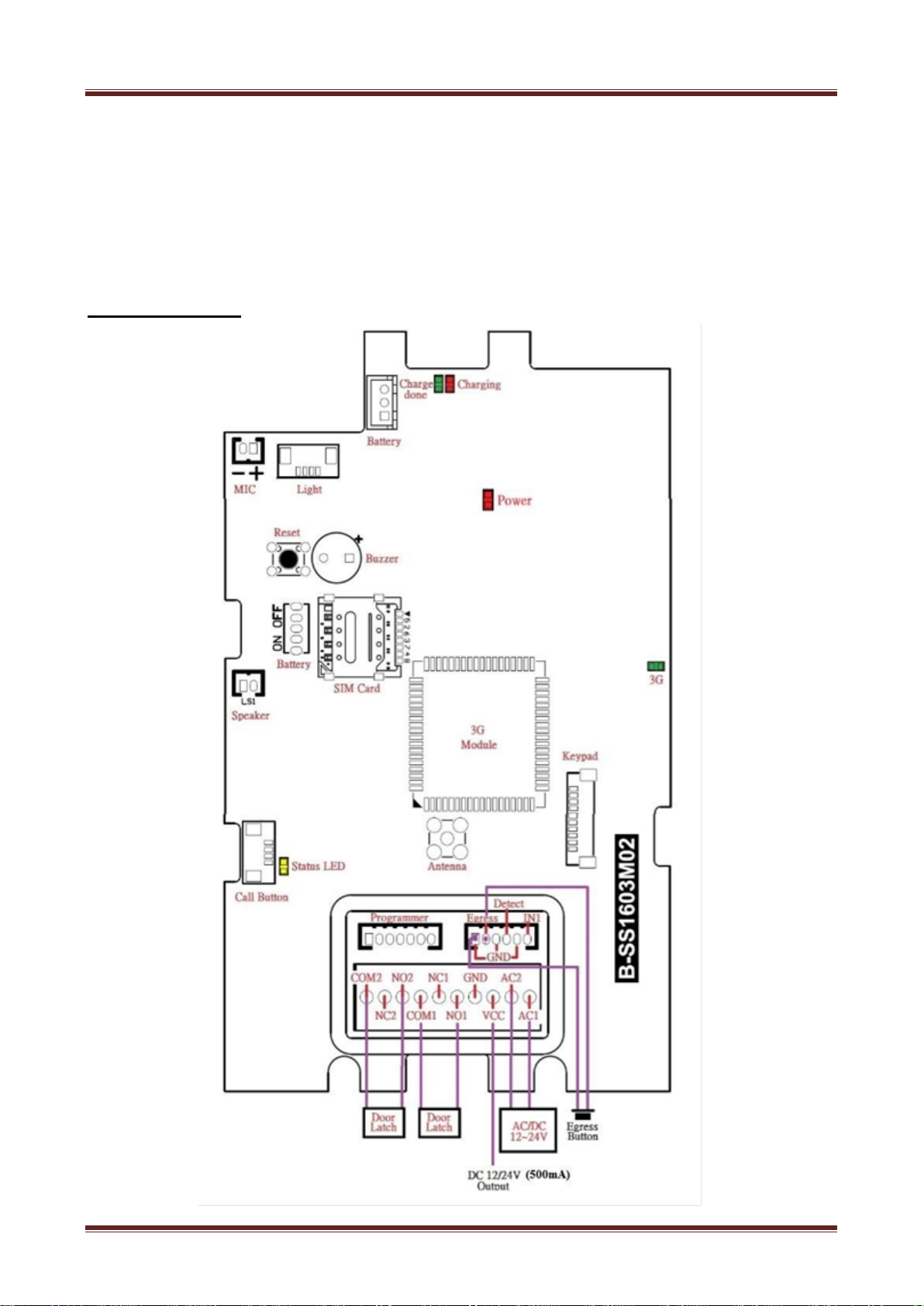
Wiring Diagram.............................................................................................................8
Using the AN1603-08....................................................................................................9
1.
Setting your call out numbers.......................................................................9
2. Setting your call in numbers (Guest List ) .................................................9
5.App on iOS and Android..............................................................................9
Programming by text message ....................................................................................10
Command Codes .........................................................................................................12
How to reset the hardware if you forget your password.............................................15
How to change the name plate ....................................................................................14
Troubleshooting (Q &A).............................................................................................15
Specification................................................................................................................16

ARISTEL NETWORKS
AN1603-08 3G Audio Intercom (E2.2) 3/16
Thank you for purchasing AN1603-08 3G/4G audio intercom. Please read this manual carefully
before using.
Be sure to keep this manual for future reference in case of any problem or questions.
Important Safety Instructions
When using this intercom, basic safety precautions should always be followed to reduce the risk of
fire, electric shock and personal injury. Please read the following before using your equipment.
1. Follow all warning and instructions on the product.
2. Unplug all the connections of product before cleaning. Do not use liquid cleaners or aerosol
cleaners. Use a damp cloth for cleaning.
3. Do not use this product near water.
4. Do not use this product near an area where there is a potential of gas leaks or near any fumes that
can be explosive.
5. Do not place this equipment near or over a radiator or any other heat source.
6. Do not overload the wall outlet or power cord where the power adapter is installed. This can result
in fire or electric shock
7. Avoid spilling liquid on this equipment and do not insert any objects through the ventilation slots.
8. Avoid using the equipment during an electrical storm. There is a remote risk of electrical shock
from lighting.

ARISTEL NETWORKS
AN1603-08 3G Audio Intercom (E2.2) 4/16
Introduction
AN1603-08 3G audio intercom system is designed for units or multi tenanted premises. It can dial
up to 8 different destinations. By pressing the relevant call button, a visitor can be connected to
the occupier whether they are on or off the site. The intercom will sequentially call 3 numbers that
are associated with the occupier. After the call is answered the door or gate can be opened by
password.
Up to 1150 guests’ numbers can be programmed into this intercom. Any guest calling the intercom
will cause the gate or door to open without the call being answered. This is a free call.
This intercom supports all Telstra, Optus & Vodafone CSFB networks.
Parts List
Item Description Q’ty
1 AN1603-08 3G4G audio intercom 1
2 Power adapter 1
3 Antenna with 3 metre tail 1
4 Mounting Bracket for antenna 1
5 Operating manual 1
6 6 Pin Cable 1
7 Terminal Blocks 1
Mounting Bracket

ARISTEL NETWORKS
AN1603-08 3G Audio Intercom (E2.2) 5/16
Installation
This intercom is suitable for both flush mounting and surface mounting.

ARISTEL NETWORKS
AN1603-08 3G Audio Intercom (E2.2) 6/16
1. SIM card installation (Fig 1)
1.1 Disconnect the power from the intercom.
1.2 Remove the rear plastic cover
1.3 Remove the SIM card cover from the bottom of the unit
1.4 Slide the SIM card holder towards the front of the unit
1.5 Lift up the holder
1.6 Before inserting the SIM card, ensure that it is not PIN number locked. (If
locked, use a mobile phone to unlock it).
1.7 Insert the SIM card (Note orientation of notched corner)
1.8 Replace holder and slide towards the rear of the unit to lock in place
1.9 Replace rear plastic cover

ARISTEL NETWORKS
AN1603-08 3G Audio Intercom (E2.2) 7/16
2. Connecting with the door lock system (Fig 2)
2.1 According your door lock type, see wiring options below.
3. Connecting the Antenna (Fig 3)
3.1 Plug in the antenna cord to the connector on the rear of the unit
3.2 Place antenna away from electrical/electronic systems (computers, microwave ovens,
etc.)

ARISTEL NETWORKS
AN1603-08 3G Audio Intercom (E2.2) 8/16
4. Power on.
4.1 Connect the 12-24v power source to the connector marked AC
4.2 The blue indicator of call button should be on and you will hear Du Du tone.
4.3 Position the intercom where it will be installed.
4.4 When the Du Du tone has ceased, the device is ready.
Wiring Diagram

ARISTEL NETWORKS
AN1603-08 3G Audio Intercom (E2.2) 9/16
Using the AN1603-08
1. Setting your call out numbers
1.1 Send the text SMS to the number of device.
1.2 The format of text SMS is
*12*1234#1[XX][Y][phone number]#1[XX][Y][phone number]#...
XX=01-08, it means the 8 call buttons.
Y=~1~3, it means three phone numbers
1.3 When the setting is finished, the sender will receive the reply as below.
1[XX][Y][ phone number]#1[XX][Y][ phone number]#...OK
1.4 If you press the call button of device, it will call to the numbers of call buttons in
sequence.
2. Setting your dial in numbers ( Guest List )
2.1 Send the text SMS to the number of device.
2.2 The format of text SMS is
*12*1234#71[country code]#72[relay][call in number 1]# 72[relay][call in number 2]#...
2.3 When the setting is finished, the sender will receive the reply as below.
71[country code]#72[relay][call in number 1]# 72[relay][call in number 2]#...OK
2.4 If a guest calls the number of the device, it will trigger the relay to control the door
latch.
2.5 If the calling number is not on the guest list, the device will answer and sound a
beep. Then the administrator can enter the programming mode by password.
3. App on iOS and Android
3.1 Please search 3G intercom on Apple store or Google Play
3.2 The App can help you to program the device more easily.
3.3 You can use the App to unlock the door via calling or SMS.

ARISTEL NETWORKS
AN1603-08 3G Audio Intercom (E2.2) 10/16
Enter System Menu
1. Please call the number of the intercom device.
2. The device will answer and sound one beep to enter system menu.
3. Enter the password of the mode you would like to enter.
3.1 Listener monitoring mode. 【*13*1212
#
】
3.2 Access control mode 【*33*5678
#
】
3.3 Program setting mode 【*12* 1234
#
】
4. Password correct is one beep, password error is 3 beeps.
5. The device will hand up after 3 failed attempts.
Enter Listener Monitoring Mode
1. You will hear a “Do” tone to enter listener monitoring mode by pressing【*13*1212
#
】
where 1212 is the monitoring password.
2. Then you can hear the live sound of the device’s surrounding environment.
* Under this mode speaker is OFF. (35
#
: To turn on speaker)
* You can still control the relay output under listener monitoring mode but speaker must be
ON status.
EnterAccess Control Mode
1. You will hear a “Do” tone to enter access control mode by pressing【*33*5678
#
】where
5678 is the access control password.
2. The door will be opened after entering the correct password
*(To open the door by password, if the number is not stored in the access control section)
Enter Program setting Mode
1. You will hear a “Do” tone to enter into program setting mode by pressing【*12* 1234
#
】where 1234 is the setting password.
2. You are now in the “program setting mode”
Note: At the end of each command there can be one of the two indications:
Successful: a long “beep” tone, failed: three short “beep” tone.
3. To make changes on settings please refer to the command codes in page 12.
4. To end program setting mode just hang up.
NOTE:
*To be successful in programming, originate a call from a land line and enter the
digits slowly or using programming by text message.

Inhaltsverzeichnis
Andere Aristel IP-Zugriffskontrollsysteme Handbücher