
Atlas IED AL-MAGPIE Bedienungsanleitung
– 1 –– 1 –
AtlasIED.com
TELEPHONE: (800) 876-3333
SUPPORT@ATLASIED.COM
1601 JACK MCKAY BLVD.
ENNIS, TEXAS 75119 U.S.A.
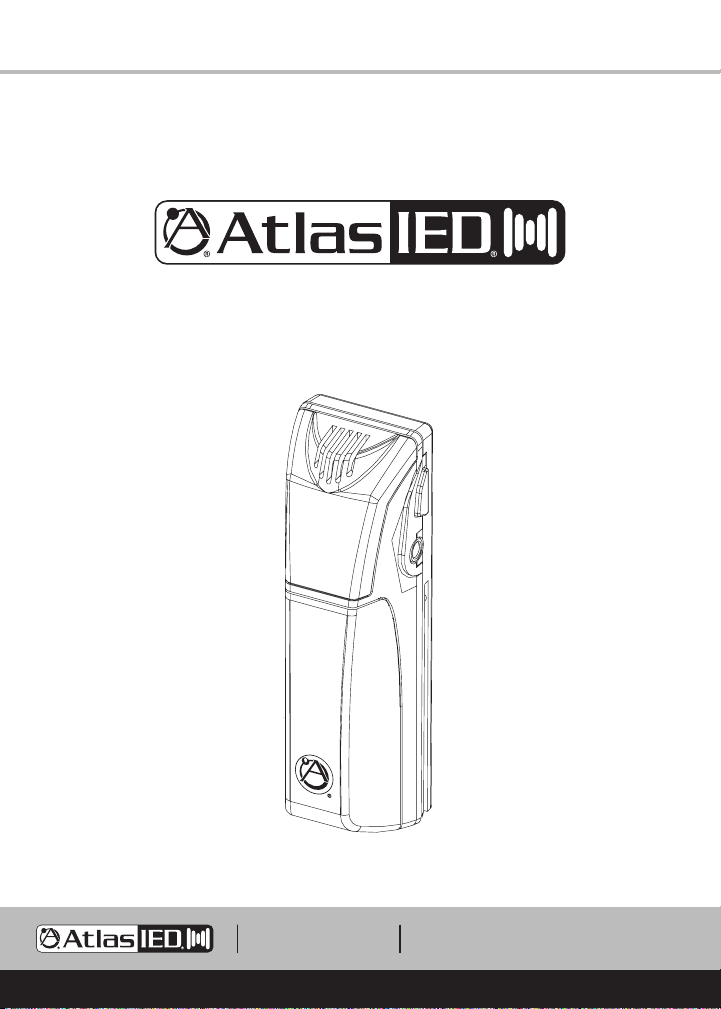
AL-MAGPIE
Wireless Infrared Microphone
VOLUME
– 2 –
AtlasIED.com
TELEPHONE: (800) 876-3333
SUPPORT@ATLASIED.COM
1601 JACK MCKAY BLVD.
ENNIS, TEXAS 75119 U.S.A.
AL-MAGPIE
Owner’s Manual
Table of Contents
Important Safety Instructions................................................................................ 3
Introduction .......................................................................................................... 7
Features ................................................................................................................ 7
Applications .......................................................................................................... 7
AL-MAGPIE Wireless Microphone Description ..................................................... 8
AL-MAGPIE-NEST Charging Station Description................................................. 10
Functions ..............................................................................................................11
Specifications ..................................................................................................... 12
Warranty .............................................................................................................. 14

– 3 –– 2 –
AtlasIED.com
TELEPHONE: (800) 876-3333
SUPPORT@ATLASIED.COM
1601 JACK MCKAY BLVD.
ENNIS, TEXAS 75119 U.S.A.
AL-MAGPIE
Owner’s Manual
Important Safety Instructions
1. Read these instructions.
2. Keep these instructions.
3. Heed all warnings.
4. Follow all instructions.
5. Do not use this device near water.
6. Clean only with dry cloth.
7. Do not block any ventilation openings. Install in accordance with the manufacturer’s
instructions.
8. Do not install near any heat sources such as radiators, heat registers, stoves, or other
device that produce heat.
9. Do not defeat the safety purpose of the polarized or grounding-type plug. A polarized
plug has two blades with one wider than the other. A grounding type plug has two
blades and a third grounding prong. The wide blade or the third prong are provided
for your safety. If the provided plug does not fit into your outlet, consult an electrician
for replacement of the obsolete outlet.
10. Protect the power cord from being walked on or pinched particularly at plugs,
convenience receptacles, and the point where they exit from the device.
11. Only use attachments / accessories specified by the manufacturer.
12. Use only with the cart, stand, tripod, bracket, or table specified by the manufacturer,
or sold with the device. When a cart is used, use caution when moving the cart /
device combination to avoid injury from tip-over.
13. Unplug this device during lightning storms or when unused for long periods of time.
The lightning flash with arrowhead symbol within an equilateral triangle,
is intended to alert the user to the presence of uninsulated “dangerous
voltage “ within the product’s enclosure that may be of sufficient
magnitude to constitute a risk of electric shock to persons.
The exclamation point within an equilateral triangle is intended to
alert the user to the presence of important operating and maintenance
(servicing) instructions in the literature accompanying the product.
WARNING: SHOCK HAZARD - DO NOT OPEN
AVIS: RISQUE DE CHOC ELÉCTRIQUE - NE PAS OUVRIR
WARNING:TO REDUCETHE RISK OF FIRE OR ELECTRIC SHOCK
DO NOT EXPOSETHIS EQUIPMENT TO RAIN OR MOISTURE
AVIS: NE PAS EXPOSER CE MATÉRIEL À LA PLUIE OU L’HUMIDITE
AFIN DE REDUIRE LE RISQUE D’INFLAMMATION OU DE CHOC ELÉCTRIQUE

– 4 –
AtlasIED.com
TELEPHONE: (800) 876-3333
SUPPORT@ATLASIED.COM
1601 JACK MCKAY BLVD.
ENNIS, TEXAS 75119 U.S.A.
AL-MAGPIE
Owner’s Manual
Important Safety Instructions
14. Refer all servicing to qualified service personnel. Servicing is required when the device
has been damaged in any way, such as power-supply cord or plug is damaged, liquid
has been spilled, or objects have fallen into the device, the device has been exposed
to rain or moisture, does not operate normally, or has been dropped.
15. This product is equipped with a three-wire grounding-type plug, a plug having a third
(grounding) pin. This plug will only fit into a grounding-type power outlet. This is a
safety feature. If you are unable to insert the plug into the outlet, contact your
electrician to replace your obsolete outlet. Do not defeat the safety purpose of the
grounding-type plug.
16. WARNING: To reduce the risk of fire or electric shock, this device should not be
exposed to rain or moisture and objects filled with liquids, such as a vase, should not
be placed on this device.
17. To completely disconnect this equipment from the mains, disconnect the power
supply cord plug from the receptacle.
18. The mains plug of the power supply cord shall remain readily operable.
19. Protective earthing terminal. The apparatus should be connected to a mains socket
with a protective earthing connection.
– 5 –– 4 –
AtlasIED.com
TELEPHONE: (800) 876-3333
SUPPORT@ATLASIED.COM
1601 JACK MCKAY BLVD.
ENNIS, TEXAS 75119 U.S.A.
AL-MAGPIE
Owner’s Manual
WARNING - When The Device Is In Use
• WARNING: For the terminals marked with symbol of may be of sufficient
magnitude to constitute a risk of electric shock. The external wiring connected to the
terminals requires installation by an instructed person or the used of ready-made leads
or cords.
• WARNING: The apparatus shall not be exposed to dripping or splashing and that
objects filled with liquids, such as vases, shall not be placed on apparatus.
• WARNING: The mains plug is used as disconnect device, the disconnect device shall
remain readily operable.
• To prevent electric shock, do not remove the product cover as there are high voltage
components inside. Refer all servicing to AtlasIED.
• Should any of the following irregularities occur during use, immediately switch off the
power, disconnect the power cord from the AC outlet and contact AtlasIED. Do not to
attempt to continue operation with the product as this may cause fire or electric shock:
• Smoke or strange smell coming from the unit.
• If the product falls or the case is damaged.
• If water or any metallic objects falls into the product.
• If the power supply cord is damaged in any way.
• If the unit is malfunctioning.
• Do not insert or drop metallic objects or flammable materials into the ventilation holes
of the product's cover, as this may result in electric shock or fire.
• Do not place any containers with liquid or metallic objects on the top of the product. If
any liquid spills into the unit, fire or electric shock may result.
• Never operate this product or touch the power supply cord during an electrical storm,
electric shock may result.
• Never exceed the power rating on the product when connecting equipment. Fire and/
or property damage may result.
• Operate the product only with the voltage specified on the unit. Fire and/or electric
shock may result if a higher voltage is used.
– 6 –
AtlasIED.com
TELEPHONE: (800) 876-3333
SUPPORT@ATLASIED.COM
1601 JACK MCKAY BLVD.
ENNIS, TEXAS 75119 U.S.A.
AL-MAGPIE
Owner’s Manual
• Do not modify, kink, or cut the power cord. Do not place the power cord in close
proximity to heaters and do not place heavy objects on the power cord, including the
product itself, doing so may result in fire or electrical shock.
• Ensure that the safety ground terminal is connected to a proper ground. Never connect
the ground to a gas pipe as a catastrophic disaster may result.
• Be sure the installation of the product is stable, avoid slanted surfaces as the product
may fall and cause injury or property damage.
CAUTION - When Installing The Product
• Plugging in or unplugging the power cord with wet hands may result in electric shock.
• Never move the unit with the power cord plugged into the wall, as damage to the
power cord may result.
• When unplugging the cord from the wall, grasp the plug, NOT the cord.
• Never install this product in humid or dusty locations, nor in direct sunlight, near
sources of heat, or in areas where sooty smoke or steam are present. Fire and electric
shock may result.
• Keep all sides of the unit at least 31/2" away from objects that may obstruct air flow to
prevent the unit's internal temperature rise.
CAUTION - When The Product Is In Use
• Never place heavy objects on the product, causing it to fall and/or break, resulting in
personal injury and property damage. In addition, the product itself may fall and cause
injury and property damage.
• Contact AtlasIED for instructions on cleaning the inside of the unit. Large accumulations
of dust inside the unit may result in heat buildup and fire.
• Ensure that the power supply plug is securely plugged into the wall outlet. Never allow
dust to accumulate on the power plug or inside the wall outlet.
• When cleaning the unit or the unit is not to be operated for an extended period, unplug
the power cord from the wall.
– 7 –– 6 –
AtlasIED.com
TELEPHONE: (800) 876-3333
SUPPORT@ATLASIED.COM
1601 JACK MCKAY BLVD.
ENNIS, TEXAS 75119 U.S.A.
AL-MAGPIE
Owner’s Manual
Introduction
Congratulations and thank you for purchasing the AtlasIED AL-MAGPIE wireless infrared
microphone. This innovative, professional grade microphone has been designed to include
unique features and excellent performance that is required for delivering clear and concise
audio through voice amplification.
Key Features
• Provides Excellent Infrared Wireless Sound Reinforcement
• Keeps Teacher’s Voice Healthy and Sustainable
• Patent Pending Design
• Unique Handheld / Lanyard / Transmitter Microphone
• Microphone Volume Controlled via Transmitter
Applications
The AtlasIED AL-MAGPIE is an in-classroom sound reinforcement solution designed for
use in K-12 and higher education facilities or where a room constrained public address
system is required. When used in conjunction with the AL2450 amplifier / receiver,
it allows the teacher and students to walk freely around the room with the infrared
microphones / system control units and project their voices through installed speakers.
– 8 –
AtlasIED.com
TELEPHONE: (800) 876-3333
SUPPORT@ATLASIED.COM
1601 JACK MCKAY BLVD.
ENNIS, TEXAS 75119 U.S.A.
AL-MAGPIE
Owner’s Manual
Microphone Description
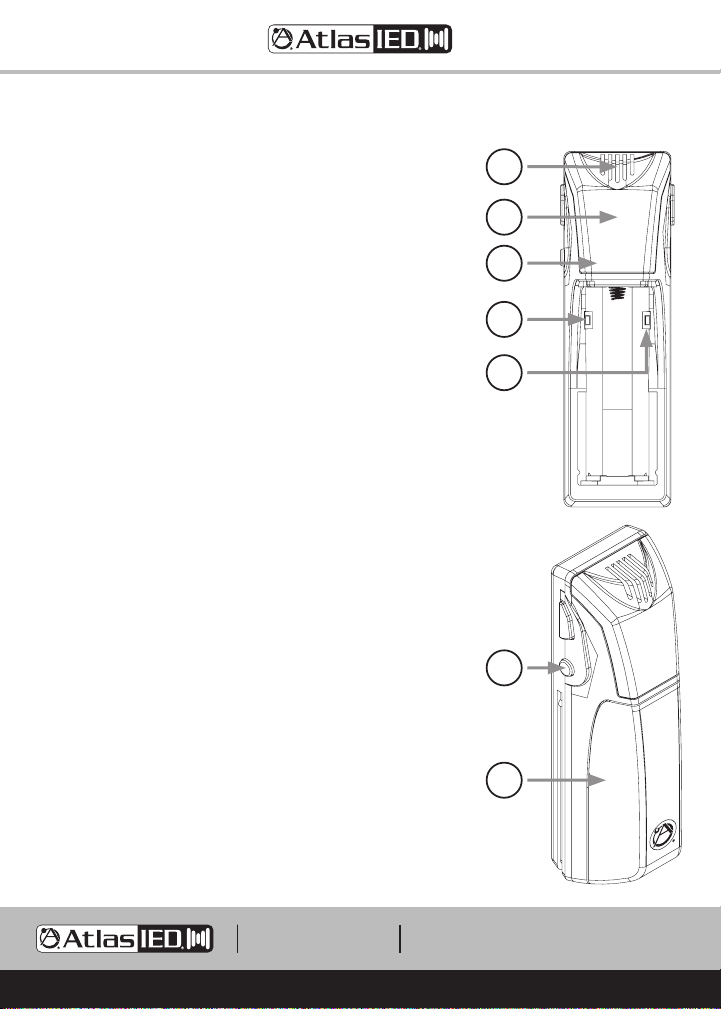
1. Microphone
High quality internal microphone is used when the unit is
in the handheld or lapel configuration.
2. IR LEDs
This cluster of IR LEDs ensure quality communications
with an AL-IRDS infrared receiver.
3. Power LED
Displays the battery power of the AL-MAGPIE.
Blue Indicates good battery power.
Red Indicates low battery power.
Off Indicates the microphone is turned off.
4. IR Channel Switch
This slide switch sets the microphone channel to “A” or “B”.
5. Lockout Switch
When this switch is set to the lockout mode the unit
works as a microphone only, no operation buttons function.
Also referred to as “Student Mode”.
6. Power Button
When the AL-MAGPIE is off, holding this button for 3
seconds will turn the unit on. When on, holding this button
for 3 seconds will turn the unit off.
7. Battery and Cover
Conceals one rechargeable battery, IR channel switch and
lockout mode switch. Note: Only use a rechargeable
Lithium LIR17500 (3.7V) or damage may occur while
charging the mic.
VOLUME
6
7
VOLUME
1
2
3
4
5
– 9 –– 8 –
AtlasIED.com
TELEPHONE: (800) 876-3333
SUPPORT@ATLASIED.COM
1601 JACK MCKAY BLVD.
ENNIS, TEXAS 75119 U.S.A.
AL-MAGPIE
Owner’s Manual
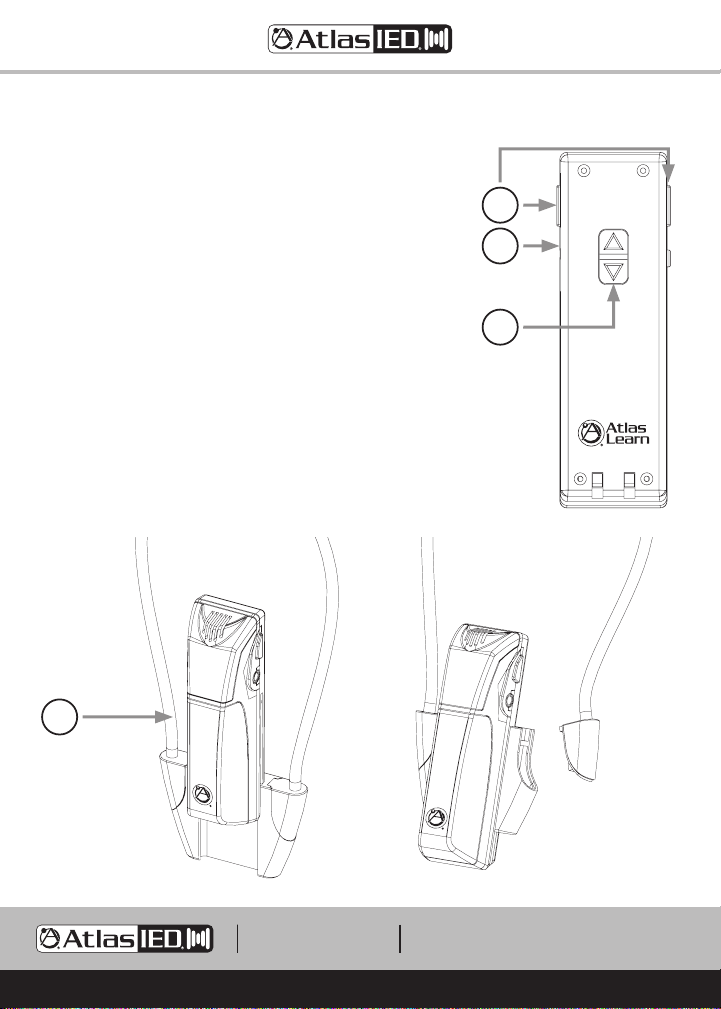
8. Panic Button
When both red buttons are pressed simultaneously, a
signal is sent to the AL2450 amplifier / receiver to close
the “Panic” relay that sends a message to an external
source, like a school’s paging system.
9. Headset Microphone Input
3.5mm jack for connection of the optional AL-HSM
headset microphone. When connected the internal
microphone is disabled.
10. Volume Button
Depressing the UP or DOWN button will raise or lower
the microphone volume.
11. Lanyard
Included lanyard for a lapel configuration.
VOLUME
11
VOLUME
8
9
10

– 10 –
AtlasIED.com
TELEPHONE: (800) 876-3333
SUPPORT@ATLASIED.COM
1601 JACK MCKAY BLVD.
ENNIS, TEXAS 75119 U.S.A.
AL-MAGPIE
Owner’s Manual
AL-MAGPIE-NEST Charging Station Description
12. Microphone Charging Receptacles
Holds the microphones in place while charging.
13. Microphone Charging LEDs
These LEDs indicate the current charging status of each receptacle:
Red = Microphone is charging
Green = Microphone is charged
Note: The AL-MAGPIE must be charged for 12 hours before being used.
VOLUME
121313
Inhaltsverzeichnis
Andere Atlas IED Mikrofon Handbücher

Beliebte Mikrofon Handbücher anderer Marken

IK Multimedia
IK Multimedia iRig Stream MIC PRO Bedienungsanleitung

DAPAudio
DAPAudio RM-101 Bedienungsanleitung

AKG
AKG CHM 21 Bedienungsanleitung

Sennheiser
Sennheiser evolution wireless series EM 100 Bedienungsanleitung

Sony
Sony C-48 Bedienungsanleitung

GIGAMEDIA
GIGAMEDIA GGM PAMICUHFG Bedienungsanleitung


