
aTli T330 Bedienungsanleitung

ATLI T330
Instruction Manual
This instruction manual covers the camera installation and
setup procedures of the ATLI T330 time lapse camera.
Please visit https://www.atlitimelapse.com/pages/download-
manual to download IN-APP CONTROL INSTRUCTION for
more information on how to connect and control the camera.

Content Index
Welcoming Notes....................................................................................................3
Safety Precautions and Warnings.................................................................3
Installation................................................................................................................3
Electrical Safety.....................................................................................................3
Transportation Security...................................................................................4
Repair.......................................................................................................................... 5
Environment...........................................................................................................5
Operation and Maintenance........................................................................ 5
Product Introduction.............................................................................................6
Overview....................................................................................................................6
Package Content.................................................................................................6
Name of Camera Parts.....................................................................................7
Installation....................................................................................................................8
Wi-Fi Antenna........................................................................................................8
Camera.......................................................................................................................8
Battery Installation............................................................................................. 9
Quick Setup............................................................................................................... 10
Installing ATLI Cam App................................................................................10
Registering the Camera to the ATLI Cam App............................... 10
Remote access......................................................................................................11
Camera Status.......................................................................................................... 12
Troubleshooting......................................................................................................13
Hard restart................................................................................................................ 15
Reset to factory settings.................................................................................... 15
Dimension...................................................................................................................15
Specifications............................................................................................................16
Warranty...................................................................................................................... 17

Welcoming Notes
Thank you for purchasing ATLI T330.
Please read this manual for proper usage and understand
the Safety Precautions and Warnings in this manual
before using the camera.
Safety Precautions and Warnings
Please read the following safety precautions and warnings
carefully below before using the camera. They are important
to avoid personal injury and damage.
Installation
Handle the camera with care and avoid dropping it which
could cause internal hardware damage.
Keep the camera clean, especially the front protective lens.
Mount the camera securely on a tripod, magic arm, C-
Clamp, or utilize the provided strap for stabilization.
Electrical Safety
Battery Usage:
- Use the high-quality 3.7V button-top style
18650 Li-ion battery for this camera.
It is advised to use the battery with a capacity
of 3400mAh or higher.
DO NOT USE FLAT-TOP STYLE BATTERY.
Camera only accepts button-top style
battery.

- Do not mix old and new batteries, or batteries of different
capacities or brands.
- Handle the batteries with care to avoid accidents such as
short circuits or overheating. Avoid exposing batteries to
extreme temperatures or direct sunlight.
- If the batteries show signs of leakage, overheating, or
damage, immediately remove them from the camera and
dispose of them properly.
- To keep the batteries in healthy condition, please remove
them from the compartment if the camera is not used for
an extended period.
Charging:
- Use the provided USB-A to USB-C cable and connect it to a
reliable power source when charging the camera.
- Charging the camera through the USB-C port WILL NOT
be possible with a USB-C to USB-C charging cable.
- The camera allows for capturing photos and videos during
the charging process of the camera.
- The batteries can also be charged by a third-party 18650 Li-
ion battery charger once they have been removed from
the camera.
Transportation Security
Avoid heavy stress, violent vibrations, and excess moisture
during transportation, storage, and installation of the
camera.

Repair
Disassemble the camera will automatically void the
warranty.
We are not liable for any problems or damage caused by
unauthorized modifications or user-attempted repair.
Contact us via email service@atliview.com for any
technical issues.
Environment
The recommended operating temperature is between
0°C/32°F to 50°C/122°F.
Avoid aiming the camera lens directly to the sun to avoid
pictures from overexposure and may possibly damage
the camera image sensor in the long run.
Installing the camera under a roof or shelter could help to
improve the camera’s life and bring extra benefits to the
quality of the recorded video/photo footage.
Operation and Maintenance
The camera is designed and manufactured for
weatherproof (IP65 standard compliance).
This product is NOT waterproof and shall not be used
under water.
To avoid scratches on the front protective lens, use only an
air blower or a microfiber cloth for cleaning.

Product Introduction
Overview
The ATLI T330 time lapse camera is a professional timelapse
camera designed specifically for long-term outdoor shooting.
With its advanced features and durable build, this camera is
perfect for capturing stunning timelapse footage in various
weather conditions.
1080P Full HD Resolution
IP65 Weatherproof
Long Battery Life
Realtime Playback
Full Control via Remote Access
Compatible with 5V/6V Solar Panel for Power Supply
Package Content
A
ATLI T330 (16GB
storage card
pre-installed)
B
USB-A to USB-C
Charging Cable
(2 meters)
C
Strap (2 meters)
A
B
C

Name of Camera Parts
1
Wi-Fi Antenna
7
Camera QR Code
2
Protective Lens
8
Strap Retainer
3
Status LED
9
Battery Door
4
USB-C Charging Port
10
Battery Door Latch
5
Power Button
11
Memory Card Slot
6
¼” Tripod Mount

Installation
Wi-Fi Antenna
To ensure maximum Wi-Fi
performance when using the
camera, it is recommended to
keep the Wi-Fi antenna upright.
This positioning allows for
optimal antenna reception
and signal strength.
Camera
Using the ¼” tripod mount at the bottom to set the camera
on mount.
Keep the Wi-Fi antenna
upright for maximum
performance.
¼” tripod mount

Battery Installation
To ensure the safe and proper functioning of the ATLI T330,
it is crucial to follow the correct battery installation process.
a) Locate the battery compartment at the bottom.
b) Unlock the battery door latch to open the battery door.
c) Insert 3 units of 18650 Li-ion battery (make sure it is fully
charged) as shown above with positive terminal (the button
top) facing outside. All batteries are installed in the same
direction.
Ensure that you align the battery correctly to prevent
any short circuits or damage.
In case 1 or 2 of the batteries were mistakenly inserted in the
wrong direction, the camera can still function, but the
battery life will be greatly reduced.
Ensure that the latch is fully locked to prevent accidental
opening during camera operation. Opening the battery
door while shooting in progress shuts down the camera
immediately and may cause damages to the recorded
video/photo files.
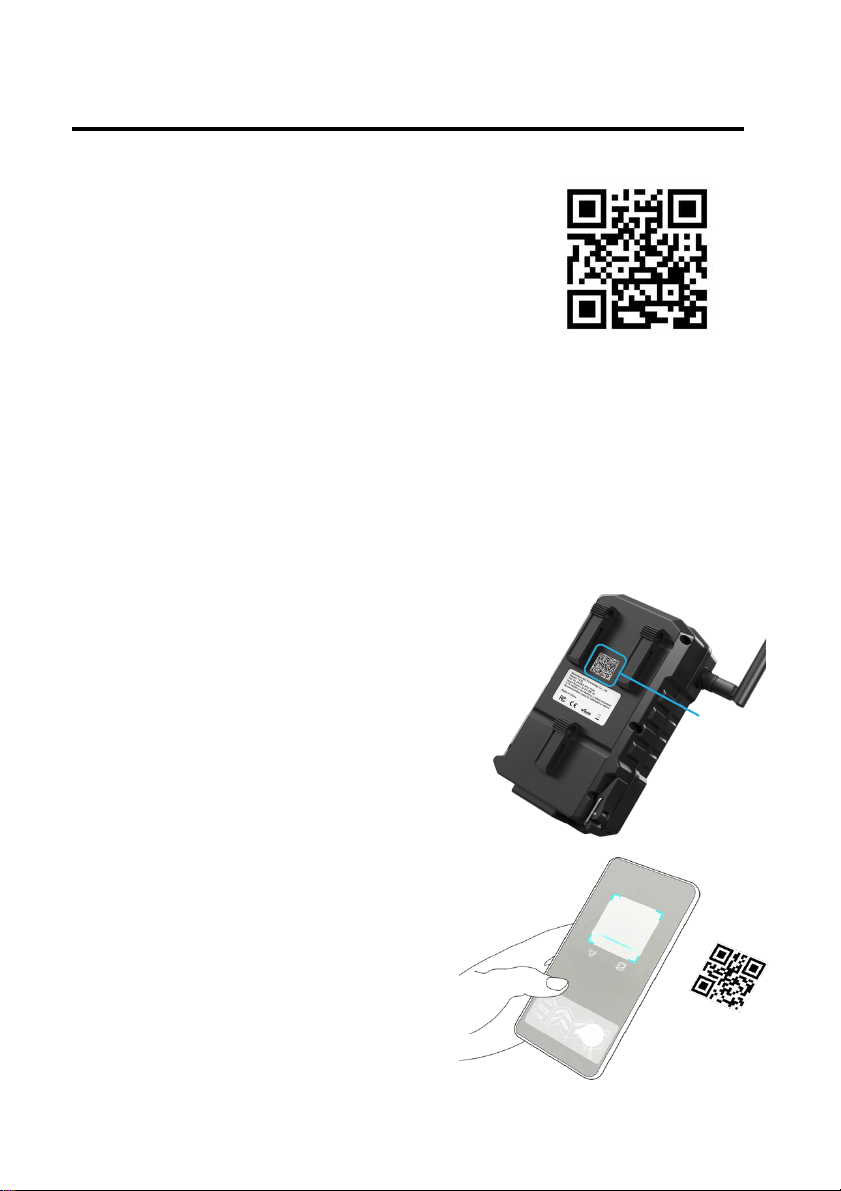
Quick Setup
Installing ATLI Cam App
Scan the QR code on the right to install
the ATLI Cam App.
The app can also be installed via the Apple
App Store or an Android App Store.
Registering the Camera to the ATLI Cam App
a. Open the ATLI Cam App to display the Discover home
screen. Time lapse videos and tutorial videos are available
in this page.
b. Locate the camera QR code at the
back as shown on the right.
c. Open the app,click on the
[Camera] icon at the bottom and
then click on [Add Camera] to
register your camera.
d. Scan the camera QR code to
connect.
e. Switch back to ATLI Cam App
to connect the camera to view
the camera dashboard.
Camera
QR Code
Inhaltsverzeichnis


