
Boca Systems BEN1PA Bedienungsanleitung

1

2
BOCALANcard-PC

3
Before You Begin your Installation
The product you have purchased is designed
to be easily installed into most IBM PC or
compatible systems. Many products have
large, easy-to-read legends to allow for the
easy configuring of the product. This
installation manual contains detailed
instructions. Most included software has automatic installation
programs to place the software correctly onto your computer.
However, as all computers are configured differently, you may be
required to perform some basic DOS or Windows tasks. If you are
not familiar with basic DOS commands such as DIR, CD, or EDIT,
you should check your DOS manual, or seek assistance from you
local computer dealer to install the product.
How to get Technical Assistance
The dealer that you purchased this product or your computer
from is the first place you should go for technical assistance. The
dealer is usually the most qualified source of help, and is most
familiar with your system and how this product should be
installed. Many dealers have customer
service and technical support programs,
with varying levels of support offered,
depending on your needs and computer
knowledge. Please contact the dealer first
whenever a problem occurs.
If your Dealer Can’t Assist you
If you can’t get assistance from your dealer, the manufacturer
provides varying levels of technical assistance as summarized on
the following page.

4
BOCALANcard-PC
The Standard Free Technical
Support number is for quick
answers to specific inquiries on
product features and technical
questions (call 407-241-8088; M-F,
8 am to 6:30 pm EST). Direct
access to technical support
representatives is provided on a
limited basis. If you require
immediate attention or in-depth
help with the installation of the
product, please call our 900-
priority support number for service. This number gives you immediate
access to senior-level technicians. The number is 900-555-4900. You will
be charged $2.00 per minute. The charges will appear on your next
phone bill.
Damaged or Missing Items
We use many world-class quality assurance programs to ensure the
product you purchased is of the highest caliber. Sometimes, however, a
component may be missing from the box, or is damaged or corrupt in
some way. If this happens, immediately return the entire package to your
place of purchase so you may exchange it for a new one. Your dealer
should be able to provide you with an exchange far more quickly than by
contacting us directly. If for some reason you are unable to return the
product directly to its place of purchase, refer to the “Servicing Your
Product” and “Warranty” sections in this manual for instructions.
Boca BBS
407-241-1601
Automated
Fax Retrieval
System
407-995-9456
2
3
1
4
5
6
79
8
Priority Service
900-555-4900
($2 per minute)
Standard Free
Technical Support
407-241-8088
On-Line Support!
CompuServe: GO BOCA
Internet:
email: [email protected]
on the World-wide WEB:
http://www.boca.org

5
Contents
EXPRESS Installation .............................................................. 8
Section One: Product Overview ......................................... 11
Section Two: Installation and Configuration ................ 14
Insert the Card.................................................................. 14
Make Network Connections......................................... 14
Install the Drivers............................................................ 15
Configure the Card with BENCFG............................. 17
Novell NetWare Drivers ................................................ 19
IBM OS/2 LAN Server.................................................... 21
Microsoft LAN Manager................................................ 22
LAN Manager for DOS & OS/2 (v. 2.1+) ............... 22
LAN Manager for DOS & OS/2 (v. 2.0).................. 22
LAN Manager (v. 2.0)................................................... 23
LAN Manager (v. 2.1)................................................... 24
Windows for Workgroups............................................. 25
Banyan Vines .................................................................... 26
Section Three: Troubleshooting......................................... 27
Appendix A: Specifications................................................. 34
Appendix B: FCC Compliance ............................................ 35
Appendix C: Servicing Your Boca Product ..................... 36
Warranty .................................................................................... 38
Copyright
©1995 Boca Research, Inc. All rights reserved. No reproduction of this
document in any form is allowed without permission in writing from Boca
Research, Inc. Boca Research is not liable for any damages resulting from
technical or editorial errors or omissions contained in this document. The
information in this manual is subject to change without notice. Revisions to the
product(s) in this manual may occur at any time without notice.
Trademarks
All Boca Research products are trademarks of Boca Research, Inc. All other
references to computer systems, software, and peripherals use trademarks
owned by their respective manufacturers.
Publication Date: June, 1995
Printed in the U.S.A. BEN2PA.PM5
6
BOCALANcard-PC
Congratulations...
...on the purchase of your BOCALANcard-PC (BEN1PA) or Dual
BOCALANcard-PC (BEN2PA) from Boca Research, Inc., a leader
in high-tech computer enhancement products. Get started by
reviewing the package contents as shown below. After continuing
with some basic introductory information, go to the EXPRESS
Installation on pages 8-11. The balance of the manual contains a
product overview, driver installation, troubleshooting, and
technical specifications.
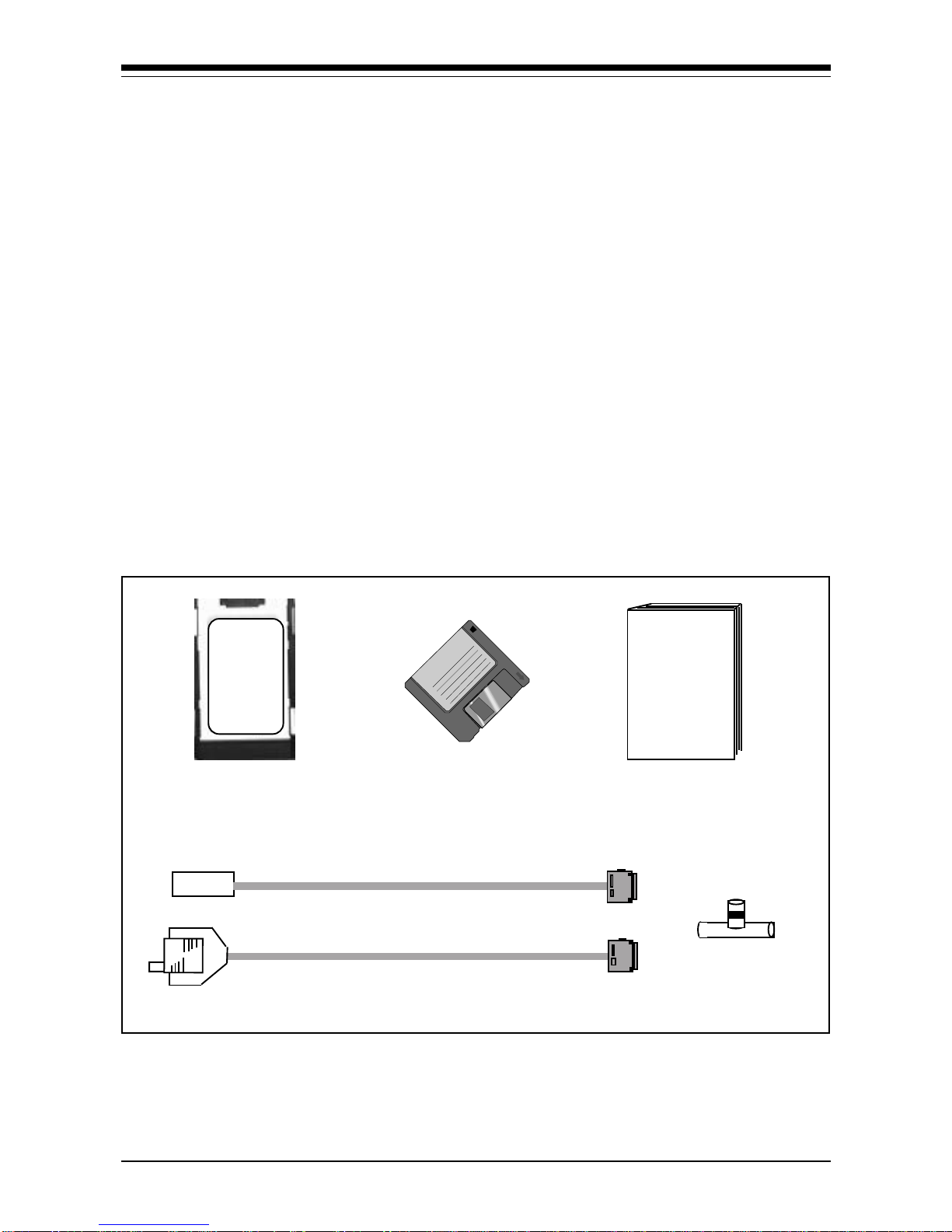
Package Contents
Make sure you have received the following items:
If any items are missing or appear damaged, contact your dealer
for assistance.
INSTALLATION
MANUAL
RJ-45 CABLE (BEN1PA)
RJ-45/BNC CABLE (BEN2PA) BNC T-
Connector
BOCALANcard-PC
(BEN1PA or BEN2PA) DRIVER
INSTALLATION
DISKETTE

7
EXPRESS Install
The EXPRESS installation sections which
follow on pages 8 through 10 are intended
for knowledgeable and experienced users
accepting default settings. For more
detailed instructions, go to Section Two
(page 14).
Section One provides a product overview
along with some basic introductory
information. Section Three offers
solutions to common problems.

8
BOCALANcard-PC
ç
START
HERE
ç
SPECIAL RJ-45
CABLE (BEN1PA)
LAPTOP OR NOTEBOOK COMPUTER
OR
SPECIAL
DUAL RJ-45/
BNC CABLE
(BEN2PA)*
*CONNECT FOR 10BASE-T
OR 10BASE2 (BEN2PA)
EXPRESS Hardware Installation
PC CARD
SLOT
BOCALANcard-PC

9
ç
ç
...CONNECT FOR
10BASE-T OR
10BASE2 (BEN2PA)
CONNECT
FOR 10BASE-T
ONLY (BEN1PA),
OR...
EXPRESS Install
ç
GO TO PAGE 10,
EXPRESS
SOFTWARE
INSTALLATION.

10
BOCALANcard-PC
EXPRESS Software Installation
ç
BOOT YOUR SYSTEM
AND GO TO THE C:\
DOS PROMPT.
TYPE A:\INSTALL
AND PRESS ENTER.
SELECT THE NETWORK DRIVERS YOU
WISH TO INSTALL BY PRESSING THE
SPACEBAR FOR EACH. FOLLOW ALL
ON-SCREEN INSTRUCTIONS.
NOW, GO TO SECTION TWO FOR
INSTRUCTIONS ON HOW TO CONFIGURE
YOUR NETWORK OPERATING SYSTEM FOR
USE WITH THE BEN1/2PA DRIVERS.
INSERT THE BOCA
RESEARCH BEN1/2PA
DISKETTE IN THE
A:\DRIVE.
PRESS ENTER TO COPY THE DRIVERS
TO YOUR HARD DRIVE.
Dieses Handbuch passt für folgende Modelle
1
Inhaltsverzeichnis
Andere Boca Systems Adapter Handbücher


