
BolyGuard BG30L Bedienungsanleitung

MMS/GPRS Security Camera
User’s Manual
BG30L
For Model
:
BG30L

Content
1 Product Feature...................................................................................2
1.1 General Description....................................................................….2
1.2 Camera Body Interfaces..................................................................2
1.3 Shooting Information Display ........................................................3
1.4 Product Feature...............................................................................4
2 Cautions................................................................................................6
3 Quick Start............................................................................................7
3.1 Install TF card and SIM card..........................................................7
3.2 Insert the battery and Power on.....................................................7
3.3 Quick start.......................................................................................8
4 Basic use and settings.........................................................................12
4.1 Mount the camera......................................................................... 12
4.2 Three camera status...................................................................... 12
4.3 User authorization ........................................................................ 13
4.4 Set master number........................................................................ 13
4.5 Set normal users............................................................................14
4.6 Set MMS parameters..................................................................... 15
4.7 Set email parameters .................................................................... 16
4.8 Set receiving email address........................................................... 17
4.9 Get on spot photo..........................................................................18
4.10 Arm ...............................................................................................18
4.11 Disarm...........................................................................................18
4.12 Check camera settings ..................................................................19
4.13Set camera parameters ..................................................................19
4.14Format TF card..............................................................................22
4.15Set master’s passwords..................................................................22
4.16Get help..........................................................................................22
4.17 Use the Remote control ................................................................23
4.18Load and remove a wireless sensor...............................................24
5 SMS command list……………………………..........................................…25
Appendix : Technical SpecificationsⅠ.....................................................26
Appendix : Parts ListⅡ.............................................................................27
- 1 -

BG30 series 1 Product Feature
1 Product Feature
1.1General Description
The BG30 is a mini GSM MMS Alarm system, based on GSM
GPRS MMS (Multimedia Massage Service), GSM SMS (Short
Message Service) and GSM Voice Technologies. When it activated,
will send MMS(Pictures) alerts to your cellphone or Email and
send Text Alerts by SMS to your mobile phone immediately. Also,
you can let the GSM MMS Alarm System BG30 send pictures to
you in fixed time.
The BG30 can monitor your home, office, shop, store,
warehouse or factory by your mobile phone from everywhere and
any time.
The GSM MMS Alarm System BG30 can be programmed by
PC programmer tool through TF card, USB cables or SMS
command. This is a new solution in the worldwide
1.2Camera Body Interfaces
The camera has a LCD display for easily setting up and has the
following I/O interfaces: Power/USB connector, TF-card slot, and
SIM-card slot.
Take a few moments to familiarize with the camera controls
and displays. It is helpful to bookmark this section and refer to it
when read through the rest of the manual.
2

BG30 series 1 Product Feature
1.3Shooting Information Display
When the camera is turned on (the power switch is slid to ON
position), the camera setting information will be displayed in the
monitor.
3

BG30 series 1 Product Feature
1.4Product Feature
1. This product can use TF card (Micro-SD card) to store images.
2. It can send MMS images to the Mobile phone or to an e-mail
4

BG30 series 1 Product Feature
address.
3. Integrated PIR detector to provide precise and timely alarm.
4. Built-in CMOS camera and infrared LED. Even in dark
environment, camera can get clear images.
5. SMS remote control: User can control the camera by SMS
command or calling.
6. Listen in the monitoring area: Call the device number to listen
in monitoring area.(Only pre-set number to dial the camera )
7. Multimode alarm: Camera can send alarm messages by SMS,
MMS, E-mail.
8. Schedule monitor: User can set the camera working as the
preset schedule.
9. Built-in Lithium battery: Rechargeable battery ensures
operation in case of external power failure.
10. Easy installation: Wireless connection. It can be installed at
any place you want
5

BG30 series 2 Cautions
2Cautions
Please use this product according to the law. Respect one
another’s privacy. Neither monitor another’s home nor private.
We hold no responsibility for the illegal use of this product.
We don’t guarantee for the document veracity, reliability or any
content except regulate in proper laws. Including no guarantee
for product suitable market or suitable area promise.
We hold no responsibility for any loss of data or income; or any
special, incidental, consequential or indirect damages
howsoever caused.
The contents of this document are provided “as is”. Except as
required by applicable law, no warranties of any kind, either
expressed or implied, including, but not limited to the accuracy,
reliability or contents of this document. We reserve the right to
revise this document or withdraw it at any time without prior
notice.
6

BG30 3 Quick Introductions
3Quick Start
3.1Install TF card and SIM
card
Open the battery cover. Insert
TF card and SIM card into the
card slot accordance with the
direction shown. Follow the
right direction
3.2 Insert the battery and
Power on
Open the battery
cover. Find the spare
lithium battery
connector and insert the
lithium battery.
Insert the power
adapter into the
Power/USB interface for
power supply, and slide
the power switch to ON
position.
7

BG30 3 Quick Introductions
3.3 Quick start
Settings Must Be Done
1Must set a master number to the camera.
2Must correctly set the network parameters for MMS and
E-mail.
3Must have at least one receiving phone number and one
receiving E-mail address.
4Must choose a proper Send Mode: Number(send MMS to
mobile phone),E-mail(send pictures to E-mail),Local(just save
pictures to TF card, don’t send out).
*[1-4 can be set on computer via profile.txt file or mobile phone via SMS]
STEPS:
Step1: Confirm cards status
Confirm the TF card and SIM card are inserted correctly.
You can see the card status on the display.
means the SIM card is inserted and it works well.
means no SIM card or the SIM card is not properly inserted.
TF Capacity means how many pictures can be stored. It
should be a nonzero number.
Step2: Edit MMS parameters via computer
8
BG30 3 Quick Introductions
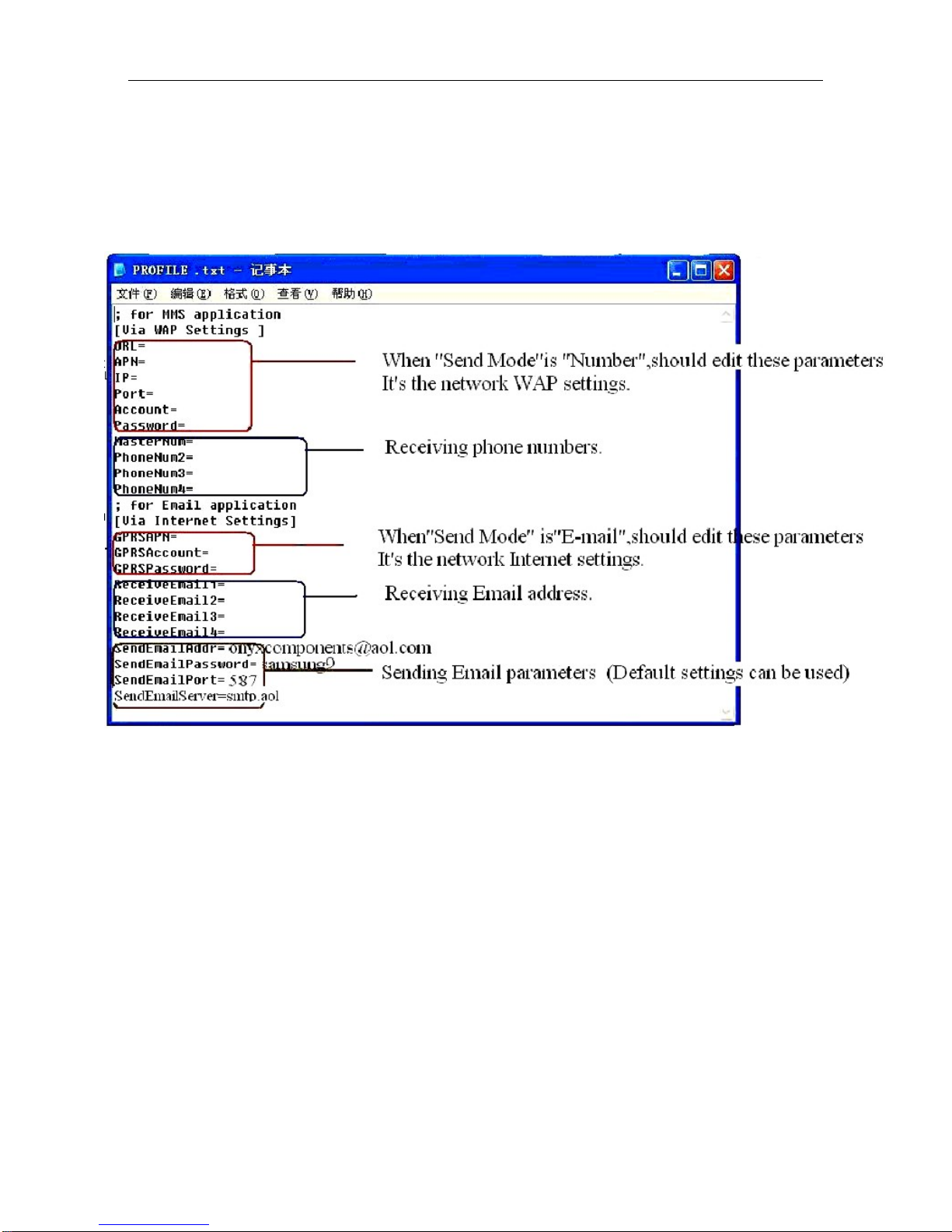
A new file named”profile.txt” is created automatically in a
new folder named “MMS” in the TF card. Reedit the file to set
the MMS parameters, below is for reference:
Step3: Choose “Send Mode”
There are 3 mode: Number(Send MMS to mobile
phone),E-mail(Send images to E-mail address),and Local(Just
store images in the TF card, do not send out). For the first use,
we suggest you choose “Number” to test if you can get MMS.
Step4: Go to Arm Status
9
Inhaltsverzeichnis
Andere BolyGuard Sicherheitskamera Handbücher


