BZB Gear BG-BPTZ-XU Bedienungsanleitung

BG-BPTZ-XU
1080P Full HD 3X/10X USB 2.0 / RS232
Huddle / Conference Room PTZ Camera
User Manual

BZBGEAR BG-BPTZ-XU PRODUCT MANUAL
Address: 830 National Drive #140, Sacramento, CA 95834, USA ·Tel: +1(888)499-9906 ·Email: support@bzbgear.com 2

BZBGEAR BG-BPTZ-XU PRODUCT MANUAL
TABLE OF CONTENTS
Statement 4
Safety Precaution 4
Introduction 5
Features 5
Packing List 5
Technical Specifications 6
Camera Overview 7
Remote Control 13
Keys Introduction for IR Remote Control 14
Menu Introduction 17
Serial Port Communication and Control 22
Camera Maintenance and Troubleshooting 29
Application Example 30
Tech Support 31
Warranty 31
Mission Statement 31
Copyright 32
Address: 830 National Drive #140, Sacramento, CA 95834, USA ·Tel: +1(888)499-9906 ·Email: support@bzbgear.com 3

BZBGEAR BG-BPTZ-XU PRODUCT MANUAL
Statement
Please read these instructions carefully before connecting, operating, or configuring this
product. Please save this manual for future reference.
Safety Precaution
●To prevent damaging this product, avoid heavy pressure, strong vibration, or immersion
during transportation, storage, and installation.
●The housing of this product is made of organic materials. Do not expose to any liquid,
gas, or solids which may corrode the shell.
●Do not expose the product to rain or moisture.
●The product has no power switch. Remove power immediately if camera is not in proper
working condition to avoid electrical shock.
●To prevent the risk of electric shock, do not open the case. Installation and maintenance
should only be carried out by qualified technicians.
●Installation and use of this product must strictly comply with local electrical safety
standards.
●The power supply of the product is ±12V, the max electrical current is 2A.
●Do not use the product beyond the specified temperature, humidity, or power supply
specifications.
●This product does not contain parts that can be maintained or repaired by users.
Damage caused by dismantling the product without authorization from BZBGEAR is not
covered under the warranty policy.
●Installation and use of this product must strictly comply with local electrical safety
standards.
●Do not turn the camera head manually. Doing so may result in mechanical damage.
Camera should only be placed on a stable horizontal surface and cannot be installed at
an angle.
●Make sure there are no obstacles within the camera’s rotational range when installing.
Never power on before installation has been completed.
Address: 830 National Drive #140, Sacramento, CA 95834, USA ·Tel: +1(888)499-9906 ·Email: support@bzbgear.com 4

BZBGEAR BG-BPTZ-XU PRODUCT MANUAL
Introduction
The BG-BPTZ-XU is a high-quality pan tilt zoom (PTZ) camera that is available in two
configurations, the 3x optical zoom and the 10x optical zoom. The 3x optical zoom variant is
ideal for smaller spaces, huddle rooms, and wide-angle shots with its 85° field of view. The
10x optical zoom version is a better fit for larger rooms where individual subjects are located
further away but still need to fill the frame using its field of view of up to 66°. Both variants of
the BG-BPTZ-XU support resolutions up to 1080p@30Hz. The BG-BPTZ-XU has quick and
easy plug and play connectivity with USB 2.0 type A for any video conferencing software
such as Skype, Zoom, Microsoft Teams, and Google Meet.
Features
●High-definition Images: This camera employs 1/2.9-inch high quality CMOS sensor.
Resolution is up to 1920x1080 with frame rate up to 30 fps.
●H.265/H.264 encoding: Makes motion video fluid and clear even with less than ideal
bandwidth conditions.
●Optical Zoom Lens: either 3x or 10x optical zoom lens.
●Leading Auto Focus Technology: Leading autofocus algorithm allows for fast,
accurate and stable auto-focusing.
●Low Noise and High SNR: Low Noise CMOS effectively ensures high SNR of
camera video.
●Control Interface:RS485, RS232, RS232 supports cascade function for convenient
installation.
●Supports Multiple Control Protocols: VISCA, PELCO-D, and PELCO-P protocols
which can be automatically recognized.
●Quiet PTZ: Utilizing a high accuracy step driving motor ensures its movements are
extremely quiet, smooth, and quick.
●255 Presets Positions: Up to 255 presets (10 presets by remote).
●Application Examples: Tele-education, Lecture recording, Webcasting, Video
conferencing, Tele-training, Tele-medicine, and Emergency command systems.
Packing List
●1x BG-BPTZ-XU Camera
●1x 12V/1.5A Power supply
●1x Remote Control
●1x USB 2.0 Cable
●1x User Manual
●1х Quick Start Guide
Address: 830 National Drive #140, Sacramento, CA 95834, USA ·Tel: +1(888)499-9906 ·Email: support@bzbgear.com 5

BZBGEAR BG-BPTZ-XU PRODUCT MANUAL
Technical Specifications
Model Number
BG-BPTZ-3XU
BG-BPTZ-10XU
View Angle
34.1° ~ 85°
8.8° ~ 66°
F Value
f=3.35mm ~ 10.05mm
f=4.34mm ~ 41.66mm
AV
F1.7 ~ 3.0
F1.85 – F2.43
Optical Zoom
3X
10X
Camera Parameters
Image Sensor
1/2.9 Inch High Quality CMOS Sensor
Effective Pixels
2.07MP, 16:9
Video Format
1920×1080P@30fps/25fps; 1280×720P@30fps/25fps; 1024×576P@30fps/25fps;
960×540P@30fps/25fps; 800×448P@30fps/25fps; 640×360P@30fps/25fps;
320×176P@30fps/25fps
Low Illumination
0.5Lux (F1.8, AGC ON)
DNR
2D & 3D DNR
White Balance
Auto/Manual/One Push/3000K/3500K/4000K/4500K/5000K/5500K/6000K/6500K/7000K
Focus
Auto/Manual/One Push
Electronic Shutter
Auto/Manual
BLC
On/Off
WDR
OFF/Dynamic Level Adjustment
Video Adjustment
Brightness, Color, Saturation, Contrast, Sharpness, B/W mode, Gamma curve
SNR
>55dB
Interface and Protocol
Video Output
USB2.0. Type A
Video Compression
H.265, H.264, MJPEG
Control Port
RS232 in & out, RS485
Control Protocol
VISCA/Pelco-D/Pelco-P
Power Supply
HEC3800 Outlet (DC12V)
USB characteristics
Support operating system
Windows 7, Windows8, Windows10, Mac OS, Linux
Video Compression
H.265, H.264, MJPEG
USB communication protocol
UVC
PTZ Parameter
Pan/Tile Rotation
-170° ~ +170° / -30° ~ +30°
Pan/Tile Controller Speed
0.1 ~ 60°/Second, 0.1 ~ 30°/Second
Preset Speed
Pan: 60°/Second, Tilt: 30°/Second
Preset Numbers
255 Presets (10 presets on IR Remote)
Other Parameter
Working Voltage
12V
Working current
0.25A(max)
Power Consumption
2.5W(max)
Storage Temperature
-10°C ~ +60°C , 20% ~ 95%
Working Temperature
-10°C ~ +50°C, 20% ~ 80%
Dimension
156.8mm×112.6mm×139.5mm
Weight
1KG
Usage
Indoor Only
Package
Camera, 12V/1.5A Power supply, Remote Controller, Manual, USB 2.0 Cable
Optional Accessories
Wall or Ceiling mounts available
Address: 830 National Drive #140, Sacramento, CA 95834, USA ·Tel: +1(888)499-9906 ·Email: support@bzbgear.com 6

BZBGEAR BG-BPTZ-XU PRODUCT MANUAL
Camera Overview
Camera Interfaces
1. RS-232, RS-422/485: Connect directly or cascade RS-232 or RS-485 to control the
camera(s) with a joystick controller or control software.
2. USB: Connect a USB 2.0 type A cable to a PC for plug & play connectivity for any
conferencing service like Skype or Zoom, supports resolution up to 1080@30Hz.
3. Power: Connect supplied 12V power adapter.
Address: 830 National Drive #140, Sacramento, CA 95834, USA ·Tel: +1(888)499-9906 ·Email: support@bzbgear.com 7

BZBGEAR BG-BPTZ-XU PRODUCT MANUAL
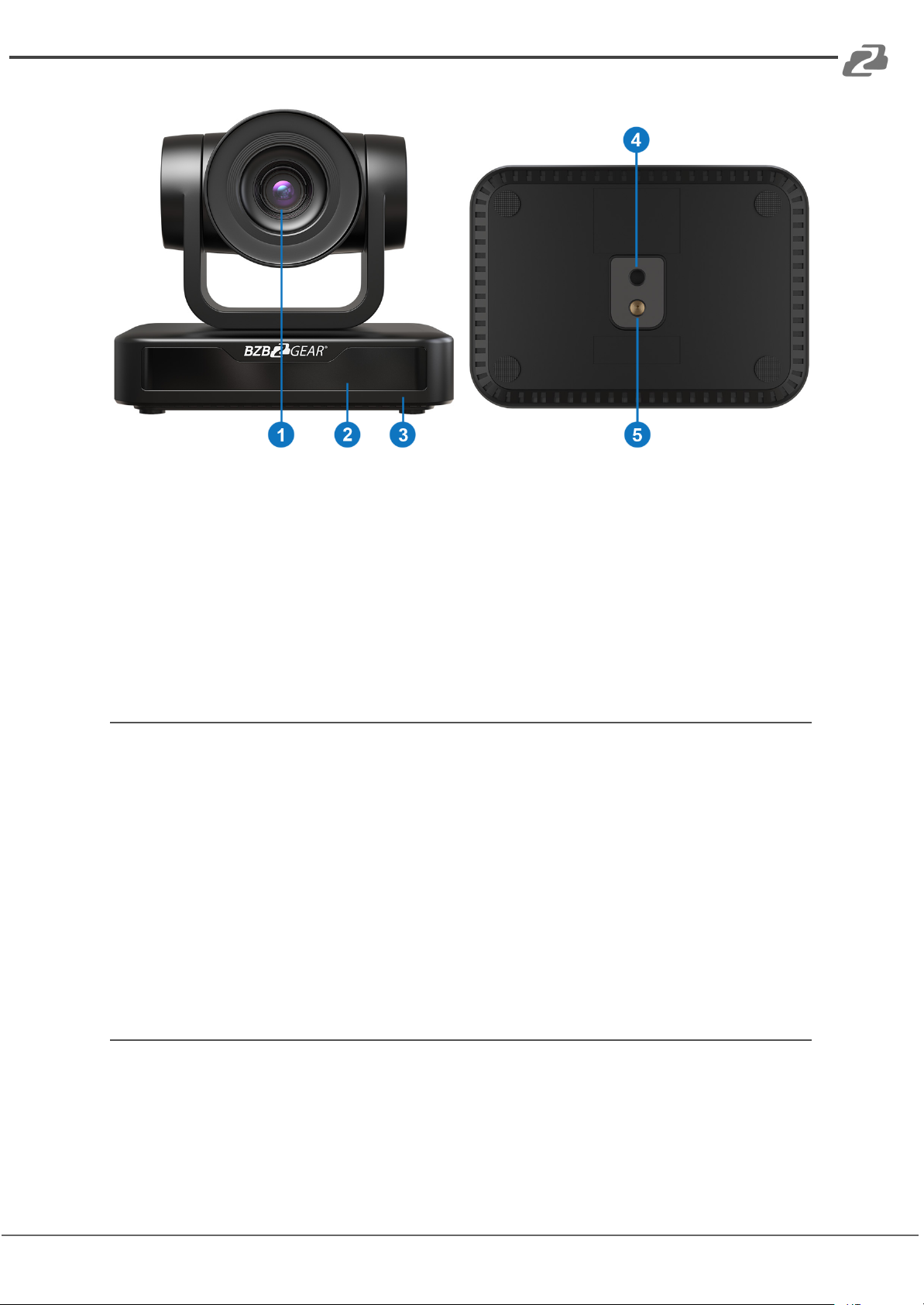
1. Camera Lens
2. Remote Controller Receiver Light
3. Camera Base
4. Mounting hole
5. Tripod Screw Hole
Power-on Initial Configuration
1) Power on: Connect DC12V power supply adapter to the power supply socket.
2) Initial configuration: Power on the unit and the power indicator light will begin
blinking. The camera head will move to the bottom left and then it will return to the
HOME position (intermediate position of both horizontal and vertical facing forward).
The camera module will zoom out and back in as well as adjust focus near and far.
When the remote control receiver light stops blinking, the self-check will be
complete.
Note: If you set or change preset 0 position, after the Power on self-test is
completed the camera will automatically move to the new preset 0 position.
Video Output
This model only supports USB 2.0 video output.
Connect the camera to a computer using the provided USB 2.0 cable and then choose your
desired video conference software or camera application to view the image.
Address: 830 National Drive #140, Sacramento, CA 95834, USA ·Tel: +1(888)499-9906 ·Email: support@bzbgear.com 8

BZBGEAR BG-BPTZ-XU PRODUCT MANUAL
Mounting Brackets
Note: Brackets can be wall mounted or upside-down. It is recommended to mount to a wall
stud, ceiling joist, and to use proper mounting hardware. It is not recommended to be
installed on plasterboard only.
1) Wall Mount Setup
Address: 830 National Drive #140, Sacramento, CA 95834, USA ·Tel: +1(888)499-9906 ·Email: support@bzbgear.com 9

BZBGEAR BG-BPTZ-XU PRODUCT MANUAL
2). Ceiling Mount Setup
Address: 830 National Drive #140, Sacramento, CA 95834, USA ·Tel: +1(888)499-9906 ·Email: support@bzbgear.com 10
Inhaltsverzeichnis
Andere BZB Gear IP-Kamera Handbücher