
CAKEWALK UM-1G Bedienungsanleitung

UM-1G_e.book 1 ページ 2008年11月11日 火曜日 午後6時30分

2
201a, 202
Before using this unit, carefully read the sections entitled: “USING THE UNIT SAFELY” and
“IMPORTANT NOTES” (p. 3; p. 5). These sections provide important information concerning the proper
operation of the unit. Additionally, in order to feel assured that you have gained a good grasp of every
feature provided by your new unit, Owner’s manual should be read in its entirety. The manual should
be saved and kept on hand as a convenient reference.
Copyright © 2008 ROLAND CORPORATION
All rights reserved. No part of this publication may be reproduced in any form without the written
permission of ROLAND CORPORATION.
UM-1G_e.book 2 ページ 2008年11月11日 火曜日 午後6時30分

3
USING THE UNIT SAFELY
002a
• Do not open or perform any internal
modifications on the unit.
...................................................................................................................
003
• Do not attempt to repair the unit, or
replace parts within it (except when this
manual provides specific instructions
directing you to do so). Refer all servicing to
your retailer, the nearest Roland Service
Center, or an authorized Roland distributor,
as listed on the “Information” page.
...................................................................................................................
004
• Never install the unit in any of the following
locations.
•Subjecttotemperature extremes (e.g.,
direct sunlight in an enclosed vehicle,
near a heating duct, on top of heat-
generating equipment); or are
• Damp (e.g., baths, washrooms, on wet
floors); or are
• Exposed to steam or smoke; or are
• Subject to salt exposure; or are
•Humid;orare
• Exposed to rain; or are
• Dusty or sandy; or are
• Subject to high levels of vibration and
shakiness.
...................................................................................................................
007
• Make sure you always have the unit placed
so it is level and sure to remain stable.
Never place it on stands that could wobble,
or on inclined surfaces.
...................................................................................................................
011
• Do not allow any objects (e.g., flammable
material, coins, pins); or liquids of any kind
(water, soft drinks, etc.) to penetrate the
unit.
...................................................................................................................
012d
• Immediately turn the power off, and
request servicing by your retailer, the
nearest Roland Service Center, or an
authorized Roland distributor, as listed on
the “Information” page when:
• If smoke or unusual odor occurs
•Objectshavefalleninto, or liquid has
been spilled onto the unit; or
• The unit has been exposed to rain (or
otherwise has become wet); or
• The unit does not appear to operate
normally or exhibits a marked change in
performance.
...................................................................................................................
Used for instructions intended to alert the
user to the risk of injury or material
damage should the unit be used
improperly.
* Material damage refers to damage or
other adverse eects caused with
respect to the home and all its
furnishings, as well to domestic animals
or pets.
Used for instructions intended to alert the
user to the risk of death or severe injury
should the unit be used improperly.
The symbol alerts the user to things that must be
carried out. The specic thing that must be done is
indicated by the design contained within the circle. In the
case of the symbol at left, it means that the power-cord
plug must be unplugged from the outlet.
The symbol alerts the user to important instructions or
warnings.The specic meaning of the symbol is
determined by the design contained within the triangle. In
the case of the symbol at left, it is used for general
cautions, warnings, or alerts to danger.
The symbol alerts the user to items that must never be
carried out (are forbidden). The specic thing that must not
be done is indicated by the design contained within the
circle. In the case of the symbol at left, it means that the
unit must never be disassembled.
UM-1G_e.book 3 ページ 2008年11月11日 火曜日 午後6時30分

4
013
• In households with small children, an adult
should provide supervision until the child
is capable of following all the rules
essential for the safe operation of the unit.
...................................................................................................................
014
• Protect the unit from strong impact.
(Do not drop it!)
...................................................................................................................
023
• DO NOT play a CD-ROM disc on a
conventional audio CD player. The resulting
sound may be of a level that could cause
permanent hearing loss. Damage to
speakers or other system components may
result.
...................................................................................................................
104
• Try to prevent cords and cables from
becoming entangled. Also, all cords and
cables should be placed so they are out of
the reach of children.
...................................................................................................................
106
•Neverclimbontopof, nor place heavy
objects on the unit.
...................................................................................................................
108c
• Disconnect all cords coming from external
devices before moving the unit.
...................................................................................................................
UM-1G_e.book 4 ページ 2008年11月11日 火曜日 午後6時30分

5
IMPORTANT NOTES
Power Supply
307
• Before connecting this unit to other devices, turn off
the power to all units. This will help prevent
malfunctions and/or damage to speakers or other
devices.
Placement
352a
• This device may interfere with radio and television
reception. Do not use this device in the vicinity of such
receivers.
352b
• Noise may be produced if wireless communications
devices, such as cell phones, are operated in the
vicinity of this unit. Such noise could occur when
receiving or initiating a call, or while conversing.
Should you experience such problems, you should
relocate such wireless devices so they are at a greater
distance from this unit, or switch them off.
354a
• Do not expose the unit to direct sunlight, place it near
devices that radiate heat, leave it inside an enclosed
vehicle, or otherwise subject it to temperature
extremes. Excessive heat can deform or discolor the
unit.
355b
• When moved from one location to another where the
temperature and/or humidity is very different, water
droplets (condensation) may form inside the unit.
Damage or malfunction may result if you attempt to
use the unit in this condition. Therefore, before using
the unit, you must allow it to stand for several hours,
until the condensation has completely evaporated.
Maintenance
401a
• For everyday cleaning wipe the unit with a soft, dry
cloth or one that has been slightly dampened with
water. To remove stubborn dirt, use a cloth
impregnated with a mild, non-abrasive detergent.
Afterwards, be sure to wipe the unit thoroughly with a
soft, dry cloth.
402
• Never use benzine, thinners, alcohol or solvents of any
kind, to avoid the possibility of discoloration and/or
deformation.
Additional Precautions
553
• Use a reasonable amount of care when using the unit’s
buttons, sliders, or other controls; and when using its
jacks and connectors. Rough handling can lead to
malfunctions.
556
• When connecting / disconnecting all cables, grasp the
connector itself–never pull on the cable. This way you
will avoid causing shorts, or damage to the cable’s
internal elements.
558b
• To avoid disturbing your neighbors, try to keep the
unit’s volume at reasonable levels (especially when it is
late at night).
559a
• When you need to transport the unit, package it in the
box (including padding) that it came in, if possible.
Otherwise, you will need to use equivalent packaging
materials.
Handling CD-ROMs
801
• Avoid touching or scratching the shiny underside
(encoded surface) of the disc. Damaged or dirty CD-
ROM discs may not be read properly. Keep your discs
clean using a commercially available CD cleaner.
204
* Microsoft, Windows and Windows Vista are
registered trademarks of Microsoft Corporation.
206e
* The screen shots in this document are used in
compliance with the guidelines of the Microsoft
Corporation.
206j
* Windows® is known officially as: “Microsoft®
Windows® operating system.”
207+209
* Apple, Macintosh and Mac OS are registered
trademarks of Apple Inc.
220
* All product names mentioned in this document
are trademarks or registered trademarks of their
respective owners.
UM-1G_e.book 5 ページ 2008年11月11日 火曜日 午後6時30分

6
Contents
USING THE UNIT SAFELY.............................................................................................................................. 3
IMPORTANT NOTES ....................................................................................................................................... 5
Contents of the Package ................................................................ 7
Names of Things and What They Do ............................................. 8
Getting Connected and Installing Drivers ..................................11
Windows Vista Users...................................................................................................................................11
Installing the Driver .......................................................................................................................11
Input/output Device Settings for Your Application...........................................................13
Windows XP Users .......................................................................................................................................14
Installing the Driver .......................................................................................................................14
Input/output Device Settings for Your Application...........................................................17
Settings for Using the UM-1G with Windows Media Player............................................17
Macintosh Users ...........................................................................................................................................18
Installing the Driver .......................................................................................................................18
MIDI Device Settings .....................................................................................................................19
Basic Use ........................................................................................22
Basic Connections and MIDI Flow..........................................................................................................22
Transmitting MIDI Messages from a MIDI Keyboard or Digital Piano
to the Sequencer Software .........................................................................................................22
Transmitting MIDI Messages from the Sequencer Software
to a MIDI Sound Module or Digital Piano ..............................................................................23
Transmitting MIDI Messages from a MIDI Keyboard or Other Device
to a MIDI Sound Module..............................................................................................................24
Troubleshooting ...........................................................................25
Deleting the Driver ......................................................................................................................................34
Appendices....................................................................................36
About Standard Driver Mode ..................................................................................................................36
Main Specifications.......................................................................37
Index ..............................................................................................38
UM-1G_e.book 6 ページ 2008年11月11日 火曜日 午後6時30分
7
Contents of the Package
The UM-1G includes the following items. When you open the package, first make sure that all
items are included. If any are missing, contact the dealer where you purchased the UM-1G.
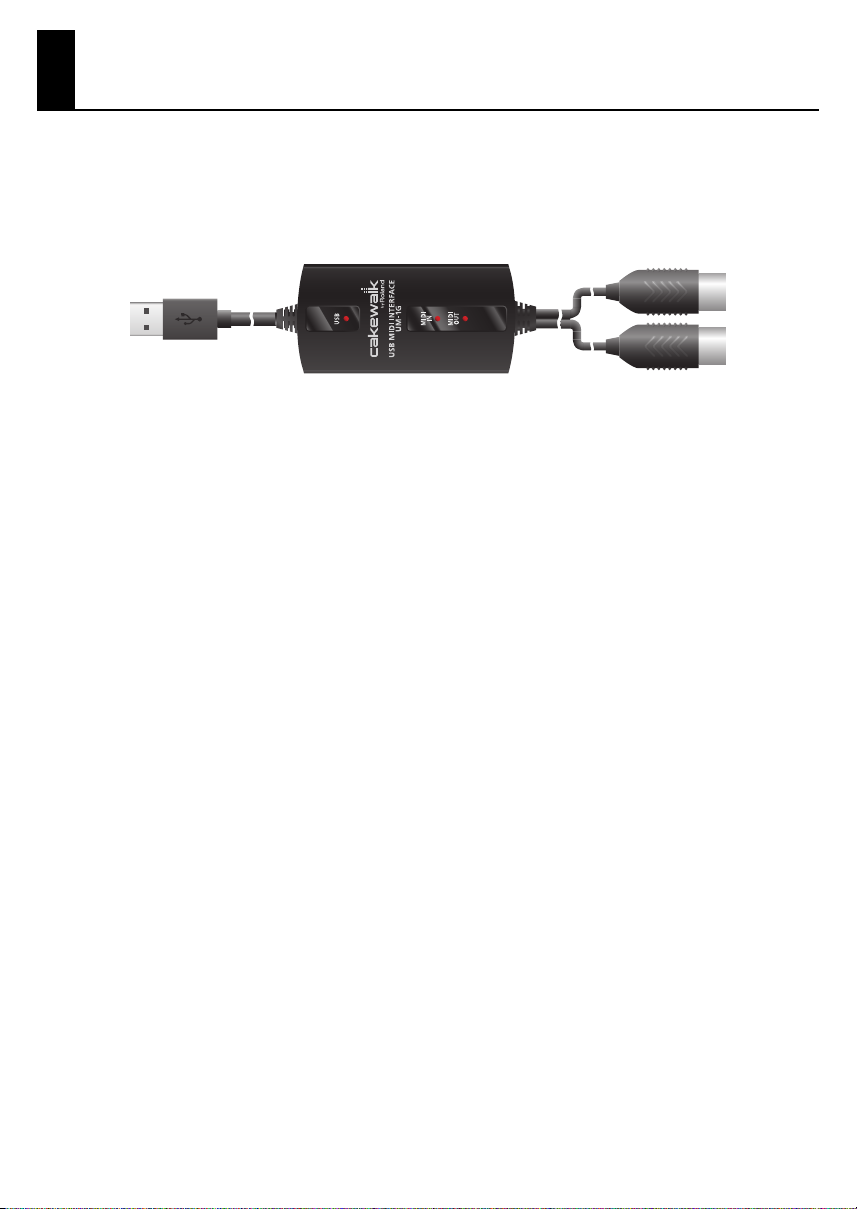
USB MIDI Interface UM-1G
CD-ROM “UM-1G CD-ROM”
This contains drivers for use with the UM-1G.
Owner’s Manual
This is the manual you are reading. Please keep it on hand for reference.
UM-1G_e.book 7 ページ 2008年11月11日 火曜日 午後6時30分
8
Names of Things and What They Do
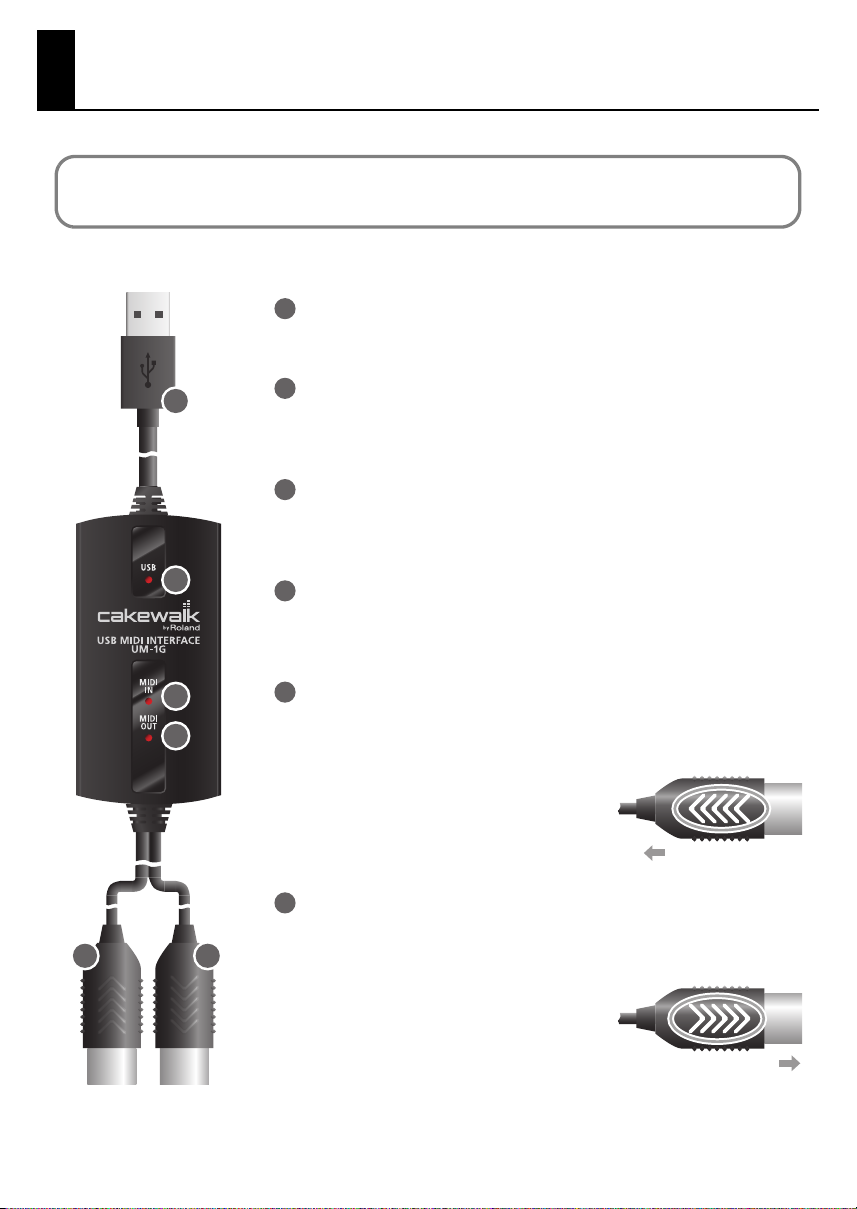
USB Cable
Use this when connecting the UM-1G to your computer.
USB Indicator
This will light when you’ve connected the UM-1G to your computer and
your computer has detected the UM-1G.
MIDI IN Indicator
If the [MIDI THRU] switch is OFF, this indicator will light when MIDI
messages are received from the device connected to MIDI IN connector.
MIDI OUT Indicator
If the [MIDI THRU] switch is OFF, this indicator will light when MIDI
messages from the computer are being transmitted.
MIDI IN Cable (CONNECT TO MIDI OUT)
Connect this to the MIDI OUT connector of the device (such as a MIDI
keyboard) that will be transmitting MIDI messages to your computer.
MIDI OUT Cable (CONNECT TO MIDI IN)
Connect this to the MIDI IN connector of the device (such as a sound
module) that is to be employed by your computer for playing music.
You must install the driver before you connect the UM-1G to your computer for the first time.
Install the driver as described in “Getting Connected and Installing Drivers” (p. 11).
5 6
2
1
3
4
1
2
3
4
5
MIDI Message Flow
6
MIDI Message Flow
UM-1G_e.book 8 ページ 2008年11月11日 火曜日 午後6時30分
9
Names of Things and What They Do
fig.panel
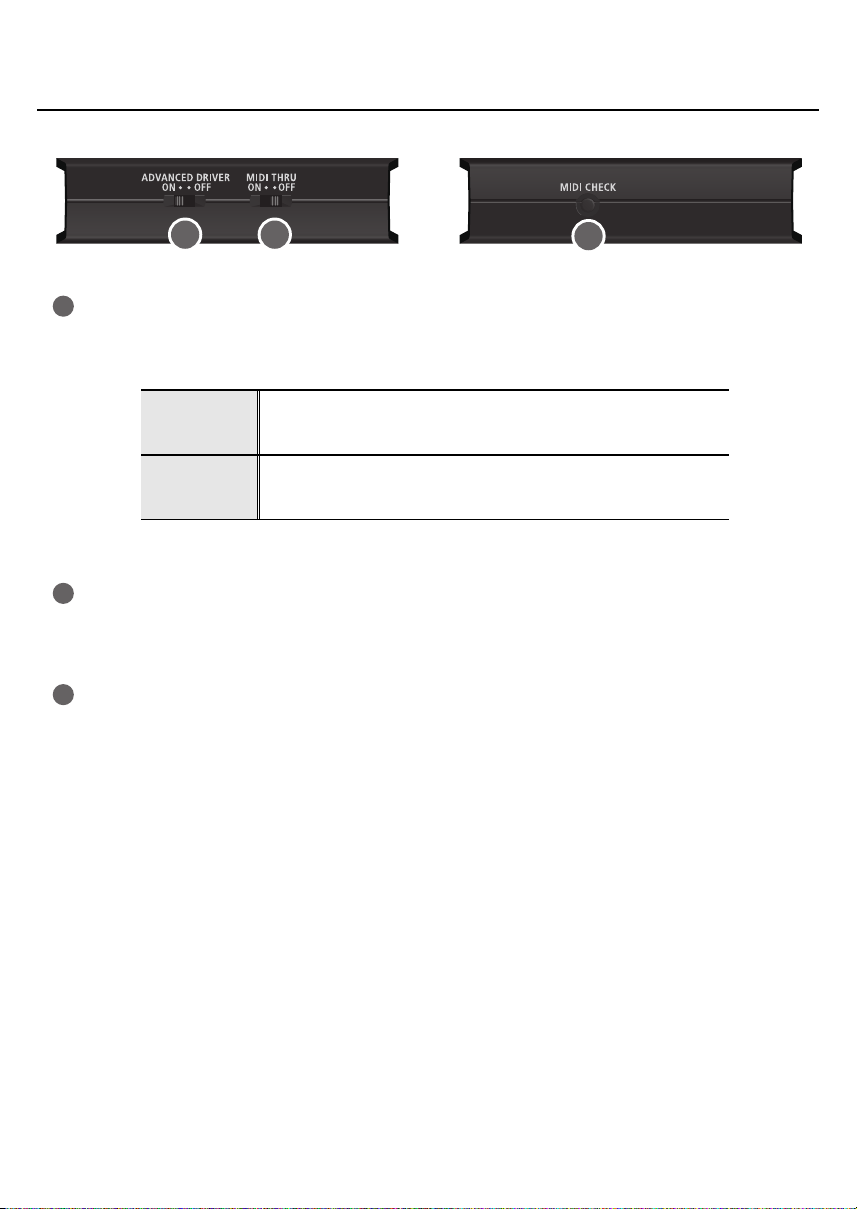
[ADVANCED DRIVER] (mode select) Switch
This switches the operating mode between Advanced mode and Standard driver mode.
Normally, you should use Advanced mode (ON).
*FPT=Fast Processing Technology of MIDI Transmission
[MIDI THRU] Switch
Selects the destination to which the MIDI messages that flow in through the UM-1G’s MIDI IN
cable are to output (→ [MIDI THRU] switch ON/OFF setting p. 22–p. 24).
[MIDI CHECK] Button
This transmits a MIDI note message from the UM-1G’s MIDI connector.
You can use this to check whether your sound module or other MIDI device is correctly
receiving MIDI data (“Testing the MIDI OUT” (p. 23)).
* The [MIDI CHECK] button cannot be used if the [MIDI THRU] switch is ON.
ON
(Advanced
mode)
This mode utilizes the UM-1G’s special, advanced MIDI driver.
This advanced driver uses *FPT technology for rapid, high-performance
MIDI transmissions.
OFF
(Standard
driver mode)
This mode uses the standard MIDI driver included with the OS.
Use this if you do not have the special driver installed.
7 8 9
7
8
9
UM-1G_e.book 9 ページ 2008年11月11日 火曜日 午後6時30分

10
Names of Things and What They Do
[MIDI THRU] Switch ON/OFF setting
You can use the [MIDI THRU] switch to specify the destination of MIDI messages sent
from the MIDI keyboard or digital piano connected to the MIDI IN cable.
fig.connect-change_e
* You can change the setting of the [MIDI THRU] switch while the UM-1G is connected to
the computer. There’s no need to re-connect the UM-1G when doing so.
* Don’t change the setting of the [MIDI THRU] switch while playback is in progress.
Doing so will cause MIDI errors.
Switch
Setting MIDI Message Destination Device
OFF MIDI messages flowing in through the UM-1G’s MIDI IN cable are routed to the
computer (sequencer software).
ON
MIDI messages flowing in through the UM-1G’s MIDI IN cable are output from the
UM-1G’s MIDI OUT cable. If you are not using sequencer software with your
performances, set this to ON.
MIDI Message Flow (THRU OFF)
MIDI Message Flow (THRU ON)
UM-1G_e.book 10 ページ 2008年11月11日 火曜日 午後6時30分
Inhaltsverzeichnis
Andere CAKEWALK Medienkonverter Handbücher


