
Centaur MAC20 Bedienungsanleitung

Instruction Manual for Centaur Mixers
MAC20, MAC30 & MAC60
Model MAC60
Model #:
Serial #:
This manual contains important safety instructions which
must be strictly followed when using this equipment.
- IMPORTANT SAFETY NOTICE -
WARRANTY REGISTRATION
SCAN THE QR CODE WITH YOUR MOBILE DEVICE OR GO TO
WWW.GLOBESLICERS.COM TO FILL OUT AND SUBMIT YOUR
WARRANTY REGISTRATION.
http://www.globeslicers.com/site/warranty.asp


Page 3
ATTENTION OWNERS AND OPERATORS ................................................................................................................4
KEY COMPONENTS OF THE MIXER ........................................................................................................................5
INSTALLATION ....................................................................................................................................................... 6-7
OPERATING INSTRUCTIONS .............................................................................................................................. 7-10
CLEANING INSTRUCTIONS ....................................................................................................................................11
IMPORTANT POINTS ...............................................................................................................................................12
RECOMMENDED MAINTENANCE ..........................................................................................................................12
CAPACITY CHART ....................................................................................................................................................13
TROUBLESHOOTING ........................................................................................................................................ 14-15
LIMITED MIXER WARRANTY ...................................................................................................................................16
WARRANTY CONTACT INFORMATION:
CENTAUR SERVICE 877-234-8287
Printed in the U.S.A. 1-2012 for Centaur products © 2012 vr1.3 6-2012
Index
CENTAUR SERVICE

Page 4
This equipment is designed to provide safe and productive processing of food products as long as the equipment is
used in accordance with the instructions in this manual and is properly maintained. Unless the operator is adequately
trained and supervised there is a possibility of serious injury. Owners of this equipment bear the responsibility to make
certain that this equipment is used properly and safely, strictly follow all the instructions contained in this manual and
the requirements of local, state or federal law.
Owners should not permit anyone to touch this equipment unless they are over 18 years old, are adequately trained
and supervised, and have read and understood this manual. Owners should also ensure that no customers, visitors
or other unauthorized personnel come in contact with this equipment. Please remember that we cannot anticipate
every circumstance or environment in which its equipment will be operated. It is the responsibility of the owner and
the operator to remain alert to any hazards posed by the function of this equipment. If you are ever uncertain about
a particular task or the proper method of operating this equipment, ask your supervisor.
This manual contains a number of precautions to follow to help promote safe use of this equipment. Throughout the
manual you will see additional warnings to help alert you to potential hazards.
Warnings affecting your personal safety are indicated by:
Warnings related to possible damage to the equipment are indicated by:
Make certain the instruction manual is available for easy reference by any operator. We have put a warning label
in the English language on its slicers. Spanish warning labels are available upon request. If the warning label or
manual becomes misplaced, damaged, or illegible, or if you require additional copies, please contact your nearest
representative.
Please remember that this manual or the warning labels do not replace the need to be alert, to properly train and
supervise operators, and to use common sense when using this equipment.
Attention Owners and Operators
or

Page 5
Power Controls
on the MAC20
Key Components of the Mixer
MAC30 FRONT VIEW
MAC30 SIDE VIEW
Attachment Hub
Planetary Grease Fitting
Planetary Shaft
Bowl Handle
Bowl Clamp
Speed Control
Stop Button
Start Button
Bowl Guard
Bowl
Rubber Feet
Attachment Hub
Thumbscrew
Bowl Lift Lever
Timer
Splash Guard
Bowl Cradle
Bowl Slides
Bowl Lift Wheel
(Model MAC60)
Bowl Lock Clamp
on the MAC20

Page 6
Installation
UNPACKING
Unpack the mixer immediately after receipt. If the machine is found to be damaged, save the packaging material
and contact the carrier within fteen (15) days of delivery. Immediately contact your source of the equipment.
You have no recourse to damage after fteen (15) days.
TO AVOID SERIOUS PERSONAL INJURY:
• ALWAYS install equipment in work area with adequate light and space.
• ONLY operate the mixer on a solid, LEVEL, non-skid surface that is nonammable.
• NEVER bypass, alter, or modify this equipment in any way from its original condition. Doing so my create
hazards and will void warranty.
• NEVER operate the mixer without all warnings attached to it.
• DO NOT attempt to lift the mixer alone.
INSTALLATION
1. Read this manual thoroughly before installation and operation. DO NOT proceed with installation and
operation if you have any questions or do not understand anything in this manual. Contact your local
representative.
2. Remove the corrugated box from the skid by removing the bands on the box.
3. Carefully unbolt the mixer from the skid using a 11/16” or 3/4” wrench.
4. Select a location for the mixer keeping these points in mind:
• Floor or counter must be level.
• Easy access for maintenance and service.
• Clearance for operating controls, installing and removing agitators, bowl, or attachments.
• Sufcient space for adding ingredients during mixing periods.
• Ensure rear ventilation outlet of mixer is not blocked.
5. Use at least two other people to tilt the unit and install the rubber feet.
6. Inspect the mixer to ensure all parts have been provided (i.e. bowl, beater, whip, and dough hook).
7. Read the electrical information found on the data plate located at the rear of the machine. The incoming
power should match the rating on the data plate.
CONNECTING TO ELECTRICAL POWER
Cord Connected Units: This machine is provided with a three-prong grounding plug. The outlet that
this plug is connected to must be properly grounded. If the receptacle is not the proper grounding type
contact an electrician. Do not under any circumstances cut or remove the third ground prong from the
power cord or use any adapter plug. Never use an extension cord. Low amp supply could damage the
mixer or cause a re.

Page 7
Installation
CONNECTING TO ELECTRICAL POWER cont’d.
Units Without Power Cord or Plug: Have a licensed electrician connect the unit to the power supply.
9. Complete the warranty registration online at www.globeslicers.com/warranty.asp.
10. Clean the mixer prior to using it. Follow the cleaning instructions on page 11.
NOTE: It is normal for the factory to apply a generous amount of grease in and on the machines before initial
use. Excess grease (brown in color) will be on all metal surfaces (e.g. top portion of bowl guard, speed
control, bowl clamps, bowl lift lever, and attachment hub thumbscrew). Excess high-pressured grease
(brownish-black) may also be found on the planetary shaft and some drippings may be found in the bowl.
Operating Instructions
TO AVOID SERIOUS PERSONAL INJURY:
• DO NOT remove the bowl guard.
• DO NOT operate the mixer before reading the instruction manual rst.
• ALWAYS disconnect or unplug electrical power before cleaning, servicing, or adjusting any parts or
attachments.
• ALWAYS keep hands, hair, and clothing away from moving parts.
ATTACHING THE BOWL TO THE MIXER
NOTE: Install the bowl BEFORE attaching the agitators.
1. Lower the bowl by pulling the bowl lift lever forward and down to its resting position. For
the MAC60, rotate the bowl lift wheel counterclockwise until it stops.
2. Lift the bowl by the bowl handles and
a. slowly position the locking pin (located on the rear of the bowl) into the hole in the
middle rear of the cradle (see g 7-1).
b. lower the bowl onto the pins located on either side of the bowl cradle.
3. Once the bowl is positioned on the cradle, secure the bowl by pulling each bowl clamp
forward until the bowl is locked tight (see g 7-2).
Fig. 7-1
Fig. 7-2
Page 8
Operating Instructions
ATTACHING THE AGITATOR TO THE MIXER (i.e., Beater, Hook, Whip)
NOTE: It is easier to install the agitator prior to adding the ingredients into the bowl.
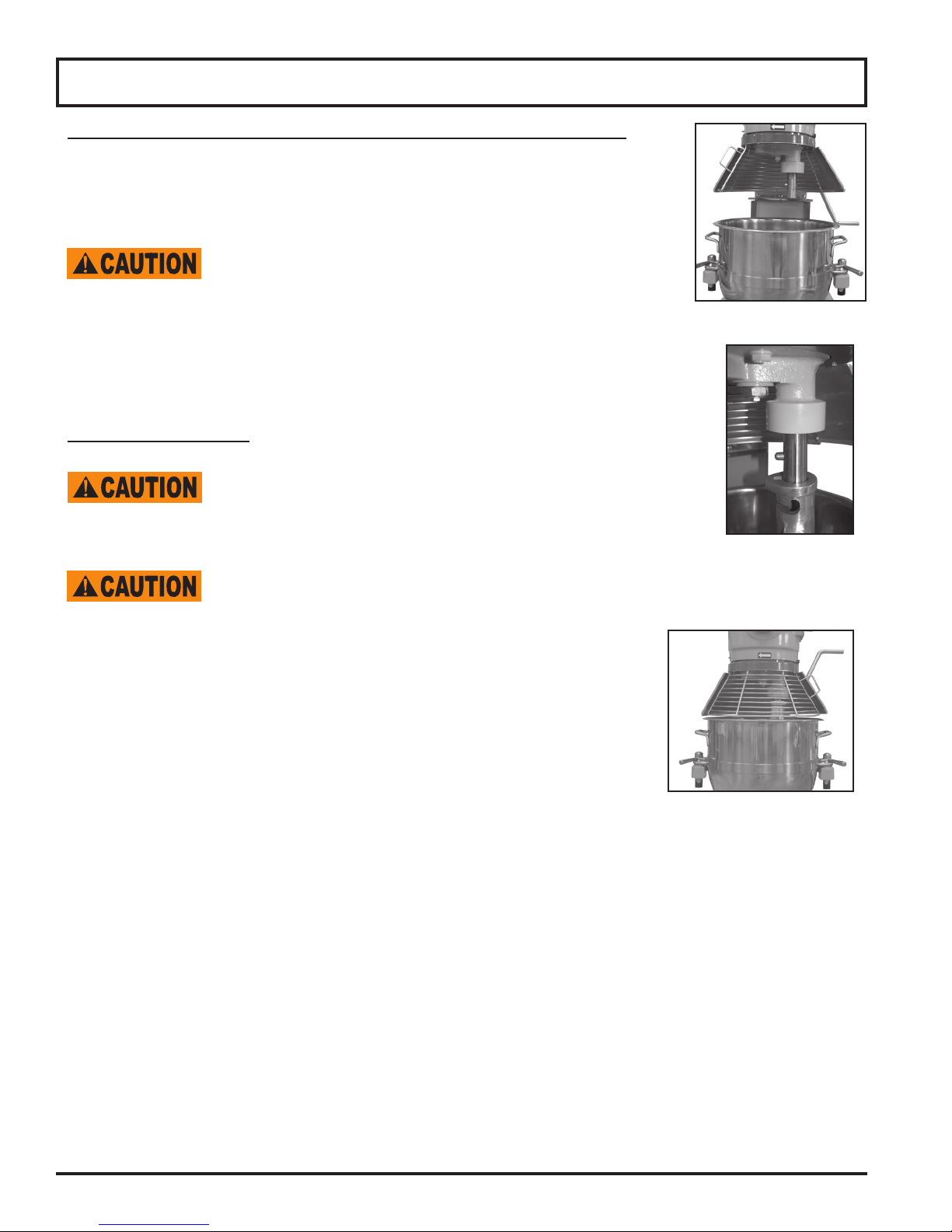
1. Rotate the bowl guard to the left so it rests in the open position (see g 8-1).
Excessive force used to open and close the bowl guard may
damage the spring lock and bowl guard microswitch, and will void
the warranty.
2. Slide the agitator slowly upwards onto the planetary shaft tting the shaft pin
through the slot in the agitator (see g 8-2).
3. Rotate the agitator clockwise to secure it onto the planetary shaft.
MIXING INGREDIENTS
Follow the capacity chart located on page 13 in this manual.
Overloading or not following this chart will damage the mixer and void
the warranty.
Agitators should always rotate in a clockwise direction around the bowl. If the agitator moves
counterclockwise, contact a licensed electrician immediately to remedy incorrect wiring.
IMPORTANT: Make sure the speed control lever is on the rst (1) speed.
1. Add the appropriate mixing ingredients into the bowl.
2. Lift completely up on the bowl lift lever until the bowl locks into position. On the
MAC60 rotate the bowl lift wheel clockwise until the bowl is all the way
up into position.
3. Rotate the bowl guard to the right so it locks into the closed position
(see g 8-3). A clicking sound will be heard.
NOTE: The mixer will not start if the bowl guard is open or the bowl is in the lowered position.
4. Set the timer for the appropriate mixing time or set the mixer for non-timed operation.
a. Timed Operation: Turn the timer knob in a clockwise direction at least ve minutes past “0” to the desired
time. NOTE: To set the time for less than ve minutes turn the timer knob clockwise to six then
counterclockwise back to the desired time.
b. Non-Timed Operation: Turn the timer knob in a counterclockwise direction to the green “on” position.
NOTE: Heavy loads should not be mixed longer than fteen minutes at this setting without an equal
amount of rest time. Failure to adhere to these instructions may cause the mixer to automatically shut off
due to overloading.
Fig. 8-1
Fig. 8-2
Fig. 8-3

Page 9
Operating Instructions
5. Select the appropriate speed setting by lifting or lowering the speed control lever. Three xed speeds are
available for use: rst (1), second (2), and third (3). NOTE:
Gear Speed Product Type/Ingredient
1 (low) Heavy: mixing pizza, bread, pasta and donut doughs, wafe/cake batter, mashing potatoes
2 (medium) Medium: 2nd stage of mixing for donut dough, etc.
3 (high) Light: whipping cream, egg whites, meringue
IMPORTANT: When mixing product always follow the recommended agitator and speed setting
according to the capacity chart located on page 13 of this manual.
6. Press the green start button located on the middle of the control panel.
Always STOP the mixer BEFORE changing speeds! Failure to do so may damage the
gears or other parts and WILL void the warranty!
7. To change the speed while mixing
a. press the red stop button
b. change the speed by raising or lowering the speed control lever
c. press the green start button to restart the mixer.
NOTE: The mixer is equipped with a motor overload protection. If the mixer shuts off during operation reduce the
batch size and
a. MAC20 and MAC30 models: Press the stop button then press the overload reset button.
b. MAC60 model: Wait two minutes. Press the stop button then press the start button.
NOTE: Reduce batch size by 10% if chilled our, water below 70°F, ice, or high gluten our is being used.
IMPORTANT: For heavier loads, the mixer should not run longer than fteen minutes without pausing for a cool
down period of at least fteen minutes or more before resuming mixing. For lighter loads the mixer should not run
longer than thirty minutes without pausing for a cool down period of at least thirty minutes or more before resuming
mixing.
8. When the ingredients have been thoroughly mixed, press the red stop button to stop the mixer. NOTE: If the
timer was used the mixer will automatically stop when the time has expired.
9. Lower the bowl by pulling the bowl lift lever forward and down to its resting position. For MAC60, rotate the
bowl lift wheel counterclockwise until it stops.
10. Rotate the bowl guard to the left so it is in the open position.
11. Remove the agitator from the planetary shaft by lifting it upwards then rotating it counterclockwise until it is
unlocked. Lower the agitator and remove from planetary shaft.

Page 10
Operating Instructions
12. Push each bowl clamp backwards to unlock the bowl from the bowl cradle.
13. Lift up slightly on the bowl so it clears the pins on the bowl cradle.
Most batches are heavy. Always use two people to remove and transport the loaded
bowl after mixing is complete. A bowl truck is included with the MAC60 and should be
used to unload bowls containing more than 50 lbs. per batch.
HOW TO USE THE ATTACHMENT HUB
Never put your hand into the feed chute when using any mixer attachment.
The mixer must be OFF before installing attachments! Do NOT use attachments while mixing!
1. Loosen and remove the attachment hub thumbscrew.
2. Remove the plastic cover from the attachment hub.
3. Lubricate the attachment shaft with a food quality grease or mineral oil.
4. Insert the attachment shaft into the hub making sure to line up the alignment pin with
the hub hole.
5. Tighten the thumbscrew back into the hub and securely tighten it.
6. Select the appropriate speed setting by lifting or lowering the speed control lever.
Recommended Speed while using attachments:
Attachment Recommended Speed
Vegetable Slicer 1 or 2
Cheese Shredder/Grater 2 or 3
Meat Grinder 1 only
NOTE: Make sure the bowl is up and the bowl guard is closed. The mixer will not start if the bowl and the
bowl guard are not in the proper operating position.
7. Turn the timer knob in a counterclockwise direction to the green “on” position.
8. Press the green start button located on the middle of the control panel.
Always STOP the mixer BEFORE changing speeds! Failure to do so may damage the
gears or other parts and WILL void the warranty!
9. To change the speed while using mixer attachments
a. press the red stop button
b. change the speed by raising or lowering the speed control lever
c. press the green start button to restart the mixer.
Plastic Cover
Thumbscrew
Dieses Handbuch passt für folgende Modelle
2
Inhaltsverzeichnis


