Compaq DAT AutoLoader Bedienungsanleitung

Compaq DAT AutoLoader
Reference Guide
Third Edition (January 2000)
Part Number 326817-003
Compaq Computer Corporation

Compaq Confidential – Need to Know Required
Writer: Debbie McRill Project: Compaq DAT AutoLoader Reference Guide Comments:
Part Number: 326817-003 File Name: a-frnt.doc Last Saved On: 1/25/00 10:27 AM
Notice
The information in this publication is subject to change without notice.
COMPAQ COMPUTER CORPORATION SHALL NOT BE LIABLE FOR TECHNICAL OR
EDITORIAL ERRORS OR OMISSIONS CONTAINED HEREIN, NOR FOR INCIDENTAL OR
CONSEQUENTIAL DAMAGES RESULTING FROM THE FURNISHING, PERFORMANCE, OR
USE OF THIS MATERIAL. THIS INFORMATION IS PROVIDED “AS IS” AND COMPAQ
COMPUTER CORPORATION DISCLAIMS ANY WARRANTIES, EXPRESS, IMPLIED OR
STATUTORY AND EXPRESSLY DISCLAIMS THE IMPLIED WARRANTIES OF
MERCHANTABILITY, FITNESS FOR PARTICULAR PURPOSE, GOOD TITLE AND AGAINST
INFRINGEMENT.
This publication contains information protected by copyright. No part of this publication may be
photocopied or reproduced in any form without prior written consent from Compaq Computer
Corporation.
© 2000 Compaq Computer Corporation.
All rights reserved. Printed in the U.S.A.
The software described in this guide is furnished under a license agreement or nondisclosure agreement.
The software may be used or copied only in accordance with the terms of the agreement.
Compaq, Deskpro, Fastart, Compaq Insight Manager, Systempro, Systempro/LT, ProLiant, ROMPaq,
SmartStart, ProSignia, registered United States Patent and Trademark Office.
Microsoft, MS-DOS, Windows, and Windows NT are registered trademarks of Microsoft Corporation.
Pentium is a registered trademark and Xeon is a trademark of Intel Corporation.
Other product names mentioned herein may be trademarks and/or registered trademarks of their
respective companies.
Compaq DAT AutoLoader Reference Guide
Third Edition (January 2000)
Part Number 326817-003

Compaq Confidential – Need to Know Required
Writer: Debbie McRill Project: Compaq DAT AutoLoader Reference Guide Comments:
Part Number: 326817-003 File Name: a-frnt.doc Last Saved On: 1/25/00 10:27 AM
Contents
About This Guide
Text Conventions.......................................................................................................vii
Symbols in Text....................................................................................................... viii
Symbols on Equipment............................................................................................ viii
Rack Stability .............................................................................................................ix
Getting Help ................................................................................................................x
Compaq Technical Support ..................................................................................x
Compaq Website ..................................................................................................x
Compaq Authorized Reseller................................................................................x
Chapter 1
Overview
Introduction to the DAT AutoLoader ...................................................................... 1-1
Features.................................................................................................................... 1-2
The SCSI Interface .................................................................................................. 1-3
Controller Requirements................................................................................... 1-3
Reliability of Backup Devices ................................................................................. 1-3
Projected Duty Cycle........................................................................................ 1-4
Capacity................................................................................................................... 1-4
Data Compression ............................................................................................ 1-4
Cassette Formats...................................................................................................... 1-5
DDS Logo Media ............................................................................................. 1-6
Write-Protecting a Cassette .............................................................................. 1-7
Life Expectancy of Cassettes............................................................................ 1-7

iv
Compaq Confidential – Need to Know Required
Writer: Debbie McRill Project: Compaq DAT AutoLoader Reference Guide Comments:
Part Number: 326817-003 File Name: a-frnt.doc Last Saved On: 1/25/00 10:27 AM
Chapter 2
Installation
DAT AutoLoader Installation .................................................................................. 2-1
Software and Tool Requirements...................................................................... 2-1
Setting the SCSI ID........................................................................................... 2-3
Switch Settings......................................................................................................... 2-3
Preparing the Computer ........................................................................................... 2-6
Installing the DAT AutoLoader ............................................................................... 2-6
Reassembling the Computer .................................................................................... 2-8
Connecting the Tabletop AutoLoader...................................................................... 2-9
Completing the Installation.................................................................................... 2-10
Chapter 3
Installing Software Drivers
Device Drivers ......................................................................................................... 3-1
Microsoft Windows NT ........................................................................................... 3-2
Novell NetWare ....................................................................................................... 3-3
ASPI Support ........................................................................................................... 3-3
Compaq Tru64 UNIX .............................................................................................. 3-4
OpenVMS ................................................................................................................ 3-4
SCO OpenServer...................................................................................................... 3-4
Configuring the SCSI ID for SCO OpenServer ................................................ 3-5
SCO UnixWare ........................................................................................................ 3-6
SunSoft Solaris......................................................................................................... 3-7
Banyan VINES......................................................................................................... 3-8
Chapter 4
Operation
Introduction to Magazines and Cassettes ................................................................. 4-1
Labeling Cassettes and the Magazine ............................................................... 4-2
Loading the Magazine with Cassettes...................................................................... 4-2
Eight-Cassette Configuration............................................................................ 4-3
Seven-Cassette Configuration........................................................................... 4-4
Single-Cassette Configuration .......................................................................... 4-4
To Load the Magazine With Cassettes.............................................................. 4-5
Loading the Magazine into the AutoLoader ............................................................ 4-6
Removing the Cassettes from the Magazine............................................................ 4-6
Ejecting the Magazine ...................................................................................... 4-7
Modes of Operation ................................................................................................. 4-9
Front Panel............................................................................................................. 4-10
Liquid Crystal Display (LCD) ............................................................................... 4-11
LCD Messages ....................................................................................................... 4-12
LCD Menu Screens................................................................................................ 4-16

v
Compaq Confidential – Need to Know Required
Writer: Debbie McRill Project: Compaq DAT AutoLoader Reference Guide Comments:
Part Number: 326817-003 File Name: a-frnt.doc Last Saved On: 1/25/00 10:27 AM
Chapter 5
Cleaning
Importance of Routine Cleaning.............................................................................. 5-1
Errors Resulting from Cleaning Neglect.................................................................. 5-2
Importance of Compaq-Approved Tape Cassettes .................................................. 5-3
DAT AutoLoader Cleaning Recommendations....................................................... 5-3
Procedure for Cleaning the Heads in Stacker Mode................................................ 5-4
Procedure for Cleaning the Heads in Random Mode .............................................. 5-4
Chapter 6
Troubleshooting
Quick Checklist ....................................................................................................... 6-1
Hardware .......................................................................................................... 6-1
Software............................................................................................................ 6-2
Installation Troubleshooting.................................................................................... 6-3
Troubleshooting After Installation........................................................................... 6-4
For Tru64 Unix................................................................................................. 6-4
For Novell NetWare ......................................................................................... 6-4
For Microsoft Windows NT Systems............................................................... 6-5
For SCO OpenServer Systems.......................................................................... 6-5
For IBM OS/2 Systems..................................................................................... 6-6
Resolving Operating Problems ................................................................................ 6-6
Resolving Magazine Problems ................................................................................ 6-6
Correcting Intermittent Failures............................................................................... 6-7
Appendix A
Regulatory Compliance Notices
Regulatory Compliance Identification Numbers .....................................................A-1
Federal Communications Commission Notice ........................................................A-1
Class B Equipment ...........................................................................................A-2
Modifications....................................................................................................A-3
Canadian Notice (Avis Canadien) ...........................................................................A-4
Class B Equipment ...........................................................................................A-4
European Union Notice ...........................................................................................A-4
Japanese Notice .......................................................................................................A-5
Taiwanese Notice.....................................................................................................A-5
Appendix B
Electrostatic Discharge
Grounding Methods.................................................................................................B-2

vi
Compaq Confidential – Need to Know Required
Writer: Debbie McRill Project: Compaq DAT AutoLoader Reference Guide Comments:
Part Number: 326817-003 File Name: a-frnt.doc Last Saved On: 1/25/00 10:27 AM
Appendix C
Specifications
Dimensions and Weight.......................................................................................... C-1
Temperature and Humidity Range.......................................................................... C-2
Power Requirements ............................................................................................... C-2
Air-Cooling Requirement ....................................................................................... C-2
Suspended Particulate ............................................................................................. C-3
Index

Compaq Confidential – Need to Know Required
Writer: Debbie McRill Project: Compaq DAT AutoLoader Reference Guide Comments:
Part Number: 326817-003 File Name: a-frnt.doc Last Saved On: 1/25/00 10:27 AM
About This Guide
This guide is designed to be used as step-by-step instructions for installation
and as a reference for operation, troubleshooting, and future upgrades.
Text Conventions
This document uses the following conventions to distinguish elements of text:
Keys Keys appear in boldface. A plus sign (+) between
two keys indicates that they should be pressed
simultaneously.
USER INPUT User input appears in a different typeface and in
uppercase.
FILENAMES File names appear in uppercase italics.
Menu Options,
Command Names,
Dialog Box Names
These elements appear in initial capital letters.
COMMANDS,
DIRECTORY NAMES,
and DRIVE NAMES
These elements appear in uppercase.
Type When you are instructed to type information, type
the information without pressing the Enter key.
Enter When you are instructed to enter information, type
the information and then press the Enter key.

viii Compaq DAT AutoLoader Reference Guide
Compaq Confidential – Need to Know Required
Writer: Debbie McRill Project: Compaq DAT AutoLoader Reference Guide Comments:
Part Number: 326817-003 File Name: a-frnt.doc Last Saved On: 1/25/00 10:27 AM
Symbols in Text
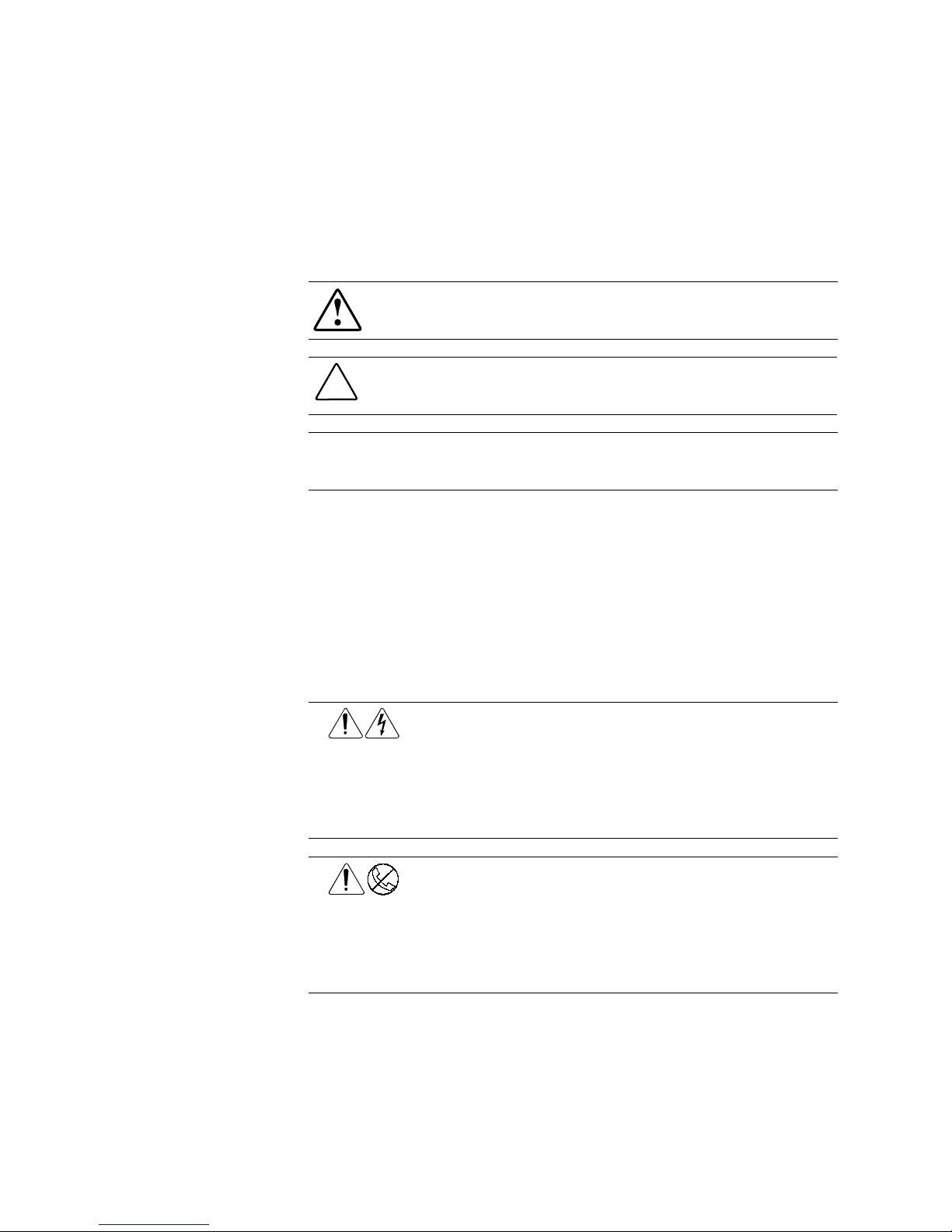
These symbols may be found in the text of this guide. They have the following
meanings.
WARNING: Text set off in this manner indicates that failure to follow directions
in the warning could result in bodily harm or loss of life.
CAUTION: Text set off in this manner indicates that failure to follow directions
could result in damage to equipment or loss of information.
IMPORTANT: Text set off in this manner presents clarifying information or specific
instructions.
NOTE: Text set off in this manner presents commentary, sidelights, or interesting points
of information.
Symbols on Equipment
These icons may be located on equipment in areas where hazardous conditions
may exist.
Any surface or area of the equipment marked with these symbols
indicates the presence of electric shock hazards. Enclosed area
contains no operator-serviceable parts.
WARNING: To reduce the risk of injury from electric shock hazards,
do not open this enclosure.
Any RJ-45 receptacle marked with these symbols indicates a Network
Interface Connection.
WARNING: To reduce the risk of electric shock, fire, or damage to the
equipment, do not plug telephone or telecommunications connectors
into this receptacle.

About This Guide ix
Compaq Confidential – Need to Know Required
Writer: Debbie McRill Project: Compaq DAT AutoLoader Reference Guide Comments:
Part Number: 326817-003 File Name: a-frnt.doc Last Saved On: 1/25/00 10:27 AM
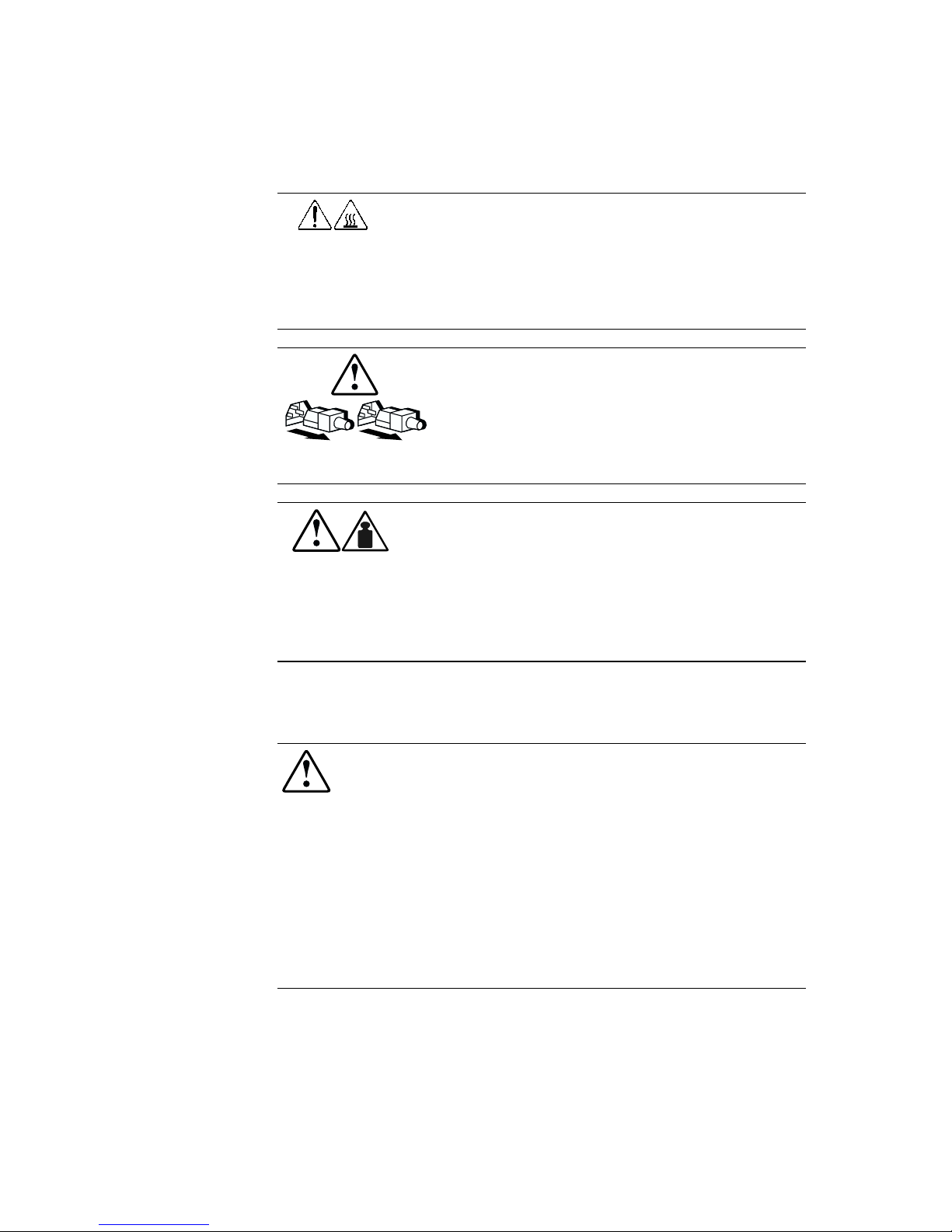
Any surface or area of the equipment marked with these symbols
indicates the presence of a hot surface or hot component. If this
surface is contacted, the potential for injury exists.
WARNING: To reduce the risk of injury from a hot component, allow
the surface to cool before touching.
Power supplies or systems marked with these symbols indicate
the equipment is supplied by multiple sources of power.
WARNING: To reduce the risk of injury from electric shock,
remove all power cords to completely disconnect power from
the system.
Any product or assembly marked with these symbols indicates that
the component exceeds the recommended weight for one individual
to handle safely.
WARNING: To reduce the risk of personal injury or damage to the
equipment, observe local occupational health and safety
requirements and guidelines for manual material handling.
Rack Stability
WARNING: To reduce the risk of personal injury or damage to the equipment,
be sure that:
■The leveling jacks are extended to the floor.
■The full weight of the rack rests on the leveling jacks.
■The stabilizing feet are attached to the rack if it is a single rack
installation.
■The racks are coupled together in multiple rack installations.
■A rack may become unstable if more than one component is extended for
any reason. Extend only one component at a time.

x Compaq DAT AutoLoader Reference Guide
Compaq Confidential – Need to Know Required
Writer: Debbie McRill Project: Compaq DAT AutoLoader Reference Guide Comments:
Part Number: 326817-003 File Name: a-frnt.doc Last Saved On: 1/25/00 10:27 AM
Getting Help
If you have a problem and have exhausted the information in this guide, you
can get further information and other help in the following locations.
Compaq Technical Support
In North America, call the Compaq Technical Phone Support Center at
1-800-OK-COMPAQ. This service is available 24 hours a day, 7 days a week.
For continuous quality improvement, calls may be recorded or monitored.
Outside North America, call the nearest Compaq Technical Support Phone
Center. Telephone numbers for world wide Technical Support Centers are
listed on the Compaq website. Access the Compaq website by logging on to
the Internet at:
http://www.compaq.com
Be sure to have the following information available before you call Compaq:
■Technical support registration number (if applicable)
■Product serial number
■Product model name and numbers
■Applicable error messages
■Add-on boards or hardware
■Third-party hardware or software
■Operating system type and revision level
Compaq Website
The Compaq website has information on this product as well as the latest
drivers and Flash ROM images. You can access the Compaq website by
logging on to the Internet at:
http://www.compaq.com
Compaq Authorized Reseller
For the name of your nearest Compaq Authorized Reseller:
■In the United States, call 1-800-345-1518.
■In Canada, call 1-800-263-5868.
■Elsewhere, see the Compaq website for locations and telephone
numbers.
Inhaltsverzeichnis
Beliebte Disc-Duplikator Handbücher anderer Marken

Logicube
Logicube EchoPlus-NG Bedienungsanleitung

Silca
Silca Delta 2000 SA Bedienungsanleitung

Reflex7
Reflex7 Daisy Chain Series Bedienungsanleitung

Vinpower Digital
Vinpower Digital SharkCopier DC Bedienungsanleitung

Codonics
Codonics Virtua E Bedienungsanleitung

Octave
Octave Copy Master II Bedienungsanleitung

Kanguru
Kanguru U2-DVDDUPE-S Bedienungsanleitung

StarTech.com
StarTech.com 8STSATDUP11 Bedienungsanleitung

DUPLO SEIKO CORPORATION
DUPLO SEIKO CORPORATION Duprinter DP-460 Bedienungsanleitung

Addonics Technologies
Addonics Technologies UDFH7 Bedienungsanleitung

Vinpower Digital
Vinpower Digital MiniLoader VDX-1 Bedienungsanleitung

Addonics Technologies
Addonics Technologies CFASTD5 Bedienungsanleitung