
Crystal Vision CoCo104 Bedienungsanleitung

Crystal Vision Ltd., Lion Technology Park, Station Road East, Whittlesford, Cambridge, CB22 4WL, England.
E-mail: [email protected] Website: www.crystalvision.tv Tel: +44(0) 1223 497049 Fax: +44(0) 1223 497059
CoCo104
Colour corrector and legaliser

CoCo104 User Manual R2.0 Crystal Vision
126/09/05
Contents
1 Introduction 4
Processing modes 5
Soft limiting 5
2 Hardware installation 7
2.1 Rear modules and signal I/O 7
2.2 CoCo104 configuration 8
2.3 Using module GPIs 9
GPI connections 10
Setting node addresses 12
3 The CoCo Controller panel 13
3.1 Installing the Controller 13
Controller to frame remote wiring 14
3.2 Using the CoCo Controller for the first time 16
3.3 Controller operation 21
Selecting a CoCo board to control 21
The Menu functions 21
Changing YUV gains 22
Changing UV pedestal and chroma hue 23
Changing RGB pedestal 23
Changing picture crop 23
Changing delay and Y/C offset 24
Saving presets 24
Recalling presets 24
Set soft clipping and legal colour options 25
Set wipe/bypass options 27

CoCo104 User Manual R2.0 Crystal Vision
226/09/05
4 The CoCo Controller-48V 28
4.1 Installing the CoCo Controller-48V 28
Connecting supply cables 29
Controller to frame remote wiring 30
Using Controller GPIs 31
4.2 CoCo Controller-48V operation 32
Changing crosspoint assignments 33
Viewing crosspoint assignments 33
Multiple routing 33
Using salvos 33
5 Using the active front panel 35
5.1 Navigating the display 36
Sub-menus and data entry 37
5.2 The CoCo104 active panel menu structure 38
5.3 Configuring YUV processing 39
5.4 Configuring RGB processing 41
5.5 Timing 43
5.6 Miscellaneous 44
6Statesman 45
6.1 Statesman operation 46
Using colour space controls 47
Controlling YUV gain and lift 47
Controlling luminance clip threshold and slope 47
Controlling U/V threshold 48
Controlling chrominance levels 49
Controlling Video/RGB levels 50
Controlling RGB gain and lift 50
Controlling RGB clip threshold and slope 51
Adjusting picture crop 52
Changing video gamma 53

CoCo104 User Manual R2.0 Crystal Vision
326/09/05
Using presets 53
Using preview (wipe) mode 54
Enable YUV/RGB clipping 54
EDH generation 54
Board bypass 55
Recalling setup default values 55
7 Trouble shooting 56
8 Specification 58

Crystal Vision Introduction
CoCo104 User Manual R2.0 426/09/05
1 Introduction
CoCo104 is a 10 bit digital colour corrector and legaliser, which allows independent
digital image adjustments in YUV and RGB domains, essential for maintaining colour
fidelity. CoCo104 passes all ancillary data, including embedded audio, transparently. 16
memories are provided to store user-defined adjustments and there is GPI output
indication of YUV and RGB clip status.
CoCo104 colour corrector and legaliser
The main features are as follows:
Digital colour corrector and legaliser
Independent digital image adjustments in YUV and RGB domains
Tools to adjust level, gain, soft clipping and timing
All limiting has adjustable softness
Performs true colour correction using RGB lift and gain
Changes YUV colours illegal in RGB to be valid in RGB
Overall gamma and independent adjustment of red, green and blue gamma
Split-screen output to preview adjustments – AUX out only
Bypass control
Passes ancillary information
16 user memories
EDH generation
Control from dedicated 1U CoCo Controller, Statesman or active panel
CoCo104 is a 100mm x 266mm module, which fits in all of the standard frames and can
be integrated with any boards from the company’s full product range. It uses the RM01
rear connector.
The 4U Indigo 4 frame will house up to 24 modules and triple power supplies.
The 2U Indigo 2 or FR2AV frame will house up to 12 modules and dual power supplies.

Crystal Vision Introduction
CoCo104 User Manual R2.0 526/09/05
The 1U Indigo 1 or FR1AV frame will house six modules and a single power supply.
The 1U Indigo DT desk top box has a built-in power supply and will house up to two
modules.
On the 1U, 2U and 4U frames a hinged front panel gives access to the PSU and all
modules. The desk top box has a removable front. The universal frame wiring system
allows any of the interface range of modules to be fitted in any position with the use of
removable rear modules.
Applications include correcting computer-generated or post-production output and
ensuring broadcast colour gamut is always legal.
Processing modes
Advance/retard Y/C offset delay
Advance/retard overall horizontal delay (74ns increments)
Hue shift UV channels
Increase/decrease Y, U and V channel lift and gain independently
Set and soft limit Y channel positive (Hi) and negative (Lo) excursions
Set and soft limit U, and V channel positive/negative excursions symmetrically
Increase/decrease RGB channel lift and gain independently
Increase/decrease RGB gamma independently and together
Set and soft limit RGB channel positive excursions independently
Set horizontal and vertical active picture area cropping region on final output
Soft limiting
Soft limiting or clipping is provided by a combination of adjustable threshold and slope
controls. The luminance channel has both high and low limiting, whilst the UV and RGB
channels have one clipping control for each colour component. UV clipping operates
symmetrically about black level and RGB clipping is adjustable at the high level only.

Crystal Vision Introduction
CoCo104 User Manual R2.0 626/09/05
CoCo104 soft limiting
Note: Although there is no provision for an RGB lower clip adjustment, when RGB clipping is
enabled, excessive negative RGB excursions are automatically prevented.

Crystal Vision Hardware installation
CoCo104 User Manual R2.0 726/09/05
2 Hardware installation
The CoCo104 colour corrector and legaliser is a single height module which fits into all
Crystal Vision rack frames. All modules can be plugged in and removed while the frame
is powered without damage.
2.1 Rear modules and signal I/O
The CoCo104 module fits into all Crystal Vision rack frames. All modules can be
plugged in and removed while the frame is powered without damage.
CoCo104 is used with the RM01 single slot rear connector in all Crystal Vision frames.
The 4U Indigo 4 frame will house up to 24 modules and triple power supplies.
The 2U Indigo 2 or FR2AV frame will house up to 12 modules and dual power supplies.
The 1U Indigo 1 or FR1AV frame will house 6 modules and a single power supply.
The 1U Indigo DT desk top box has a built-in power supply and will house up to 2
modules.
On the 1U, 2U and 4U frames a hinged front panel gives access to the PSU and all
modules. The desk top box has a removable front. The universal frame wiring system
allows any of the interface range of modules to be fitted in any position with the use of
removable rear modules.
RM01 rear module connections:
RM01 fits in all current frames Description
RM01 (ZLA00227 artwork)
•24 modules per 4U frame, 12
per 2U frame, six per 1U
frame & two per desk top box
•All frame slots can be used
BNC Signal
AUX (2) Second auxiliary input
SDI IN SDI input
N/C Not used
MAIN(1) SDI output 1
MAIN(2) SDI output 2
AUX (1) First auxiliary input

Crystal Vision Hardware installation
CoCo104 User Manual R2.0 826/09/05
2.2 CoCo104 configuration
The jumper links on the board are set correctly when CoCo104 is tested before despatch and should be
left as set at the factory. The following information is for jumper position confirmation only.
J5
CoCo104 showing default factory jumpers
Link positions - board viewed as above
Link Required position
J8 & J9 Must be in the ON position
J2, J3, J5, J7 Must be in the SLOW position
J6 Leave jumper in place
J14 Leave in WDOG position
J1, J4, J16, J17 Leave all four jumpers in the right hand position to enable the CoCo Controller panel. Leave
in the left-hand position for GPI outputs
PL7 Selects GPI ‘e’ (IN/FADER/OUT) and GPI ‘f’ (IN/POWER/OUT) function – default is OUT
PA43/PA65 Not used
Crystal Vision Hardware installation
CoCo104 User Manual R2.0 926/09/05
2.3 Using module GPIs
Each slot has an associated set of GPI connections for remote control and external status
outputs on the frame rear-panel remote connectors. For convenience, GPI lines are
associated with reference codes ‘a’ to ‘f’ in the connector pin-out tables for each frame.
GPI lines can be used for either remote preset control or a second serial port for the CoCo
Controller panel. GPI lines ‘e’ and ‘f’ are reserved for an optional remote fader.
To enable GPI preset selection, ensure that the four jumpers J1, J4, J16 and J17 are all
positioned away from the edge connector.
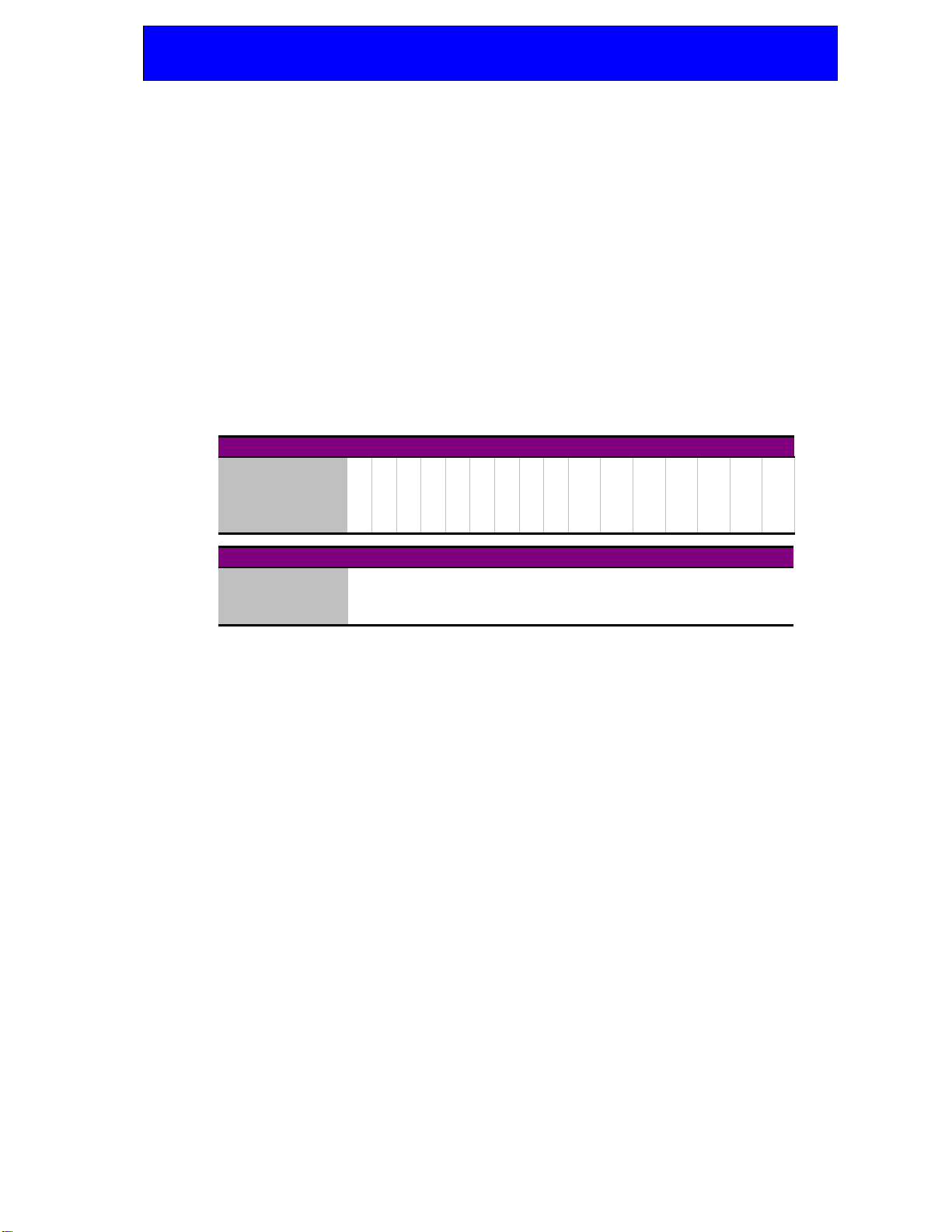
The following table shows the binary weighted code required to recall presets 1 to 16
according to the state of GPI ‘e’. A ‘0’ is an open GPI input and a ‘1’ is a grounded GPI
input.
Recall Preset 12345678910 11 12 13 14 15 16
GPI ‘a’ 0101010101010101
GPI ‘b’ 0011001100110011
GPI ‘c’ 0000111100001111
GPI ‘d’ 0000000011111111
OPEN (+5V) GROUND
‘a’, ‘b’, ‘c’, ‘d’ See table above
‘e’ No action IN/FADER/OUT – depends on JP7
‘f’ No action IN/POWER/OUT – depends on JP7
GPI input assignment
GPI input connections have 10k Ωpull-up resistors to +5V. Closed-contact switches or
+5V to +24V logic levels can be used
GPI output connections (when provided) have 330Ωseries resistors fitted to drive LEDs
and 10k Ω pull-up to +5V (to drive a remote input).
Note: Jumpers PL 1, 4, 16 and 17 should be left in the left hand GPI position to enable normal
GPI operation and in the right hand position to enable RS485 comms for a CoCo
Controller.
Inhaltsverzeichnis
Andere Crystal Vision Steuerungssystem Handbücher


