Davco SHOP PRO ST Bedienungsanleitung

Updated 09/08/2020
F1321 REV C
F1321 REV E
FOR UPDATED INFORMATION VISIT WWW.DAVCO.COM
SHOPPRO®ST
WITH 50/80 PSI REGULATOR
TECHNICAL MANUAL
F1321 REV E
TABLE OF CONTENTS
Applications and Features............................................... 1
ShopPro®ST Components .............................................. 2
EImportant Safety Precautions .........................................3
Set-up and Maintenance ................................................ 4
Hoses and Adapters .................................................... 5
Hose Connections Priming.............................................. 6
Priming the Fuel Module with Compucheck Fitting ....................... 7
Hose Connections for Priming at 50 PSI ................................. 8
Priming with Regulator settings of 50 PSI ...............................10
Fuel Tank Sweeping with Filtration......................................11
Fuel Transfer with Filtration ............................................12
Service Parts ..........................................................13
Service Parts - Adapters................................................14
Warranty Policy ........................................................15
Parts Return Policy ....................................................16


1
DAVCO Technology, LLC www.davco.com800-328-26111600 Woodland Drive, Saline, MI 48176-1629 F1321 REV E
SHOP PRO®ST
WITH 50/80 PSI PRESSURE REGULATOR
TECHNICAL MANUAL
APPLICATIONS AND FEATURES
EProduct Warning: The ShopPro is only
approved for use with diesel fuel. It is
not approved for use with gasoline or
any other flammable liquids.
Applications
• Priming after Filter Service
- Eliminates the use of hand priming pumps after
performing maintenance
- Uses on-board fuel to prime engines and filters, avoids
the hassle of keeping reserve fuel on hand
- Eliminates cross contamination of fuel
• Fuel Transfer
- Filters and transfers fuel in one operation
- Transfers fuel when repairing tanks or crossover lines
- Transfers fuel for trucks being sold or taken out of
service
• Tank Cleaning
- Removes contaminated fuel, sediment and water from
fuel tanks of diesel powered equipment or from diesel
storage tanks
- Cleans fuel tanks during service — can be a value
added service or a new revenue stream
- Eliminates downtime due to fuel contamination
Specifications
• Height: 24" handle down, 38" handle up
• Width: 21"
• Depth: 24"
• Weight: 35 lbs
• Electric Motor: 12VDC, 3000 RPM, UL
®Listed
• Flow Rate: 12VDC: 91 GPH
ShopPro Filtration
• All-in-one fuel filter and water separator for diesel fuel
• Superior fuel/water separation
• Easy to access drain
• Lightweight aluminum construction
Features
• Cart
- Heavy-duty steel construction
- Portable and self-contained
• Electrical
- UL
®Listed, rear-facing receptacle
- Waterproof ON/OFF switch
- 12VDC connection
• Pump and Motor
- Electric motor/pump combination rated for continuous
operation
- UL
®Listed and CSA approved
• Adapters and hoses
- No-drip fittings
- Color-coded for function
• Regulator
- 50 psi (handle up, range of 45 psi to 50 psi) for use on
MaxxForce Engines
- 80 psi (handle down, range of 75 psi to 80 psi) for use
on other applications

2
DAVCO Technology, LLC www.davco.com800-328-26111600 Woodland Drive, Saline, MI 48176-1629 F1321 REV E
SHOP PRO®ST
WITH 50/80 PSI PRESSURE REGULATOR
TECHNICAL MANUAL
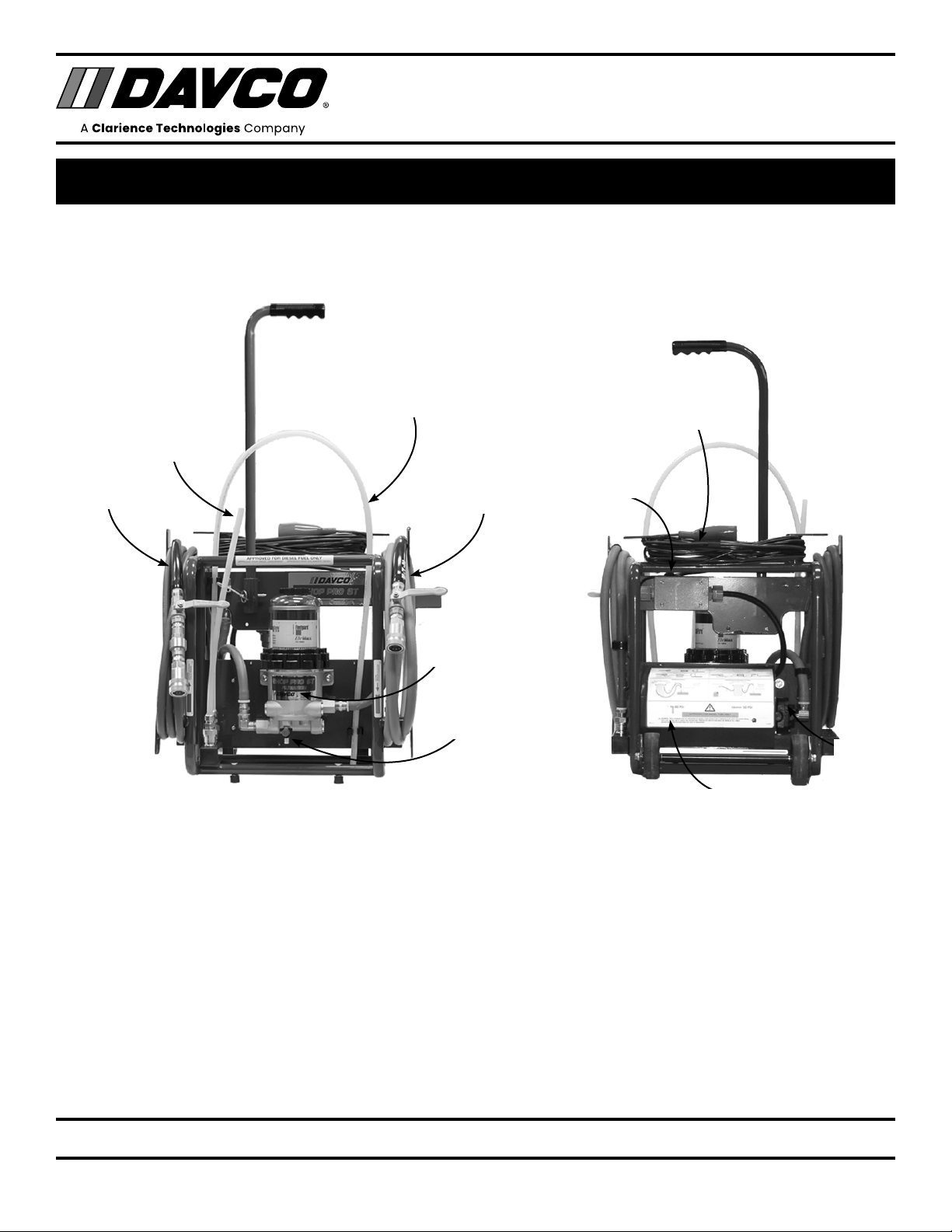
SHOPPRO®ST COMPONENTS
Handle
Filtration
Unit
Dispensing
Wand
Pressure
Hose
Pick-up Wand
Drain
Suction Hose
Power Connection
On/Off Switch
Motor
Pump

3
DAVCO Technology, LLC www.davco.com800-328-26111600 Woodland Drive, Saline, MI 48176-1629 F1321 REV E
SHOP PRO®ST
WITH 50/80 PSI PRESSURE REGULATOR
TECHNICAL MANUAL
General Safety Precautions
• The ShopPro is only approved for use with diesel fuel.
It is not approved for use with gasoline or any other
flammable liquids.
• Read all instructions before use to avoid injury.
• To avoid serious injury or death, follow the safety
information in this document.
• Keep this manual. If you need to replace the manual, call
customer service at 800-328-2611 or visit www.davco.
com for a replacement.
• Read all product safety labels.
• Refer to appropriate regulations for environmental and
workplace safety rules.
EWARNING: To prevent personal injury
- Recommended Personal Protection Equipment:
- Eye Protection
- Chemical resistant gloves
• Avoid Fuel Spillage: When disconnecting attachments
equipped with Quick connect fittings, wrap a shop rag
around the fitting to catch any residual fuel. Allow fuel to
drain back into hoses before closing ball valves to avoid
spillage when returning hoses to the Cart.
• Do not leave the ShopPro running unattended. Follow
engine manufacturer guidelines for proper priming
procedures. Always disconnect the power supply when
the ShopPro is not in use.
• Scalding hazard: When diesel fuel is circulated through
an operating engine, it can become very hot. Do not allow
fuel to come in contact with eyes or unprotected skin.
Allow the engine and fuel to cool to ambient temperature
before replacing the fuel filter or performing service
operations which could result in spillage of fuel from the
fuel system.
• Fire Prevention: Heated fuel can form combustible
vapor mixtures in the area around the fuel source. To
eliminate the potential for fire, keep open flames, sparks
or other potential ignition sources away from the work
area. Do not smoke during filter replacement or service
operations.
• Inhalation Precaution: Always perform engine or vehicle
fuel system maintenance in a well ventilated area that is
kept free of bystanders.
• The ignition key must be in the off position, unless
otherwise directed. To avoid unintentional engine startup,
use a lockout key and/or signage to alert personnel that
work is being performed.
Government Regulations
• Engine fluids (oil, fuel, and coolant) may be a hazard to
human health and the environment. Handle all fluids and
other contaminated materials (such as filters and rags)
in accordance with applicable regulations. Recycle or
dispose of engine fluids, filters, and other contaminated
materials according to applicable regulations.
FIMPORTANT SAFETY PRECAUTIONS

4
DAVCO Technology, LLC www.davco.com800-328-26111600 Woodland Drive, Saline, MI 48176-1629 F1321 REV E
SHOP PRO®ST
WITH 50/80 PSI PRESSURE REGULATOR
TECHNICAL MANUAL
SETUP AND MAINTENANCE
Set-up and First Use
1. Unpack the ShopPro ST and remove cable ties from
hoses.
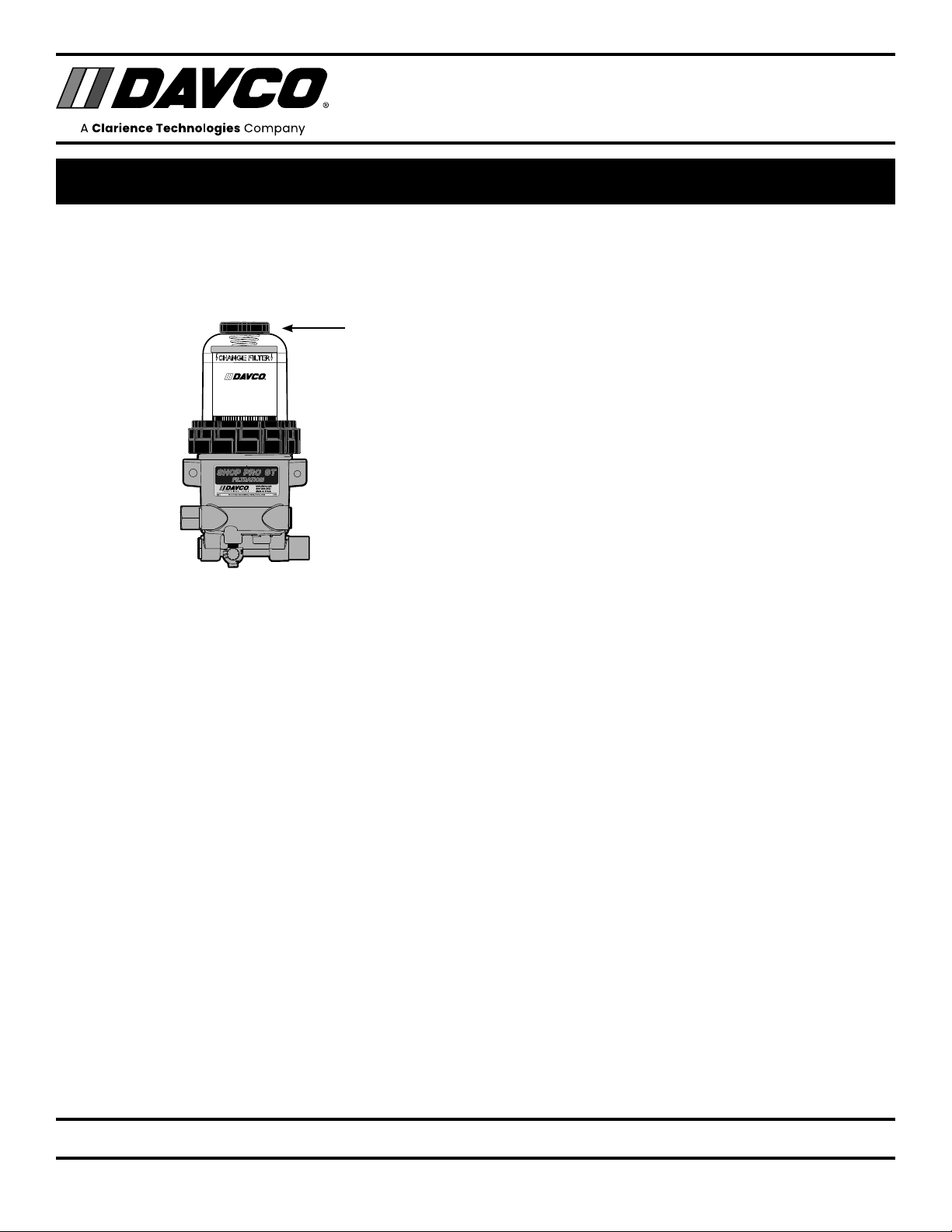
2. Remove the vent cap from the filtration unit.
3. Pour diesel fuel into the clear cover until it reaches the
black band on the filter element. (This fuel will be on
the “dirty” side of the filter, meaning that the fuel will be
filtered before flowing through the ShopPro ST to the
engine or tank.)
4. Reinstall the vent cap and tighten by hand until it clicks.
The ShopPro ST is now ready for use.
5. Connect the ShopPro to a power source. Install the
pick-up wand (green hose) and dispensing wand (red
hose). Put the wands in a five gallon (minimum) fuel
container or truck fuel tank. Turn the ShopPro power on
and circulate fuel until there are no bubbles in the sight
tube. Turn off the ShopPro. Close the ball valves on both
hoses. Remove the wands from the hoses and return
them to their storage area. Connect the hoses to the hose
retainers. (Refer to photo on page 2.)
Filtration Unit Maintenance
Drain Water
Water that has been separated from fuel will collect in the
bottom of the body of the filtration unit. Drain the water
periodically. The frequency will depend on how often the
ShopPro is used and the quality of the fuel it has filtered.
1. Open the vent cap slightly to break the vacuum. Place the
end of the drain hose in a suitable container and open the
drain valve.
2. When only fuel is coming out of the hose, shut the valve.
Hand tighten the vent cap until it clicks.
Filter Replacement
Replace the filter in the filtration unit when there is low flow/
pressure or when the filter is visibly contaminated. The filter
change will also include replacement of the seals on the vent
cap and on the collar.
1. Remove the vent cap and open the drain valve to drain
the fuel below the collar level. Close the drain valve.
2. Remove the collar (use the DAVCO wrench) then remove
the clear cover. Remove the filter. Remove the seals from
the cover and the vent cap. Dispose of the filter and the
seals properly.
3. Using a clean shop rag, clean the cover, vent cap, collar
and threads on the filtration unit body. Do not use any
acetone based cleaners on the clear cover.
4. Install the new filter and the seals (included with the
replacement filter).
Pro Tip: Write the date of the filter change with a permanent
marker on the filter wrap.
Pro Tip: Install the cover and collar on the filtration unit hous-
ing. Apply downward pressure on the top of the cover and
rotate the collar until contact. Use a DAVCO wrench to tighten
three additional ribs.
5. Pour clean fuel into the filtration unit.
6. Reinstall the vent cap and tighten by hand until it clicks.
Replacement filter part number:
Fleetguard: FS19624
Service Parts
See 13 for service parts. Call DAVCO customer service at
800-328-2611 to order.

5
DAVCO Technology, LLC www.davco.com800-328-26111600 Woodland Drive, Saline, MI 48176-1629 F1321 REV E
SHOP PRO®ST
WITH 50/80 PSI PRESSURE REGULATOR
TECHNICAL MANUAL
HOSES AND ADAPTERS
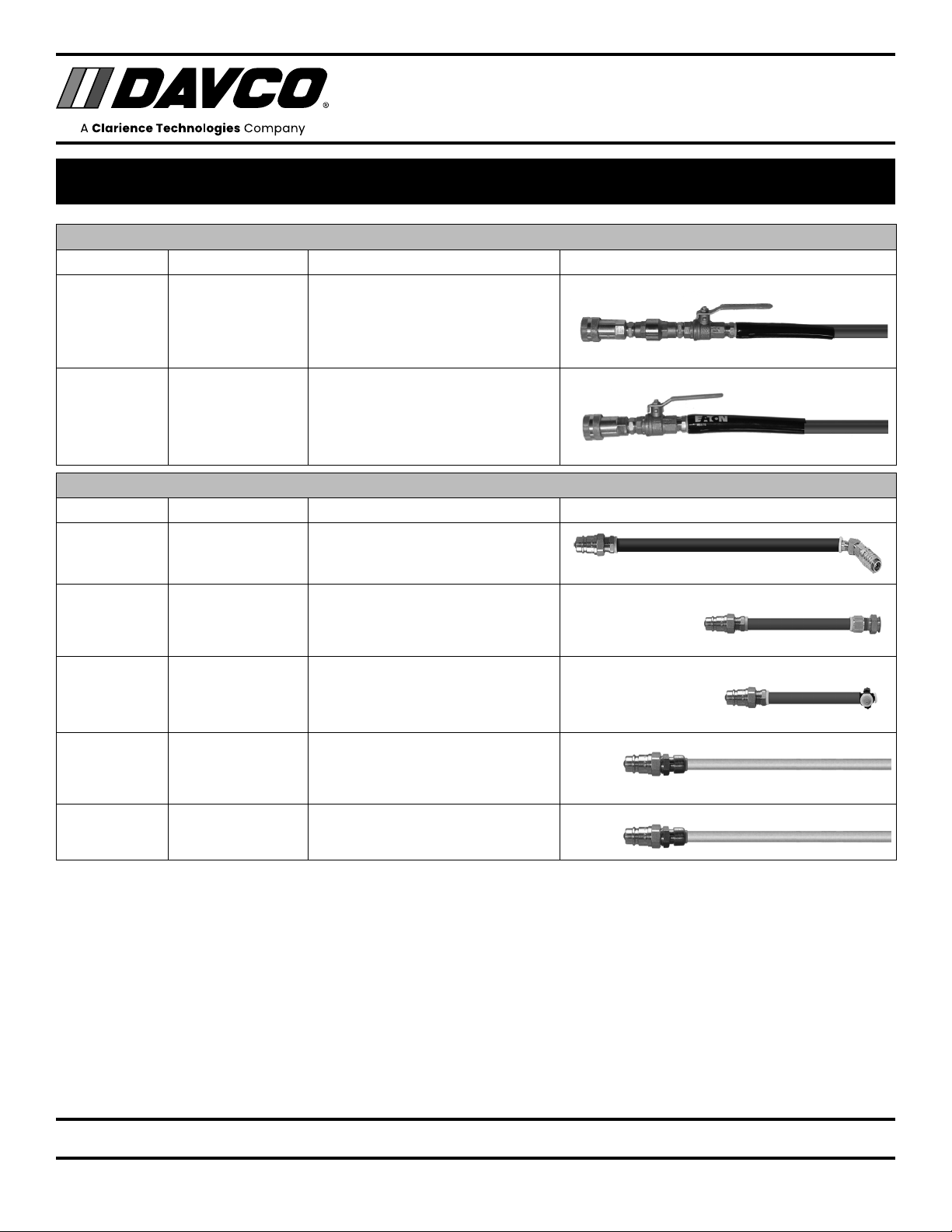
HOSES
Hose Connection Description Photo
Red Quick connect Pressure Hose with check valve
Green Quick connect Suction Hose
ADAPTERS
Hose Connection Description Photo
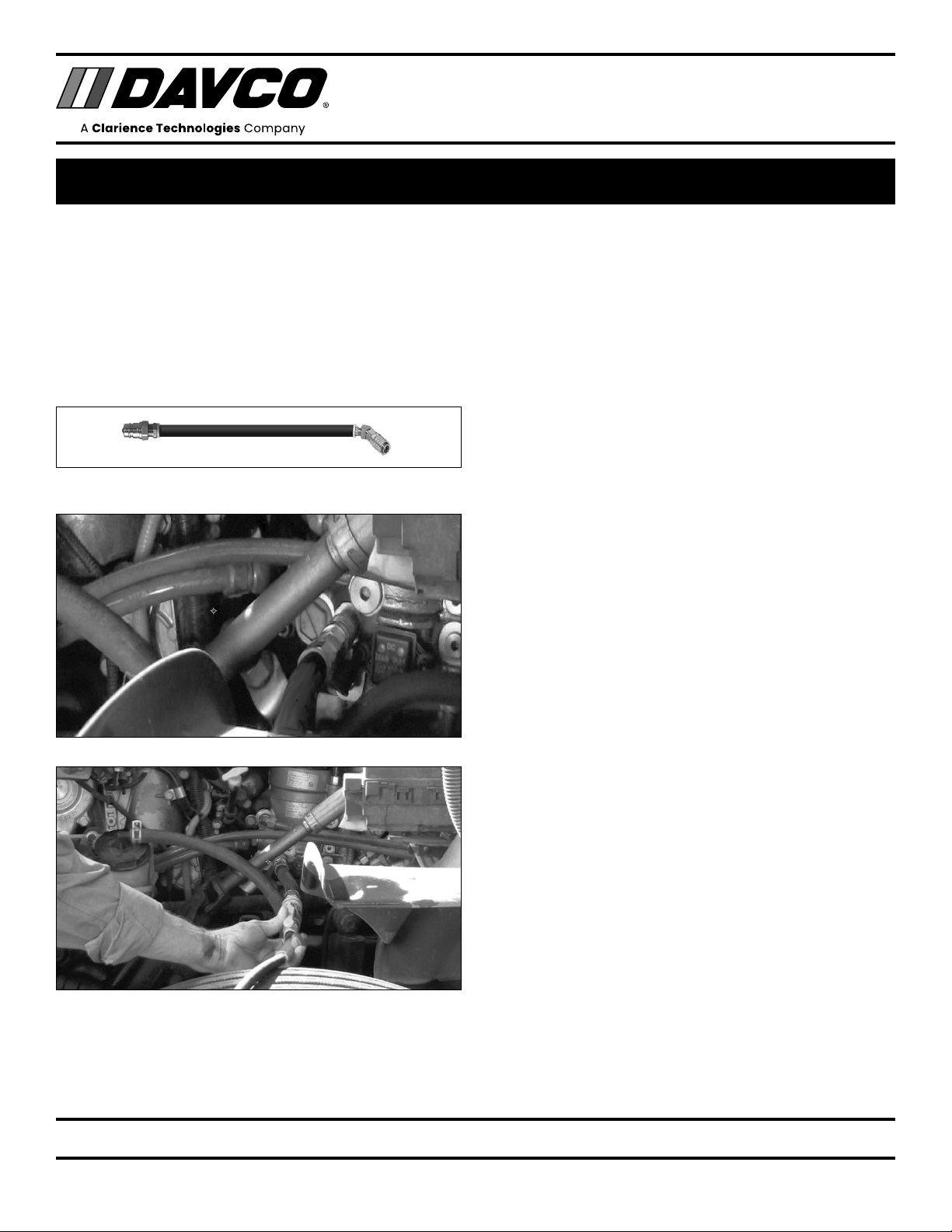
Blue Compucheck Compucheck fitting for priming Fuel
Module
Red Voss Priming MaxxForce Engines using
regulator setting of 50 PSI
Green Voss Priming MaxxForce Engines using
regulator setting of 50 PSI
60" White tube Quick connect Pick-up Wand: Put in fuel tank or
container
20" White tube Quick connect Dispensing Wand: Tank sweeping or
fuel transfer

6
DAVCO Technology, LLC www.davco.com800-328-26111600 Woodland Drive, Saline, MI 48176-1629 F1321 REV E
SHOP PRO®ST
WITH 50/80 PSI PRESSURE REGULATOR
TECHNICAL MANUAL
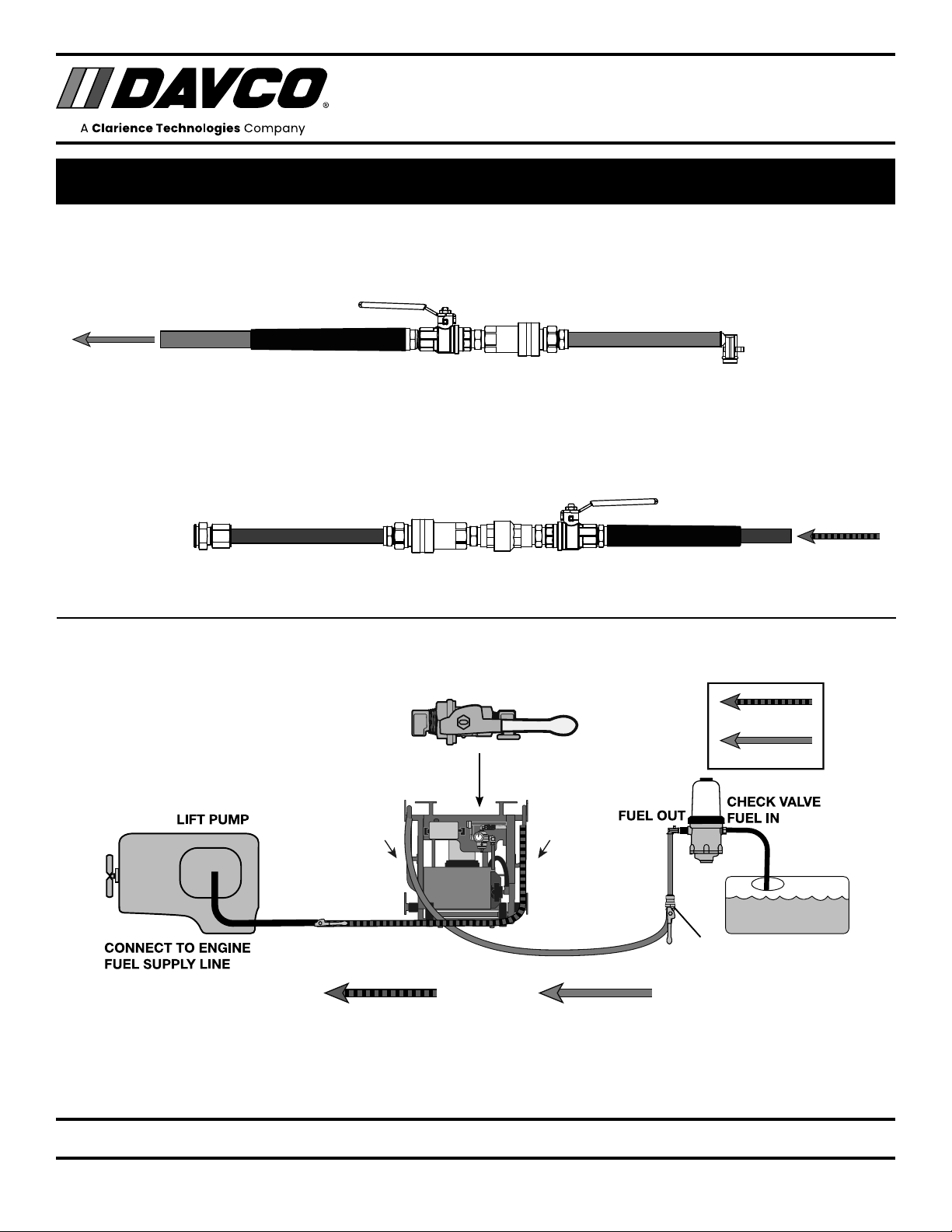
HOSE CONNECTIONS PRIMING
PRESSURE
HOSE
SUCTION
HOSE
QUICK
CONNECT
PRESSURE (RED)
SUCTION (GREEN)
PRESSURE (RED)
SUCTION (GREEN)
PRESSURE (RED) SUCTION (GREEN)
FUEL PRIMING
COMPUCHECK FITTING
COMPUCHECK
ADAPTER (BLUE)
Priming with Compucheck Adapter—Use 80 PSI Setting on Regulator

7
DAVCO Technology, LLC www.davco.com800-328-26111600 Woodland Drive, Saline, MI 48176-1629 F1321 REV E
SHOP PRO®ST
WITH 50/80 PSI PRESSURE REGULATOR
TECHNICAL MANUAL
PRIMING THE FUEL MODULE WITH COMPUCHECK FITTING
Regulator Settings:
Use the 80 PSI Regulator setting to prime the fuel module.
1. Connect the ShopPro to a power source.
2. Attach the Pick-up (60") wand to the suction hose (green)
and insert it into the fuel tank.
3. Open the ball valve.
4. Attach the Compucheck Adapter (blue hose) to the
pressure hose (red) on the ShopPro.
5. Connect the Compucheck fitting to the priming port on
the fuel module.
6. Open the ball valve.
7. Turn the ShopPro FXP ON. Prime the fuel system for four
minutes.
8. While the ShopPro is still turned ON, start the engine.
Allow the engine to idle for one minute before revving the
engine. Turn off the engine.
9. Turn the ShopPro off. Close the ShopPro pressure hose
ball valve. Remove the Compucheck adapter from the fuel
module.
10. Remove the pick-up wand from the fuel tank. Allow the
fuel to drain back into the tank before closing the ball
valve.
11. Return the adapters and hoses to the ShopPro cart.
12. Restart the truck and check for leaks.

8
DAVCO Technology, LLC www.davco.com800-328-26111600 Woodland Drive, Saline, MI 48176-1629 F1321 REV E
SHOP PRO®ST
WITH 50/80 PSI PRESSURE REGULATOR
TECHNICAL MANUAL
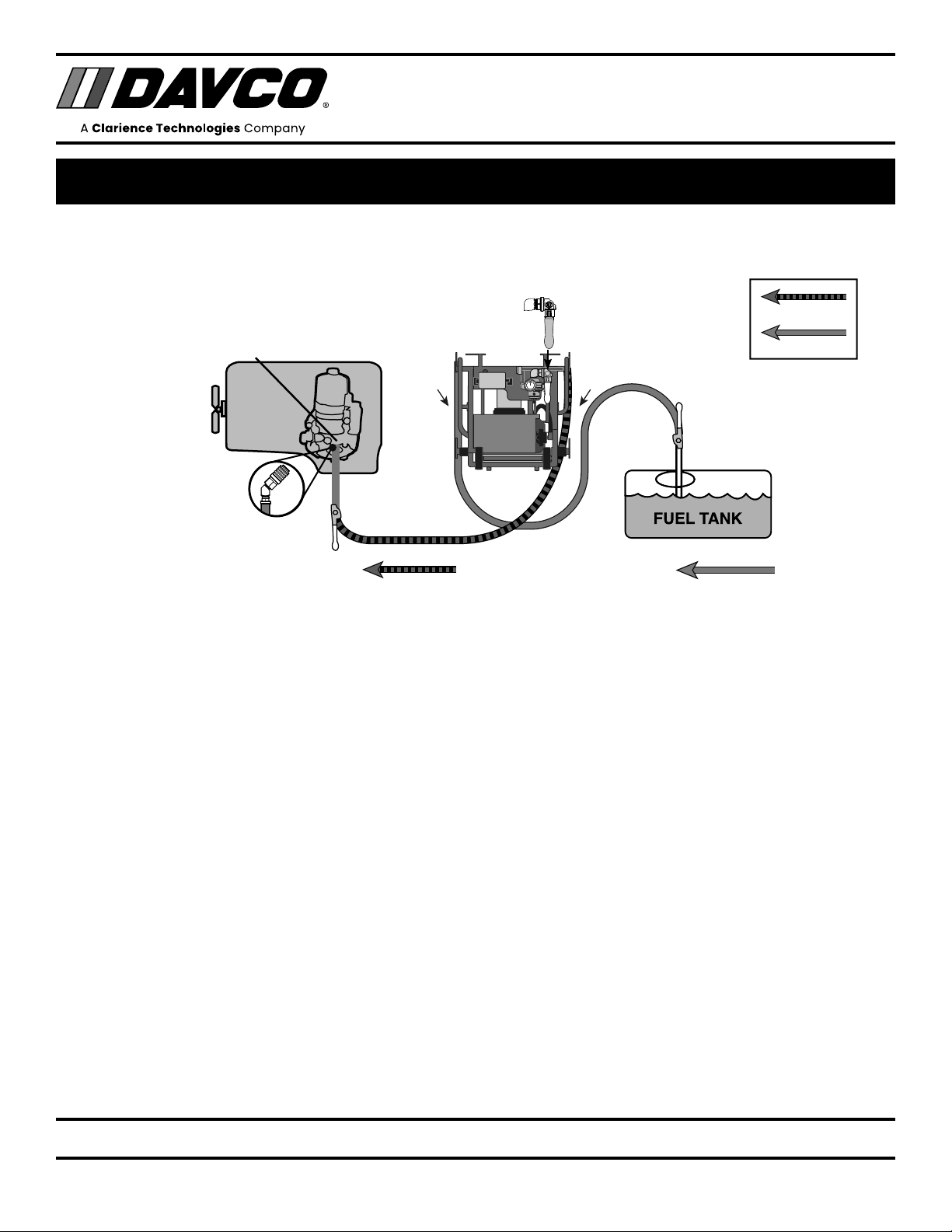
HOSE CONNECTIONS FOR PRIMING AT 50 PSI
Priming with Regulator Settings of 50 PSI
Use on engine applications that require 50 PSI for priming
PRESSURE
HOSE
SUCTION
HOSE
FUEL TANK
PRESSURE (RED)
SUCTION (GREEN)
PRESSURE (RED)
SUCTION (GREEN)
QUICK
CONNECT
QUICK
CONNECT
SUCTION (GREEN)PRESSURE (RED)
50
PSI
Green hose with 90°
Voss Fitting
Connect to Fuel
Outlet on Fuel Pro
Connect to Fuel
Supply Line
Green Suction Hose
Red Pressure Hose
Red hose with
straight Voss Fitting
Inhaltsverzeichnis
Andere Davco Wassersystem Handbücher
Beliebte Wassersystem Handbücher anderer Marken

Spirotech
Spirotech SPIROVENT SUPERIOR S250 Bedienungsanleitung

Culligan
Culligan Aqua-Cleer Aqua-Cleer Advanced Drinking Water... Bedienungsanleitung

A.O. Smith
A.O. Smith Dura-Max AJH - 1000A - P Bedienungsanleitung

Microline
Microline T.F.C.-4 Handbuch

Eureka Forbes
Eureka Forbes Aquaguard Select Bedienungsanleitung

Cetetherm
Cetetherm AquaEfficiency Bedienungsanleitung