
Devantech dS2824 Bedienungsanleitung


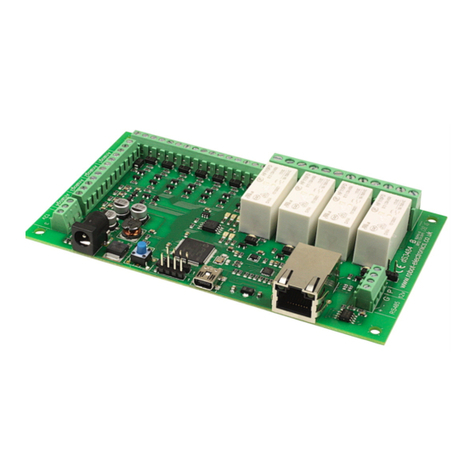
dS2824
dS2824 User Manual v4.12
Table of Contents
Documentation history.................................................................................................................4
A quick look...............................................................................................................................5
Introduction...............................................................................................................................6
Getting started...........................................................................................................................7
ocating the IP Address...............................................................................................8
Configuring the dS2824.............................................................................................................10
Status page.............................................................................................................11
Network page...........................................................................................................12
Webpage security.............................................................................................................13
TCP/IP page.............................................................................................................15
Configuring relays.....................................................................................................17
Relay automation.....................................................................................................18
Input/Output configuration........................................................................................21
Connecting I/O to Virtual Relays.........................................................................................22
dSx Configuration.....................................................................................................23
dSx Mapping Table............................................................................................................24
dSx Example....................................................................................................................26
Sequencer...............................................................................................................28
Sequencer commands.......................................................................................................29
K Outputs........................................................................................................................30
Sequencer Examples.........................................................................................................30
Schedules................................................................................................................35
Counter/Timers........................................................................................................37
Event Notifications....................................................................................................40
Node-RED........................................................................................................................41
Peer to Peer.............................................................................................................42
Email notifications....................................................................................................43
Pinging remote machines...........................................................................................44
Repeat Time....................................................................................................................44
Attempts.........................................................................................................................44
Delay..............................................................................................................................45
Ping Time........................................................................................................................45
Rebooting the target machine.............................................................................................45
The application page..................................................................................................................46
Application page security...........................................................................................47
Accessing your webpage from the internet...................................................................48
Boolean equations.....................................................................................................................49
TCP/IP command sets................................................................................................................51
ASCII command set..................................................................................................51
Binary command set.................................................................................................53
AES binary command set...........................................................................................56
Modbus commands...................................................................................................58
Function 01 (0x01) Read Coils............................................................................................58
Function 04 (0x04) Read Input Registers..............................................................................58
Function 05 (0x05) Write Single Coil....................................................................................59
Function 15 (0x0F) Write Multiple Coils................................................................................59
Error code 1.....................................................................................................................59
Copyright © 2016-2021, Devantech td.
All rights reserved. www.robot-electronics.co.uk 2

dS2824
dS2824 User Manual v4.12
Error code 2.....................................................................................................................59
Error code 3.....................................................................................................................59
Modbus Gateway......................................................................................................59
oading the application firmware.................................................................................................60
Erasing old configuration settings...............................................................................62
dS2824 hardware......................................................................................................................63
ED indication..........................................................................................................64
Power supply...........................................................................................................64
Operating temperature..............................................................................................64
Power relays............................................................................................................65
Analogue/Digital flexible I/O's....................................................................................66
Connection examples.................................................................................................................66
Temperatue sensor...........................................................................................................67
Power supply input voltage................................................................................................67
Analogue channels............................................................................................................67
Serial port connections..............................................................................................69
dS2824 dimensions...................................................................................................................70
Notes...................................................................................................................................... 71
Copyright © 2016-2021, Devantech td.
All rights reserved. www.robot-electronics.co.uk 3

dS2824
dS2824 User Manual v4.12
Documentation history
v4.01 Major update to the underlying dScript, now with functions and local variables.
Added “From Address” for easymail emails.
v4.02 Bug fixes for the underlying dScript.
v4.03 Editor update, added support for multiple editor tabs.
Compiler update, added support for multiple files in project.
Compiler update, added support for #ifdef, #else, #endif
v4.04 TCP server socket now transmits keepalives when connections become dormant
for 10 seconds. 6 unacknowledged packets at 10 second intervals will result in
port closure.
V4.05 Added phone app support (IO Network 2 on the App stores). Fixed bug that caused
intermittent module not found error on firmware update.
V4.06 Added system reboot button to config status screen.
dScript updated to support dS2832. See dScript-v4.xx manual.
V4.07 Added new features:
Ping Used to ping other machines to check if responding.
Sequencer Added a 120 step, 12 output sequencer
v4.08 Added display of MAC address to network configuration page.
Bugfix – NTP (Real time clock) startup failed under some circumstances.
Renamed command “counters” to “setcounters”.
V4.09 Added 3 new commands to Binary and AES Binary command set, to
control all relays in one command. Set all, set selected and clear selected.
V4.10 Added support for dSx42 extension modules.
v4.11 Added Event Notifications, sends message to remote computer.
v4.12 Bugfix – Adding steps to the sequencer could crash the board.
Note: If you have a custom app based on app-dSxxxx-v4-07 or earlier, you will need to re-
name the “counters” command to “setcounters” for it to compile with this version.
Copyright © 2016-2021, Devantech td.
All rights reserved. www.robot-electronics.co.uk 4

dS2824
dS2824 User Manual v4.12
A quick look
Ethernet connected module, 10/100Mb auto negotiated.
Relays – 24 x 16Amp 250Vac C/O.
I/O – 8 x flexible I/O's NPN output, Volt free input or 12-bit analogue input.
Power – 12VDC 1.5Amp supply required. 2.1mm center positive.
Connections – Screw Terminals for N/O N/C and Common contacts
PCB size – 249mm x 123mm
Controlled graphically by secure webpage or optionally one of ASCII, Binary or Modbus com-
mand sets over TCP/IP.
Email notifications – 8 selectable notifications, up to 100 emails/hour max.
Peer to Peer – Control relays on other modules.
Notifications – Sends a message when selected I/O change state.
ine powered (up to 300 meter range) extension modules.
Sequencer – Flexible 100 step, 12 output sequencer
Schedules – Able to schedule events based on time of day/week
Counter/Timers – Count or time events. 10 counts/second Max.
Also available when optionally programming in dScript is a TT level serial port and an RS485
serial port.
Copyright © 2016-2021, Devantech td.
All rights reserved. www.robot-electronics.co.uk 5

dS2824
dS2824 User Manual v4.12
Introduction
The dS2824 is an Ethernet connected relay module featuring 24 channels of 16Amp 250Vac re-
lays. Each relay has both normally open (NO) and normally closed (NC) as well as the common
available on three terminals.
In addition to the relays, the dS2824 has 8 flexible I/O channels which may be individually
configured to be:
1. NPN transistor output.
2. Active low input with pull-up (allows direct connection of volt free contacts).
3. Active low input without pull ups (easy to connect logic level inputs).
4. Analogue 12-bit inputs using a 4.096v reference (0v-4.096v input range).
5. Analogue 12-bit inputs using a 5v reference (0v-5v input range).
The dS2824 requires a 12v 1.5Amp power supply such as this one:
http://www.robot-electronics.co.uk/universal-12vdc.html
The dS2824 has four built in control methods.
Primary control method is graphically by using its built in secure website.
Secondary control may be one of:
ASCII - type in commands via a program such as PuTTY.
Binary - Command set using binary codes
Modbus – Functions 1, 4, 5 and 15 supported
And if you should wish to modify the supplied firmware – you can.
Behind the scenes there is dScript, a powerful multi-threaded operating system and program-
ming language. The supplied firmware is written in dScript as well as HTM , CSS and
Javascript on the webpages and the full source is in the separately down-loadable dScript sup-
port package.
You do not need to use dScript at all, but its great to know its there - just in case you do.
Copyright © 2016-2021, Devantech td.
All rights reserved. www.robot-electronics.co.uk 6

dS2824
dS2824 User Manual v4.12
Getting started
Start by plugging in the Ethernet cable to connect the module to your network, and the 12v
jack plug from your adapter. Switch on and the first thing you will note is that the blue ED will
flash 3 times. This indicates that the control firmware is loaded on the module. (If the blue led
does not flash you will need to load in the control firmware. Don't worry, this is very easy to
do. Just go to the chapter on installing the firmware and follow the instructions there).
If you are using a Win7/8/10 PC, open your browser and into the address bar (not the search
bar) type:
http://dS2824/index.htm
You should now see the application webpage and you can control relays and I/O's.
Copyright © 2016-2021, Devantech td.
All rights reserved. www.robot-electronics.co.uk 7

dS2824
dS2824 User Manual v4.12
Locating the IP Address
If you are not using a windows PC then you will need to find the IP address of the module.
The simplest method is connect the module (Ethernet, USB then lastly, Power) and load up the
dScript editor.
Go to Module Select Port and make sure the correct serial port is selected as illustrated above.→
Now go to Module IP Address and the current IP address is displayed.→
Make sure the Ethernet is connected before you apply power. If you plug the Ethernet cable in
after the power, the module will already have booted with a default IP address.
Alternatively, if you have a DHCP server on your network (your router is normally the DHCP
server) then the dS2824 will get its IP address from that. og on to your router and navigate
to the AN client list.
Above is the entry from our ASUS RT-N66U router. So now you type:
192.168.0.9/index.htm
into your browser address bar and you should see the application webpage shown on the pre-
vious page.
Copyright © 2016-2021, Devantech td.
All rights reserved. www.robot-electronics.co.uk 8

dS2824
dS2824 User Manual v4.12
If you prefer, you can download a java program that will run on Windows, MAC or inux, and
will list all of our modules that are connected to your AN. DevantechModuleFinder.jar
If you do not have a DHCP server the dS2824 will use a default IP address of 192.168.0.123 so
make sure your PC is on the same subnet of 255.255.255.0 and its IP address is
192.168.0.xxx
Copyright © 2016-2021, Devantech td.
All rights reserved. www.robot-electronics.co.uk 9

dS2824
dS2824 User Manual v4.12
Configuring the dS2824
There are a set of configuration pages to get the dS2824 operating as you want it. These
pages are all _configx.htm, (that's a leading underscore character).
ie.
_config.htm
_config2.htm
Anything that starts with _config is considered a special name for configuration pages and can
only be seen if you have the the USB cable plugged in and connected to your PC.
Why only if the USB cable is plugged in?
Its an additional security measure. After you have configured and deployed the module, you
really don't want these configuration pages available for others to change. So with the USB ca-
ble disconnected the _config pages are not available. If you try to access them you just get
served a “not authorised” page instead.
So for now, you do want to look over the config pages. If you have a Win10, inux or MAC PC,
you can go right ahead and plug in the USB cable. These machines will install their own USB
drivers. We won't be sending anything to the board, its just the presence of the USB connec-
tion that enables the config pages to be served. If you have a Win7 or Win8 PC you will need
to install the drivers. (go to the chapter on installing the firmware and follow the instructions
there).
With the USB cable connected, browse to:
192.168.0.9/_config.htm
(substituting your IP address)
Copyright © 2016-2021, Devantech td.
All rights reserved. www.robot-electronics.co.uk 10
Andere Handbücher für dS2824
2
Inhaltsverzeichnis
Andere Devantech Computerhardware Handbücher
Beliebte Computerhardware Handbücher anderer Marken

EMC2
EMC2 VNX Series Betriebsanleitung

Panasonic
Panasonic DV0PM20105 Bedienungsanleitung

Mitsubishi Electric
Mitsubishi Electric Q81BD-J61BT11 Bedienungsanleitung

Gigabyte
Gigabyte B660M DS3H AX DDR4 Bedienungsanleitung

Raidon
Raidon iT2300 Bedienungsanleitung

National Instruments
National Instruments PXI-8186 Bedienungsanleitung


