Locking Arms
IJ
K
Use the quick install adaptor on a wall or ceiling application
1/2”Rubber
Grommet
Video-Power
Cables
Mounting Surface
Mount with the quick install adaptor.
Mounting Surface
Mounting externally using the template
Mounting externally using required cable entry
3/4”
Rubber Grommet
Cable Entry
Installation
The following optional accessories are available for specific applications.
Contact your retailer or local representative for details.
Using the quick install adaptor (Optional):
When mounting the dome to a ceiling or wall using the quick install adaptor, use the template to
cut a hole as the circle marked “T2” with a hole cutter.
Install the adapter into the mounting surface by turning the screws anti-clockwise by approx 1 turn
to release the arms and then turn clockwise to pull the arms towards the flange and secure the
adapter to the mounting surface (see image I).
Push the cables through the opening and 1/2” rubber grommet.
Make sure the grommet is properly installed on the adaptor to prevent dust ingress (see image J).
Removing the dome cover and the camera module
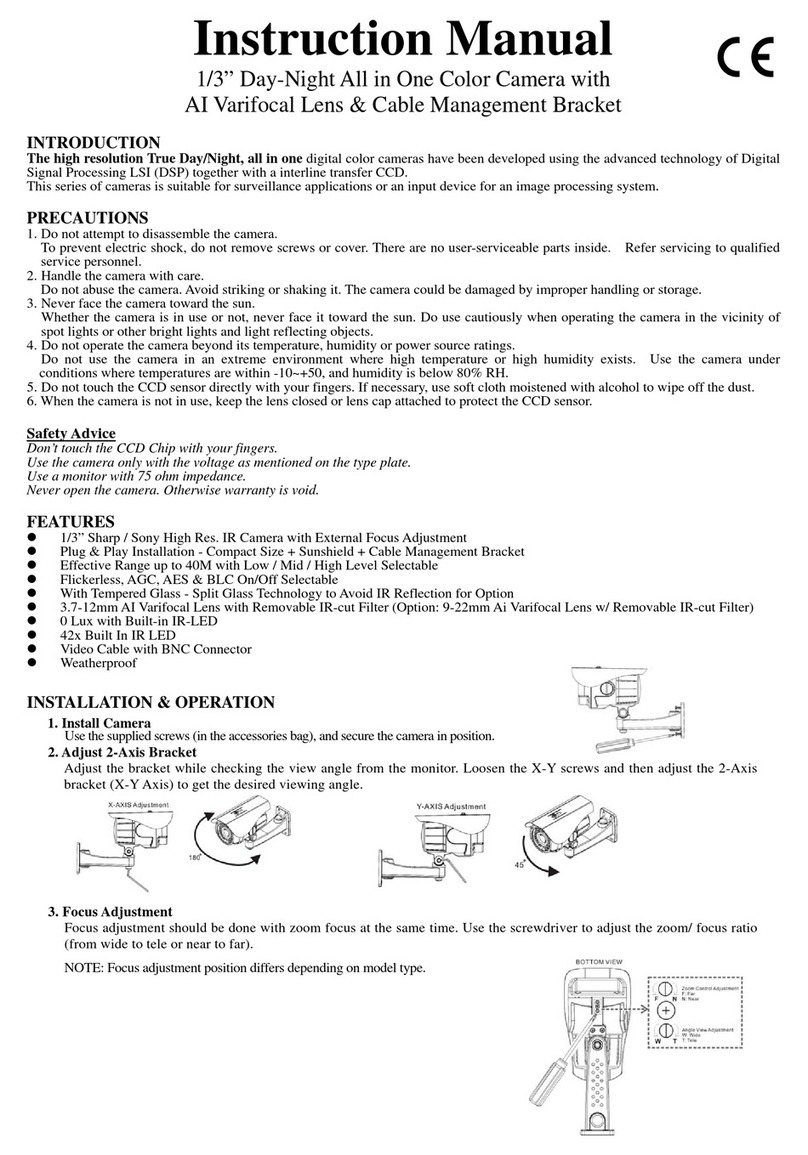
Use the supplied large torx driver to loosen the four cover screws. The screws
are captive and will be retained in the lid (image A).
Loosen the gimbal securing screws to remove the camera assembly (image B).
Open the required cable entry
Use either the base cable entry (C1) or side cable entry (C2) as required. When surface
mounting and using the side cable entry (C2) open either the large (C3) or small (C4)
knock-out within the outer ring to the required size by cutting away excess material with a
hole cutter. The outer ring can be rotated so that either of the knock-outs lie alongside the
side cable entry, as required. Unused cable entries should be blanked with sealing plugs
(C5). If the conduit entry is not used, cables should be passed through a slotted cable
grommet (C6) to prevent dust ingress.
For external applications, conduit should be used to carry cables into the housing.
When mounting the dome to a ceiling or wall using screws, first knock out the four base
screw access holes that correspond to the template marks “T1”. This can be done by
using a cross-point screwdriver(see image D).
Create four holes on the mounting surface using template marks “T1”; then create an
aperture using the template mark “T4” for the 3/4”base cable entry.
When flush mounting or surface mounting
using the outer ring, ensure that the large
rubber gasket (see image F) is in place
under the lip of the dome enclosure.
Connect the wiring
Feed the preconnected main lead through one of the cable access points and connect it
to your video output and power input cables.
A wire-ended adaptor lead (E1) is supplied for use with power supply cables that are not
terminated with an appropriate power connector.
For 12VDC operation: Connect the red lead to “+” and the black lead to “-”.
12VDCGND
Video Output
Power Input
Wire-ended adaptor lead
E
E1
Red: +12VDC
Black: 0VDC
IMPORTANT: If the dome is being mounted externally, use a suitable sealant
around the cable entry hole to ensure a moisture resistant seal. This will prevent
water vapour from the connected conduit condensing inside the housing.
IMPORTANT: If the dome is being mounted externally using the four base
holes, use the supplied rubber o-rings within each of the four mounting
holes of the dome base to ensure moisture resistant seals.
Note: Do Not Overturn the Screws.
Mounting the Enclosure with Optional Accessories
AB
Create an aperture in the mounting surface to a diameter of 4.3” (110mm) as
indicated by “T3” (as showen in template). Turn silver-colored screws
counter-clockwise by half a turn to extend the locking arms and then clockwise to
tighten them against the mounting surface (see image F).
Using Locking Arms on the dome base for Flush mount.
Locking Arm
Locking Arm
3/4”Base Cable Entry
1/2” Side Cable Entry
Flush Mount Using Locking Arms
Locking Screw
Extending the Locking arms with screw driver.
Rubber Gasket
Locking Arm
D
Note: In case of dust and moisture ingress, always use the large rubber gasket
on the dome base before installing the dome base.
Tighten the screws sufficiently to compress the o-ring moisture seals located
underneath the screwheads.
Do Not Overtighten.
Replace the Camera Module
Tighten the gimbal screws to reinstall the camera assembly with a screw driver.
F
Install the Dome Liner
on the Camera Module
G
Install the camera liner
Carefully fit the camera liner over the
camera base so that it snaps into
place (as shown in image G), and do
not obstruct the camera lens.
Replace the Dome Cover
Replace the dome cover using the index marks (as shown in
image H) to align it and tighten the torx screws to secure the lid.
Do not overtighten.
H
The dome cover
The dome base
index mark
index mark
Mount on a US single gang Box:
When mounting the dome to the box,
carefully remove the screws on the box.Install
the 3/4“ grommet on the base to prevent dust
ingress, then push the cables through the
dome base and 3/4” rubber grommet.
Mount the dome base on the box and reinstall
the two screrws on te securing ositions.
Tighten the screws sufficiently on the box
(position T5, see image K).
Screw
Gimble
Gimble
T1
T2
Template
Cable Access Using Base Cable Entry
When the cables are threaded through the mounting
surface, create an apture of 3/4” (26.5mm) indicated
“T4”.
Note: When mounting the dome on a surfce with
the four T1 screws, use one of the side knock-outs
as indicated for cable entry
(see installation guide overleaf ).
Note: When mounting on a US Singal Gang Box,
use the pre-drielled securing holes in the dome base
as indicated “T5”.
Do Not Open the aptures at position “T5”.
Surface Mount (on a wall or ceiling)
Using Quick Install Adaptor:
Create an aperture in the mounting surface to a
diameter of 1.5” (56mm) as indicated by “T2”.
Using Locking Arms:
Create an aperture in the mounting surface to a
diameter of 4.3” (105mm) as indicated by “T3”.
Using Screws:
Create four holes at template positions ‘T1’, use the
screws and plugs provided in the screw kit where the
mounting surface is appropriate.
Cable Access
T1
T1
T1
T5
T3
T5
US Singal Gang Box
US Singal Gang Box
T4