
DVIGear DVI-3551a Bedienungsanleitung

User Guide
Video-PC to HDMI Converter / Scaler
DVI-3551a

TABLE OF CONTENTS
SECTION PAGE
PRODUCT SAFETY ....................................1
PRODUCT LIABILITY...................................1
1. INTRODUCTION ...................................2
2. SPECIFICATIONS ..................................3
3. PACKAGE CONTENTS ..............................6
4. CONNECTING THE HARDWARE......................6
5. OPERATING THE UNIT..............................8
6. TROUBLESHOOTING ..............................15
7. LIMITED WARRANTY ..............................16
8. REGULATORY COMPLIANCE .......................16

-1-
WARNING – Product Safety
1. Do not dismantle the product housing or modify the printed circuit board
module as this may result in electrical shock or burn.
2. Do not attempt to service this product yourself as opening or removing the
product housing may expose you to dangerous voltages or other hazards.
Refer all servicing to qualied service personnel.
3. Keep this product away from liquids. Spills into the product housing may
result in re, electrical shock, or equipment damage. If liquid spills into the
housing, unplug the product immediately. Have the product checked by a
qualied service engineer before using it again.
4. Place the product in an even and stable location. If the product falls or is
dropped, it may cause an injury and/or malfunction.
5. Avoid exposing the product to extreme temperatures or to high humidity
levels as this may result in damage to the product.
6. Only use the supplied External AC Power Adapter. The use of other power
adapters may cause this product to fail or may cause a re.
7. Do not twist or exert excessive force on the ends of the cables connected to
this product as this may cause it to malfunction.
Product Liability
Every effort has been made to ensure that this product is free of defects.
DVIGear cannot be held liable for the use of this product or for any direct or
indirect consequential damages arising from its use. It is the responsibility of
the users of this product to check that it is suitable for their requirements and
that it is installed correctly.
All rights are reserved. No parts of this manual may be reproduced or transmitted
by any form or means electronic or mechanical, including photocopying,
recording or by any information storage or retrieval system without the written
consent of DVIGear.
DVIGear reserves the right to revise any of its hardware and software following
its policy to modify and/or improve its products where necessary or desirable.
This statement does not affect the legal rights of the user in any way. All
third-party trademarks and copyrights are recognized. The DVIGear logo is a
registered trademark of DVIGear, Inc. HDMI™ is a registered trademark of
HDMI LLC. All other trademarks are the property of their respective holders.

-2-
1.0 INTRODUCTION
The model DVI-3551a is a professional quality Switcher / Converter / Scaler
with an HDMI output. The unit offers switchable input connections that
accommodate a wide array of input signal formats, including: HDMI, DVI
(via DVI-to-HDMI adapter), RGB Analog via an HD15-pin connector, Analog
Component Video (both YPbPr and YUV formats), S-Video, and Composite
Video. All video inputs include stereo audio follow, which are digitally
embedded in the HDMI output signal. A separate S/PDIF Coaxial Digital
Audio input and output are also provided. User adjustable audio delay can
be introduced to ensure proper audio lip-sync. The DVI-3551a unit features a
high-performance scaling engine that allows user-selection of a wide range of
PC and HDTV output resolutions up to 1920x1200 and 1080p/60.
Our professional digital distribution products have been serving the industry
for over ten (10) years. DVIGear offers a full line of high quality Digital Matrix
Routers, Switchers, Splitters, Video Scalers, Up/Down/Cross Converters,
Format Converters, Analog-Digital Converters, as well as a wide range of long
reach Digital Cables, Extenders, and Optical Transmission systems.
1.1 Features
The DVI-3551a Video-PC to HDMI Converter/Scaler offers several advanced
features:
• OutputResolutionsupto1080pandWUXGA
• HDMI/DVI,RGB,YPbPr,YUV,YC,andCVInputs
• StereoAudioinputswithAudioFollowswitching
• AdjustableAudioDelayforLip-SyncCorrection
• HDMII/OisfullyHDCPCompliant
• InfraredRemoteControl
• RS232controlofallswitchinganddisplayfunctions
• 3DMotionAdaptiveDe-Interlacing
• 3:2Pull-Downwith2:2Pull-DownRecovery
• DigitalNoiseReduction
• ACPowerAdapterwithlockingplugforaddsecurity
• OptionalRackMountKit

-3-
2.0 SPECIFICATIONS
Input Connections
HDMI or DVI 1x HDMI female connector, DVI using DVI-8511b Adapter (not included)
Analog RGB 1x HD15-pin VGA female connector
Analog Component Video 3x RCA female connectors
S-Video 1x 4-pin Mini-DIN female connector
Composite Video 1x RCA female connector
Digital Audio (S/PDIF) 1x RCA female connector
Stereo Audio 6x RCA and 2x PC Audio (3.5mm)
Input Formats
HDMI / DVI HDMI v1.2 / HDCP 1.1 compliant (see table on page 4)
Analog RGB Up to 1920x1200@60 Hz, 1600x1200@60Hz
Analog Component Video YPbPr / YCbCr up to 1080p
Composite Video & S-Video (Y/C) NTSC / PAL formats
Output Formats
HDMI 1x HDMI female connector, HDMI v1.2 compliant
HDMI Output Resolutions Up to 1080p@60Hz and 1920x1200@60 Hz (see table on page 5)
HDMI Embedded Audio Digital audio per HDMI specication
Digital Coaxial Audio (S/PDIF) 1x RCA female connector
Audio Delay Adjustment OFF, 40 ms, 110 ms, 150 ms
Device Control
Front Panel 10x Buttons with On-Screen Display navigation
IR Remote Control IR Remote Control with On-Screen Display navigation
RS232 Control See tables on pages 11-14
Scaling Engine
Phase Lock Loops 8-bit, Triple Analog to Digital Converter
De-Interlacing 3D Motion Adaptive De-Interlacing with 3D Noise Reduction
Pull-Down 3:2 with 2:2 recovery
Mechanical
Size (H x W x D) 1.9” x 8.5” x 6.1” (47.2 mm x 215.2 mm x 154.7 mm)
Weight (net) 2.2 lbs. (1.0 kg)
Environmental
Operating Temperature +32° to +122°F (0° to +50°C)
Storage Temperature +14° to +158°F (-10° to +70°C)
Operating / Storage Humidity 10% to 85%, Non-Condensing
Power Requirements
AC Power Adapter Input: 100-240VAC @50/60Hz Output: 5VDC @2.0A
Regulatory Approvals
Converter/Scaler Unit FCC, CE, RoHS
AC Power Adapter FCC, CE, UL, CUL, PSE, GS, RoHS
Accessories
Included Accessories IR Remote Control Unit, AC Power Adapter, User Guide
Optional Accessories International AC Power Adapter (USA, Euro, UK, Australia)
DVI-5300-RM Rack Mount Kit

-4-
2.1 Supported Input Formats and Resolutions
The DVI-3551a accepts HDMI, DVI, Analog RGB, Analog Component Video,
S-Video (Y/C), and Composite Video inputs via rear-panel connectors. The
resolutions and formats supported by these inputs are as follows:
Resolution / Format Vertical Rate
(Hz)
Scan
Format Signal Format Input
Connector
NTSC/PAL SDTV 60 NTSC, 50 PAL Interlaced Composite Video RCA
NTSC/PAL SDTV 60 NTSC, 50 PAL Interlaced S-Video (Y/C) 4-pin mini-DIN
480i 720x480 60 Interlaced YUV NTSC RCA, HDMI (1)
576i 720x576 50 Interlaced YUV PAL RCA, HDMI (1)
480p 720x480 60 Progressive YPbPr / RGBHV (2) HD15, HDMI, RCA
576p 720x576 50 Progressive YPbPr / RGBHV (2) HD15, HDMI, RCA
720p 1280x720 50, 60 Progressive YPbPr / RGBHV (2) HD15, HDMI, RCA
1080i 1920x1080 50, 60 Interlaced YPbPr / RGBHV (2) HDMI, RCA
1080p 1920x1080 50, 60 Progressive YPbPr / RGBHV (2) HD15, HDMI, RCA
VGA 640x480 60, 72, 75, 85 Progressive RGBHV HD15, HDMI
SVGA 800x600 56, 60, 72, 75, 85 Progressive RGBHV HD15, HDMI
XGA 1024x768 60, 70, 75, 85 Progressive RGBHV HD15, HDMI
SXGA 1280x1024 60, 75, 85 Progressive RGBHV HD15, HDMI
UXGA 1600x1200 60 Progressive RGBHV HD15, HDMI
WXGA 1280x800 60 Progressive RGBHV HD15, HDMI
WSXGA 1680x1050 60 Progressive RGBHV HD15, HDMI
WUXGA 1920x1200 60 Progressive RGBHV HD15, HDMI
Note 1: This signal is actually 480i@30Hz doubled, or 576i@25Hz doubled.
Note 2: Analog YPbPr input is only available via the 3-RCA connectors, not via
the HD15-pin Connector.

-5-
2.2 Supported Output Formats and Resolutions
The DVI-3551a has a single HDMI output. An internal scaling engine provides
user selection of a wide range of output resolutions as listed below:
Resolution / Format Vertical Rate
(Hz)
Scan
Format
Signal
Format
Output
Connector
480i 720x480 60 Interlaced YUV NTSC HDMI (1)
576i 720x576 50 Interlaced YUV PAL HDMI (1)
480p 720x480 60 Progressive RGBHV HDMI
576p 720x576 50 Progressive RGBHV HDMI
720p 1280x720 50, 60 Progressive RGBHV HDMI
1080i 1920x1080 50, 60 Interlaced RGBHV HDMI
1080p 1920x1080 50, 60 Progressive RGBHV HDMI
VGA 640x480 60 Progressive RGBHV HDMI
SVGA 800x600 60 Progressive RGBHV HDMI
XGA 1024x768 60 Progressive RGBHV HDMI
SXGA 1280x1024 60 Progressive RGBHV HDMI
SXGA+ 1400x1050 60 Progressive RGBHV HDMI
UXGA 1600x1200 60 Progressive RGBHV HDMI
WXGA 1280x800 60 Progressive RGBHV HDMI
WXGA+ 1440x900 60 Progressive RGBHV HDMI
WSXGA 1680x1050 60 Progressive RGBHV HDMI
WUXGA 1920x1200 60 Progressive RGBHV HDMI
Note 1: This signal is actually 480i@30Hz doubled, or 576i@25Hz doubled.
-6-
3.0 PACKAGE CONTENTS
Before attempting to use this unit, please check the packaging and make certain
the following items are contained in the shipping carton:
• DVI-3551aVideo-PCtoHDMIConverter/Scaler
• ACPowerAdapter
• IRRemoteControl
• UserGuide
Note: Please retain the original packing material should the need ever arise to return the
unit. If you nd any items are missing, contact your reseller or DVIGear immediately. Please
have the Model Number, Serial Number, and Invoice Number available for reference when
you call.
4.0 CONNECTING THE HARDWARE
Please study the images below to become familiar with the locations of the
controls, signal inputs, signal output, and the power input.
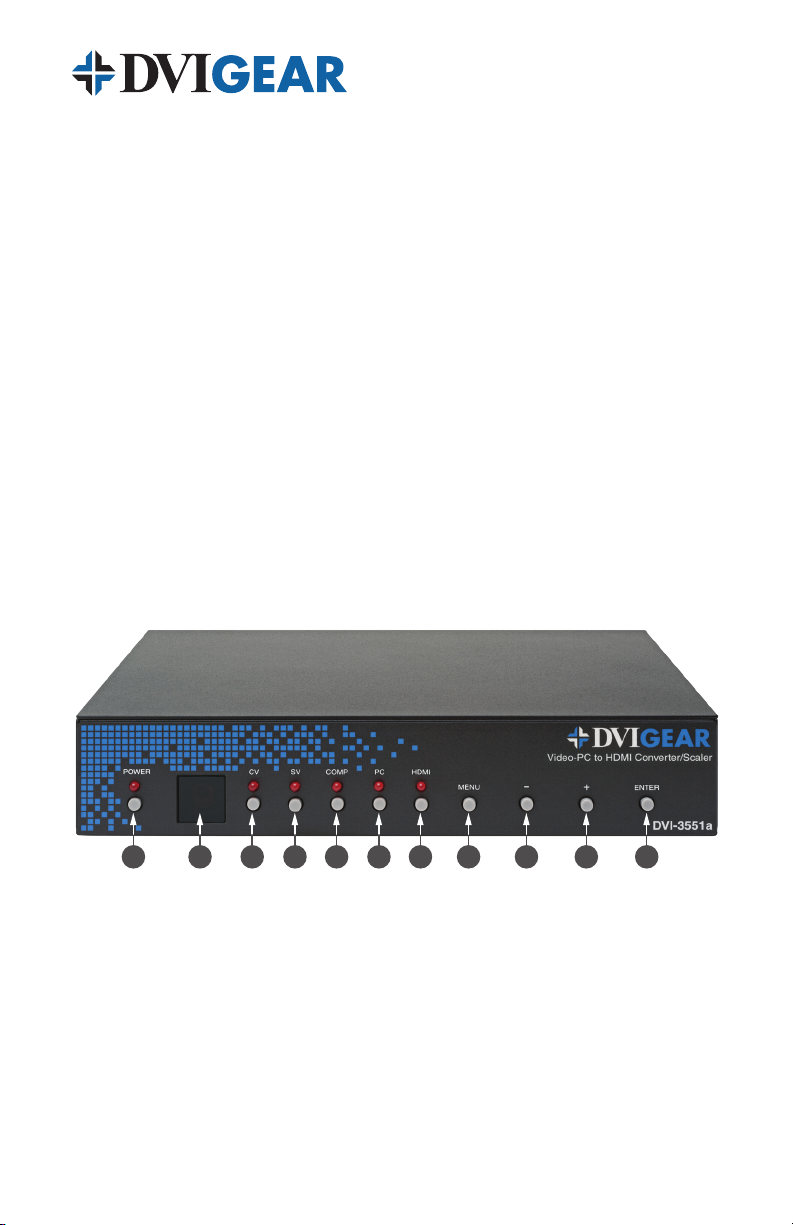
Front Panel Controls: The front panel has several push buttons to manually
control the unit. The numbers below the product photo relate to the control
directly above the number.
1Power ON / OFF Switch
2Infrared Receiver Sensor
3Composite Video Input Select
4S-Video Input Select
5Component Video Input Select
6PC (RGB Analog) Input Select
7HDMI / DVI Input Select
8On-Screen Display Menu Select
9Selected Menu Item Decrease (-)
10 Selected Menu Item Increase (+)
11 Enter, Select (or Memorize) Menu Item
1 2 3 4 65 7 8 9 10 11

-7-
Rear Panel Connectors: The rear panel has the connectors required to
interface the unit to all Input / Output devices and the External AC Power
Adapter. The numbers above and below the drawing relate to the connector
directly above or below the number. Refer to the corresponding number and
functional description below.
1S/PDIF Audio Output (for use with external audio system)
2 3.5mmAUXAudioInput(forusewhenDVIsignalisappliedtothe
HDMI input)
3RS-232 Control Port
43.5mm PC Audio Input (for use with PC audio output)
5Stereo Audio Input for Component Video Input (2x RCA Connectors)
6S/PDIF Digital Audio Input
7Stereo Audio Input for Composite Video Input (2x RCA Connectors)
8Composite Video Input (RCA Connector)
9HDMI Video Output
10 HDMI or DVI Video Input
11 PC / RGB Analog Input (HD15-pin connector)
12 Component Video Inputs (3x RCA Connectors)
13 Stereo Audio Input for S-Video Input (2x RCA Connectors)
14 S-Video Input (4-pin mini-DIN)
15 +5 VDC Input (connects to external AC Power Adapter)
Connect the supplied AC Power Adapter to the DVI-3551a. Use only the
furnished power adapter to avoid the possibility of equipment damage. Next,
connect the appropriate cables to the Input(s) and Output and power ON the
source and destination devices.
Plug the AC Power Adapter into the unit and into an AC wall outlet. The unit will
automatically power ON. Verify that the LED above the switch lights up indicating
910
1 2 3 4 6 8
11 12 13 14 15
5 7

-8-
that power has been applied to the unit. Press the Power button to turn the
unit OFF / ON again as needed. In the event of a power outage, this unit will
automatically power ON and restore the last used settings as soon as power is
reapplied to the unit.
Note: Proper operation of this product depends on the use of the high quality cables.
DVIGear’s Super High Resolution (SHR™) cables provide low loss, low jitter, high bandwidth
signal handling and are recommended for use with this product.
5.0 OPERATING THE UNIT
The DVI-3551a Convert/Scaler can be operated from either the front panel
controls, or via the included Infrared Remote Control unit.
Since Infrared is the control method used by the majority of users, please take
the time to familiarize yourself with the location and function of the various
control buttons on the Controller.
Note: Please use the OSD menu for resolutions not directly accessible from the IR remote.
Toggle through
the Inputs
Select PC Input
Select HDMI Input
Select OSD Menu
Navigate Menus
and Adjustments
Select Auto-Adjust
Function
Select YPbPr
Input
Select Output
Resolution
Exit Menu
Reset to Factory
Default Settings
Power On/Off
INPUT POWER
HDMI/DVIHD PC
VGA SVGA XGA
SXGA UXGA 1080i
1080p720p480p
EXIT MENU
RESET AUTO
ADJUST
CR-27*A
OK
Inhaltsverzeichnis
Andere DVIGear Medienkonverter Handbücher

DVIGear
DVIGear DVI-3331a Bedienungsanleitung

DVIGear
DVIGear DVI-3420a Bedienungsanleitung

DVIGear
DVIGear DVI-3420a Bedienungsanleitung

DVIGear
DVIGear DVI-3531a Bedienungsanleitung

DVIGear
DVIGear DVI-3221a Bedienungsanleitung

DVIGear
DVIGear DVI-3130a Bedienungsanleitung

DVIGear
DVIGear DVI-3531a Bedienungsanleitung

DVIGear
DVIGear DVI-3150a Bedienungsanleitung

DVIGear
DVIGear DVI-3210a Bedienungsanleitung

DVIGear
DVIGear DVI-3120a Bedienungsanleitung


