
EDA CM4 Firmware-Update

Software Installation Guide of CM4 IO Case
1
Software Installation Guide
of CM4 IO Case
2021-1-5
EDA TECHNOLOGY CO.,LTD

Software Installation Guide of CM4 IO Case
2
Table of Contents
Special Notice:........................................................................................................................................................... 3
1. Preparation ........................................................................................................................................................ 3
2. Installation.......................................................................................................................................................... 4
2.1. Modify Bootloader ..................................................................................................................................... 4
2.2 Modify the Device Tree File................................................................................................................. 7
2.2.1. Configure GPIO3............................................................................................................................ 7
2.2.2 Modify config.txt file ........................................................................................................................ 7

Software Installation Guide of CM4 IO Case
3
Special Notice:
ON/OFF switch of CM4 IO Case is driven by Bootloader & 40pin GPIO driver of
CM4, so it controls the system on/off by software. It is not a traditional switch which
cut off or turn on the power supply of the board. Forcing the power shutdown during
CM4 operation may damage the file system and cause the system crash. It is highly
recommended to implement the system on/off by our software code.
GPIO3 on 40pin connector is used for one-click switch. We define the signal as
a GPIO instead of SCL1 of I2C. Please remap the I2C function to another pin since
this signal has been used to implement one-click switch function.
Fan is directly powered by +12V DC power, the system doesn’t control the fan,
if you want to turn off the fan after the system is shut down, you have to remove the
power system of CM4 IO board. We will upgrade the fan and software in next
version.
1. Preparation
The following hardware and software should be prepared before you start.
rpiboot server
Linux host to program the bootloader into CM4 ( we use PI3B+ as
a host in the document, you can use Pi4 or other Raspberry Pi
computer)
CM4 IO Board
A CM4 IO board with CM4 installed
CM4 IO case
A CM4 IO case with a switch
Micro USB
cable
A standard USB plug on one end, a Micro USB plug on the other
end.
Dupont cable
Prevent CM4 IO from booting normally.
Power supply
12V/2A DC, provide power for CM4 IO.
Software Installation Guide of CM4 IO Case
4
2. Software Installation
2.1. Modify Bootloader
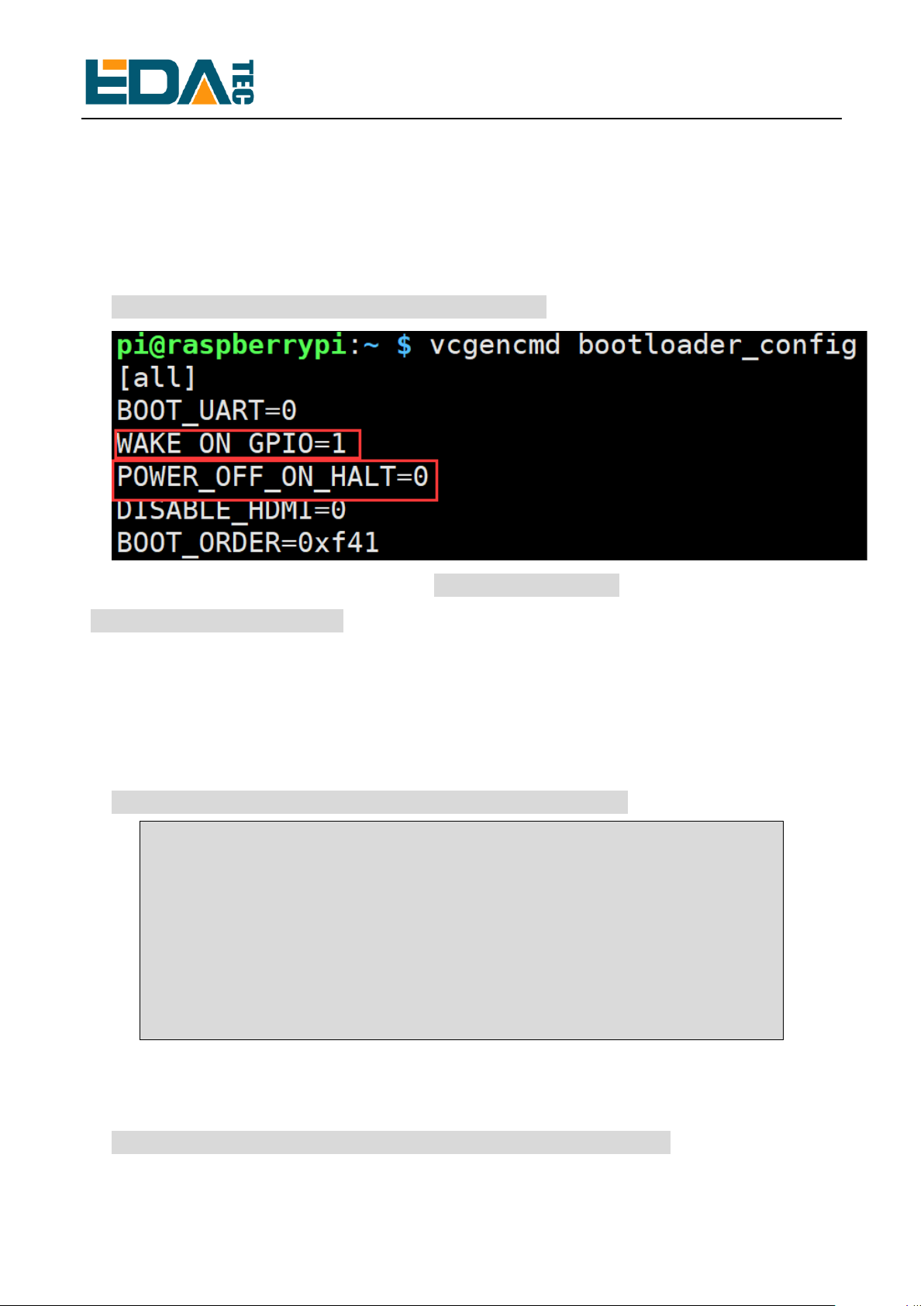
⚫Firstly test whether the bootloader on your CM4 supports software boot.
Power on CM4 and type the following command:
pi@raspberrypi:~ $ vcgencmd bootloader_config
As above shows, if there appears “WAKE_ON_GPIO=1” and
“POWER_OFF_ON_HALT=0”, then you can skip the step 2.1 and turn to step 2.2
“Change the Device Tree File”. If not, continue this section.
Boot Pi3B+, open the terminal after the system boot up, type the following
command step by step.
⚫Download the USB programming tool
git clone --depth=1 https://github.com/raspberrypi/usbboot
Cloning into 'usbboot'...
remote: Enumerating objects: 43, done.
remote: Counting objects: 100% (43/43), done.
remote: Compressing objects: 100% (34/34), done.
remote: Total 43 (delta 4), reused 27 (delta 2), pack-reused 0
Unpacking objects: 100% (43/43), done.
⚫Install the lib library
pi@raspberrypi:~/work/test1 $ sudo apt install libusb-1.0-0-dev

Software Installation Guide of CM4 IO Case
5
Reading package lists... Done
Building dependency tree
Reading state information... Done
libusb-1.0-0-dev is already the newest version (2:1.0.22-2).
0 upgraded, 0 newly installed, 0 to remove and 136 not upgraded.
⚫Go to the downloaded usbboot folder
pi@raspberrypi:~/work/test1 $ cd usbboot/
⚫Compile usbboot
pi@raspberrypi:~/work/test1/usbboot $ sudo make
cc -Wall -Wextra -g -o bin2c bin2c.c
./bin2c msd/bootcode.bin msd/bootcode.h
./bin2c msd/start.elf msd/start.h
./bin2c msd/bootcode4.bin msd/bootcode4.h
./bin2c msd/start4.elf msd/start4.h
cc -Wall -Wextra -g -o rpiboot main.c -lusb-1.0
⚫Replace the files in the recovery directory with the “recovery folder” we provide.
⚫Connect PI3B+ and CM4 IO Board through a USB cable, please check the below
connection.
⚫Connect the pin1 and pin2 of J2 by a Dupont cable, as shown in the following
image.

Software Installation Guide of CM4 IO Case
6
⚫Run “rpiboot” on PI3B+, prepare for the bootloader burning and wait the CM4 IO
board power on.
pi@raspberrypi:~/work/test1/usbboot $ sudo ./rpiboot -v -d recovery/
⚫Power CM4 IO on, then the following print information appears at the terminal of
PI3B+.
Boot directory 'recovery/'
Loading: recovery//bootcode4.bin
Waiting for BCM2835/6/7/2711...
Loading: recovery//bootcode4.bin
Device located successfully
libusb: error [udev_hotplug_event] ignoring udev action bind
………………
libusb_bulk_transfer sent 79 bytes; returned 0
Received message GetFileSize: pieeprom.bin
Loading: recovery//pieeprom.bin
File size = 524288 bytes
Received message ReadFile: pieeprom.bin
File read: pieeprom.bin
libusb_bulk_transfer sent 524288 bytes; returned 0
Received message Done: pieeprom.bin
Second stage boot server done

Software Installation Guide of CM4 IO Case
7
⚫When the installation is complete, power CM4 off and remove the Dupont cable
& USB cable.
2.2 Modify the Device Tree File
2.2.1. Configure GPIO3
Power on the CM4 again, open the terminal after the system boot up, type the
following command step by step.
⚫View the status of each pin
pi@raspberrypi:~ $ sudo raspi-gpio get
BANK0 (GPIO 0 to 27):
GPIO 0: level=1 fsel=0 func=INPUT pull=UP
GPIO 1: level=1 fsel=0 func=INPUT pull=UP
GPIO 2: level=1 fsel=0 func=INPUT pull=UP
GPIO 3: level=1 fsel=0 func=INPUT pull=UP
…………
We just need to check the function of GPIO3 to make sure GPIO3 is configured
as a normal GPIO function. If the GPIO3 in your CM4 IO is configured as with I2C
function, you will need to overwrite the CM4 device tree file under the boot folder
with the “bcm2711-rpi-cm4.dtb” we provide.
pi@raspberrypi:~ $sudo mv xxx/bcm2711-rpi-cm4.dtb /boot/bcm2711-rpi-cm4.dtb
⚫Reboot
pi@raspberrypi:~ $ sudo reboot
2.2.2 Modify config.txt file
Type the following command at the terminal of CM4 IO.
⚫Open /boot/config.txt
pi@raspberrypi:~ $ sudo nano /boot/config.txt

Software Installation Guide of CM4 IO Case
8
⚫Add “dtoverlay=gpio-shutdown”to config.txt file, as the following image shows.
⚫Save and exit when it is complete, execute the following command to shut down.
pi@raspberrypi:~ $ sudo poweroff
⚫After the system shuts down, power off CM4 IO. Connect the two Dupont cables
of the switch inside the case with CM4 IO, the red cable is connected to Pin3 and
the black cable is connected to Pin39, as the following pictures show.
⚫Once connected, power CM4 IO on. When the system starts normally, the
installation of the switch software is finished.
Andere Handbücher für CM4
1
Inhaltsverzeichnis
Andere EDA E/A-System Handbücher

Beliebte E/A-System Handbücher anderer Marken

WAGO
WAGO 750-344 Bedienungsanleitung

Teknim
Teknim TWM-1887 Bedienungsanleitung

Intelligent Appliance
Intelligent Appliance IA-2662-E Bedienungsanleitung

BERGHOF
BERGHOF ECC DIO 16/16 Bedienungsanleitung

Advantech
Advantech PCM-27J3AU Installations- und Betriebshandbuch

Festo
Festo CP-E08-M12-CL Bedienungsanleitung


