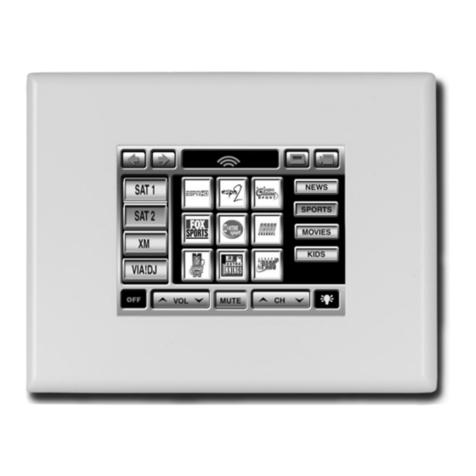
Elan ViaValet 6.4 Bedienungsanleitung

Tabletop/Under-Cabinet
Color Touch Panel
INSTALLATION MANUAL


© ELAN Home Systems 2005 • All rights reserved. Page i
ELAN HOME SYSTEMS INSTALLATION MANUAL VIA!Valet6.4
Table of Contents
Introduction . . . . . . . . . . . . . . . . . . . . . . . . . . . . . . . . . . . . . . . . . . . .1
Touch Screen Technology . . . . . . . . . . . . . . . . . . . . . . . . . . . . . . .1
Features . . . . . . . . . . . . . . . . . . . . . . . . . . . . . . . . . . . . . . . . . . . . . . .1
Movable Swivel Display . . . . . . . . . . . . . . . . . . . . . . . . . . . . . . . . . . . . .2
Specifications . . . . . . . . . . . . . . . . . . . . . . . . . . . . . . . . . . . . . . . . . . .3
System Design & Applications . . . . . . . . . . . . . . . . . . . . . . . .4
Planning . . . . . . . . . . . . . . . . . . . . . . . . . . . . . . . . . . . . . . . . . . . . . . .4
Applications . . . . . . . . . . . . . . . . . . . . . . . . . . . . . . . . . . . . . . . . . . . .6
Stand-Alone/Home Theater . . . . . . . . . . . . . . . . . . . . . . . . . . . . . . . . . .6
Stand-Alone/Home Theater-Expanded . . . . . . . . . . . . . . . . . . . . . . . . . .7
ELAN System6 . . . . . . . . . . . . . . . . . . . . . . . . . . . . . . . . . . . . . . . . . . .9
ELAN Z•System . . . . . . . . . . . . . . . . . . . . . . . . . . . . . . . . . . . . . . . . .10
ELAN HD System . . . . . . . . . . . . . . . . . . . . . . . . . . . . . . . . . . . . . . . .11
RS-232 Controlled Devices (Regardless of System Type) . . . . . . . . . . . . .12
Installation . . . . . . . . . . . . . . . . . . . . . . . . . . . . . . . . . . . . . . . . . . . . .13
Pre-Wire . . . . . . . . . . . . . . . . . . . . . . . . . . . . . . . . . . . . . . . . . . . . . .13
Control, Status, Power . . . . . . . . . . . . . . . . . . . . . . . . . . . . . . . . . . . .13
Video Termination Jumper . . . . . . . . . . . . . . . . . . . . . . . . . . . . . . . . . .14
VIA!Valet6.4 Touch Panel Connections . . . . . . . . . . . . . . . . . .15
Under Cabinet Installation . . . . . . . . . . . . . . . . . . . . . . . . . . . . . .16
Connections . . . . . . . . . . . . . . . . . . . . . . . . . . . . . . . . . . . . . . . . . . .19
Stand-Alone/Home Theater . . . . . . . . . . . . . . . . . . . . . . . . . . . . .19
ELAN System12 . . . . . . . . . . . . . . . . . . . . . . . . . . . . . . . . . . . . . . . .20
ELAN System6 . . . . . . . . . . . . . . . . . . . . . . . . . . . . . . . . . . . . . . . . .21
ELAN Z•System . . . . . . . . . . . . . . . . . . . . . . . . . . . . . . . . . . . . . . . .22
ELAN HD System . . . . . . . . . . . . . . . . . . . . . . . . . . . . . . . . . . . . . .23
Programming . . . . . . . . . . . . . . . . . . . . . . . . . . . . . . . . . . . . . . . . . .24

VIA!Valet6.4 INSTALLATION MANUAL ELAN HOME SYSTEMS
Page ii © ELAN Home Systems 2005 • All rights reserved.
Table of Contents
Operation . . . . . . . . . . . . . . . . . . . . . . . . . . . . . . . . . . . . . . . . . . . . . .25
Timeout . . . . . . . . . . . . . . . . . . . . . . . . . . . . . . . . . . . . . . . . . . . . . . .25
Video Mode . . . . . . . . . . . . . . . . . . . . . . . . . . . . . . . . . . . . . . . . . . . .25
Video Overlays . . . . . . . . . . . . . . . . . . . . . . . . . . . . . . . . . . . . . . . . .25
Cleaning . . . . . . . . . . . . . . . . . . . . . . . . . . . . . . . . . . . . . . . . . . . . . .25
Cleaning Mode . . . . . . . . . . . . . . . . . . . . . . . . . . . . . . . . . . . . . . . .26
Troubleshooting . . . . . . . . . . . . . . . . . . . . . . . . . . . . . . . . . . . . . . . .27
Warranty . . . . . . . . . . . . . . . . . . . . . . . . . . . . . . . . . . . . . . . . . . Back Page

© ELAN Home Systems 2005 • All rights reserved. Page 1
ELAN HOME SYSTEMS INSTALLATION MANUAL VIA!Valet6.4
Introduction
The VIA!®Valet6.4 Tabletop/Under-Cablinet Color Touch Panel is an
intelligent, affordable solution for controlling audio, video, and
automation equipment in a multi-room environment or as a stand-
alone controller (a Home Theater, for example). Whether it’s on a
desk in a home office, a nightstand by the bed, in the kitchen on the
counter or mounted under a cabinet, the VIA!Valet6.4 is the right
choice. With IR control, RS-232 control, and full-motion video dis-
play, it has all of the features that make ELAN’s award-winning
VIA!6.4 Touch Panel the most successful product in its category.
Touch Screen Technology
The VIA!Valet6.4 utilizes a polyester plastic film suspended over a
glass panel, which is then adhered to the front of a color LCD (Liquid
Crystal Display) screen. Depressing the polyester film with a finger
allows the film to touch the glass panel underneath, generating a
location signal that is read by the electronics. The 6.4 inch diagonal
color LCD display is an active matrix TFT Liquid Crystal Display.
Please use fingers only when operating this unit. Do not use pens,
pencils, or styluses as these may damage the polyester film.
Features
• Ideal for Desk or Countertop Use
• Mounts Easily Under Cabinetry
• Folds Down Flat and Out of the Way
• 180° Back/Front 270° Left/Right Display Swivel
• Full Touch Screen Capabilities
• Full Motion Color Video Capabilities
• 6.4 Inch Color Active Matrix TFT Liquid Crystal Display
• IR and RS-232 Control Options
• Easy, Powerful VIA!®Tools Programming

VIA!Valet6.4 INSTALLATION MANUAL ELAN HOME SYSTEMS
Page 2 © ELAN Home Systems 2005 • All rights reserved.
Introduction (cont’d)
Features (cont’d)
Movable Swivel Display
The VIA!Valet6.4’s display pivots back to front on a central 180° axis,
as shown below.
The display also rotates up to 270° from it’s stow position, allowing
you to view the display from almost anywhere in the room. When the
VIA!Valet6.4 is not being used, simply rotate the display back to the
stow position. This feature helps protect the polyester plastic film
display from environmental damage such as grease splatter.
Stow
Position
Display
Face
180°
Front/Back
Movement
Display
Face
Display
Face
Stow
Position
Display
Face
Display
Face
Stow
Position

© ELAN Home Systems 2005 • All rights reserved. Page 3
ELAN HOME SYSTEMS INSTALLATION MANUAL VIA!Valet6.4
Introduction (cont’d)
Specifications
Connections .............................. Local Port (RJ-45),System Port (RJ-45), Video IN
(“F” connector), Video Loop OUT (“F” connector) Power Terminal (2 Pin)
Wiring Requirements ........................ Cat-5 (Data), RG-6 or RG-59 coaxial cable
(Composite Video)
Display ................................................................................. High Contrast 6.4” LCD
Resolution ...................................................................................... 2.6 Million Colors
Signal....................................................... NTSC/PAL (auto-switch) Composite Video
Viewing Angles ................................ 60º Up 35º Down, 45º Left/Right from Center
Power ....................................................................................................... 16VDC, 1.0A
Dimensions ...................................................................7-1/2”(W) x 8-1/2”(H) x 8”(D)
190.5 mm (W) x 216.0 mm (H) x 203.2 mm (D)

VIA!Valet6.4 INSTALLATION MANUAL ELAN HOME SYSTEMS
Page 4 © ELAN Home Systems 2005 • All rights reserved.
System Design & Applications
Planning
The VIA!Valet6.4 can be installed and placed on almost any flat sur-
face such as a desk, table or countertop, or easily mounted under-
neath a cabinet. Because it folds flat, the VIA!Valet6.4 can be tucked
neatly out of view when not in use.
Before installing the VIA!Valet6.4 it is essential to have a detailed and
accurate system design. Talk with the homeowner to make sure all
expectations and design goals are explored. The first step to a good
design is to map the system. It is advisable to mark up a copy of the
house floor plan with speaker, keypad, touch panel, volume control,
and equipment locations, etc. Make sure that all locations are
decided upon before pre-wiring commences so that all necessary
wiring and installation hardware is in place.
It is essential that ALL system components are accounted for prior
to the pre-wire stage. After establishing design goals with the home-
owner, make a detailed list of all components. Include source equip-
ment, keypads, touch panels, volume controls, amplifiers, communi-
cations gear, etc. Gather up any IR remote controls that may be
necessary for final programming, or ensure that the IR codes for all
equipment to be installed are available in the VIA!TOOLS IR Library.
When planning specific under cabinet installation locations for
LCD Touch Panels, please keep the following tips in mind:
• When properly installed, nothing should be applying contact
pressure to the touch panel except for the operator’s finger.
If something is touching the touch screen window, a false
signal can be generated causing the touch panel to respond
incorrectly.
• Avoid installation in direct sunlight or strong ultraviolet light
(such as grow lamps for plants). This can degrade or discolor
the polyester film.
• Avoid installation over heat generating devices and/or in moist
areas where condensation can form on the polyester film.
Both heat and condensed moisture can affect touch screen
performance.
• Avoid applying any foreign objects, such as adhesive labels,
glue, etc. on the touch screen’s polyester film. This can
release chemicals that can discolor the clear film.

© ELAN Home Systems 2005 • All rights reserved. Page 5
ELAN HOME SYSTEMS INSTALLATION MANUAL VIA!Valet6.4
System Design & Applications (cont’d)
• The touch panel/LCD assembly should not be mounted near
electronics that emit radio frequencies or electromagnetic inter-
ference (such as CRT monitors, light dimmers, and some power
supplies).
• Do not mount the VIA!Valet6.4 outdoors or in areas exceeding
its operating temperature range of -10°F(-23°C) to +115°F
(+46°C). If the LCD display is over-heated or its temperature
reduced below its recommended minimum, the liquid crystal
polymer can be damaged and the display image may not
recover.

VIA!Valet6.4 INSTALLATION MANUAL ELAN HOME SYSTEMS
Page 6 © ELAN Home Systems 2005 • All rights reserved.
System Design & Applications (cont’d)
Applications
Stand-Alone/Home Theater
The VIA!Valet6.4 can be used for any stand-alone (non-ELAN) system
application or as a Home Theater controller. The diagram below
shows a basic application using one VIA!Valet6.4, a PVIA1 Valet Wall
Plate and an ELAN IRD4 Amplified IR Connection Block to control a
stack of A/V equipment.
Digital Music Server
Satellite
DVD
IR Emitter
IR Emitter
IR Emitter
Amplified IR
Connection Block
PVIA1 Valet
PWR1
IR OUT
VIDEO OUT
9VDC PWR9 16VDC PWR1
TO VIA VALET
PWR2
Inhaltsverzeichnis
Andere Elan Touchscreen Handbücher

Elan
Elan XP84 Bedienungsanleitung

Elan
Elan VIA!4.0-EM Bedienungsanleitung

Elan
Elan vl10 Bedienungsanleitung

Elan
Elan ITP-12 Bedienungsanleitung

Elan
Elan VIA! VALET100EM Bedienungsanleitung

Elan
Elan VIA! 4.0 Bedienungsanleitung

Elan
Elan VIA! 4.0 Bedienungsanleitung

Elan
Elan TS7 Bedienungsanleitung

Elan
Elan ViA 2-8.4 Bedienungsanleitung

Elan
Elan TS2 Bedienungsanleitung
Beliebte Touchscreen Handbücher anderer Marken

IBASE Technology
IBASE Technology ASTUT-152-RE1S Bedienungsanleitung

YASKAWA
YASKAWA TP 610C Bedienungsanleitung

B&R
B&R Power Panel C Series Bedienungsanleitung

Beijer Electronics
Beijer Electronics X2 control Bedienungsanleitung

AXIOMTEK
AXIOMTEK GOT321W-521 Bedienungsanleitung

TRIDONIC.ATCO
TRIDONIC.ATCO x-touchBOX Bedienungsanleitung