
Emerson PACMOTION VFD Bedienungsanleitung

VFD External Keypad Guide
GFK-3246A
April 2022
PACMotion™ VFD External Keypad
(IC866-EKPD)

PACMotion™ VFD External Keypad User Guide Contents
GFK-3246A April 2022
Contents i
Contents
Section 1: General Specifications and Installation...................1
Mechanical Installation .................................................................................................. 1
Through Panel Mount .................................................................................................... 2
Electrical Installation...................................................................................................... 2
Allowed System Configurations ..................................................................................... 3
Section 2: Easy Startup...........................................................4
To Setup The PACMotion VFD External Keypad Communication Address
............ 4
Working with Multiple Drive Networks........................................................................... 5
Networks with Two PACMotion VFDs Connected ........................................................... 5
Changing the Display Language ..................................................................................... 6
Drive Fault Message and Trip Codes ............................................................................... 6
PACMotion VFD External Keypad Display Messages........................................................ 7
Section 3: Troubleshooting ....................................................8
General Contact Information ......................................................9
Technical Support.......................................................................9

PACMotion™ VFD External Keypad User Guide Warnings and Cautions
GFK-3246A April 2022
Warnings and Cautions ii
Warnings and Caution Notes as Used in this Publication
WARNING
Warning notices are used in this publication to emphasize that hazardous voltages, currents, temperatures, or other
conditions that could cause personal injury exist in this equipment or may be associated with its use.
In situations where inattention could cause either personal injury or damage to equipment, a Warning notice is used.
CAUTION
Caution notices are used where equipment might be damaged if care is not taken.
Note: Notes merely call attention to information that is especially significant to understanding and operating the
equipment.
These instructions do not purport to cover all details or variations in equipment, nor to provide for every possible
contingency to be met during installation, operation, and maintenance. The information is supplied for informational
purposes only, and Emerson makes no warranty as to the accuracy of the information included herein. Changes,
modifications, and/or improvements to equipment and specifications are made periodically and these changes may or
may not be reflected herein. It is understood that Emerson may make changes, modifications, or improvements to the
equipment referenced herein or to the document itself at any time. This document is intended for trained personnel
familiar with the Emerson products referenced herein.
Emerson may have patents or pending patent applications covering subject matter in this document. The furnishing of
this document does not provide any license whatsoever to any of these patents.
Emerson provides the following document and the information included therein as-is and without warranty of any
kind, expressed or implied, including but not limited to any implied statutory warranty of merchantability or fitness for
particular purpose.

PACMotion™ VFD External Keypad User Guide Section 1
GFK-3246A April 2022
1
Section 1: General Specifications and Installation
Name
Description
Supply Input
24V + / - 10%, DC, 30mA
RS485 Signal
Industry standard 2-wire +5V differential
Environmental
Operational: -10 … 50°C
Storage: -40°C … 60°C
Relative Humidity
< 95% (non condensing)
Protection Rating
IP55
Max Cable Length
25m / 82.5ft shielded twisted pair
Mechanical Installation
Figure 1: Dimensions

PACMotion™ VFD External Keypad User Guide Section 1
GFK-3246A April 2022
2
Through Panel Mount
Figure 2: Through Panel Mount
Electrical Installation
Figure 3: Cable Requirements
CAUTION
Incorrect cable connection may damage the drive. Extra careshould be taken when using third party
cable.

PACMotion™ VFD External Keypad User Guide Section 1
GFK-3246A April 2022
3
Allowed System Configurations
Different drive models can be used on the same PACMotion VFD External Keypad network provided a
unique communications address is assigned to each.
Note: Cannot be used with Master –Slave or Cascade Control
Figure 4: Supported Configurations

PACMotion™ VFD External Keypad User Guide Section 2
GFK-3246A April 2022
4
Section 2: Easy Startup
To Setup The PACMotion VFD External Keypad
Communication Address
By default, the PACMotion VFD External Keypad (IC866-EKPD) will try to communicate with the drive
that has Address1 in the network after powering up for the first time.
The PACMotion VFD External Keypad will display Scanning for Drive 01 after power up, which indicates
that the PACMotion VFD External Keypad is searching for the drive with the correct drive addressin the
network. Once the drive has been found, the message Load... will be displayed on the PACMotion VFD,
which indicates that the PACMotion VFD External Keypad is reading the configuration information from
the drive. Usually it will take 1~2 seconds for the PACMotion VFD External Keypad to read this
information. After the data has been loaded, the PACMotion VFD External Keypad willdisplay the drive
real time status.
NOTE In the case where the keypad is connected to a drive where the networkaddress is not 1, the
following steps can be used to set the address of the drive.
Figure 5: Select Drive Address

PACMotion™ VFD External Keypad User Guide Section 2
GFK-3246A April 2022
5
Working with Multiple Drive Networks
When the PACMotion VFD External Keypad is used on networks with multiple drives, the user can
change the drive address to set up communication with another drive in the same dive network at any
time.
Figure 6: Set Drive Address
Networks with Two PACMotion VFDs Connected
A maximum of two PACMotion VFD External Keypads can be connected within the same drive network
to communicate with the same drive or different drives.
When using two PACMotion VFD External Keypads simultaneously on a network, the user must change
the PACMotion VFD External Keypads Device Number on the second PACMotion VFD External Keypads
to ensure correct operation. All PACMotion VFD External Keypads units are set to Device Number 1 by
default.
Figure 7: Select PACMotion VFD External Keypad ID
Note: Once the user has set the PACMotion VFD External Keypad as Device Number 2, PACMotion VFD
Studio software cannot be used on the same drive network. The PACMotion VFD External Keypad
device address should only be changed to 2 if two PACMotion VFD External Keypad units are connected
on a network. A PACMotion VFD External Keypad with Device Number 1 must always be present for the
network to function correctly.
PACMotion™ VFD External Keypad User Guide Section 2
GFK-3246A April 2022
6
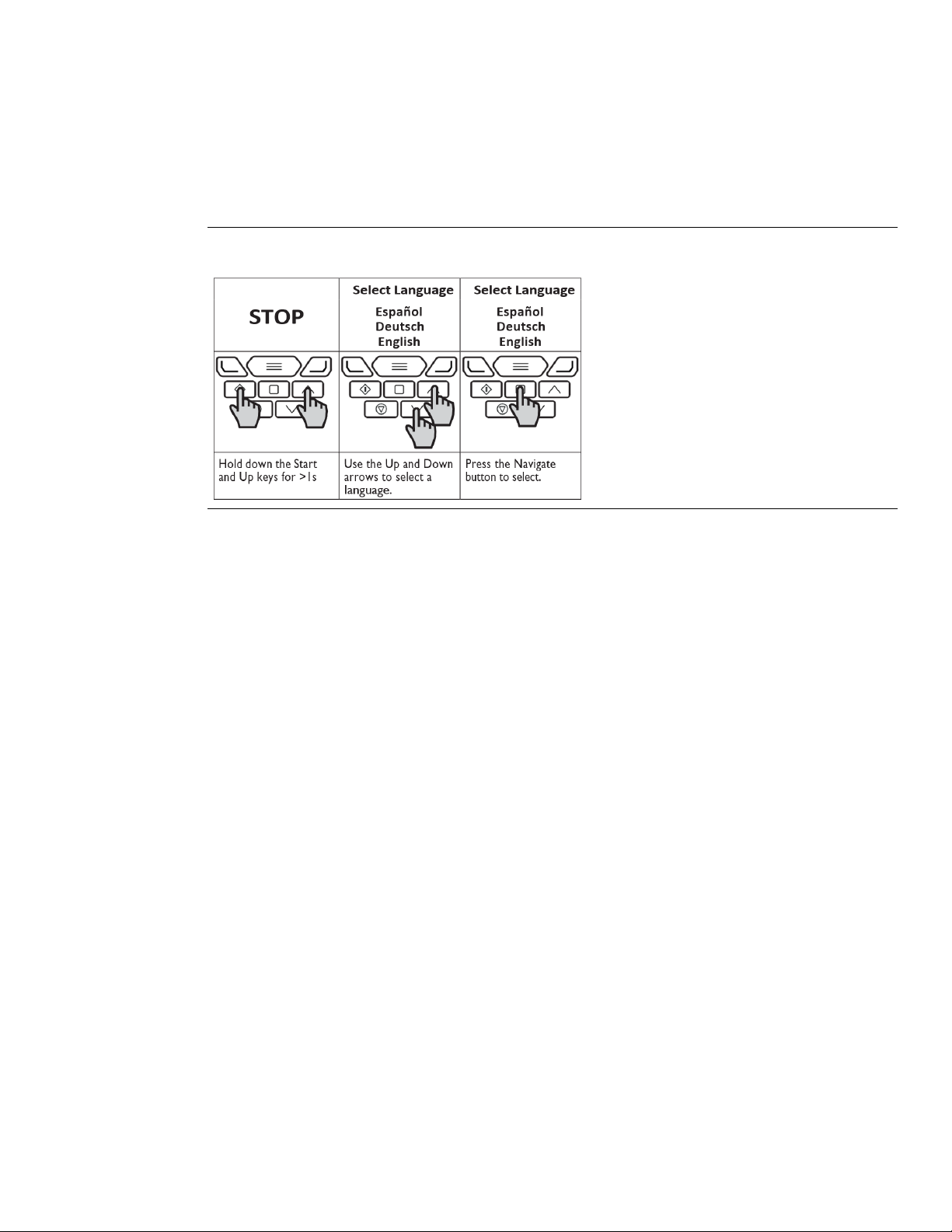
Changing the Display Language
Figure 8: Select Language
Drive Fault Message and Trip Codes
See the PACMotion VFD Advanced User Manual (GFK-3112) for further information.

PACMotion™ VFD External Keypad User Guide Section 2
GFK-3246A April 2022
7
PACMotion VFD External Keypad Display Messages
The PACMotion VFD External Keypad uses various display messages to indicate different working
statuses.
Status
Description
Scanning for Drive xx
The PACMotion VFD External Keypad is searching for the drive
with address ‘xx’ in the network.
Load…
The PACMotion VFD External Keypad has found the drive in
the network andis loading the initialisation information
from the drive.
SC-OBS
The communication link between the PACMotion VFD and
PACMotion VFD External Keypad has failed.
Select Language
Displayed in the language selection screen, with a list of
available languages. Press the Navigate keyto select a
language
Select drive address xx
Displayed when selecting the address of the PACMotion VFD
that the PACMotion VFD External Keypad should try to
communicatewith. Press the Stop key to select the drive
address.
Select PACMotion VFD External
Keypad ID
Displayed when selecting the PACMotion VFD External
Keypad ID (1 or 2) so that two PACMotion VFD External
Keypads can be connected to a singledrive, or network of
multiple drives.
Andere Handbücher für PACMOTION VFD
1
Dieses Handbuch passt für folgende Modelle
1
Inhaltsverzeichnis
Andere Emerson Tastenfeld Handbücher


