
Eminent PL369 Bedienungsanleitung

LOCKS
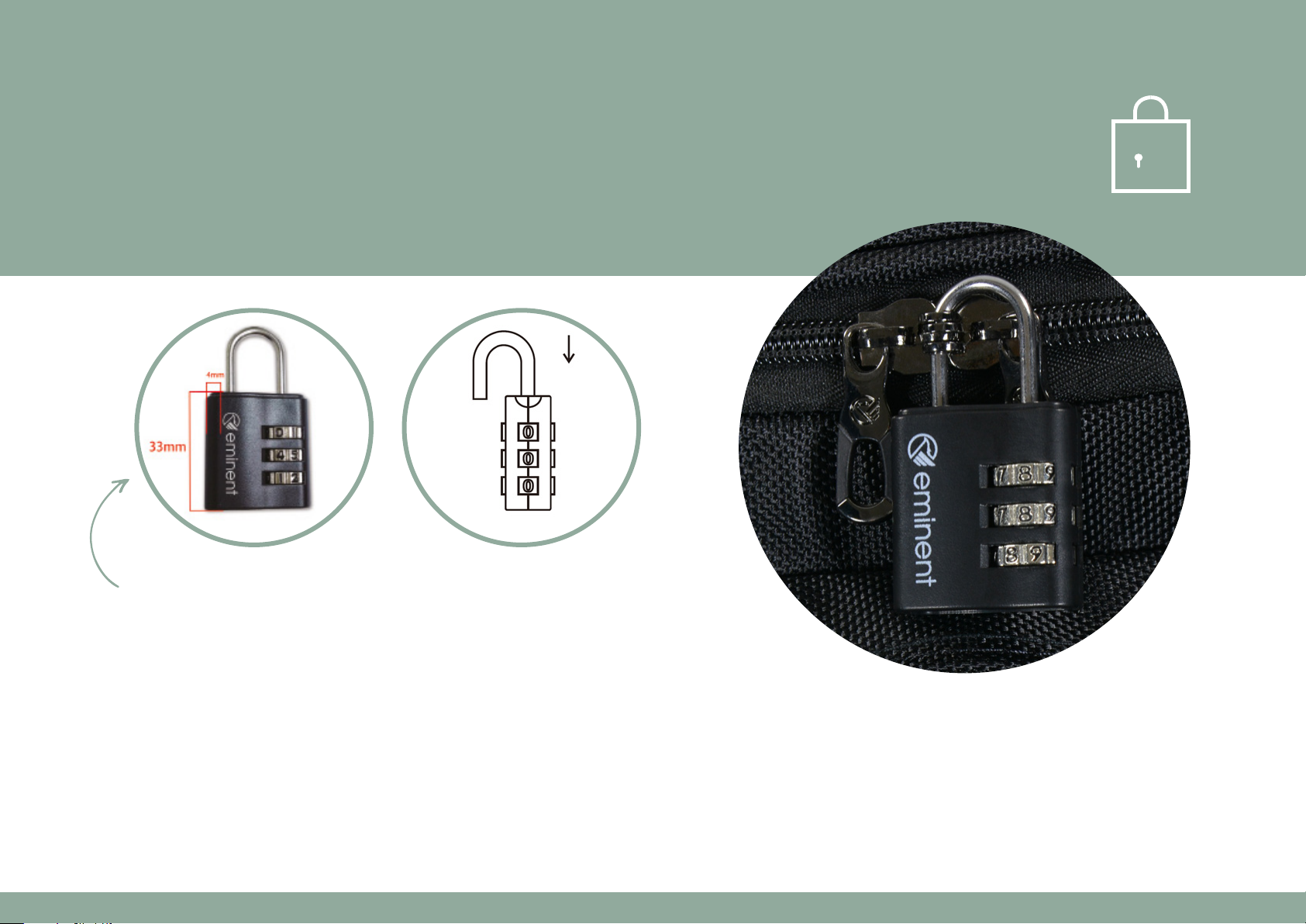
PAD LOCK
code: PL369
COMBINATION LOCK INSTRUCTION
1. The preset open combination at factory is 0-0-0.
2. Turn shackle 90° (as fig. shown) after the lock is opened, push shackle downward and press firmly,
then turn dials to your desired numbers.
3. Release shackle, your new combination is now set.
LOCKS
PL369
Shackle size: Ø3.2mm
W32 x D15 x H56.5mm
Housing material: ABS
Weight: 20g

TSA FIXED LOCK
code: TSA192
COMBINATION LOCK INSTRUCTION
The original combination is 0-0-0.
To set your own combination, please follow these easy steps:
Setting
Push A and hold it without releasing. Turn D to the combination of your choice. Release A.
Locking
Turn D to the combination you have Set Put B into the slots C.
Turn D to any combination other than the one you set.
Unlocking
Turn D to the combination you set Push E in the direction of arrow.
LOCKS
The zipper lock is preset at 0-0-0

TSA PAD LOCK
code: TSA302
COMBINATION LOCK INSTRUCTION
The original combination is 0-0-0.
To set your own combination, please follow these easy steps:
1. Pull up the shackle to open the lock (A).
2. Rotate the shackle 90° counterclockwise and press all
the waydown (B). Hold down and continue to turn
another 90° counterclockwise (C).
3. Set your own combination by turning the dials.
4. Turn the shackle back as normal. Then the setting is completed.
To reset to a new combination, please repeat steps 1 to 4 above.
Please remember your new combination.
A
B
C
LOCKS
Shackle
Dials

TSA FIXED LOCK
code: QL275
LOCKS
unlocking direction diagram
TO OPEN THE LOCK TO RESET THE LOCK
STEP 1
Turn the dials to the last
set combination. The
original combination,
set from factory, is
0-0-0.
STEP 2
According to the arrow
guidance on the lock
body, rotate the lock 45
degrees in the direction
of illustrated arrow.
STEP 1
Turn the dials to the last
set combination. The
original combination, set
from factory, is 0-0-0.
Slide down the Reset
Button A to RESET
position.
STEP 2
Turn the dials
to set your own
combination.
STEP 3
Slide up the Reset
Button A to RESET to
the original position.
Your lock will now open
at your own personal
combination.
SETTING YOUR OWN COMBINATION

TSA FIXED LOCK
code: JY-D216
COMBINATION LOCK INSTRUCTION
The original number is preset at 0-0-0.
TO SET YOUR PERSONAL COMBINATION, PLEASE FOLLOW THE BELOW STEPS
1. Set the dials (2) at its original numbers 0-0-0
aligned to the indication line (3)
2. Open the lock by pushing the button (4)
3. Press down the reset button (1) with a tool until you hear a “click“ sound.
4. Set the dials (2) to any number you want; for example 8-8-4
5. Push the button (4) towards the direction of arrow and the reset
button (1) will be back when you hear the “click“ sound.
Your new personal combination is now memorised.
LOCKS
Button
push to open 4
Dials 2
Reset Button 1
Indication Line 3

TSA FIXED LOCK
code: JY-D216
RESET
To reset the combination, please follow steps 1 - 5 by using the last memorised combination.
HOW TO USE THE COMBINATION LOCK
1. Allign the dials (2) to the indication line (3) by using last memorised numbers,
than push the button (4) to the left to open the lock
2. Press down the lock body to latch the luggage, then turn the dials (2) randomly
to any numbers except those which were last memorised.
LOCKS
Button
push to open 4
Dials 2
Set Button 1
Indication Line 3

TSA FIXED LOCK
code: TSA669
COMBINATION LOCK INSTRUCTION
To set your own combination, follow these steps:
1. 0pen the lock A (The original number is 0-0-0).
2. Press down the reset button B with a tool until you hear the “click“ sound.
3. Set your combination by turning the dials C (for example 8-8-8).
4. Push the button A to the open position and let the reset button slide back until hear the “click“ sound.
Now your personal combination is set. Remember your personal combination by heart.
WARNING
If the cylinder is opened, please pay attention to lock it again by rotating it 90° anticlockwise.
(Any tool which can be inserted in the cylinder is OK)
RESET
To reset the combination, please follow steps 1 - 4 by using the last memorised combination.
LOCKS
A
C
B

TSA FRAME LOCK
code: EM048
COMBINATION LOCK INSTRUCTION
Your combination lock is preset at 0-0-0. You may leave it at this setting or
reset to your own confidential setting as follows:
1. Open your case and locate the change shift lever
extending from the back of the lock.
2. Move the change shift lever from A to B.
3. Set three dials to a number you are familiar with.
4. Leave dials set to your combination, return shift lever from B to A.
5. Record your personal combination you can reset at any time
RESET
To reset the combination, please follow steps 1 - 4 by using the last memorised
combination.
Lever
B
B
A
A
LOCKS

TSA FIXED LOCK
code: TSA13102
COMBINATION LOCK INSTRUCTION
To set your own combination, follow these steps:
1. 0pen the lock A (The original number is 0-0-0).
2. Press down the reset button B with a tool until you hear the “click“ sound.
3. Set your combination by turning the dials C (for example 8-8-8).
4. Push the button A to the open position and let reset button back until hear the “click“ sound.
Now your personal combination is set.
Remember your personal combination by heart.
RESET
To reset the combination, please follow steps 1 - 4 by using the last memorised combination.
LOCKS
Button A
Dials C
Reset Button B
press down to reset
Push to open
Dieses Handbuch passt für folgende Modelle
11
Inhaltsverzeichnis


