
Flow MINI Bedienungsanleitung


#findyourflow online
/owsportstech
owsportstech.com

Thank you for purchasing
the Flow MINI handheld massager.
Visit support.owsportstech.com for online help,
support videos, general tips and useful information about Flow.

At Flow Sports Technology, we’re always working on nding ways to help
athletes achieve their goals. Thank you for putting your trust in us to help
you get the most out of your workouts and recover faster. While percussion
therapy is not a new idea, we never felt there was a reliable option that
ticked all the boxes. So, we went back to the drawing board and designed
Flow to be different. Lightweight. Quiet. A battery that would last. Some
call the Flow MINI ‘game-changing’ or even a ‘breakthrough innovation’.
Call it what you want, We just love helping athletes nd their ow again.
IMPORTANT SAFETY INSTRUCTIONS
BEFORE USING THIS PRODUCT ENSURE YOU HAVE READ THE INSTRUCTION MANUAL
AND ANY WARNINGS ON THE DEVICE

Before undertaking a Flow massage please rst obtain approval from your doctor if any of
the following apply: Pregnancy, diabetes with complications such as neuropathy or retinal
damage, peripheral neuropathy, wearing of pacemakers, recent surgery, epilepsy or
migraines, herniated disks, spondylolisthesis, spondylolysis, or spondylosis, recent joint
replacements or IUDs, metal pins or plates or any other concerns about your physical
health. Not for use by persons 13-year-old and under.
SafetyWarnings
Do not use this device on your
head or near your genitals. Do
not use the device above your
C4 ( approximately mid-throat
level).
Do not place your nger or
any objects near the shaft or
socket while the device is in
use. Do not get hair caught in
the massage head socket or
shaft or any other moving part on
the device.
Do not block the ventilation
ports of the motor. Do not allow
dust or debris to build up in vent
ports. Do not insert objects in
the motor ventilation ports.
Do not get the device wet
other than by cleaning it
with a lightly damp towel.
This device contains an
extremely powerful magnet!
Users of pacemakers must
consult their doctor before using
this device.
!
Li-ion
IF DAMAGED
EUROPE
• Those aged 14 years and above or persons with reduced physical, sensory or
reasoning capabilities should only use this device once they have received su-
pervision or instruction by a responsible person who has demonstrated use of the
device in a safe way and disclosed the hazards involved.
• Do not use device as a toy. Close attention is necessary when used near children.
• Keep the device out of reach of children.
• Never submerge the device in water or other liquids or pour water over the device.
• Keep away from heat sources and direct sunlight.
• Keep ventilation ports free from dirt, dust, and debris.
• Do not use the device for any other purpose than personal massage.
• Do not handle any part of the A/C wall charger or device with wet hands.
• Do not unplug the A/C wall charger by pulling on the cable. Grasp the plug to
unplug, not the cable.
• Do not use any lubricants, cleaning agents, polishes or air fresheners on any part
of the device.
• Contact the Flow support team when repair is required. Do not disassemble the
device as incorrect reassembly may result in an electric shock or re.
• If the device is malfunctioning, or has been dropped, damaged, left outdoors,
received a sharp blow or dropped into water, do not use and contact the Flow
support team.
The battery is a sealed unit and under normal circumstances poses no safety concerns.
• Therefore keep the device away from excessive heat and direct sunlight. Do not
place on or in heating devices, such as microwave ovens, stoves, or radiators.
Batteries may explode if overheated.
• Do not put device in a re as it may explode as damaged batteries may also
explode. Dispose of the device in accordance with local regulations.
• Do not smash or pierce the battery casing, or expose it to high external pressure.
Doing so may lead to a short circuit or overheating.
Battery Safety

In the Box
Flow MINI
Handheld Massager
Flow Heads™
A/C Wall Charger
Also included:
• Soft carry bag
• Stickers
• Operating guide
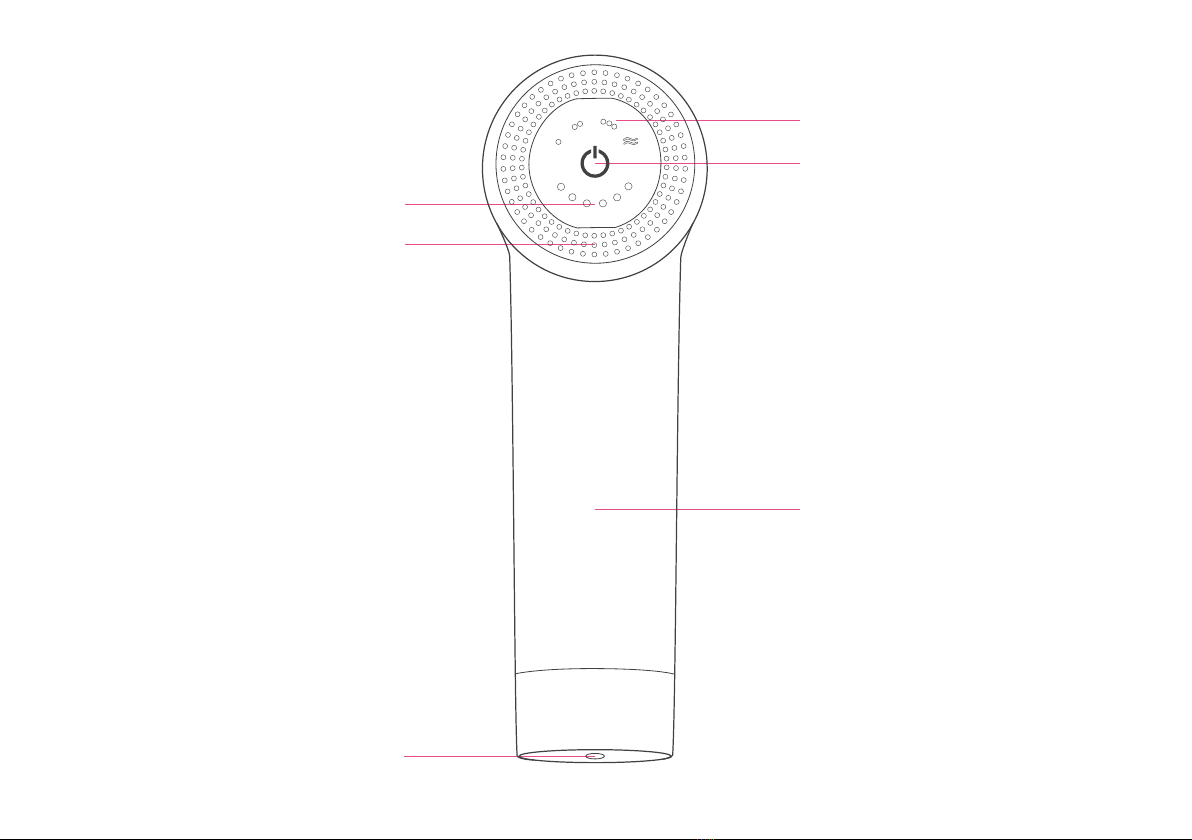
Overview
Battery status LEDs
Massage status LEDs
Charge port
High-torque motor
air ow ventilation
Internal battery
ON/OFF & Setting Selection

Flow Heads™
Your device comes with four interchangeable Flow Heads™, which can be quickly and easily
swapped. To change, pull the head away from the device. There will be a small pop as the
head comes off, and you’ll be ready to insert a new one .
Fork
Perfect for the spine, lower neck and
Achilles’ tendon along with major muscle
groups like the calves and quadriceps.
Care should be taken when using the fork
Flow Head™ in tender areas.
Hammer
The jack of all trades head, this head
is designed for overall body treatment
and larger muscles groups.
The small diameter of the bullet head
makes it perfect for focused muscle
treatment; to pinpoint trigger points and
work them away.
Bullet Medium
Made with closed-cell PU foam, this
forgiving, non-porous & hygienic
head is perfect for all over body
use and more sensitive zones.

Your device is designed to be as easy to
operate as possible.
Press the large power button once, and the
device will start to operate in Relax mode,
our rst level.
Press again for level two, Refresh mode.
Press once more for maximum power at
level 3, Recharge mode.
Press a fourth time to start Flow mode.
To switch off press one last time and your
device will power down. There is no need
to do anything else, as Flow will sleep after
5 minutes of non-use. To wake, simply press
the power button.
Modes
Quick Start
Push &
Twist
Press
To turn the device on press the large power
buttton in the centre of the control panel.
Pressing again will activate the various
modes (see opposite). Massage desired
body part at the required speed and apply
pressure as needed. Cycle though the
modes or hold down the power button to
switch off when nished.
Remove the device carefully from the box.
Your Flow MINI will already have the Medium
Flow Head™ tted. To remove it simply grip
the base of the Flow Head™ and tug until you
hear a ‘pop’.
With the device off, fully insert the
Flow Head™ of your choice by pushing
it into the socket. Do not operate the
device without a Flow Head™.

• Do not clean device while charging.
• Do not use water to clean the device.
• Do not use abrasive cleaning chemicals or solvents.
• Do use a slightly damp towel to clean the device.
• Do use the supplied cloth to dry afterward.
Cleaning
Maintenance
Charging
• High-density foam Flow Heads™ should be replaced every
three months or if they show obvious signs of wear and tear or
become dirty.
• Fully charge the device before rst use.
• Recharge device monthly to maintain battery life.
• Device can be recharged at any time and at any battery level.
• Only recharge using the supplied Flow A/C Wall Charger.
• Do not keep/leave/store the device in direct sunlight or at tem-
peratures above 40°C.
• The device and charger work best at normal room tempera-
ture. Do not charge in direct sunlight or cold temperatures. The
temperature range for charging is 0°C to 40°C.
• Never leave your device operating or charging unattended.
• It is recommended not to fully deplete the battery.
• Flow MINI is TSA approved as a carry-on item, it must only be
stored in carry-on baggage. If a carry-on bag is checked at the
gate, the device must be removed from the bag and kept with the
passenger in the aircraft cabin.
• Fully charge the device prior to long-term storage.
Travel/Storage
Charging Complete
When fully charged the A/C wall
charger will display a Green LED
and the device will show all 6
power indicator LEDs lled.
The device will not turn on while
charging.
Low or No Charge
When your device has very low or
zero charge left in its battery the
control panel will display a Red LED
and may operate sluggishly.
It is not recommended to run the
battery down to this point.
Charging your Device
Plug the A/C wall charger securely
into a wall socket.
The charger unit will display a Red
LED indicating that the charger is
connected and providing charge
- the charge level LEDs on the
control panel will cycle through -
Red, Amber & Green.
Inhaltsverzeichnis


