Flyability ELIOS 2 RAD Bedienungsanleitung

2
ELIOS 2 RAD USER MANUAL Page 2 of 15
Table of content
1Before starting ............................................................................................................................................................................................3
2ELIOS 2 RAD System...............................................................................................................................................................................3
3Elios 2 RAD.................................................................................................................................................................................................... 4
4ELIOS 2 RAD detector module........................................................................................................................................................ 4
Out of range behaviour................................................................................................................................................................................... 4
Specifications............................................................................................................................................................................................................5
5Cockpit Interface .......................................................................................................................................................................................6
6Post flight analysis with Inspector 3.0 .........................................................................................................................................7
7Calibration......................................................................................................................................................................................................8
Setting up RiumConfig.....................................................................................................................................................................................8
Calibrating the Elios 2 RAD sensor module .....................................................................................................................................9
8Technical Specifications ...................................................................................................................................................................... 11
9ELIOS System transmitted Power ...............................................................................................................................................14

Before starting
ELIOS 2 RAD USER MANUAL Page 3 of 15
1Before starting
This manual focuses on the features of the dosimetry payload of Elios 2 RAD. It complements the following
documents, which the Elios 2 RAD user must also read and understand fully:
–ELIOS 2 Original Instructions –certification compliance, safety guidelines and checklists
–ELIOS 2 User Manual –complete user guide
–ELIOS 2 Smart Battery Guidelines –safety guidelines
2ELIOS 2 RAD System
The Flyability ELIOS 2 was developed explicitly as a flying platform capable of entering confined and
cluttered environments. Elios 2 RAD is equipped with an additional dosimetry sensor.
Figure 2.1: System overview
The operator will enjoy full control of Elios through the Ground Control System (GCS). A tablet allows the
operator to monitor a live video feed and instantaneous dose rate transmitted by ELIOS 2. RAD The Flyability
Inspector post-mission analysis software provides a simple solution to visualize the recorded video, the
thermal video and dosimeter data. Inspector 3.0 premium allows the user to recreate a 3D image of the flight
environment to better visualize the dose rates measured in various locations.

Elios 2 RAD
ELIOS 2 RAD USER MANUAL Page 4 of 15
3Elios 2 RAD
Elios 2 RAD is a specially modified Elios 2 designed to carry a dosimetry detector module. Apart from the
mounting bracket for the detector module, and the modified casing with a connector, all user changeable
parts are compatible with a standard Elios 2. There is no significant change in flight behaviour and collsion
resilience, though flight time is reduced slightly due to the added weight of the sensor module.
4ELIOS 2 RAD detector module
This module allows Elios 2 RAD to measure ambient radiation. At its core, the sensor module has an energy-
compensated Geiger-Müller tube capable of detecting both Gamma and X-rays.
The sensor module is removable for calibration, but can only be installed on the specially modified Elios 2 RAD
drone. To remove the sensor, undo the straps that hold in it place, and disconnect the cable that plugs into
the body of the drone.
Elios 2 RAD is shipped with three detectors, each detector is designed for a specific dose rate range
Out of range behaviour
The Elios 2 RAD detectors will provide accurate readings within their specified range. Below a certain
threshold it will display zero, with occasional spurious. Such readings serve as an indicator that the detector
is still operational, but the values should be ignored, and it can be assumed that the actual dose rate is lower
than the threshold level.
Above the maximum range the detector reaches its saturation point, above this value, the reading will
continue to rise but it will no longer be accurate.

Detector Specifications
ELIOS 2 RAD USER MANUAL Page 5 of 15
Detector Specifications
HIGH LEVEL RADIATION DETECTOR
Detector technology Energy-compensated Geiger-Müller
Types of radiation detected Gamma, X-ray
Calibration Energy Cs137
Angular response <30% over 180
H*(10) dose rate range –10k 1.5 mSv/h –10 Sv/h @ 1 to 2 second sample rate
Sensitivity 0.006 cps/uSv/h
Dose sensitivity < 0.1 µSv
MID LEVEL RADIATION DETECTOR
Detector technology Energy-compensated Geiger-Müller
Types of radiation detected Gamma, X-ray
Calibration Energy Cs137
Angular response <30% over 180
H*(10) dose rate range –10k 8uSv/h - 1Sv/h @ 1 to 2 second sample rate
Sensitivity 1 cps/uSv/h
Dose sensitivity < 0.1 µSv
HIGH LEVEL RADIATION DETECTOR
Detector technology Energy-compensated Geiger-Müller
Types of radiation detected Gamma, X-ray
Calibration Energy Cs137
Angular response <30% over 180
H*(10) dose rate range –10k 3uSv/h - 10mSv/h @ 1 to 2 second sample rate
Sensitivity 2.6 cps/uSv/h
Dose sensitivity < 0.1 µSv

Cockpit Interface
ELIOS 2 RAD USER MANUAL Page 6 of 15
5Cockpit Interface
The dosimetry data is streamed directly to the ground station and can be monitored in real time on the
Cockpit application.
DOSE RATE PLOT
A graphical representation of the dose rates measured over the past few seconds is displayed in the
lower left corner (1).
DOSE RATE
The current dose rate is displayed below the plot (2)
TOTAL DOSE
The total dose absorbed by the drone since the battery is connected is displayed below the dose rate
(2)
SETTINGS MENU
The cockpit setings menu contains the additional ‘RAD SENSING’menu tab. This contains the
following settings:
1. Unit, the unit in which the dose and dose rate are displayed, this can either be Sievert or Rem
2. Measured Value, the dose rate currently measured by the detector, updated every 2 seconds
3. Session Accumulated Dose, the total dose absorbed by the drone since the battery is connected
4. Lifetime Accumulated Dose, the total dose absorbed by the drone in it’s lifetime before this session

Post flight analysis with Inspector 3.0
ELIOS 2 RAD USER MANUAL Page 7 of 15
6Post flight analysis with Inspector 3.0
The flight data can be downloaded onto a PC using Inspector 3.0. The basic version allows the dosimeter data
to be displayed alongside the video, while the premium version can re-create a 3D model of the flight
environment, with the flight path being colorized corresponding to the locally measured dose rate values.
DOSE RATE GAUGE (1)
This gauge will display the dose rate at the current point in the video, and the total dose absorbed
until that point in the flight. The user can choose whether the value is displayed in Sievert or Rem in
the settings menu.
TRAJECTORY COLOR BAR (2)
This menu allows you to change the color mapping of the flight path line in the 3D model. By default
it will autoscale from the minimum to the maximum value.
RADIATION TAB (3)
Click on this tab to expand a plot of the measured dose rate throughout the flight, this allows you to
quickly identify hotspots

Calibration
ELIOS 2 RAD USER MANUAL Page 8 of 15
7Calibration
The sensor module can be calibrated using the manufacturer’s software by connecting the sensor module to
a PC via the provided cable. The following softwares are required:
1. RIUMCONFIG calibration software, available for free on the windows store
2. The FTDI driver for the connection cable, available here
You will also need a license for the RIUMCONFIG software, this is a .csv file provided with the drone. If you do
Setting up RiumConfig
This software is developed by Icohup, the manufacturer of the detector unit. It can only be installed via the
Windows Store. Follow the instructions to install it.
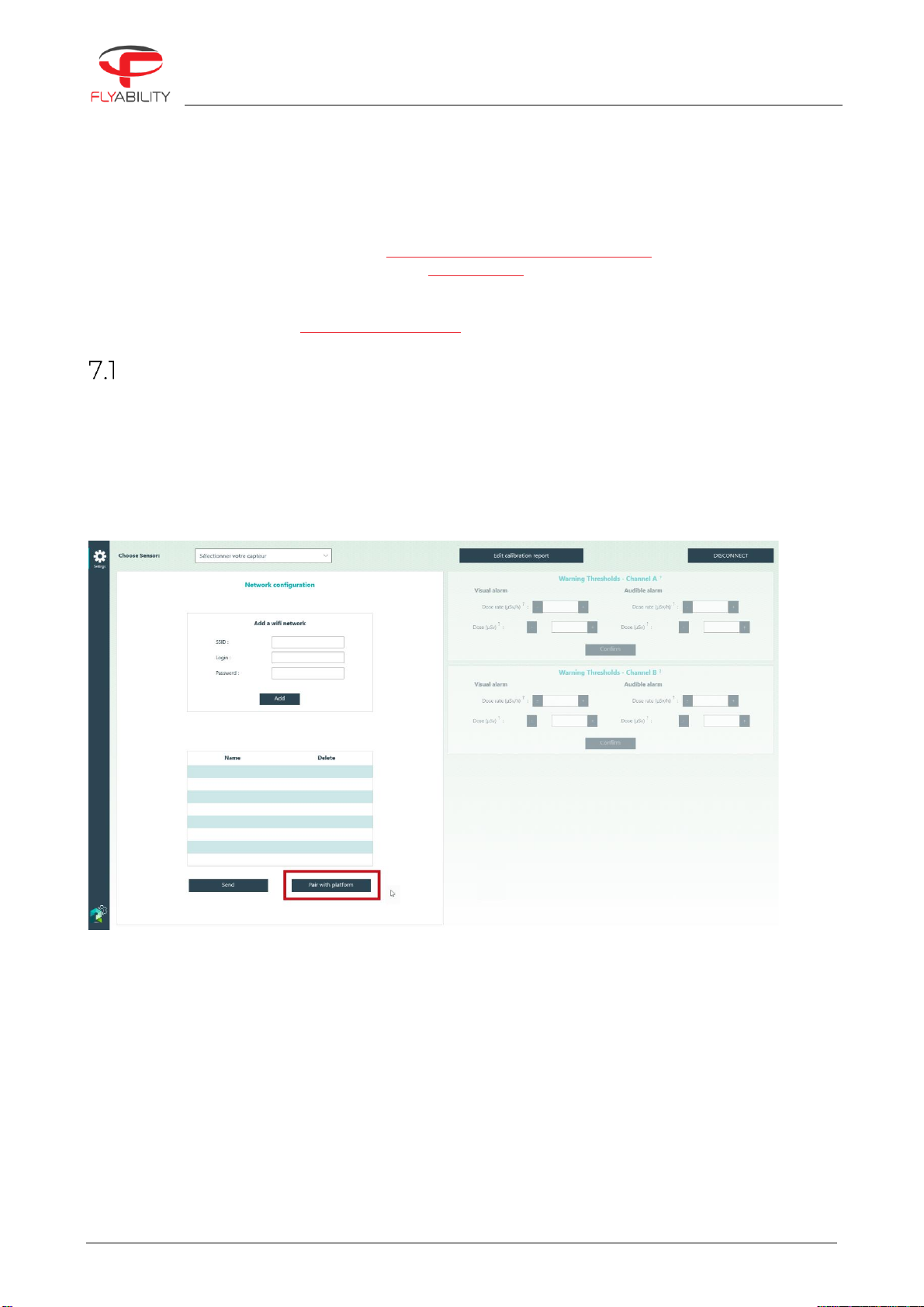
When launching the program you will be given the option to create a password (mot de passe means
password). This is not needed for the Elios 2 RAD sensor module, but we recommend you do it anyways,
because otherwise it will just keep bothering you with it. You may encounter parts of the program that are
not translated, to help you we show you the main translated parts here below.
To activate the license, click on “Pair with platform”. This will open a window where you can select your .CSV
license file. Once you have done this, restart the program. You will notice that there is no exit button, so you
must press Alt+F4 to terminate it.
Start the program again. A second “calibration” button will have appeared on the left hand bar. You have
successfully installed and activated RiumConfig.

Calibrating the Elios 2 RAD sensor module
ELIOS 2 RAD USER MANUAL Page 9 of 15
Calibrating the Elios 2 RAD sensor module
Use the provided USB adapter to connect the sensor module to your PC.
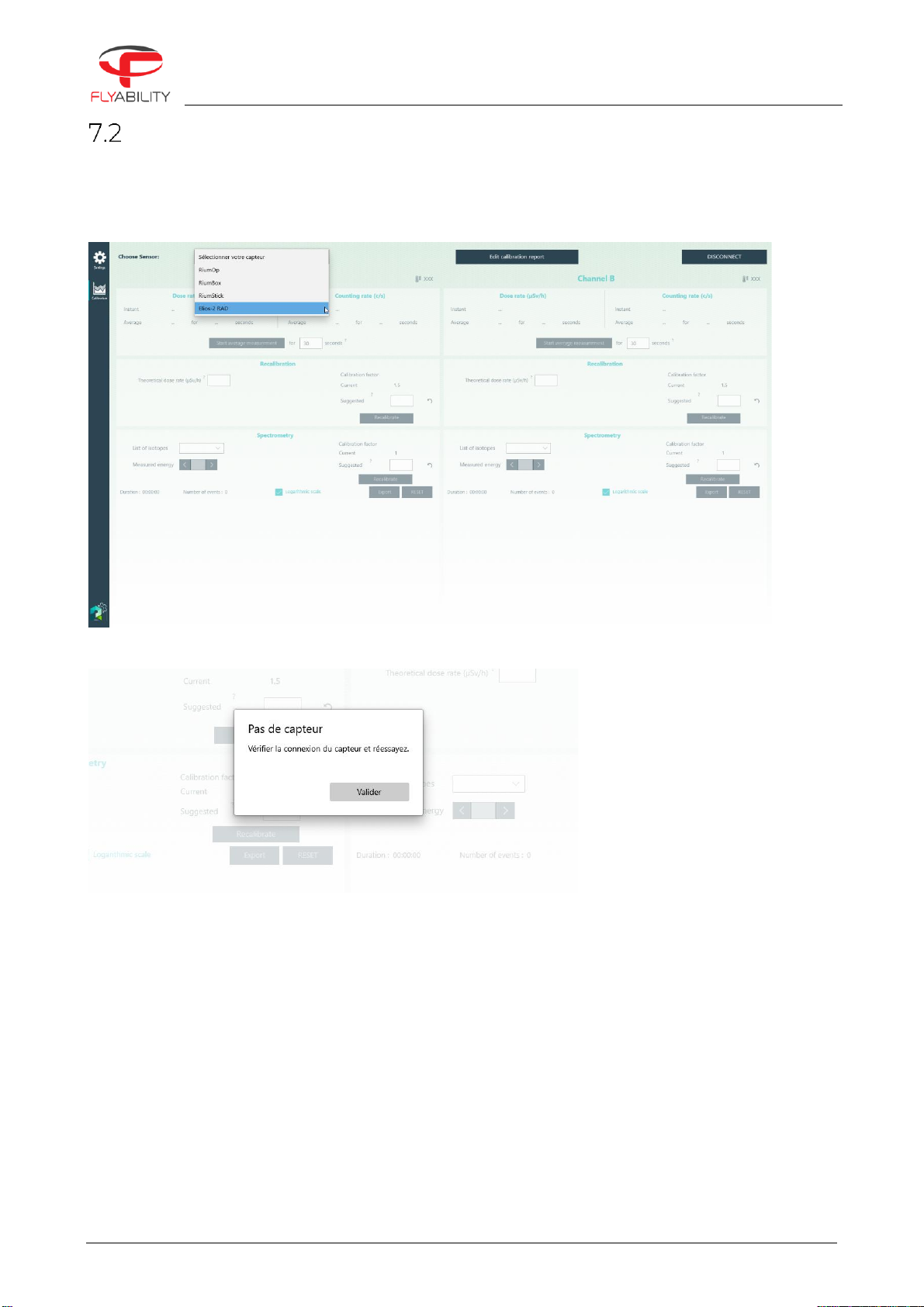
In RiumConfig, click on the “Calibration” tab on the bar to the left, then select Elios-2 RAD from the drop down
menu in the top left.
If the Elios 2 RAD sensor module is not connected to your PC at this point, then you will get this message
This message means: “No sensor, verify the connection and try again”. This can be due to a faulty connection,
or due to the drivers not being installed correctly. Be sure that the FTDI drivers have been installed.
If the sensor module is successfully connected you will get a message saying “Confirmation de connexion”,
click ‘Valider’ to continue.
You can now calibrate the E2 RAD detector unit by making an average measurement and comparing it with
the theoretical value of a known reference source. A suggested value for the calibration factor will appear in
the field when you enter the theoretical dose rate of the known reference source.

ELIOS 2 RAD USER MANUAL Page 10 of 15
When placing the detector module near the reference source, keep into consideration the slightly irregular
directional response of the detector. The position of the GM-tube within the detector is marked on the
housing.
Andere Handbücher für ELIOS 2 RAD
1
Inhaltsverzeichnis
Andere Flyability Quadcopter Handbücher