
Harper HB-551 Bedienungsanleitung

2
Thank you for choosing Harper products. Before use, read the op-
erating instructions and save them in case you have any questions
about servicing the device.
PRECAUTIONARY MEASURES
1. Do not disassemble device by yourselves. It may lead to mal-
function of device.
2. ln case of any malfunction, please contact authorized service
center.
3. Do not lead device and accessories unattended. Please keep
them out of reach of children and pets. Small parts can cause
suffocation.
4. The device is supposed to be used in normal climate conditions.
Extreme climate conditions (temperature below 0°С and above
45°С, too high level of humidity) can cause malfunction of device
and wreck electronic components of device.
5. Protect device from water, do not touch it with wet hands.
Information about restrictions on the use of technical equipment,
taking into account its purpose for work in residential, commer-
cial or industrial areas
The equipment is designed to work in residential and commercial are-
as, public places, industrial areas with small and medium power con-
sumption, without exposure to harmful and dangerous production factors.
The equipment is intended for operation without the constant presence of
maintenance personnel.
REQUIREMETS TO TRANSPORTATION
Transportation of equipment should be carried out in the original pack-
aging in covered vehicles by any means of transport.
3
APPOINTMENT
These headphones are designed for mobile devices with Bluetooth
functionality.
They are designed for wireless transmission of audio data: talking on
the phone, listening to music files.
ITEMS INCLUDED
• 1 x Bluetooth stereo headset НВ-551
• 1 x Micro USB charging cable
• 1 x User’s manual
• 1 x Guarantee card
• 3 x Pair of silicone ear pads (big, middle, small sizes)
PAIRING
1. Take two earbuds out from the charging case, they will automati-
cally connect with each other, and you will hear the “bee” sound.
2. Open the Bluetooth function on your device to search for nearby
Bluetooth devices.

4
3. Select the “HB-551” from the list of available Bluetooth devices.
4. Once paired successful, you would hear prompt tone “Connect-
ed”.
5. Then you can play music or take calls with your earbuds now.
6. If its disconnected, you will hear prompt sound “Disconnected”.
CONTROL
1. Мusic control
Single press L/R earbud х1: play/pause music.
Рress on left earbud х2: volume up.
Рress on right earbud х2: volume down.
Рress on left x3: previous music.
Рress on right x3: next music.
2. Call аnd voice assistant call control
Single press on L/R earbuds х1: answer/ sang up call.
Long press L/R earbuds 2 s: reject call.
Long press 3 s on the L/R earbuds: call voice assistant
Long press 5 second on the L/R earbuds: power on/off
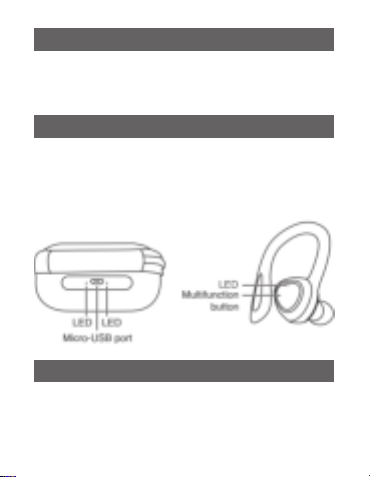
LED INDICATION
Function Carging case Earpiece
Earpiece - ON N/A Red Blue LED light up
for around 1 second
Earpiece - OFF N/A Red Blue LED light up
for around 1 second

5
Pairing left and right
earpiece
N/A Both earpieces will
flash blue and red LED
alternatively
Paired left and right
earpieces
N/A One earpiece will flash-
es blue
Pairing to music
device
N/A Blue and Red LED flash
alternatively
Paired to music
device
N/A Blue LED flashes every
5 seconds
Earpiece - charging Blue LED
light up
Red LED light up
Earpiece – charging
complete
Blue LED off Red LED off
Earpiece – low
battery
N/A Red LED flashes
Charging case
- charging
Red LED
light up
N/A
Charging case –
charging complete
Red LED off N/A
Charging case –
low battery
Blue LED
flashes
N/A
REMARKS
1. Take out the earpieces from the charging box and it will automat-
ically switch on and automatically start pairing.
2. Put the earpiece into the charging box and it will automatically
switch off and automatically start charging.

6
3. The earpiece will automatically power off if idle for around 5-10
minutes or if the battery capacity is too slow.
4. If malfunction occur due to electrostatic discharge, unplug the
charging cable and connect it again.
PRODUCT PARAMETERS
• Bluetooth version: 5.1
• Frequency response: 20Hz – 20 kHz
• Earphones charging time: 1,5h
• Case charging time: up to 2h
• Work time: up to 4 h
• Case battery capacity: 300mAh
• Earphones battery capacity: 2*30mAh
• Plug for charging: micro USB
• Sensitivity: 95dB±5
• Impedance: 16 Ohm
• The maximum work range: 10m
DISPOSAL INFORMATION
This device is designed and made of high quality materials
and components, which can be recycled and reused. The
symbol means that electrical and electronic equipment must
be disposed of separately from household waste after use.
Notes
In accordance with constant improvement, specifications and
design are subject to change without notice.
This product does not contain precious metals.

Information about certification
The products passed all the assessment procedures established in the technical
regulations of the Customs Union and the Eurasian Economic Union
Information about product certification, certificate number and date, validity
period you can find on the website www.harper.ru or by calling technical support
8-800-600-7107
Production date is indicated on the gift-box
Life duration of product: 24 months
Warranty period: 12 months
Warranty service is provided on the base of warranty card that goes together with
the product.
Warranty card and User manual are integral parts of the product.
For additional information about the product and authorized service centers you may
find at www.harper.ru or by telephone 8-800-600-7107.
Manufacturer: Harper International Trading Limited 15F, Radio City, 505 Hennessy
Road, Causeway Bay, Hong Kong
Made in China
Importer/claims organization: LLC «Progress-Plyus», App.11, floor 2, Build.50, k.1,
Udaltsova Str., Moscow, Russia, 119607, tel.: +74951330210, email: info@harper.ru
Bluetooth stereo headset with microphone
НВ-551

8
Благодарим Вас за выбор продукции Harper. Перед началом
использования ознакомьтесь с руководством по эксплуатации
и сохраните его на случай возникновения вопросов по обслу-
живанию устройства.
МЕРЫ ПРЕДОСТОРОЖНОСТИ И ХРАНЕНИЕ
1. Не разбирайте устройство самостоятельно, это может при-
вести к неисправностям в работе.
2. В случае возникновения неполадок обращайтесь в автори-
зованный сервисный центр.
3. Не оставляйте устройство и аксессуары без присмотра.
Храните их вне пределов досягаемости детей и домашних
животных. Мелкие детали устройства могут стать причи-
ной удушья.
4. Устройство предназначено для эксплуатации в нормальных
климатических условиях. Экстремальные климатические
условия (температура ниже 0°С или выше 45°С, крайне вы-
сокий уровень влажности) могут стать причиной неполадок
и вывести из строя электронные компоненты устройства.
5. Оберегайте устройство от влаги, не трогайте его мокрыми
руками.
Сведения об ограничениях в использовании технического
средства с учетом его предназначения для работы в жилых,
коммерческих или производственных зонах
Оборудование предназначено для работы в жилых и коммерче-
ских зонах, общественных местах, производственных зонах с ма-
лым и средним электропотреблением, без воздействия вредных
и опасных производственных факторов. Оборудование предна-
значено для эксплуатации без постоянного присутствия обслу-
живающего персонала.
9
УСЛОВИЯ ТРАНСПОРТИРОВКИ
Транспортировка оборудования должна производиться в за-
водской упаковке в крытых транспортных средствах любым
видом транспорта.
НАЗНАЧЕНИЕ
Данные наушники разработаны для использования с мобиль-
ными устройствами, поддерживающими функцию Bluetooth.
Они предназначены для беспроводной передачи аудиоданных:
разговора по телефону, прослушивания музыкальных файлов.
КОМПЛЕКТАЦИЯ
• 1 х Bluetooth стереонаушники НВ-551
• 1 х Micro USB кабель для зарядки
• 1 х Руководство по эксплуатации
• 1 х Гарантийный талон
•
3 х Силиконовые амбушюры – пара (большие, средние, маленькие)

10
СОПРЯЖЕНИЕ
1. Перед использованием убедитесь, что наушники полно-
стью заряжены.
2. Выньте оба наушника (левый и правый), светодиод на обо-
их наушниках будет мигать синим и красным поочередно.
Они автоматически соединятся друг с другом в течение 10
секунд вы услышите звуковой сигнал.
3. Когда наушники подключены, одна сторона светодиода на-
ушников будет мигать синим цветом.
4. Теперь вы можете начать сопряжение со своим устройством.
5. Включите функцию Bluetooth на своем устройстве и най-
дите “HB-551” для сопряжения. Светодиодная индикация
начинает мигать синим цветом, когда наушники успешно
соединяются с устройством.
УПРАВЛЕНИЕ
1. Управление музыкой
Нажатие левого/правого наушника х1: воспроизведение/пауза.
Нажатие левого наушника х2: увеличение громкости.
Нажатие правого наушника х2: уменьшение громкости.
Нажатие левого наушника х3: предыдущая песня.
Нажатие правого наушника х3: следующая песня.
2. Управление звонками и вызов голосового ассистента
Нажатие левого/правого наушника х1: ответ на входящий зво-
нок/завершение вызова.
Длительное нажатие левого/правого наушника около 2 с: сброс
входящего звонка.
Inhaltsverzeichnis
Sprachen:
Andere Harper Kopfhörer Handbücher


