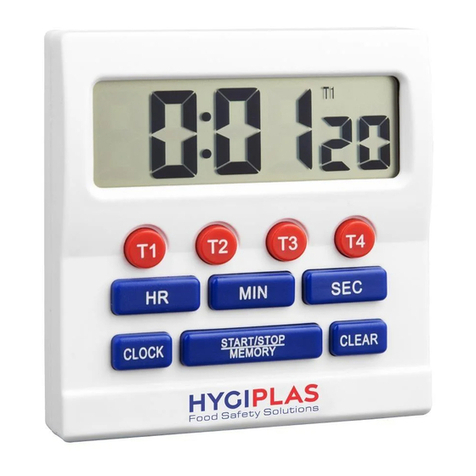
HYGIPLAS CF916 Bedienungsanleitung

Big DigitTimer
Instruction manual
Model •Modèle •Modell •Modello •Modelo •Malli:
CF916
NL IT
FR ES
DE PT
Big DigitTimer
Handleiding
Minuteur grand afifchage
Mode d’emploi
Timer mit großer Ziffernanzeig e
Bedienungsanleitung
Timer a cifre grandi
Manuale di istruzioni
Temporizador de dígitos grandes
Manual de instrucciones
Temporizador de dígitos grandes
Manual de instruções

UK
2
Features:
•Big digit display
•4 timers count down/up simultaneously
•Maximum count down/up 99hr 59min 59sec
•Memory for preset value
Speciifcation:
Maximum count down/up range 99 hours 59 minutes 59 seconds
Count down/up display resolution 1 second
Display size 66(W) X 22(H) mm
Digit size 10(W) X 18(H) mm
Battery 1.5 volt, size AAA or equivalent X 1 piece
(included)
Product size 80(W) X 85 (H) X 31(D) mm
INSTALLATION:
Open the battery cover.1.
Install battery with correct polarity positioning.2.
Close the battery cover.3.
Peel off display protective sheet.4.
Press�and�hold�[CLOCK]�until�display�lfashing.5.
Press [12/24] button on the back to select 12 or 24 hours time format.6.
Press [HR], [MIN] and [SEC] to set the correct time. *7.
Press�[CLOCK]�to�ifnish�clock�setting.8.
•12/24 hours time format
•Foldaway stand
•Magnetic attachment
OPERATION:
COUNT DOWN
1. Press [T1] to select timer 1.
2. Press [HR], [MIN] and [SEC] to set the desired count down time. *
3. Press [START/STOP/MEMORY] to start TIMER 1 ‘s [T1] count down.
4. Press the button again to pause.
5. Press the button once more to resume count down.

UK
3
6. The timer will sound when display value becomes 0:00 00 and will be counting up
to show the elapsed time.
7. Press [START/STOP/MEMORY] to stop TIMER 1.
8. Press the button again to recall the memorized preset value.
9. Press [CLEAR] to clear all values.
10.Press T2, T3 or T4 to select the desired timer.
11.Repeat step 2 to 9 to set and run the selected timer.
COUNT UP
1. Press T1, T2, T3, or T4 to select the desired timer.
2. Press [CLEAR] to clear display values.
3. Press [START/STOP/MEMORY] to start count up.
4. Press the button again to pause.
5. Press the button once more to resume count up.
* During setting the values, press and hold the [HR], [MIN] or [SEC] button will
increase the values automatically.
* All active timers [T1] to [T4] are shown in the top right corner of the display.
* The static characters in the corner of the display [T1] to [T4] relate to the
timer�reading�on�the�display;�the�lfashing�characters�relate�to�the�otheractive
timers.
Compliance
Dispose of depleted batteries in accordance with local regulations, within the EC there are
nominated disposal points for batteries.
The WEEE logo on this product or its documentation indicates that the
product must not be disposed of as household waste. To help prevent
possible harm to human health and/or the environment, the product
must be disposed of in an approved and environmentally safe recycling
process. For further information on how to dispose of this product
correctly, contact the product supplier,or the local authority responsible
for waste disposal in your area.
HYGIPLAS parts have undergone strict product testing in order
to comply with regulatory standards and specifications set by
international, independent, and federal authorities.
HYGIPLAS products have been approved to carry the following symbol:
All rights reserved. No part of these instructions may be produced or transmitted in any form or by any means, electronic, mechanical,
photocopying, recording or otherwise, without the prior written permission of HYGIPLAS.
Every effort is made to ensure all details are correct at the time of going to press, however, HYGIPLAS reserve the right to change
specifications without notice.

NL
4
Kenmerken:
Big digit display•
Gelijktijdige af-/optteling van 4 timers•
Maximale aftelling/optelling 99 uur 59 min. 59 Sec.•
Geheugen voor instelwaarden•
12/24-Uur tijdsindeling•
Inklapbare steun•
Magnetsche bevestiging•
Speciifcatie:
Maximaal af-/optellingsbereik 99 Uur 59 minuten 59 seconden
Resolutie af-/optellingsweergave 1 Seconde
Displaygrootte 66(b) x 22(h) mm
Digitgrootte 10(b) x 18(h) mm
Batterij 1,5 Volt, type AAA of equivalent x 1 stuk
(inbegrepen)
Productgrootte 80(b) x 85(h) x 31(d) mm
INSTALLATIE:
Schuif de batterijdeksel open.1.
Plaats de batterij in de juiste poolpositie.2.
Sluiten de batterijdeksel dicht.3.
Haal de beschermingsfolie van het display.4.
Druk en houd ingedrukt [CLOCK] totdat het display knippert.5.
Druk de knop [12 / 24] aan de achterzijde in om de 12 of 24 uur6.
tijdsindeling te kiezen.
Druk op [HR], [MIN] en [SEC] om de juiste tijd in te stellen. *7.
Druk op [CLOCK] om de instelling te voltooien.8.

NL
5
WERKING:
AFTELLING
Druk op [T1] om TIMER 1 te selecteren.1.
Druk op [HR], [MIN] en [SEC] om de gewenste aftellingstijd in te stellen. *2.
Druk op [START/STOP/MEMORY] om de aftelling van timer 1 [T1] te starten.3.
Druk de knop opnieuw in om te pauzeren.4.
Druk nogmaals één keer op de knop om het aftellen te hervatten.5.
De timer geeft een geluidssignaal zodra de ingestelde displaywaarde 0:00 006.
bereikt en start automatisch het optellen om de verstreken tijd weer te geven.
Druk op [START/STOP/MEMORY] om timer 1 te stoppen.7.
Druk opnieuw op de knop om de opgeslagen instelwaarde op te roepen.8.
Druk op [CLEAR] om alle waarden te wissen.9.
Druk op T2, T3 OF T4 om de gewenste timer te selecteren.10.
Herhaal de stappen 2 tot 9 om de gewenste timer in te stellen en te starten.11.
OPTELLING
Druk op T1, T2, T3 of T4 om de gewenste timer te selecteren.1.
Druk op [CLEAR] om alle displaywaarden te wissen.2.
Druk op [START/STOP/MEMORY] om de optelling te starten.3.
Druk de knop opnieuw in om te pauzeren.4.
Druk nogmaals één keer op de knop om het optellen te hervatten.5.
* Door tijdens het instellen van de waarden de knop [HR], [MIN] of [SEC] in te
drukken en ingedrukt te houden, worden de waarden automatisch verhoogd.
* Alle actieve timers [T1] tot [T4] worden weergegeven in de rechter bovenhoek
van het display
* De statische tekens in de hoek van het display [T1] tot [T4] verwijzen naar
de timermeting op het display, de knipperende tekens naar de andere
actieve timers

FR
6
Caractéristiques :
Grand�écran�d’afifchage•
4 minuteurs compte à rebours / progressif simultanés•
Durée maximale du compte à rebours / progressif de 99 h 59 min 59 sec•
Mémoire�pour�valeur�prédéifnie•
Format horaire 12 / 24 heures•
Support pliant•
Attache magnétique•
Spéciifcation :
Durée maximale de compte à
rebours / progressif
99 heures 59 minutes 59 secondes
Résolution de l’écran de compte à
rebours / progressif
1 seconde
Dimensions de l’écran 66 (l) x 22 (H) mm
Dimensions des chiffres 10 (l) x 18 (H) mm
Pile 1 pile AAA ou équivalent de 1,5 V (fournie)
Dimensions du produit 80 (l) x 85 (H) x 31 (P) mm
INSTALLATION :
Ouvrir glisser le couvercle de la pile.
1.
Installer la pile en respectant la polarité.2.
Fermer le couvercle de la pile en place.3.
Décoller�le�iflm�de�protection�de�l’écran.4.
Appuyer sur [CLOCK] jusqu’à ce que l’écran clignote.5.
Appuyer sur le bouton [12/24] au dos pour sélectionner le format horaire de6.
12 ou 24 heures.
Appuyer sur [HR], [MIN] et [SEC] pour régler l’heure. *7.
Appuyer sur [CLOCK] pour terminer le réglage de l’horloge.8.

FR
7
FONCTIONNEMENT :
COMPTE À REBOURS
Appuyer sur [T1] pour sélectionner le minuteur 1.1.
Appuyer sur [HR], [MIN] et [SEC] pour régler la durée du compte à2.
rebours désirée. *
Appuyer sur [START/STOP/MEMORY] pour démarrer le compte à rebours3.
du MINUTEUR 1.
Appuyer à nouveau sur le bouton pour pauser.4.
Appuyer à nouveau sur le bouton pour redémarrer le compte à rebours.5.
Le�minuteur�sonne�lorsque�0:00�00�s’afifche�à�l’écran�et�démarre�un�compte6.
progressif indiquant le temps écoulé.
Appuyer sur [START/STOP/MEMORY] pour arrêter le MINUTEUR 1.7.
Appuyer à nouveau sur le bouton pour rappeler la valeur mémorisée.8.
Appuyer sur [CLEAR] pour effacer toutes les valeurs.9.
Appuyer sur T2, T3 ou T4 pour sélectionner le minuteur.10.
Répéter les étapes 2 à 9 et déclencher le minuteur sélectionné.11.
COMPTAGE PROGRESSIF
Appuyer sur T1, T2, T3 ou T4 pour sélectionner le minuteur.1.
Appuyer�sur�[CLEAR]�pour�effacer�les�valeurs�afifchées.2.
Appuyer sur [START/STOP/MEMORY] pour démarrer le compte progressif.3.
Appuyer à nouveau sur le bouton pour pauser.4.
Appuyer à nouveau sur le bouton pour redémarrer le compte progressif.5.
* Lors�de�la�conifguration�de�ces�valeurs,�appuyer�sur�le�bouton�[HR],�[MIN]�ou
[SEC] et le maintenir enfoncé pour augmenter automatiquement les valeurs.
* Tous�les�minuteurs�actifs�[T1]�à�[T4]�sont�afifchés�en�haut�à�droite�de�l’écran.
* Les caractères statiques [T1] à [T4] au coin de l’écran correspondent au
minuteur�afifché�à�l’écran.�Les�caractères�clignotants�correspondent�aux�autres
minuteurs actifs.

DE
8
Funktionen:
Große Ziffernanzeige•
Gleichzeitig Countdown/Zeitnahme von 4 Zeiten•
Maximaler Countdown/Zeitnahme 99 h 59 Min. 59 Sek.•
Speicher für voreingestellte Werte•
Zeitformat 12 oder 24 Stunden•
Klappständer•
Magnethalterung•
Speziifkation:
Maximaler Countdown-/
Zeitnahme-Bereich
99 h 59 Min. 59 Sek.
Aulfösung�der�Countdown-/
Zeitnahmeanzeige
1 Sekunde
Anzeigegröße 66(B) x 22(H) mm
Zifferngröße 10(B) x 18(H) mm
Batterie 1,5�V,�Größe�AAA�oder�vergleichbar,�1�
Batterie (im Lieferumfang)
Produktgröße 80(B) x 85(H) x 31(T) mm
EINRICHTUNG:
ffnen abschieben.1.
Batterien einlegen (auf korrekte Ausrichtung achten).2.
Schließen wieder aufschieben.3.
Schutziflm�vom�Display�abziehen.4.
[UHR] gedrückt halten, bis das Display blinkt.5.
Die Taste [12 / 24] auf der Rückseite drücken, um das 12- oder 24-Stunden6.
Zeitformat zu wählen.
Mit [H], [MIN] und [SEK] die korrekte Uhrzeit einstellen. *7.
[UHR] drücken, um die Einstellung der Uhrzeit zu beenden.8.
ö

DE
9
BETRIEB:
COUNTDOWN
[T1] drücken, um Timer 1 zu wählen.1.
Mit [H], [MIN] und [SEK] die gewünschte Countdown-Zeit einstellen. *2.
Durch Drücken von [START/STOP/SPEICHER] wird der Countdown für3.
TIMER 1 [T1] gestartet.
Durch erneutes Drücken der Taste wird die Zeitnahme unterbrochen.4.
Taste noch einmal drücken, um den Countdown wieder zu starten.5.
Der�Timer�ertönt,�wenn�der�Displaywert�0:00�00�erreicht.�Dann�zählt�die6.
Anzeige weiter und zeigt so die vergangene Zeit ab 0:00 00 an.
Durch Drücken von [START/STOP/SPEICHER] wird TIMER 1 gestoppt.7.
Durch erneutes Drücken der Taste wird der gespeicherte voreingestellte8.
Wert aufgerufen.
Mit�[LÖSCHEN]�werden�alle�Werte�gelöscht.9.
Durch Drücken von T2, T3 oder T4 den gewählten Timer wählen.10.
Schritte 2 bis 9 wiederholen, um den gewählten Timer einzustellen und11.
zu aktivieren.
ZEITNAHME
Durch Drücken von T1, T2, T3 oder T4 den gewählten Timer wählen.1.
Mit�[LÖSCHEN]�werden�die�Display-Werte�gelöscht.2.
Durch Drücken von [START/STOP/SPEICHER] wird die Zeitnahme gestartet.3.
Durch erneutes Drücken der Taste wird die Zeitnahme unterbrochen.4.
Taste noch einmal drücken, um den Countdown wieder zu starten.5.
* Wenn Sie beim Einstellen der Werte die Taste [H], [MIN] bzw. [SEC] gedrückt
halten, steigen die Werte automatisch.
* Alle aktiven Timer [T1] bis [T4] werden oben rechts im Display angezeigt.
* Die statischen Zeichen in der Ecke des Displays [T1] bis [T4] beziehen sich auf
den Timer-Wert auf dem Display; die blinkenden Zeichen beziehen sich auf die
anderen aktiven Timer.

IT
10
Funzioni:
Display a cifre grandi•
4 timer eseguono il conteggio in avanti e il conto alla•
rovescia contemporaneamente
Conto alla rovescia/ conteggio in avanti max. 99 ore 59 min. 59 sec.•
Memoria del valore preimpostato•
Formato orario 12/24 ore•
Base pieghevole•
Sistema�di�ifssaggio�magnetico•
Speciifche:
Intervallo massimo di conteggio
in avanti/ conto alla rovescia
99 ore 59 minuti 59 secondi
Risoluzione display conteggio in
avanti/ conto alla rovescia
1 secondo
Dimensioni del display 66 mm (L) x 22 mm (H)
Dimensione cifre 10 mm (L) x 18 mm (H)
Batteria 1 batteria da 1,5 Volt, AAA o equivalente (inclusa)
Dimensioni prodotto 80 mm (L) x 85 mm (H) x 31 mm (P)
IMPOSTAZIONE:
Eaprire il coperchio della batteria.1.
Inserire la batteria posizionando la polarità in modo corretto.2.
Chiudere il coperchio della batteria.3.
Rimuovere la pellicola protettiva dal display.4.
Premere�senza�rilasciare�[CLOCK]�ifno�a�quando�il�display�non�lampeggia.5.
Premere il pulsante [12/24] nella parte posteriore per selezionare il formato6.
orario a 12 o 24 ore.
Premere [HR], [MIN] e [SEC] per impostare l’ora esatta. *7.
Premere [CLOCK] per completare l’impostazione dell’orologio.8.
Andere Handbücher für CF916
1
Inhaltsverzeichnis
Sprachen:
Andere HYGIPLAS Timer Handbücher