
Ingrasys G3213E Bedienungsanleitung

G3213E
User’s Manual
Version 1.0

–-
1
Table of Contents
Important Notices –Read Before Use ............................................................................2
Overview.........................................................................................................................2
Package Contents ............................................................................................................3
Installation.......................................................................................................................4
Hardware Installation.......................................................................................................................................................4
Software Installation ........................................................................................................................................................ 4
Discover IP Cameras........................................................................................................................................................ 4
Assigning IP Address to the device ................................................................................................................................. 5
Discovering devices in Windows Network......................................................................................................................6
ActiveX add-on Installation.............................................................................................................................................8
Accessing the camera....................................................................................................10
Viewing the live video...................................................................................................................................................10
The Live view page........................................................................................................................................................ 12
Video & Audio..............................................................................................................14
Network Configuration .................................................................................................22
Recording......................................................................................................................27
Event Management........................................................................................................32
Configuration of Event Handling...................................................................................................................................32
Examples of Event Handling ......................................................................................................................................... 38
System Options .............................................................................................................41
Connectors & LED........................................................................................................45
Cable connectors............................................................................................................................................................ 45
Schematic diagram of Digital I/O .................................................................................................................................. 45
LED Indicators............................................................................................................................................................... 45
Troubleshooting ............................................................................................................46
Check firmware version.................................................................................................................................................46
Upgrade device firmware............................................................................................................................................... 46
Recover device settings..................................................................................................................................................48
Technical Specifications ...............................................................................................49

–-
2
Important Notices
–Read Before Use
This instruction manual is intended for administrators and users of the Ingrasys G3213E IP Camera, including
instructions for using and managing the camera on your network. The use of video surveillance devices can
be prohibited by laws that vary from country to country. It is the user’s responsibility to ensure that the
operation of such devices is legal before installing this unit for surveillance purposes.
Heed all warnings
Before installing the IP Camera, please read and follow all the safety and operating instructions to avoid any
damages caused by faulty assembly and installation. The user must adhere to all the warnings on the product
and in this manual.
Liability
Every reasonable care has been taken in the preparation of this instruction manual. We cannot be held
responsible for any technical or typographical errors and reserves the right to make alterations to the product
and manuals without prior notice. We make no warranty of any kind with regard to the material contained
within this manual, including, but not limited to, the implied warranties of merchantability and fitness for a
particular purpose. The user should verify the relevant information is current and complete before placing
orders. All products are sold subject to our terms and conditions of sale at the time of order acknowledgement.
We shall not be liable nor responsible for the applications and resale of its products or bundled software with
statements different from or beyond the specification/parameters stated by us. We are under no obligation to
provide any further technical support service or product/software alteration beyond our representation.
Trademarks
All names used in this manual and products are probably registered trademarks of respective companies.
CE/FCC Statement (EMC)
This equipment has been tested and found to comply with the limits for a Class A digital device, pursuant to
Part 15 of the FCC Rules which are designed to provide reasonable protection against such interference
when the equipment is operated in a commercial environment. If the equipment is not installed and used in
accordance with the instruction, it generates, uses, and can radiate radio frequency energy which may cause
harmful interference to radio communications. Operation of this equipment in a residential area is likely to
cause interference, in which case the user at his/her own expense will be required to take whatever measures
may be required to correct the interference.
Overview
The G3213E is designed as cost effective 2MP bullet type IP camera which built with a 2 megapixel sensor to
support viewing resolution of 1920x1080 at 30 fps to capture high quality and high resolution video.
In order to adapt to constantly changing outdoor lighting condition, the G3213E is equipped with a removable
IR-cut filter as well as 30M IR illuminator for superior image quality around the clock. And the G3213E is
furnished with IP66 rated housing to protect against rain and dust.
G3213E is also furnished with multiple power sources as redundant power source to make it to fit in wide
range of projects.

–-
3
Package Contents

–-
4
Installation
Hardware Installation
1. Identify the type of network device.
2. If the network device supports PoE (Power over Ethernet) function, simply connect the camera to it
via Ethernet cable.
3. If not, both Ethernet cable and power supply (DC12V or AC24V) should connect to device.
Software Installation
Discover IP Cameras
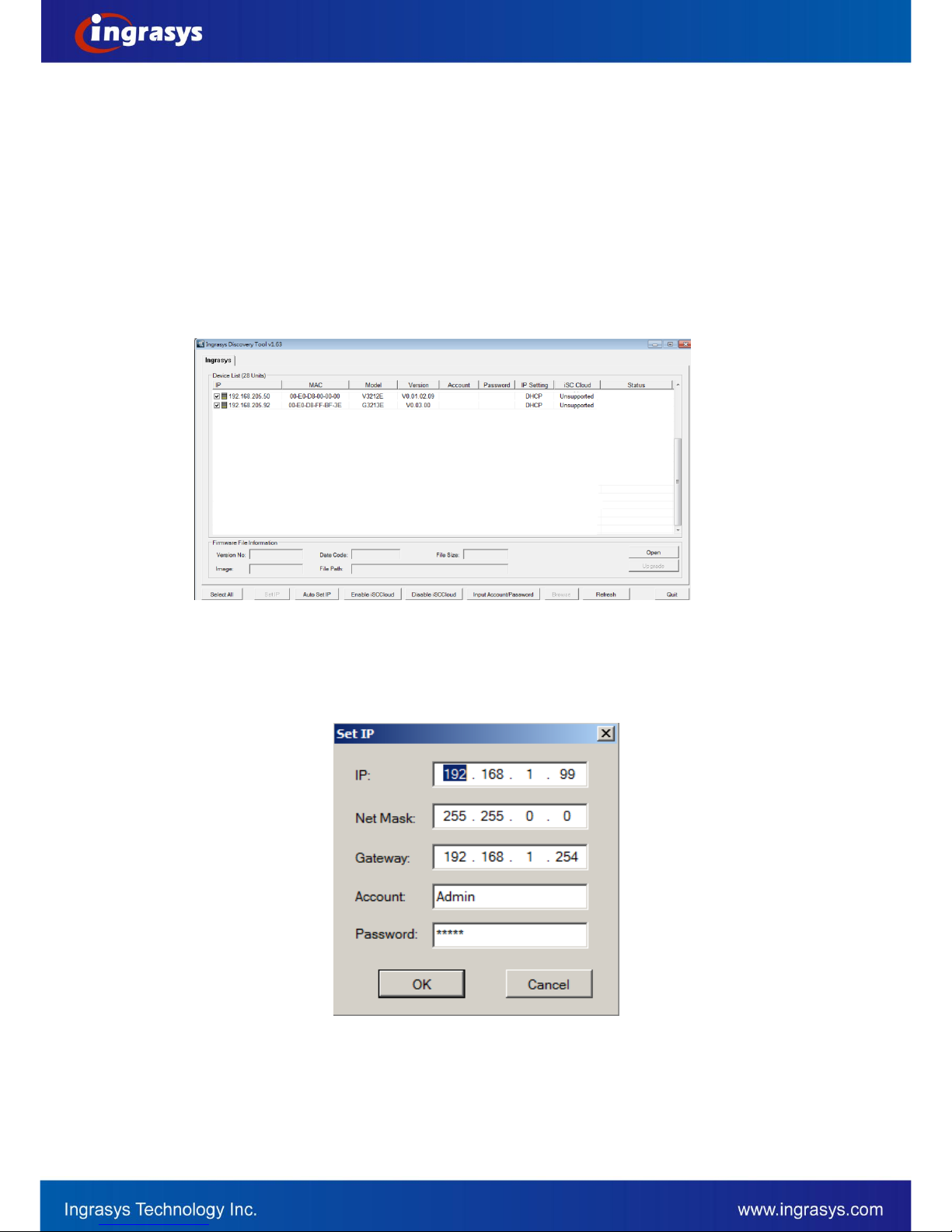
Discovery Tool is a utility provided for not only searching and displaying the available IP cameras information
in a network but also managing the multiple networking settings such as static IP address assignment.
After completing the hardware installation, run ingrasysDiscovery.exe to search for the IP camera installed.
–-
5
Assigning IP Address to the device
The steps of applying this search tool are described as below.
1. Launch IPCAM Discovery Tool (ingrasysDiscovery.exe)
2. Assign IP address
The selection is based on a single or multiple camera devices.
[Set IP]
This is applied to one specific camera selected from the Device List.
Step1: Select one specific camera device
Step2: Input desired IP information
The default settings of account /password are Admin / Admin. If that were been changed, please
enter the set values.
[Auto Set IP]
This is applied to a group of specific cameras selected from the Device List.

–-
6
Step1: Select specific cameras
Step 2: Input Account / Password
The default account information is Admin / Admin. If the values have been re-set, please enter the
set values.
Step 3: Input IP information
Discovering devices in Windows Network
If the IP camera is installed in a network with DHCP and UPnP services, after obtaining an IP address from
DHCP server, it can then be discovered in “Windows Network” of a client PC, see figure below. The reason for
being automatically discovered is that the IP camera’s UPnP is default enabled (see Network
Network
Connectivity).

–-
7
NOTE:
The term “Windows Network” in given figure above is used in Windows Vista / 7. It can be referred to Windows XP “My
Network Places”which possesses the same capability of discovering UPnP devices.
Right-click on the device and select “Properties”, the pop-up window shows all the information related to the
device, including the web access info. Use the web address to connect to the IP camera. Or simply double-
click on the selected device, which gets immediately access to the camera webpage.
To identify the camera from the listed devices in “Network”, utilize the UPnP name and the device’s MAC
address. This MAC address can be found on the label.

–-
8
ActiveX add-on Installation
It is recommended to use Internet Explorer 8 or later as the primary browser to access the IP cameras website.
The first-time access to the camera webpage will be prompted to install the ActiveX. To allow the installation,
click “Install”on the message bar and follow the instructions to complete ActiveX installation.
When the installation is completed, IE browser can display the live video of the IP camera as the below figure.

–-
9
NOTE:
If, however, there is not any prompted message or ActiveX cannot be installed at all, it is needed to
change the IE security level and settings.
<Example>
Internet Explorer 9: Internet Options Security Custom level
Ensure the “Download signed ActiveX controls” setting is either “Enable”or “Prompt”selected.
Dieses Handbuch passt für folgende Modelle
1
Inhaltsverzeichnis
Andere Ingrasys IP-Kamera Handbücher

Ingrasys
Ingrasys D3010E Bedienungsanleitung

Ingrasys
Ingrasys G2214H Bedienungsanleitung

Ingrasys
Ingrasys G3211E Bedienungsanleitung

Ingrasys
Ingrasys G2214H Bedienungsanleitung

Ingrasys
Ingrasys M2210E Bedienungsanleitung

Ingrasys
Ingrasys M2210E Bedienungsanleitung

Ingrasys
Ingrasys N3211E Bedienungsanleitung

Ingrasys
Ingrasys G2334H Bedienungsanleitung

Ingrasys
Ingrasys G3211E Bedienungsanleitung


