
InventDesign 22501 Bedienungsanleitung

22501 Multi function LED Controller V3.0 User Instructions Page 1 of 11
22501
LED Controller
USER INSTRUCTIONS
Pls kindly read through instructions before use
22501 Multi function LED Controller V3.0 User Instructions Page 2 of 11
Forword
Thanks for choosing our 22501 LED Controller. Before installation and use, we
strongly recommend you to read through this manual carefully. If device has
been damaged during transport, please report it to your supplier immediately.
Please don’t take any action without contacting your supplier first.
After-sales Service
From the day you purchase our products within a year, if being used properly
in accordance with the instruction, and quality problems occur, we provide free
repair or replacement services except the following cases:
1. Any defects caused by wrong operations..
2. Any damages caused by unauthorized removal, maintenance, modifying
circuit, incorrect connections and replacing chips.
3. Any damages due to transportation, vibration etc after the purchase.
4. Any damages caused by earthquake, fire, lightning strike, pollution and
abnormal voltage.
5. Any damages caused by negligence, inappropriate storing at high
temperature and humidity environment or near harmful chemicals.
6. Product has been updated
Safety Warnings
1. Please don’t install this controller in lightening, intense magnetic and
high-voltage fields.
2. To reduce the risk of component damage and fire caused by short circuit,
make sure correct connection
3. Always be sure to mount this unit in an area that will allow proper
ventilation to ensure a fitting temperature.
4. Check if the voltage and power adapter suit the controller & if anode or
cathode definition is the same as the controller’s.
5. Don’t connect cables with power on. Make sure a correct connection and
no short circuit checked with instrument before power on.
6. Please don’t attempt any repairs yourself; doing so will void your
manufactures warranty.
22501 Multi function LED Controller V3.0 User Instructions Page 3 of 11
For update information, kindly please consult with your supplier.
Product Brief
22501 multi function LED controller is dedicated to control entire RGB
color changes of LED lights with 4 wires (common anode), such as RGB
LED module, LED strip, LED tape, LED wall washer, floodlight, LED under
water lamp and other LED lights.
This controller can work with LT-SYSTEM-3060 power amplifier to expand
the power output, realizing infinite power expansion to connect any quantity of
LED lights.
V 3.0 is the latest & wonderful version integrated ideas from many clients;
it has much more functions than V2.0, more perfect in performance, especially
the soft changes in color fades, very perfect & unimpeachable, deserved to be
the best RGB controller with best color smooth changes among similar
products.
. Technical Specs
Part No
22501
Input VoltageDC5V-DC24V Speed8 levels
Output current
6A/CH3 BRT Adjust8 levels
Working Temp
-3555
Total output
Power
190W(5V); 1
220W(12V) ; 1
450W(24V) Cover SizeL211W40H30(mm)
Changing Mode
17 modes Package Size
L215W43H33(mm)
Color DepthMax. 256 levels
per RGB Gross
Weight
180g
. Features
1. Auto adaptable for LED lights with voltage from DC5-24V.
2. 3-Channel RGB full color control, maximum outputs 6A per Channel.
22501 Multi function LED Controller V3.0 User Instructions Page 4 of 11
3. 17 modes of color skipping, color gradual changeswith color depth
maximum 256 levels per RGB.
4. Speed of each mode is adjustable separately from 1-8 levels.
5. Brightness of each mode is adjustable separately from 1-8 levels.
6. Can rest at current color and color depth by selecting PAUSE function.
7. Can restore to default settings with the newly added RESET button.
8. Used as a standalone controller or to work together with LT-3060,
realizing infinite power expansion to connect any quantity of LED
lights.
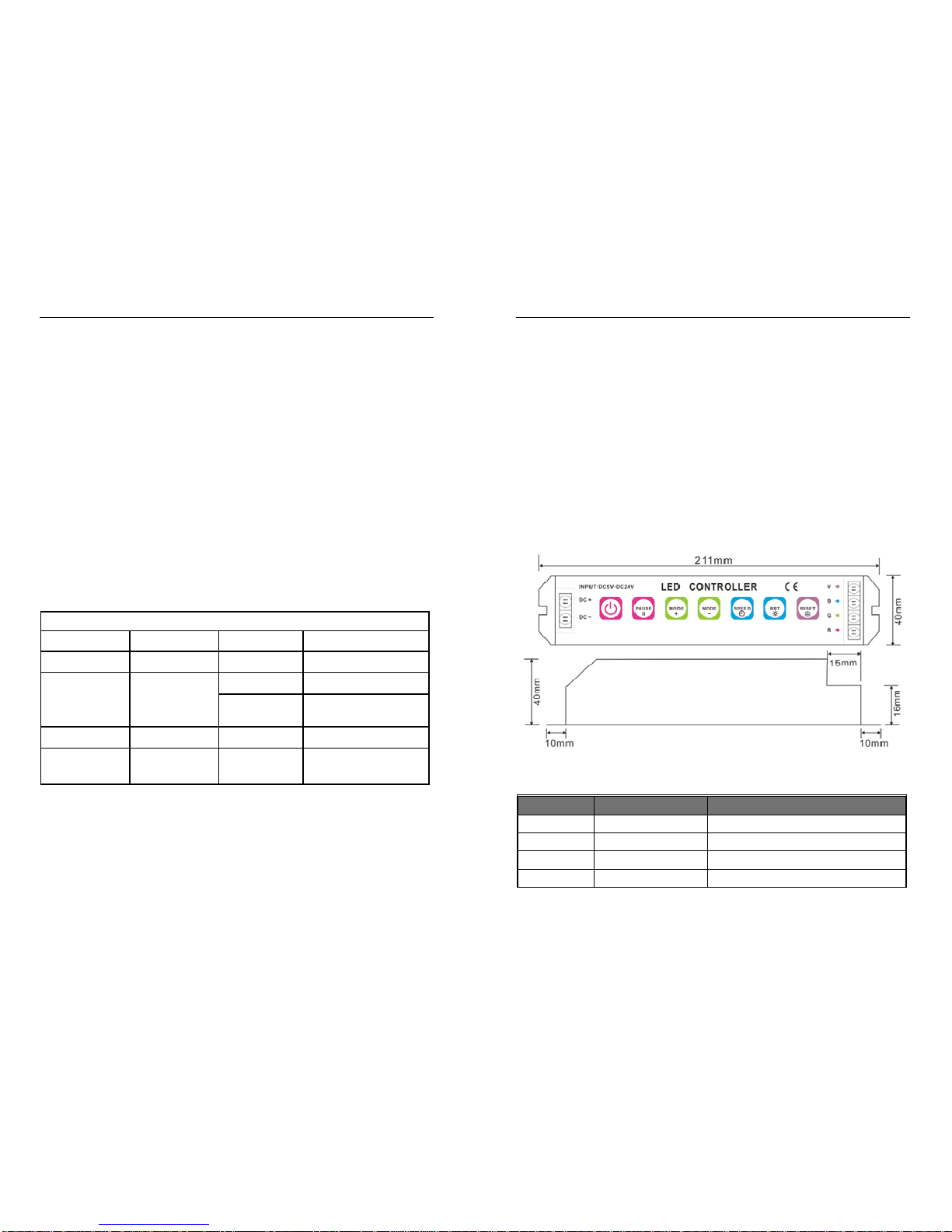
. Product Dimension
. Tables of changing modes
Sequence
Modes Description
1 Static red Supports Brightness adjustment
2 Static green Supports Brightness adjustment
3 Static blue Supports Brightness adjustment
4 Static yellow Supports Brightness adjustment

22501 Multi function LED Controller V3.0 User Instructions Page 5 of 11
5 Static purple Supports Brightness adjustment
6 Static cyan Supports Brightness adjustment
7 Static white Supports Brightness adjustment
8 3 color skipping Red, green and blue 3-color skipping
9 7 color skipping Red, green, blue, yellow, purple,
cyan, white 7-color shipping
10 White color strobe Whitewith all red, green and blue
onstrobe
11 3 color smooth Red, green and blue 3-color gradual
changes
12 Full color smooth All 7-color gradual changes
13 R-G color smooth Red, green 2-color gradual changes
14 R-B color smooth Red, blue 2-color gradual changes
15 G-B color smooth Green, blue 2-color gradual changes
16 White color fade &
change whitewith red, green & blue on
gradual bright & fade
17 Great circulation All changing modes overlap cycle
, Operating instructions
The controller, there are 7 function keys:
ON/OFF
PAUSE
MODE+
MODE-
SPEED
BRT
RESET
Sign Button
Description
22501 Multi function LED Controller V3.0 User Instructions Page 6 of 11
ON/OFF
ON/OFF
Turn on/off the controller
Any button can start the controller at off status
PAUSE PausePress this button will rest at current color,
press it again, will continue to change.
MODE+
Mode+
Press this button to select next mode
MODE-
Mode-
Press this button for previous mode
SPEED
Speed
Press this button to select 1-8 speed
changing levels.
BRT
Brightness
Press this button to select 1-8
brightness adjustment levels.
RESET
Reset
Press it a second, enter Cycle modePress
this button over 3 secondsif LED flickers twice, it
means it has restored to Default status successfully.

22501 Multi function LED Controller V3.0 User Instructions Page 7 of 11
.Conjunction sketch map
1. Connected to LED RGB module;
2. Connect to high power LED lights, the controller provides
control signals only, the lights need extra power based on the
specific working voltage of the lights, one controller can
control unlimited quantity of high power LED lights.
The high power lights must have built-in constant PWM current driving
circuit
22501 Multi function LED Controller V3.0 User Instructions Page 8 of 11
. Conjunction diagram, working with 3060 power amplifierconnected to LED
module as an example
3 popular conjunction methods as follows, the 3 methods can be
mixed up randomly.
1. Method OneAll amplifiers connected to the main power

22501 Multi function LED Controller V3.0 User Instructions Page 9 of 11
2. Method TwoConnect the controller and the amplifier by a method of
“hand in hand”.
3. Method ThreeThe LED modules are followed by amplifiers in series.
22501 Multi function LED Controller V3.0 User Instructions Page 10 of 11
. Exception Handles
Malfunction Causation Settle
No Light
1. No power from plug
2. Power supply protector
works
3. Incorrect connection
1Check the socket
2Check the
malfunction
re-power on
3Check connection
Incorrect
color
Amplifier not
in phase
4. Incorrect RGB output
wire connection
5. Incorrect in-phase
connection
4Re-connect RGB
wires
correspondently
5Re-connect
in-phase wires
correspondently
No response
from button 6. Selected Pause button 6Press Pause or
Reset button
again

22501 Multi function LED Controller V3.0 User Instructions Page 11 of 11
No changes
from certain
mode 7. Speed is too slow 7Press Speed to
accelerate
Voltage drop Controller capability Add power amplifier
Inhaltsverzeichnis
Beliebte Netzwerk-Router Handbücher anderer Marken


NETGEAR
NETGEAR FS526T - Switch Bedienungsanleitung

Korenix
Korenix JetNet 5710G Series Bedienungsanleitung

Automated Logic
Automated Logic ZN551 Betriebsanleitung

Cisco
Cisco ASR 1000 Series Bedienerhandbuch

EnGenius
EnGenius ESR-9710 Bedienungsanleitung

Cisco
Cisco 805 Series Bedienungs- und Sicherheitshinweise