IP Power 9258 Bedienungsanleitung

IP POWER 9258 USER MANUAL
IP POWER 9258
USER MANUAL

IP POWER 9258 USER MANUAL
USER MANUAL
IP POWER 9258T / 9258S
Version: V1.50
2008.04
- 1 - VER. X.X,

IP POWER 9258 USER MANUAL
Warning:
Any changes to this equipment without permission may cause damages to your equipment! This
equipment has been proved by CE & FCC to can be prevented from the influence of harmful
electronic jamming in normal business use condition.
IMPORTANT NOTICE
1. We have no responsibility for the possible damage caused by improper usage or
abnormal working environment.
2. Do not use IP POWER in strong shaking condition.
3. Please contact the dealer If IP POWER works improperly.
Copyright © 2005 All rights reserved. No part of this publication may be reproduced, stored
in a retrieval system, or transmitted in any form or by any means, electronic, mechanical,
photocopying, recording or otherwise, without the prior written consent of us
All other products mentioned in this document are trademarks of their respective
manufactures.
We are exempt from notify any change of our products.
- 2 -

IP POWER 9258 USER MANUAL
Table of Content
1. INTRODUCTION...........................................................................................................4
FEATURES..........................................................................................................................
9258 FUNCTION DESCRIBE.................................................................................................
2.SPECIFICATION............................................................................................................5
PACKAGE CONTENTS .........................................................................................................
MINIMUM SYSTEM REQUIREMENTS.....................................................................................
3.INTERFACE DESCRIPTION........................................................................................6
4.HARDWARE & SOFTWARE INSTALLATION...........................................................7
HARDWARE INSTALLATION ..................................................................................................
SOFTWARE INSTALLATION...................................................................................................
5. INITIAL SETTING.........................................................................................................8
INITIAL SETTING THROUGH ETHERNET.................................................................................
SETTING OF SOFTWARE SHUT DOWN CONTROLLED PC/ SERVER…………………….
6. HARDWARE CONTROL & SETTING……………………………………………….13.
7. CONTROL AND SETTING THROUTH THE INTERNET EXPLORE.................... 14
LOGIN.................................................................................................................................
CONTROL THE POWER SUPPLY OF OUTLETS………………………………………………..
POWER SUPPLY STATE QUERY……………………………………………………………...
SYSTEM SETTING............................................................................................................…
SETTING THE PASSWORD…………………………………………………………….……
SETTING THE IP ADDRESS.…………………………………………………………………
EMAIL SETTINGS……………………………………………………………………….. …
SETTING THE TIME SCHEDULE……………………………………………………………..
SETUP UP OWN OUTLET DEFAULT STATUS ………………….……………………………
. Internal Clock Settings & Network Time Protocol (NTP)………..……………………..
. WAKE ON LAN………………………………………………………………………………
. GPRS FOR CELL PHONE : SUPPORT WAP……………………………………………….
. FIRMWARE UPDATE:…………………………………………………………………….
8. DDNS SETTING ……………………………………….………………….……………24
9. CHECK STATUS THROUGH SNMP ……………….………………….……………25
10. CONTROL AND SETTINGS THROUGH HTTP ORDER………………………….26
ORDER FORMAT……………………………………………………….…………………….
11. FAQ ……………………………………………………………….…………………….28
12. Webpage Customization ….………………………………….…………………….28
- 3 - VER. X.X,

IP POWER 9258 USER MANUAL
1. Introduction
IP POWER 9258 is a web controller which can be easily used in the industry field. With the
remote network control technology, user can control or query the power supply of equipment.
User can do this in any computer connected to the internet or local area network, there is no
special program needed, also there is no need to open the external case of the computer.
Try to imagine that while traveling in a foreign country, you can control the power supply of your
electric equipments, such as a computer, a server, a router, an entrance guard or security /
surveillance system directly or use a time schedule comes with the IP POWER 9258. You can
remotely control the power switch with any computer connected to the network, which is not only
convenient, but it also big saving on the manpower and time.
Feature
1. Built in web server, can be used through the Ethernet or Internet network .
kinds of real time state of 9258.
er at
rnet web
and hyperlinks to
6.
7. Safety shut down controlled PC/ Server ( WINDOWS OS )
are each outlet ON /OFF
2. Support multiple browser, such as Internet Explore, Netscape, you can operate the switch
and check the state without any special program .
3. Control 4set AC : outlet equipment at the same time.
* 9258T - Outlet NEMA5-15P / 9258S - Outlet IEC320-C13.
AN - virtual IP4. Supported HTTP, DDNS , SMTP, SNMP, INTERNET- fixed IP, DHCP, L
5. Security passwords identify. Easily installed and can be updated online.
6. Supported RS232 port communication, indicate all
7. Separated LED indicates the state of each switch.
8. Develop tool (SNMP) is provided. It can be modified to meet the user’s special need.
9. Safely designed for high voltage resistance and protection for leakage of electrical currency,
using nonflammable material
10. Network Server reboot -- canremote control to reboot thepower on for the PC or Serv
remote site ,
11. Timer Schedule -- can pre-set the time schedule to turn power on / off thru Internet /
Ethernet.
12. Support NTP (Network Time Protocol ) - synchronize the time of 9258 to the Inte
address time .
WAP Mo13. bile Phone Control - can use the GPRS cell phone via WAP to control
14. Setup up own outlet default : when regain power it store each outlet to those status
setting. hics15. Arrange own webpage design : Change the user-defined grap
DKcustomize the web pages by webpage S
Provide SDK (VB & VC) for own Software develop and application .1
1
18. Local Hardw
Specification
* Maximum rated voltage for each 4 outlet : 250V AC, 24V DC
h 4 outlet : (Total) 15A AC/DC,
* Maximum rated currency: ( Individual outlet ) 6A AC/DC
* Action delay: Max 10ms
* Working temperature: 0~ 70°C
* Maximum rated currency for eac
- 4 -

IP POWER 9258 USER MANUAL
X.X,
- 5 -
2.Specification
Package contents
* 9258S - For EU / AU / UK
* 9258T – For USA / TW / JP
Option; RJ45 (Cat5) net wire
Option : Power Cable ( Choose one)
Minimum System Requirements
Intel Pentium III 300MHz or above/compatible AMD CPU
WINDOWS operating system (IE5.0+SPI) & LINUX
Minimum 64MB RAM
VGA Card: supported direct draw
Network card with RJ45 port & Ethernet HUB or Switcher
Internet network (Ethernet, ADSL or other ways, depends on whether you need far end
control ability or not)
NOTICES:
1. IP Power 9258S : for 220-250V, please use power (IN) wire at 10A current..
Max output current: (total) 10A. Max ( individual) 6A.
2. IP Power 9258T : for 100-120V, please use power (IN) wire at 15A current..
Max output current: (total) 15A. Max (individual) 6A .
VER.

IP POWER 9258 USER MANUAL
3. Interface Description
IP Power 9258
Front interface shown below:
From left to the right
1. RESET: self-protect AC reset button. IP Power 9258 can cut off the power supply of outlets
automatically if there is a shortcut or current overload. After user having solved the problem,
push the reset button, the AC power supply will become normal.
2. LED: 4 LED indicator lights. If the LED is on, means the corresponding outlet is power on.
3. RS232 port: provide the power output state and get IP address to re-update if update fail
4. Output : To connect with daughter device - IP Power 9258 Outlet
5. Circle sign and On & Off : Hardware power ON /OFF setup. Pleasedo o refer page
11 for proper operation.
6. RJ45 Ethernet port: link to the net wire.
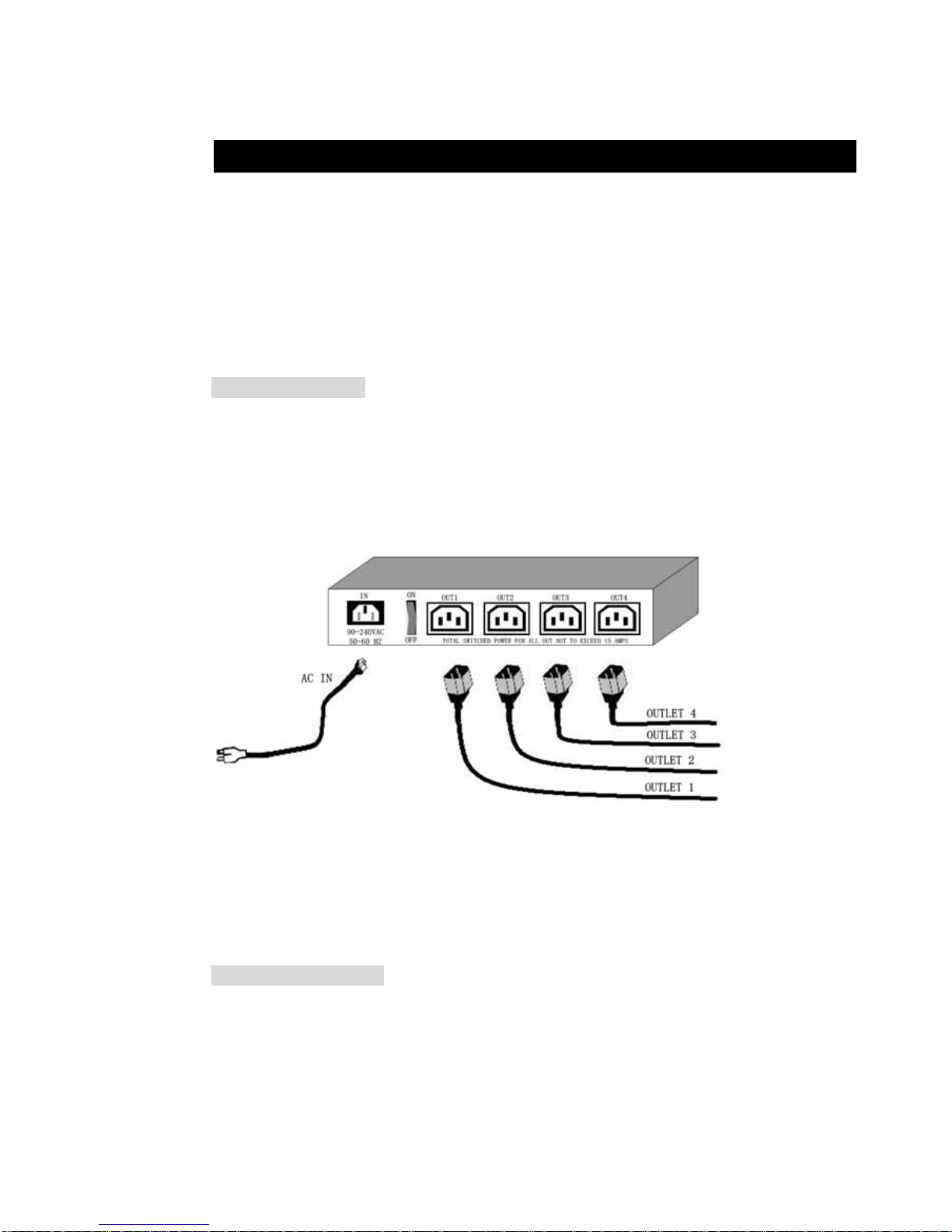
Rear interface shown below:
9258S: :
9258T:
Port description (from left to the right)
1. 90-240VAC power input port
2. Power switch : the power switch ON /OFF of IP Power 9258.
3. OUT 1- 4 : 4 individually switched AC outlets
- 6 -

IP POWER 9258 USER MANUAL
X.X,
- 7 -
4. Hardware & Software installation
Before you star to use IP Power 9258, please follow the steps below
Check the package to make sure the contents is complete.
Prepare one Ethernet HUB or Router
Check the voltage of the power supply to make sure it is AC 110-240 volt
Please confirm the specification of your power cable.
IP Power 9258S : for 220-250V, please use the 10A power cable.
IP Power 9258T : for 100-120V, please use the 15A power cable.
Hardware installation
1 Connect the 9258 to HUB through network wire.
2 Connect the HUB or Router to the internet (may through ADSL/XDSL modem).
3 Connect the power adapter to the 9258.
4 Connect the power adapters of under control electric equipment to corresponding
out port of 9258.
Turn on your computer and the power adapter of IP Power 9258
* for 220-250V, please use power wire can support 10A current..
Max. output current: (total) 10A , (individual) 6A.
• for 100-120V, please use power wire can support 15A current..
Max. output current: (total) 15A , (individual) 6A
Software installation
Having connected the power supply and network wire with RJ45 port to the 9258, please install
the software by following the steps below:
1. Start your computer, put the installation disc in the CDROM, then find the file named
ipeditv3.exe in the installation disc.
2. Copy the file to your desktop or any directory you want it saved to.
3. Start the initial setting process following the construction in next section.
VER.

IP POWER 9258 USER MANUAL
5. Initial Settings
Initial setting through the Ethernet
Open “IPEdit.exe”. Make sure that the IP Kamera 9060-O
is properly turned on and there is a Ethernet connection
from the RJ45 cable.
In the local devices section of IPEdit all AVIOSYS products under the same subnet network will
appear. Please refer to (Figure 1.1) below:
(Figure 1.1 IPEDIT)
.
- 8 -

IP POWER 9258 USER MANUAL
(Figure 1.2 IPEdit)
IPEDIT will search and display all IP Products 9XXX series under the same local Ethernet. The
default name for the IP Power 9258 is “IP9258” Please refer to (Fig. 1.2 above).
1. Double click and highlight your IP Power 9258 device. The default device name and
IP/Network settings will all be displayed on the right hand side of IPedit.
Make sure that the IP Address of your 9258 is setup on the same subnet network as your
PC’s (Subnet mask, Gateway)
*Represents that your 9258 does not match the gateway of your router.
(E.g If the Default Gateway of your computer is 192.168.1.1 The IP Address of your 9258 will
need to be set up to 192.168.1.XXX.)
2a. Automatically Detect Network settings (Please go to 2b. for steps on how to manually
enter network settings)
a.) Click on the REF button to theright of IPEdit
b.) Please wait a few seconds while IPEdit detects your network settings. Then click the Apply
button to apply the new network settings
- 9 - VER. X.X,
Andere Handbücher für 9258
2
Inhaltsverzeichnis
Andere IP Power Netzwerk-Hardware Handbücher
Beliebte Netzwerk-Hardware Handbücher anderer Marken

Matrix Switch Corporation
Matrix Switch Corporation MSC-HD161DEL Bedienungsanleitung

B&B Electronics
B&B Electronics ZXT9-IO-222R2 Bedienungsanleitung

Yudor
Yudor YDS-16 Bedienungsanleitung

D-Link
D-Link ShareCenter DNS-320L Bedienungsanleitung

Samsung
Samsung ES1642dc Gebrauchsanweisung

Honeywell Home
Honeywell Home LTEM-PV Montageanleitung