Jaton 5.1 AV Switch Box Bedienungsanleitung

CS 5.1 Surround Sound Converter
Copyright © Jaton Corporation, 2002.
Trademark(s)® Registered.
All rights reserved.
Release Revision 0.20

5.1 AV Switch Box
CS 5.1 Surround Sound Converter
2
Welcome!
Thank you for purchasing the 5.1 AV Switch Box!
This product is designed to provide years of service allowing you
to select between a wide variety of audio and video components.
This remarkable Switch Box has been engineered to provide you
with many years of the home theater enjoyment.
Please take a few minutes to read this manual thoroughly before
you connect and operate the 5.1 AV Switch Box.
CAUTION
You are cautioned that any changes or modifications not
expressly approved in this manual could void your authority to
operate this equipment.
Do not place the unit near heat sources, rain, moisture or
mechanical shock, and ensure that there is nothing to interfere
with proper ventilation/airflow.
TO PREVENT FIRE OR SHOCK HAZARD, DO NOT EXPOSE
THE UNIT TO RAIN OR MOISTURE!
The “ lightening bolt” symbol is intended to alert the user to the
presence of un-insulated “dangerous voltage” with the product’s
enclosure that may be of electric shock to persons.
!

5.1 AV Switch Box
CS 5.1 Surround Sound Converter
3
The “exclamation mark” symbol is intended to alert the user to
the presence of important operating and maintenance
instructions in the literature accompanying the appliance.
Features:
The 5.1 AV Switch Box as a multiple audio / video source
selector servers to your television. It allows you to quickly and
easily select which audio / video source you wish to use, without
disconnecting and reconnecting your components.
Once connected, you can switch between components using
buttons on the front panel of the Switch Box or by using the
Infrared Remote Control that came with your Switch Box unit.
•Convert stereo audio to 6 speakers surround
•Independent AV source control
•Composite Video In/Out only
•5.1 channel pre-amp outputs
•Source Direct switch bypasses, tone controls and bass
management for purest sound quality
•Switched AC outlet built-in
Easy of use
Switch between components using the front panel buttons or your
infrared remote control.
Expansion
Connect up to 5 components such as Satellite Receivers, DVD
players, Laser Disc players, VCRs, Camcorders, Video Games
etc. and switch between them in any order. It works with any
component having composite connectors. No adapters are
required.

5.1 AV Switch Box
CS 5.1 Surround Sound Converter
4
Quality
Internal amplification minimizes signal loss and balances color
for the best possible picture.
Circle Surround
Circle Surround® ("CS") is a powerful and versatile multichannel
decoder capable of delivering up to 5.1 channels of audio from
any stereo, matrix encoded or Circle Surround encoded
material. The first in the Circle Surround family of technologies,
CS incorporates superior steering of surround information and
remarkable center channel placement, while maintaining
full-range bandwidth in each speaker.
With Circle Surround, listeners may now enjoy their 5.1 home
entertainment systems with any stereo source material including
music on CDs, television programming, cable broadcasts
and movies on VHS. It also decodes any matrix encoded
material, providing better performance than older systems such
as Dolby Pro Logic ®. Optimal results can be achieved with
playback of Circle Surround encoded source material.
Circle Surround Features:
Backwards Compatibility: Circle Surround delivers up to a 5.1
channel home theater experience from many formats, including
stereo, Dolby Surround® and down-mixed Dolby Digital®
& DTS®. It provides the most accurate decoding of surround
material with true center channel dialog isolation and outstanding
separation among the rear channels.
Smoother Steering: CS is designed to immerse listeners in a
realistic surround environment. The exceptional steering and
channel separation of CS establishes new performance
benchmarks for matrix surround decoding. Using patented dual-
band technology, CS provides smoother steering between left
and right surround channels and from front to rear

5.1 AV Switch Box
CS 5.1 Surround Sound Converter
5
surround channels compared to alternative technologies. The
thrill of this experience can rival discrete 5.1 surround sound
formats.
Full bandwidth: CS playback provides full bandwidth in each
channel for outstanding audio quality, which can be experienced
from any source via a simple stereo connector.
Flexibility: CS decoding can be easily implemented for a wide
variety of product applications including computers, laptops,
game consoles, TVs, DVD players or Internet and web
devices. Since the 5.1 CS encoded signal can be carried over
standard stereo cables or broadcast methods, listeners in all
types of environments can now experience breathtaking
surround sound from the widest possible variety of sources.
Specification
Physical Dimension: Width = 8 ¼”, Height = 2 ¼”, Depth
= 6” (Box Unit Only)
Audio Inputs Reference Level: -10dBV (47Ω)
Maximum Level: + 6dBV (1 kHz, 1%
distortion)
Video Inputs Composite signal Vp-p=1.0V
(75Ω)
Input Video Source: Video Camcorder
VCR, TV, Satellite Tuner
CD Recorder
Laser Disc Player
DVD/VCD/CD/MP Players
Video Game Console
Input Audio Source: 6 CH Audio Output devices

5.1 AV Switch Box
CS 5.1 Surround Sound Converter
6
2 CH Stereo Audio Output
device
Video Output: Composite Signal: Vp-p=1.0V (75Ω)
- Output:
•TVset, Video Projector
Audio Output: CS 5.1 (6 CH) output
Audio S/N ratio: 90 dB or more
Audio Frequency
response:
20 Hz to 20 kHz
Distortion: Less than 0.3% (with reference
input, 1 kHz)
Power requirement: AC 120V~, 60 Hz (Original Design )
AC 220~, 50 Hz (Optional Design)
Power consumption: 5 Watts (3 Watts in standby mode)
Check List:
•Switch Box Unit (1)
•Infrared remote Control (1)
•User’s Manual (Printed)
•Register Card (Printed)
All cables will connect to this unit are sold separately. Your
Package may also contain other printed material with special
offers for direct purchase of related products as well.
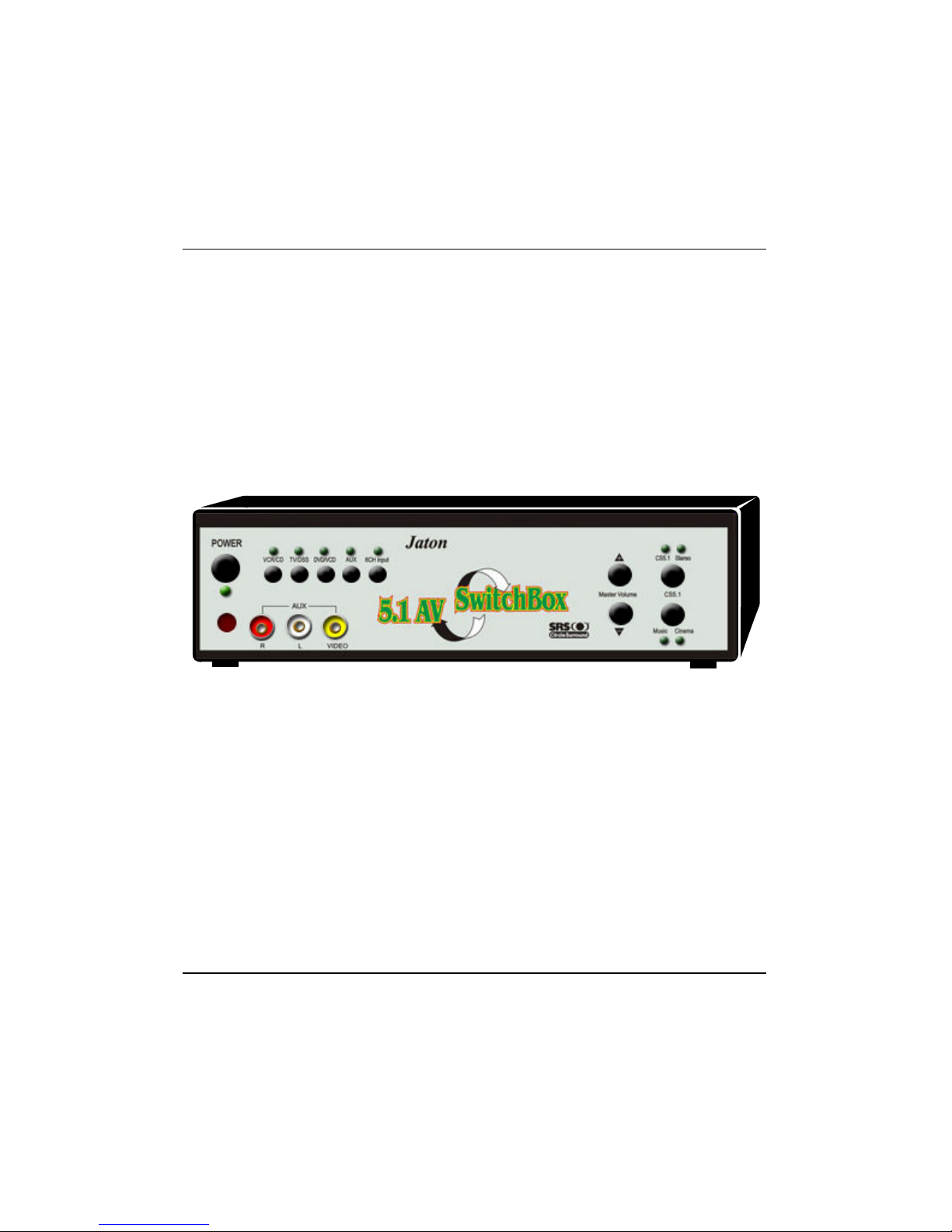
Box Unit [F]
Front Side
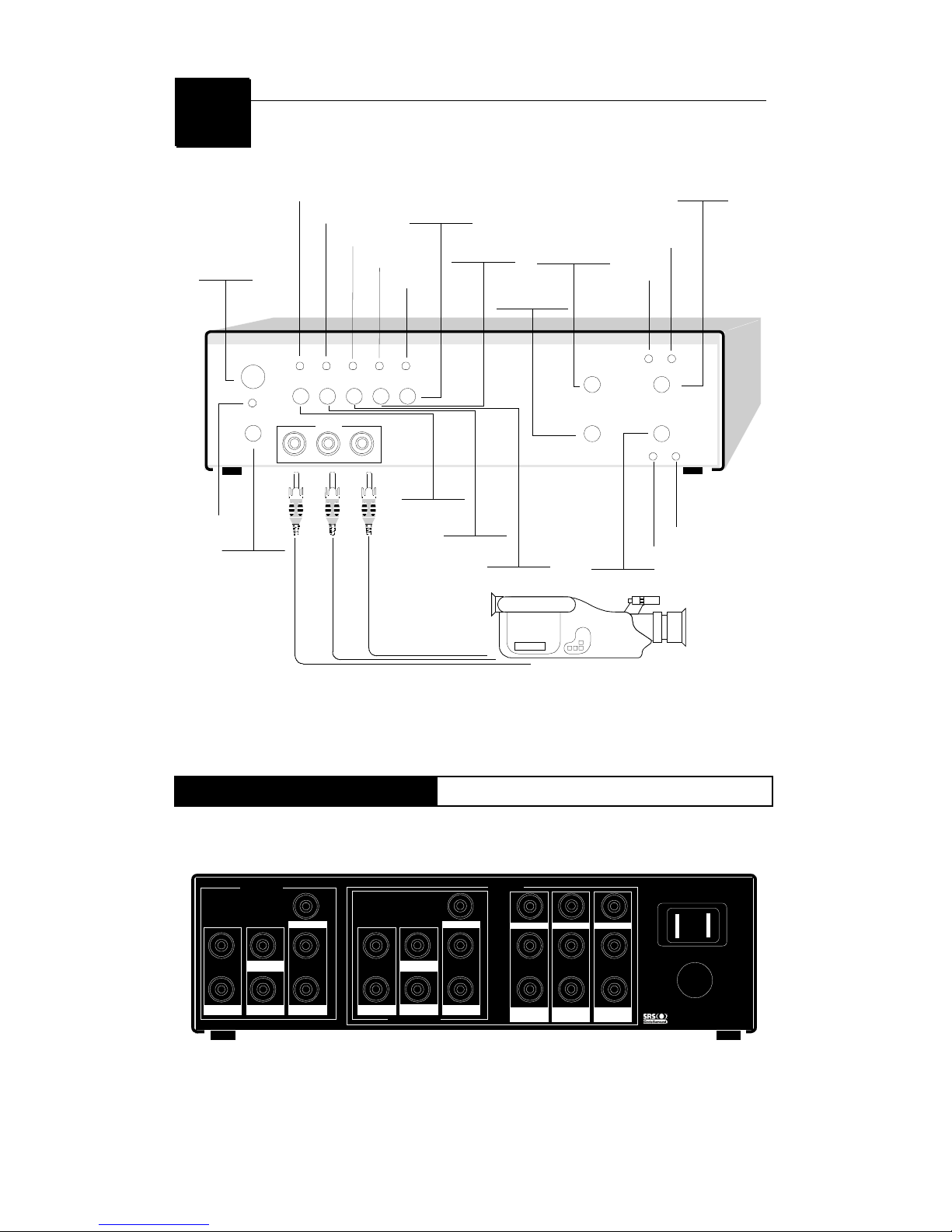
The touch button panel on the front side of AV5.1 Switch Box provides
quick access to commonly used functions.

5.1 AV Switch Box
CS 5.1 Surround Sound Converter
7
POWER
VCR/CD TV/DSS DVD/VCD AUX 6CH/DVD
AUX
R L VIDEO
MASTER VOLUME MODE
CS 5.1
CS 5.1 STEREO
MUSIC CINEMA
+
-
Infrared Receiver
Power Button
LED-VCR/CD
LED-TV/DSS
LED-DVD/VCD
LED-AUX
LED-6 ch/DVD
LED-CS 5.1
(MODE)
LED-STEREO
(MODE)
MODE Button
LOUDER-MASTER
VOLUME
SOFTER-MASTER
VOLUME
CS 5.1 Button
LED-CINEMA
LED-MUSIC
6 CH/DVD Button
AUX Button
DVD/VCD Button
TV/DSS Button
VCR/CD Button
LED-POWER
Camcorder
If your remote control doesn’t function at all, then these buttons
on Box front panel will act as a keypad for you.
Box Unit [R]
Rear Side
While connections on the rear panel of the AV5.1 Switch Box are
labeled for specific component names for easy reference, you can
substitute a mentioned device in its place.
OUTPUT
6 CH INPUT
INPUT
SWITCHED AC OUTLET
Surround
L
R
Front
L
R
Front
L
R
Surround
L
R
Woofer
Center
Woofer
Center
DVD/VCD
Video
L
R
TV/DSS
Video
L
R
VCR/CD
Video
L
R
is a trademark of SRS Labs, Inc
VideoVideo
Rear Side Diagram.

5.1 AV Switch Box
CS 5.1 Surround Sound Converter
8
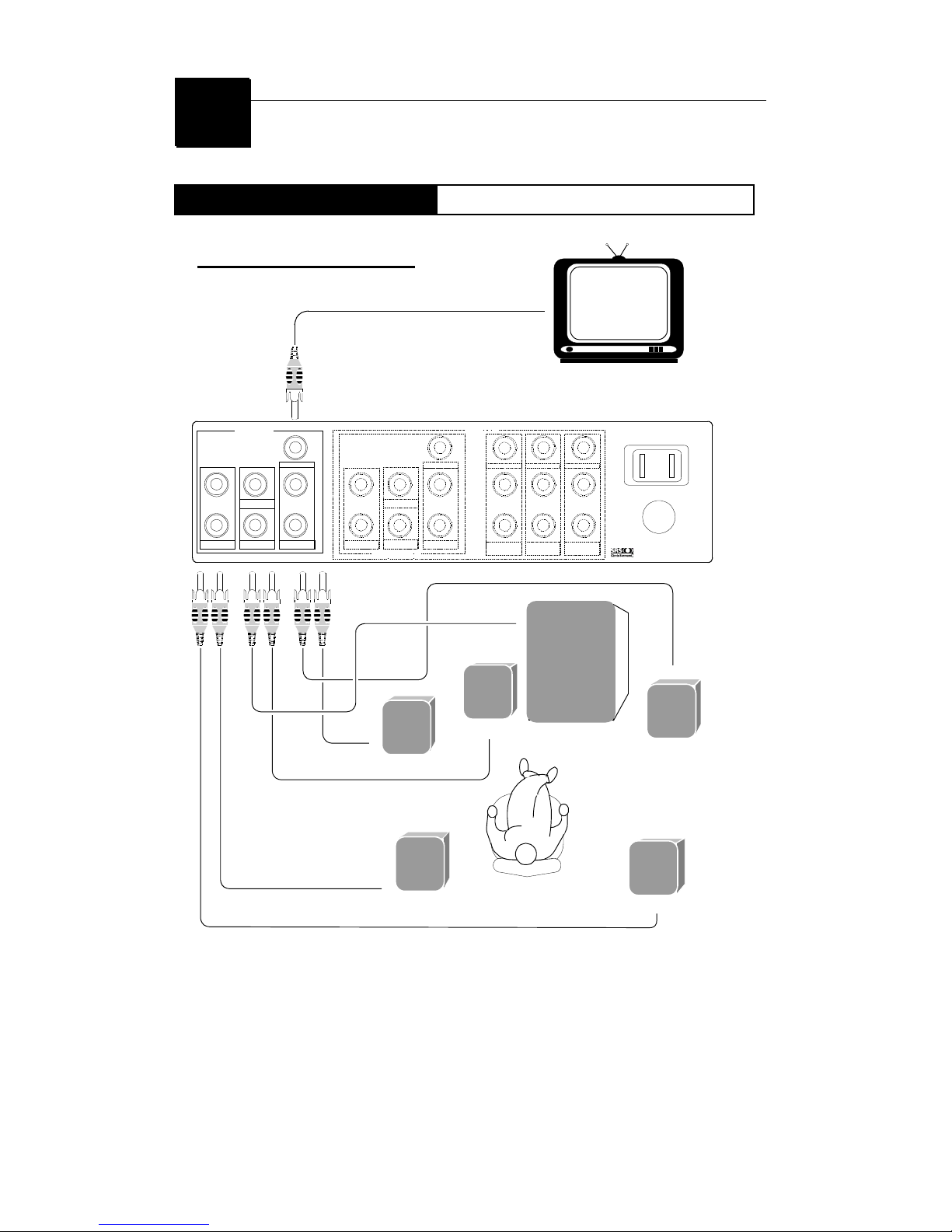
Output Connection
Box Unit
OUTPUT
6 CH INPUT
INPUT
SWITCHED AC OUTLET
Surround
L
R
Front
L
R
Front
L
R
Surround
L
R
Woofer
Center
Woofer
Center
DVD/VCD
Video
L
R
T V /D S S
Video
L
R
VCR/CD
Video
L
R
is a trademark of SRS Labs, Inc
VideoVideo
Television
Subwoofer
Surround Right
Front Left
Center
Front Right
Surround Left
LL
R R
OUTPUT SECTION
This illustration is for information purpose only. This
product has a pre-amplifier only. It requires a 5.1
power amplifier to drive the speakers..

5.1 AV Switch Box
CS 5.1 Surround Sound Converter
9
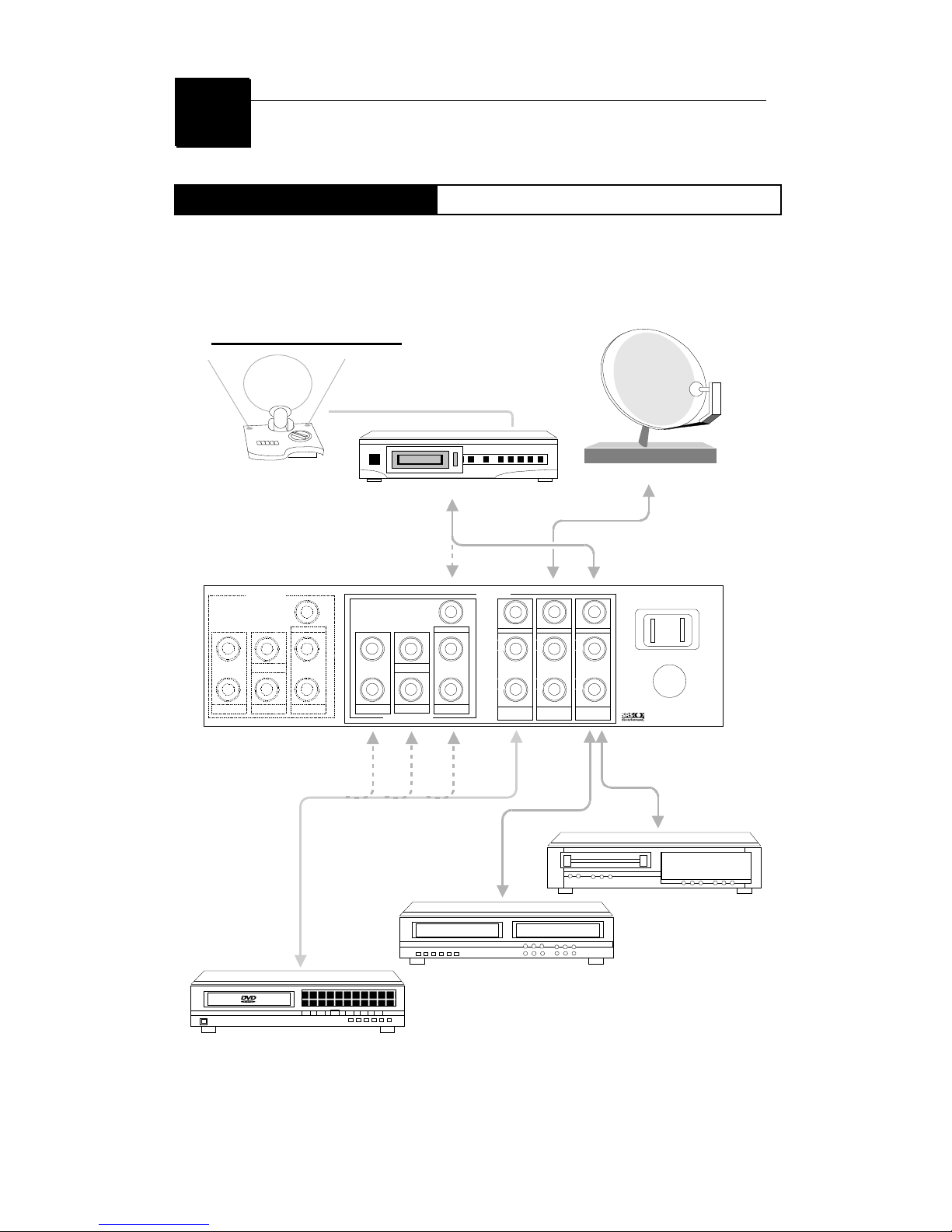
Input Connections
Box Unit
Certainly, you can plug many of AV sources into the Switch Box
to convert two channels stereo audio up to multiple channels.
OUTPUT
6 CH INPUT
INPUT
SWITCHED AC OUTLET
Surround
L
R
Front
L
R
Front
L
R
Surround
L
R
Woofer
Center
Woofer
Center
DVD/VCD
Video
L
R
TV/DSS
Video
L
R
VCR/CD
Video
L
R
is a trademark of SRS Labs, Inc
VideoVideo
LL
RR
INPUT SECTION
VCR
CD Recorder
DVD Player
MD Player
TV Attena Direct Satellite Tuner

5.1 AV Switch Box
CS 5.1 Surround Sound Converter
10
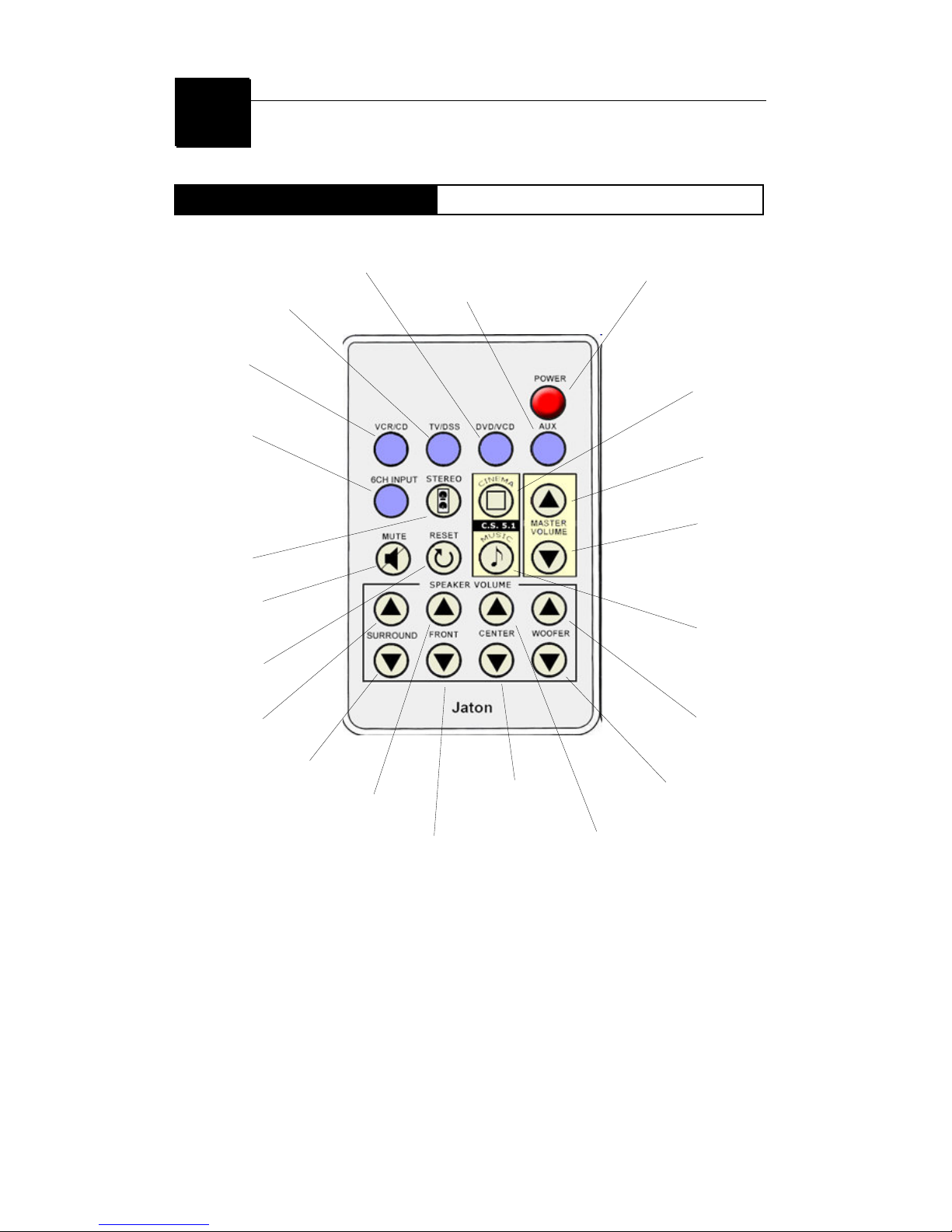
Remote control
How to use
Press to turn the Input
component ON or OFF.
Press to turn the Input
component ON or OFF.
Press to turn the audio
Output volume ON or OFF.
Press to select audio
Output mode in Stereo.
Press to reset te audio
Output modes.
Press to increase the volume
of surround speakers.
Press to decrease the volume
of surround speakers.
Press to increase the
volume of front speakers.
Press to decrease the
volume of front speakers.
Press to turn the Input
component ON or OFF.
Press to turn the Input
component ON or OFF.
Press to turn the Input
component ON or OFF.
Press to turn the power ON or OFF.
Press to select
the audio Output
in mode of CS 5.1
-Cinema.
Press to increase
the volume of
audio Output.
Press to decrease
the volume of
audio Output.
Press to increase the
volume of Sub Woofer.
Press to decrease the
volume of Sub Woofer.
Press to decrease the
volume of Center speaker.
Press to increase the
volume of center speaker.
Press to select the
audio Output mode
of CS 5.1 - Music.
Inhaltsverzeichnis