Jaton SonicWave-SR Bedienungsanleitung

Copyright © 2001 Jaton Corporation, USA.
NOTICE
The information in this document is subject to change, as the
Company may make changes to product in order to improve
User’s Guide
version 4.00
-SR-SR

SonicWave - SR User’s Guide
Version 4.0
2
reliability, design, or function, without prior written notice. No
part of this manual may be reproduced or transmitted in any
form or by any means without the written permission of the
company.
IN NO EVENT WILL THE COMPANY BE LIABLE FOR SPECIAL
INCIDENTAL OR CONSEQUENTIAL DAMAGES, WHETHER
ARISING DIRECTLY OR INDIRECTLY, SUCH AS LOSS OF
PROFIT OR GOOD WILL, THAT MAY BE SUFFERED IN
CONNECTION WITH THE PURCHASE OF THIS PRODUCT OR
FROM THE BREACH OF ANY REPRESENTATION OR
WARRANTY.
July 2000, Rev A
LICENSE
The Company grants the customer a non-exclusive, non-
transferable license to use the software, if any,
accompanying this product for internal use on a single
computer system. The end user may make a single copy
of the software solely for backup purposes; otherwise, no
copies may be made of the software or any part thereof.
No other license of any kind is granted to any part of the
product or any of the intellectual property therein.
TRADEMARK ACKNOWLEDGMENTS
SonicWave User's Guide, Jaton Corporation 1998. All rights
reserved.
FortéMedia, Inc. is a registered trademark of FortéMedia, Inc.
Direct3D, DirectX, DirectSound, DirectSound3D, DirectMusic, and
DirectInput are trademarks of Microsoft Corporation; Windows,
Windows 3.1, Windows 95, Windows 98, Windows Me, Windows
2000, Windows XP and Windows NT are registered trademarks of
Microsoft Corporation.
SoundBlaster and SoundBlaster Pro are trademarks of Creative Labs,
Inc.
All other product names or trademarks are the property of their
respective owners.
Copyright protection claimed includes all forms and matters of
copyright table material and information now allowed by statutory or
judicial law or hereinafter granted, including without limitation, material
generated from the software programs which are displayed on the screen

SonicWave - SR User’s Guide
Version 4.0
3
such as icons, screen display looks, etc. Reproduction or disassembly of
embedded computer programs or algorithms is prohibited.
Table of Contents
INTRODUCTION............................................................................6
WHY PCI SOUND CARD?.............................................................6
FEATURES:.....................................................................................7
ABOUT THIS DOCUMENT............................................................7
SYSTEM REQUIREMENTS...........................................................8
HARDWARE DESCRIPTION.......................................................9
SONICWAVE-SR2 PCBLAYOUT................................................9
SONICWAVE-SR4 PCBLAYOUT................................................9
SONICWAVE-SR6 PCBLAYOUT..............................................10
HARDWARE INSTALLATION..................................................10
4.1 INSTALLATION STEPS:........................................................10
DRIVER INSTALLATION:.........................................................13
ÿÿ WINDOWS 98 DRIVER INSTALLATION..........................13
CD Autorun Setup.................................................................19
CD Manual Setup...................................................................21
VERIFYING THE FM801 DRIVER INSTALLATION FOR
WINDOWS 98...............................................................................24
FORTÉMEDIA CONTROL PANEL FOR WINDOWS 98............26
ÿÿWINDOWSME DRIVER INSTALLATION......................33
CD Autorun Setup.................................................................34
VERIFYING THE FM801 DRIVER INSTALLATION FOR
WINDOWSME..........................................................................35
ÿÿWINDOWS 2000/XP DRIVER INSTALLATION.................36

SonicWave - SR User’s Guide
Version 4.0
4
ÿÿWINDOWS NT4.0 DRIVER INSTALLATION.....................38
PCI Sound Card Driver install from Autorun.....................38
Manually Install PCI Sound Card Driver............................40
VERIFYING THE FM801 INSTALLATION FOR WINDOWS
NT4.0.............................................................................................46
WINDOWS NT DRIVER UNINSTALL.........................................49
DOS DRIVER INSTALLATION (WITHOUT WINDOWS)..........51
FM801 PCI Sound Card Step by Step DOS Drive
Installation...............................................................................52
EZAUDIO™ SOFTWARE APPLICATION.............................56
INTRODUCTION...........................................................................56
ACTIVATING EZAUDIO™.........................................................57
EZAUDIO™ COMPONENT DESCRIPTION...............................58
PLAY EZAUDIO™.......................................................................59
EZAUDIO™ RECORDING...........................................................59
SELECTING CD, MIDI, OR WAVE TITLES..............................60
THE CD PLAYLIST ......................................................................60
THE MIDI PLAYLIST ..................................................................61
THE WAVE PLAYLIST ...............................................................62
PLAY MIXER..............................................................................63
RECORD MIXER.........................................................................64
FREQUENTLY ASKED QUESTIONS &
TROUBLESHOOTING.................................................................67
WHAT ARE THE CONFIGURATION PROBLEMS?....................68
WHAT ARE DMA CHANNELS AND PCI? ................................69
WHAT SHOULD I DO IF I HAVE PROBLEMS WITH PLAYING
GAMES?.........................................................................................69
CAN I INSTALL TWO SOUND CARDS?......................................70
WHY ARE SOME OF THE WINDOWS MULTIMEDIA
COMPONENTS (I.E. MEDIA PLAYER) MISSING?.....................70
WHAT HAPPENED IF MY FM801 SOUND CARD AND DRIVER
ARE BOTH PROPERLY INSTALLED, YET, THERE IS STILL NO
SOUND?.........................................................................................70

SonicWave - SR User’s Guide
Version 4.0
5
HOW DO I CHANGE VOLUME AND BALANCE LEVELS IN
WINDOWS 9X?.............................................................................71
MY MICROPHONE RECORDS AT VERY LOW LEVELS, WITH
DISTORTION, OR NOT AT ALL?................................................71
WHY DOESN’T MY CD AUDIO WORK?....................................72
WHAT TO DO IF SOUND CARD IS NOT FOUND OR IRQ IS NOT
ASSIGNED TO FM801 PCI SOUND CARD?.................................73
HOW TO ADJUST SB IRQ/IO/DMA FOR SOME DOS GAMES?74
DOES FM801 SUPPORT LINUX OS?..........................................75
WHAT ARE THE 2-SPEAKER, 4-SPEAKER AND 6-SPEAKER
AUDIO OUTPUT OPTIONS USED THAT CAN BE FOUND IN
FORTÉMEDIA CONTROL PANEL?............................................75
WHY ARE TWO INTERRUPTS ALLOCATED FOR MY FM801
SOUND CARD?..............................................................................75
TECHNICAL SUPPORT................................................................76
LIMITED WARRANTY................................................................78
OTHER LIMITS.............................................................................78
EXCLUSIVE OBLIGATION...........................................................79
OTHER STATEMENTS................................................................79
TERMS AND CONDITIONS..........................................................79
SERVICES AGREEMENT:.............................................................80
ENTIRE OBLIGATION.................................................................80
REDUCING WARRANTY CLAIM REJECTIONS..................81

SonicWave - SR User’s Guide
Version 4.0
6
INTRODUCTION
Congratulations! You have purchased a Jaton PCI
Sound Card that will bring you endless enjoyment
in playing SoundBlaster games, computer music,
and many more features! With this Sound Card
you will experience the latest audio technology…..
so get ready to be impressed!
SonicWave-SR sound card is an advanced audio
controller for the PCI Bus. FortéMedia (chipset
maker), a leader in the PC Multimedia industry,
developed the FM801 technology. It is
compatible with Microsoft Windows, Microsoft
DirectX and Thousands of DOS games. Legacy
Audio block supports AdLib Music Synthesizer,
Sound Blaster Pro, MPU401 UART mode and
Joystick function in order to provide highest
hardware compatibility for numerous PC games on
real DOS environment.
SonicWave-SR PCI Sound card contains the result
of many years of experience in PC games, sound
and communication development. The sound can
be created with FM or wave-table synthesis and
held to a professional performance standard. Each
sound in the wave-table is derived from real
instrument sounds that have been carefully pro-
duced for inclusion in FortéMedia's extensive
sound library.
Why PCI Sound Card?
The PCI bus is far superior to the ISA bus. It is capable of
transferring data on a wider 32-bit bandwidth bus. This

SonicWave - SR User’s Guide
Version 4.0
7
allows much more data to pass from the PCI bus to the
host processor. The ISA bus is only capable of 16-bit
bandwidth transfers. Using the PCI bus will allow up to a
20 times increase in speed over much slower DMA
transfers on the ISA bus. This drastically reduces the
overhead on the host CPU. This tremendous processing
power opens up new possibilities for sound cards. Real-
time software based sound fields are now possible without
bogging down the host CPU.
Features:
• PCI 2.1 Compliant
• Soft MPEG-II Support
• Microsoft DirectSound and MMSystem
Compliance
• 128-voice Software Wave-Table Synthesizer
support Available
• Superior 3D positional Audio Support
• Creative Environmental Audio (EAX) game
titles Compatible
• Native DOS Game Support without Software
Emulation
• Analog/Digital Joystick Interface
• Legacy Audio compatibility
• Hardware Sound Blaster Pro compatibility
• AdLib compatible Music Synthesizer
• MPU401 UART mode MIDI interface Joystick
About This Document
Many people don’t read manuals, however, an
ounce of caution is worth a pound of prevention,
so we do strongly recommended that you take a
few moments to go through these pages before
installing your SonicWave-SR hardware and

SonicWave - SR User’s Guide
Version 4.0
8
software.
This user’s guide contains Hardware and Software
Installation pilots to setup your SonicWave Sound
Card and its Driver Software for Windows9x/Me,
Windows2000/XP, Windows NT 4.0 and DOS
environment. It also provides the instructions on
how to use Audio Rack, an easy to use application
for playing digital MIDI music, wave sound and CD
audio on your PC. There is a "Setup" section in
this user’s guide, providing instructions on how to
recover, re-fresh and re-install SonicWave PCI
sound card drivers in a quick and convenient way.
Readers can also use the Setup program provided
to install or upgrade sound card drivers.
System Requirements
• Pentium CPU or equivalent*
• Windows 98, Windows Me, Windows 2000,
Windows XP, Windows NT4.0 or MS-DOS 6.0
or higher
• Microsoft DirectX version 6 or higher
• PCI Bus with one available Bus Master slot
• 16MB of RAM (32MB if you use software
Wave-table with 4MB sound library)
• Hard disk drive, 12MB free on your hard disk
• CD-ROM drive and Audio cable
•• Speakers
* Wavetable software bundled package recommends Pentium 166 or
higher.

SonicWave - SR User’s Guide
Version 4.0
9
HARDWARE DESCRIPTION
SonicWave-SR2 PCBLAYOUT
VIDEO AUX TAD
Plate
VIDEO 1
R G L G
PANASONIC 1
L G G R
SONY 1
MIC
LINE IN
SPEAKER
AUX 1 TAD 1
PC SPK
JP1
GAME 1
1
PCI Local Bus - -PnP
2 channel sound output
SonicWave-SR4 PCBLAYOUT
VIDEO AUX TAD
Plate
VIDEO 1
R G L G
PANASONIC 1
L G G R
SONY 1
MIC
LINE IN
FRONT SPEAKER
REAR SPEAKER
AUX 1 TAD 1
PC SPK
JP1
GAME 1
1
PCI Local Bus - -PnP
SPDIF OUT
4 channel sound output
* SPDIF OUT = 2 Channel sound output only.

SonicWave - SR User’s Guide
Version 4.0
10
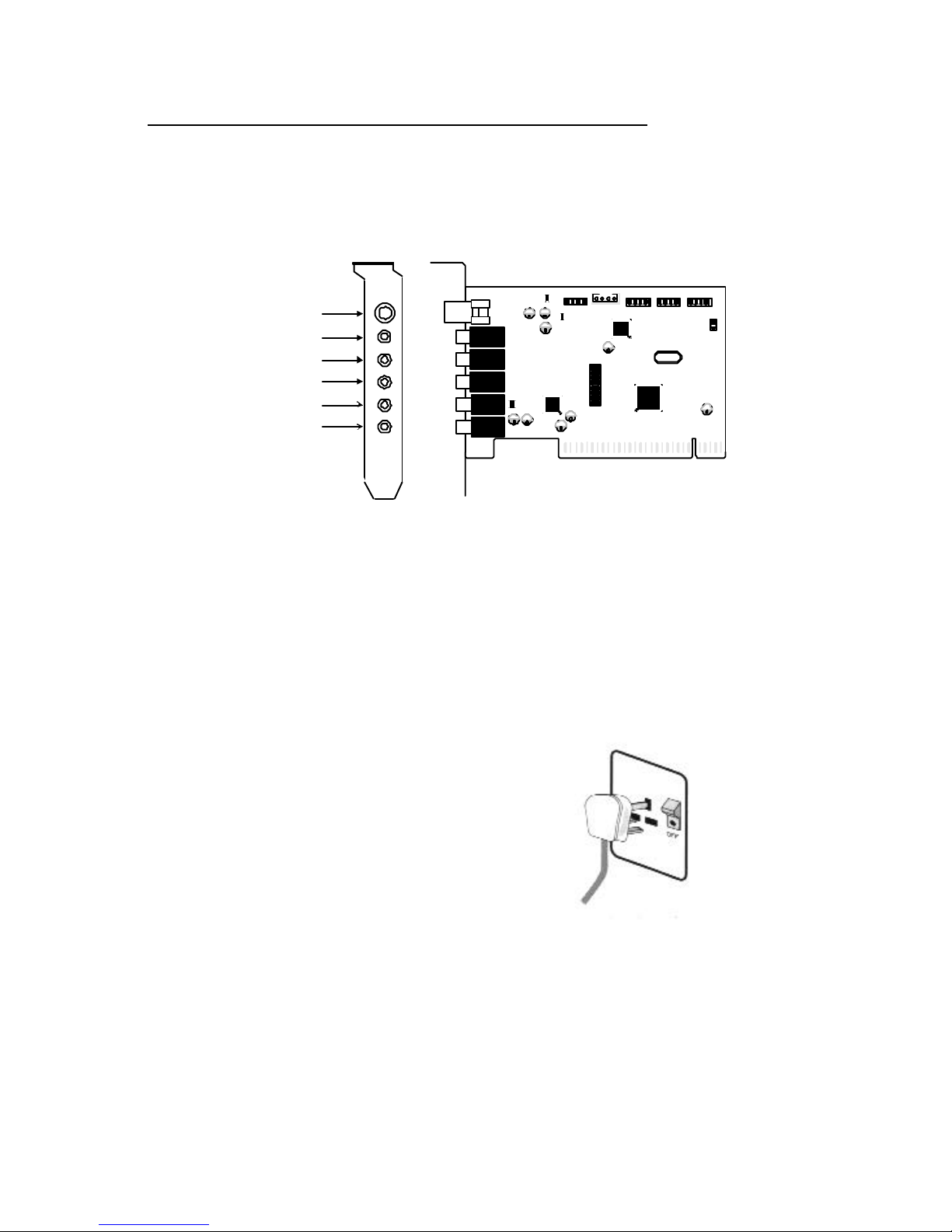
SonicWave-SR6 PCBLAYOUT
VIDEO AUX TAD
Plate
VIDEO 1
R G L G
PANASONIC 1
L G G R
SONY 1
MIC
LINE IN
FRONT SPEAKER
REAR SPEAKER
CENTER & SUB
AUX 1 TAD 1
PC SPK
JP1
GAME 1
1
PCI Local Bus - PnP
SPDIF OUT
6 channel sound output
*SPDIF OUT = 2 Channel sound output only.
HARDWARE INSTALLATION
4.1 Installation Steps:
ÌÌ Turn your computer’s
power off.
Turn off the power to your
PC and any attached
peripheral devices such as
Printers, Scanner and
Monitor.
Inhaltsverzeichnis
Beliebte Soundkarte Handbücher anderer Marken

PCchips
PCchips CMI8330 Bedienungsanleitung

Creative
Creative Sound BlasterX G5 SB1700 Bedienungsanleitung

IBM
IBM Music Feature Card Bedienungsanleitung

Diamond Multimedia
Diamond Multimedia Xtreme Sound Bedienungsanleitung

Digigram
Digigram VX222v2 Bedienungsanleitung

MARIAN
MARIAN SERAPH M2 Bedienungsanleitung