
LBS LBS-1275-SL Bedienungsanleitung
Slimline User Guide v9
Models:
LBS-1275-SL
LBS-1275-SL-DCS
LBS-12110-SL
LBS-12110-SL-DCS
LBS-12150-SL
LBS-12150-SL200
Installation & User Guide
Slimline (SL) Range

Slimline User Guide v9
Installation & User Guide
SL Range
2
Contents
1Introduction.....................................................................................................................................4
2Do’s and Don’ts ...............................................................................................................................5
2.1 Ensure the battery is physically secure...................................................................................5
2.2 Do not penetrate the battery enclosure.................................................................................5
2.3 Maintain an acceptable temperature range...........................................................................5
2.4 Avoid repeated shock and vibration.......................................................................................6
2.5 Avoid exposure to water or salt spray ....................................................................................6
2.6 Do not short circuit the battery ..............................................................................................6
3Longevity & Depth of Discharge......................................................................................................7
4Battery Management System..........................................................................................................8
5Installation.......................................................................................................................................9
5.1 Stowage...................................................................................................................................9
5.2 Mounting orientation ...........................................................................................................10
5.3 Connecting DC loads and chargers .......................................................................................11
5.3.1 LBS-1275-SL and LBS-12110-SL .........................................................................................11
5.3.2 LBS-12150-SL and LBS-12150-SL200.................................................................................11
5.3.3 LBS-1275-SL-DCS and LBS-12110-SL-DCS..........................................................................12
5.3.4 Regulated Charge Sources ................................................................................................12
5.3.5 Current Limits....................................................................................................................12
5.4 Connecting to the integrated DC-DC charger (DCS models only).........................................13
5.4.1 Configuring the DC-DC Charger.........................................................................................13
5.4.2 Ignition Trigger Input ........................................................................................................15
6User Guide.....................................................................................................................................16
7Specifications.................................................................................................................................17

Slimline User Guide v9
Installation & User Guide
SL Range
3
Version History
1) Initial Release
6) Added LBS-1275-SL and LBS-1275-SL-DCS
8) Added LBS-12150-SL and next generation DC-DC Charger with rotary switches
9) Added LBS-12150-SL200, altered input voltage range for DCS models and other general
updates
Slimline User Guide v9
Installation & User Guide
SL Range
4
1 Introduction
Congratulations! You have purchased a state-of-the-art lithium battery and we hope you enjoy many
years of trouble-free life. This Installation and User Guide describes how to connect and safely operate
the Slimline range of 12V batteries.
This User Guide covers the following SL 12V battery range:
•LBS-1275-SL
•LBS-1275-SL-DCS
•LBS-12110-SL
•LBS-12110-SL-DCS
•LBS-12150-SL
•LBS-12150-SL200
As with all batteries, you should consider the mechanical and environmental conditions that you
intend to operate the battery in to maximise overall performance and achieve the longest battery life.
LBS offer these general guidelines; however, you should seek our further advice or that of a qualified
electrical tradesperson if you are in doubt.
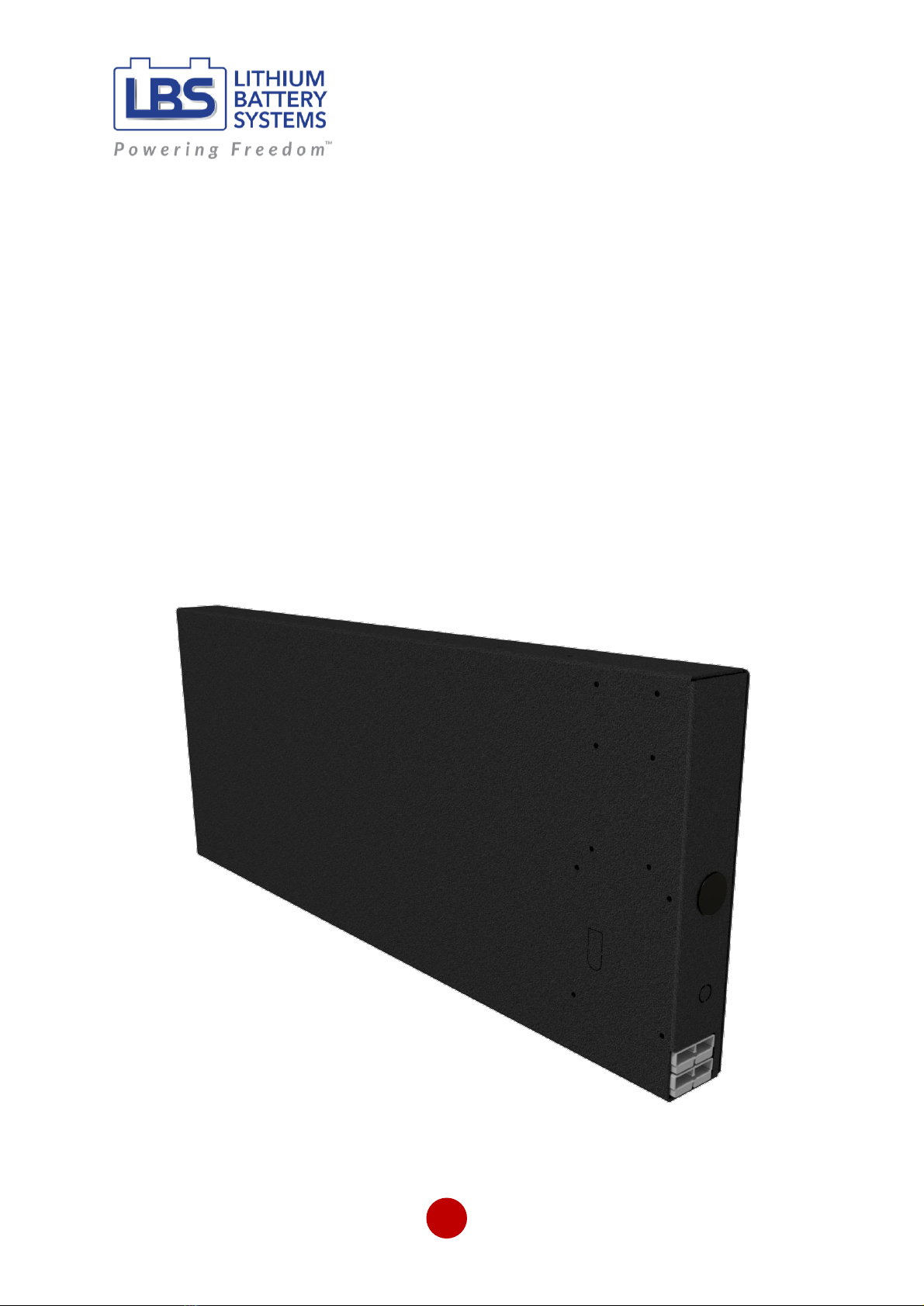
Figure 1: LBS-12110-SL Battery

Slimline User Guide v9
Installation & User Guide
SL Range
5
2 Do’s and Don’ts
This battery contains lithium iron phosphate (LFP) cells. While LFP cells are the safest Li-Ion chemistry,
the stored chemical energy represents a risk of fire, burns or explosion if misused.
Avoid injury to yourself and others, adhere to the warnings in this Guide.
•Avoid mechanical shock
•Do not expose to fire
•Do not pierce battery
•Do not disassemble
•Do not drill into enclosure
•Do not short the terminals
•Keep away from water
•Avoid direct sunlight
•Do not charge battery below 0oC or above 45°C
•Do not store battery below -20oC or above 60oC
To ensure a long and safe life from your battery, please ensure you consider the following:
2.1 Ensure the battery is physically secure
Even though lithium batteries are light weight in comparison to lead acid, they can still become a
dangerous projectile in a moving vehicle, RV, cart or boat if not secured. Ensure the battery is safely
secured before travel. If in doubt seek LBS advice and consider making use of LBS mounting brackets
to safely secure the battery.
2.2 Do not penetrate the battery enclosure
You may be tempted to drill into the aluminium enclosure to secure mounting brackets. Doing so may
inadvertently penetrate one of the cells which could cause thermal runaway and vapour emissions.
Do not under any circumstances drill or penetrate the enclosure. Use only existing mounting holes in
the battery and short screw lengths no greater than 13mm.
We strongly recommend the LBS mounting kit with screws and brackets that are designed to safely
attach to the battery. Alternatively, use strapping and clamping to secure the battery in place.
2.3 Maintain an acceptable temperature range
Like all batteries, LBS batteries operate and perform the best, as well as last the longest, in a cool and
stable temperature environment between 10oC and 25oC. The maximum window of full operation is
0-45oC. Do not attempt to charge the battery below 0°C or above 45°C.
If you regularly discharge outside of this suggested range, you should consider changing the battery
location, or actively cool or heat the environment in order to preserve battery life. If the ambient
temperature that the battery operates in is greater than 60oC, you should cease use immediately.

Slimline User Guide v9
Installation & User Guide
SL Range
6
Avoid direct sunlight –the internal temperature of the enclosure can rise quickly due radiation from
the sun.
Operating outside of these guidelines diminishes the life and performance of the battery and voids
the warranty.
2.4 Avoid repeated shock and vibration
Whilst the battery is robustly constructed and protected in an aluminium enclosure, it is not designed
to operate continuously in high shock or high vibration environments. Normal use in a 4WD
environment is acceptable and the battery has been designed in accordance with these expected
conditions. However, dropping the battery or exposing the battery to a high number of excessive
vibrations may lead to a fault or failure of the battery.
2.5 Avoid exposure to water or salt spray
Whilst the battery is mechanically protected, the enclosure is only IP20 equivalent and is not designed
for a wet environment. Do not submerge the battery in water or expose the battery to direct water
spray.
Avoid exposing the battery long term to salty water spray such as in a marine environment to avoid
corrosion. Salt laden air may also cause corrosion in the long term; therefore, minimise exposure by
installing the battery in a protected hatch or compartment.
2.6 Do not short circuit the battery
Do not short circuit the battery. Pay attention when using metallic tools in the vicinity of the terminals,
as accidentally contacting the positive and negative terminal with a metallic object like a spanner will
cause a short circuit and spark.
Always perform work on passive wiring first and connect the live battery as the last connection. If you
must work on live circuits, exercise due care, and use insulated tools where possible. If you are unsure
how to install the battery, seek advice from LBS or a suitably qualified electrical tradesperson.
Check to ensure the connecting Anderson plugs are correctly wired (positive and negative) and do not
attempt to mismatch Anderson colours when connecting.

Slimline User Guide v9
Installation & User Guide
SL Range
7
3 Longevity & Depth of Discharge
One of the advantages of lithium batteries over lead-acid batteries is longevity. If you want to realise
the long life potential out of your lithium battery, then consideration must be given to depth of
discharge.
A battery lifespan is rated by the number of cycles before the original capacity hasreduced by a certain
amount.
A cycle is defined as discharging from fully charged, to a percentage Depth of Discharge (DoD), and
then charging back to full again. So, DoD describes what percentage of the battery capacity is being
used each time.
NOTE - DoD is different to State of Charge (SoC, also known as Charge Level); in fact, they add together
to 100%. So, 80% DoD equates to 20% SoC.
The less DoD you use each cycle, the longer the battery will last.
This fact should be considered when choosing the battery Amp hour capacity. You will have a higher
return on battery investment if there is enough capacity at hand such that you are not heavily
discharging the battery on every cycle. A capacity ‘overhead’ ensures lower DoD, extended life and
therefore a higher financial return on your investment.
LBS Lithium Iron Phosphate (LFP) batteries have a cycle life of 5,000 cycles at 50% DoD and 2,000
cycles at 80% DoD.

Slimline User Guide v9
Installation & User Guide
SL Range
8
4 Battery Management System
Your battery comes with an integrated Battery Management System (BMS).
The BMS is an electronic solid-state circuit board which manages the cells and protects the battery
across a range of scenarios which primarily includes over charge and over discharge protection. Unlike
lead acid batteries, over charging or over discharging a lithium battery may lead to a hazardous
scenario. Therefore, the BMS is the heart and soul of a lithium battery.
The Slimline battery BMS is a highly reliable solid-state device which is primarily designed to keep the
cells safe and the overall pack from being damaged by excessive voltage or excessive discharge event.
It has the following features:
•Cell over-voltage protection
•Cell under-voltage protection
•Over current protection
•In-rush current protection
•Short circuit protection
•Transient voltage protection and fusing, with fail-safe monitoring of the fuse
•Fail-safe operation if connection to any cell is lost
•Blocking charge above 45°C (with automatic recovery)
•Blocking discharge (all loads disconnect) above 60°C (with automatic recovery)
•Smart passive cell balancing
Slimline User Guide v9
Installation & User Guide
SL Range
9
5 Installation
5.1 Stowage
The Slimline battery is likely to be stowed in a car, RV or 4WD or used as a portable battery for
camping. An important part of the battery installation is securely fixing it down or safely stowing it
away during transport so that it does not become a projectile in an accident.
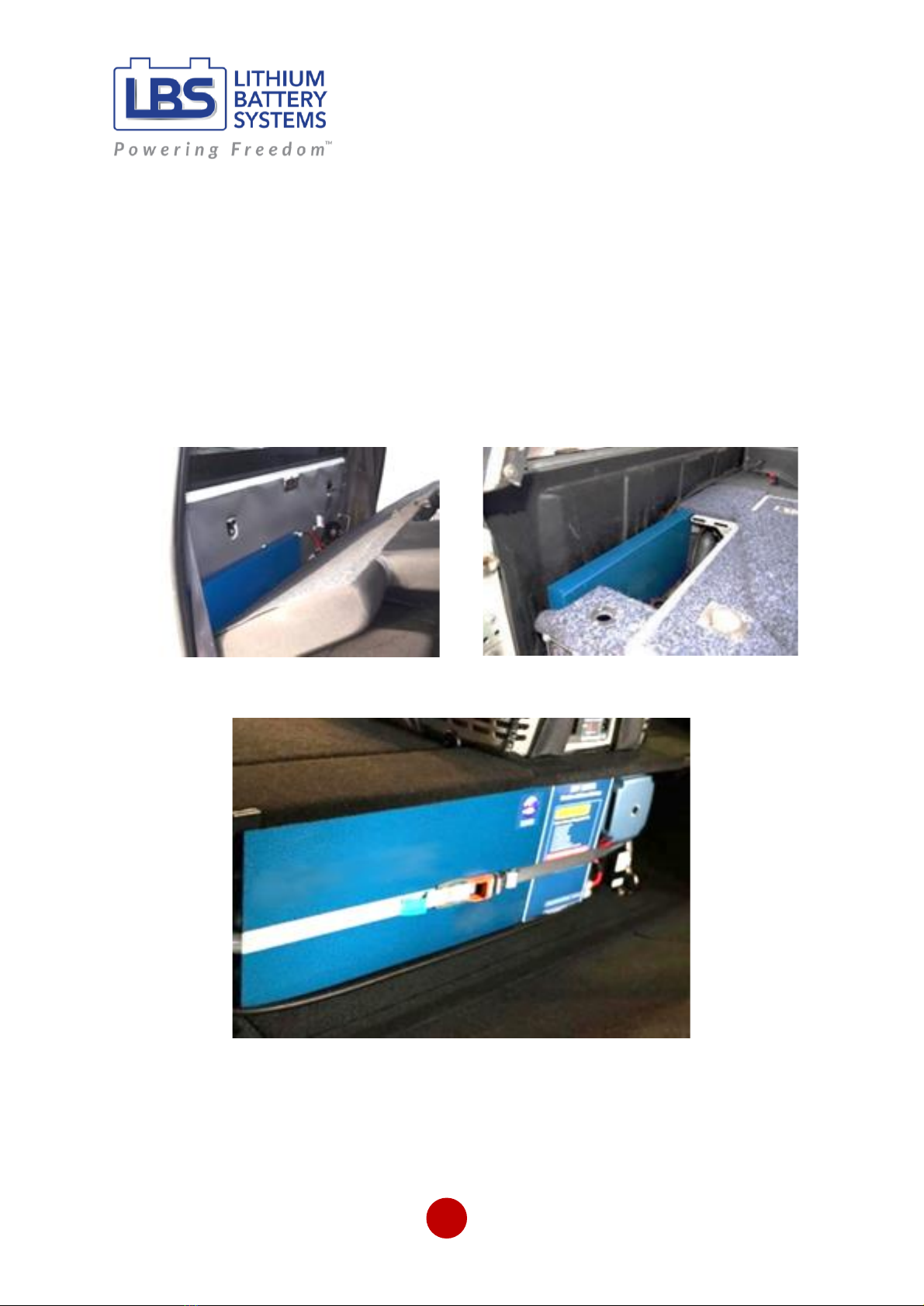
Figure 2, Figure 3 & Figure 4 illustrate some handy stowage solutions (Battery Colour: Hammertone
Blue). The primary benefit of the Slimline battery is that it can tuck away behind a seat in a vehicle.
Too often space is at a premium and the slim shape and design of the battery means it can be hidden
away easily.
Figure 2: Behind a seat
Figure 3: Back of a 4x4
Figure 4: Strapped at the back of a 4x4
Slimline User Guide v9
Installation & User Guide
SL Range
10
5.2 Mounting orientation
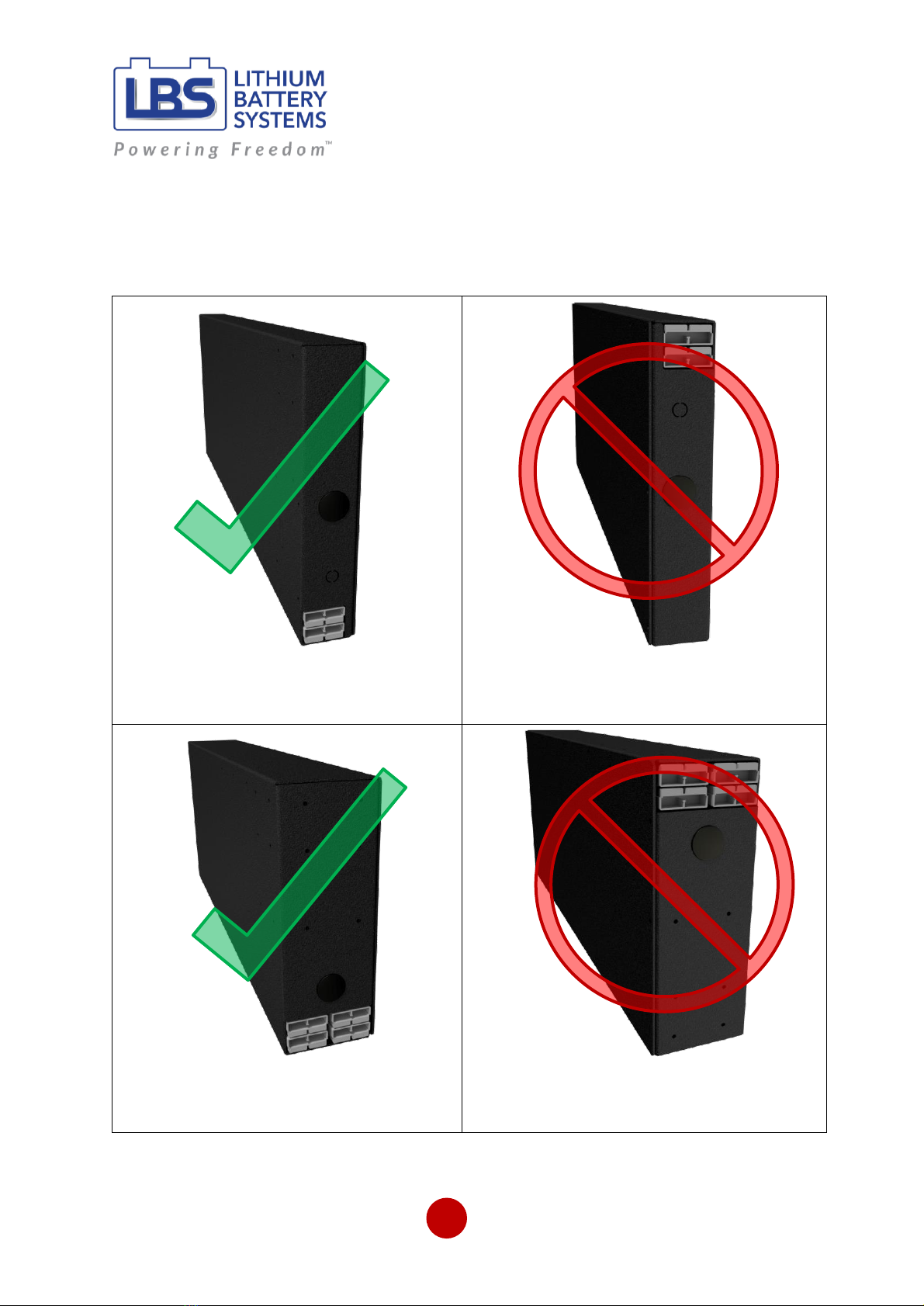
The Slimline battery is best mounted on its side with the Anderson terminals at the bottom. Do not
mount on its side with the Anderson plugs at the top. In this configuration the internal cells are upside
down which is against the cell manufacturer’s recommendations. Please refer to the figures below.
Figure 5: Recommended orientation for
LBS-1275-SL/LBS-12110-SL (-DCS) batteries.
Figure 6: Do not install the LBS-1275-SL/
LBS-12110-SL (-DCS) in the above orientation.
Figure 7: Recommended orientation for
LBS-12150-SL/LBS-12150-SL200 batteries.
Figure 8: Do not install the LBS-12150-SL/
LBS-12150-SL200 in the above orientation.
Dieses Handbuch passt für folgende Modelle
5
Inhaltsverzeichnis
Andere LBS Batteriepack Handbücher

Beliebte Batteriepack Handbücher anderer Marken


IOGear
IOGear GBP24V Series Bedienungsanleitung

Inventus Power
Inventus Power PROTRXion S-12V100-TRX-HD Bedienungsanleitung

Clas Ohlson
Clas Ohlson PW-290A Bedienungsanleitung

EINHELL
EINHELL MULTI-Ah Power X-Change Plus Bedienungsanleitung

Samsung
Samsung EB-U3300 Bedienungsanleitung

ECTIVE
ECTIVE LC Series Bedienungsanleitung