Lenoxx PDVD1300 Bedienungsanleitung

- 1 -
PDVD1300
PORTABLE DVD PLAYER
INSTRUCTION MANUAL

- 2 -
Safety Information
1. User notice
After purchasing the DVD player, please read the operations and other instructions of the
user manual carefully.
2. Disc
Do not use broken or damaged discs. Using a broken or damaged disc can damage the
DVD player.
3. Inspection
Check the DVD player and power adapter for any damage before use.
4. Repair
In order to avoid electric shock, please the included adaptors and ensure proper
connection. If repairs are required to your unit, please consult a qualified technical
service center.
5. Earphone
Take care when adjusting volume when using earphones. Using earphones at a high
volume can damage your hearing.

- 3 -
6. Humidity
In avoid of electric shock and fire accident, please don’t use the DVD player in a wet
environment such as rain or bathtub or in a humid environment such as sauna.
7. Keep away from liquid
Ensure the DVD player and its spare parts are kept away from and liquid source. Liquid
inside the DVD player can cause an electronic shock.
8. Keep away from heat
Ensure the DVD player and its spare parts are kept away from heat sources such as
heaters, induction cookers, and so on.
9. Thunder and Lightning
Do not use the DVD player during thunder and lightning conditions.
10. Ventilation
Ensure the DVD player is used in a ventilated environment. Do not use with it resting on
a bed, sofa, or other soft surfaces as it can cause the DVD player and other parts
components to be very hot and can cause a fire.
11. LCD Screen
Do not drop, impact or scratch the LCD screen. Do not rest heavy items on top of the
DVD player.
Note: Do not to touch the LCD screen directly should it become broken. If the liquid of
LCD has touched the skin, please wash your skin with water for at least 15 minutes
12. Laser
Attention: This DVD player is equipped with a laser system. In case of requiring repair,
please contact the distributor or our technical service center. Do not open the DVD.
13. Charger
Use the supplied AC charger to re-charge the battery. Ensure that it is suitable for your
local environment and use a suitable travel adaptor if using overseas.

- 4 -
Unsuitable INPUT, OUTPUT can cause damage to the DVD player, fire or electric shock.
Do not use the AC adaptor or battery if they are damaged.
14. Battery and charging
1) Charging process:
Before shipping, all batteries have not enough power.
Connect either the 240V mains power adaptor (indoor use) or the 12V car adaptor (in car
use) to the DC input socket on the DVD player.
The DVD player will charge by itself.
The red light will be on when the battery is charging.
When it is fully charged, the light will be green.
Note: you can play a DVD while the DVD player is charging.
Note:
Please consult a qualified service technician to replace the battery if required.
1) Do not put the battery into fire.
2) When the DVD player is charging or playing, do not install the battery.
3) Do not put the battery into water or other liquids, it will cause damage to the battery.
4) Do not hit, impact or drop the battery.
5) Do not open the battery and change the structure.
6) If you want to have a long rest or sleep, please take the power off to prevent
rechargeable cell damage or damage caused by an unexpected accident.
7) Use in temperatures -5°C —40°C

- 5 -
Disc Type
Disc
Type
Disc
Marks
Record
contents
Disc
size Playing time on the disc
DVD DVD Audio/Video
12CM
Up to 2 hours (SS-SL; Single-
sided single-layer disc)
Up to 4 hours (DS-SL;
Double-sided single-layer disc)
8CM
Up to 80 minutes (SS-SL;
Double-sided single-layer disc)
Up to 160 minutes (DS-SL;
Double-sided double-layer disc)
Super
VCD
Super
VCD
Audio/Video 12CM Up to 74 minutes
VCD
VCD1.0/
2.0
Audio 8CM Up to 20 minutes
CD CD Audio
12CM Up to 74 minutes
8CM Up to 20 minutes
MP3 Audio 12CM Up to 600 minutes
Using discs
Hold the disc on the discs edge, do not touch the surface.
Do not put tape or stickers on disk
Do not let the disc be exposed to direct sunlight or direct heat source
After playing a disc, store the disc in its case or other storage method where it will be
kept clean and undamaged.
Before play disc, use a soft clean cloth to clean the disc from the centre to the outer of
the disc.
Do not use gasoline, non-special disc cleaners or anti static spray to clean the disc.

- 6 -
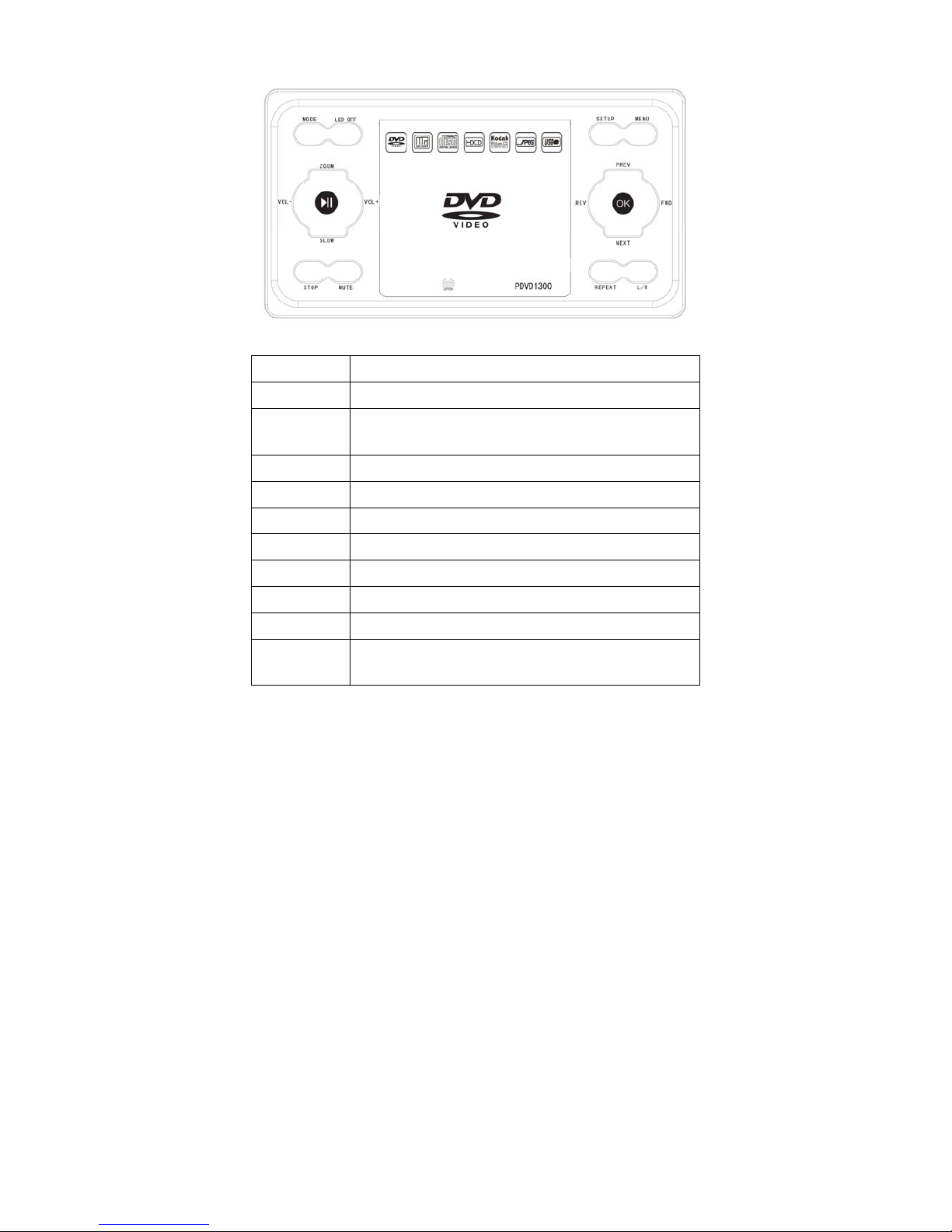
Panel
MODE Press to change playback mode
LED OFF Press to turn the screen off. Audio will still be heard if playing.
ZOOM
Press during DVD playback to zoom into the picture on the
screen
VOL- Press to decrease volume
VOL+ Press to increase volume
SLOW Press to slow play a DVD disc which allows for this function
►║ Press to pause playback, press again to resume playback
STOP Press to stop playback
MUTE Press to mute sound. Press again to unmute sound
SETUP Press to access the set up menu for the DVD player
MENU
Press to access a DVD discs menu on discs which allow this
function

- 7 -
PREV
Press to fast forward in DVD playback. Press to go forward a
song in CD playback.
REV
Press to rewind in DVD playback. Press to go back a song in CD
playback.
FWD
Press to go back a chapter when playing a DVD disc which
allows for this function
NEXT
Press to go forward a chapter when playing a DVD disc which
allows for this function
OK Press to make a selection when changing settings in menus
REPEAT In CD disc playback, press to repeat the current music track
L/R Press to switch between left/right/stereo sound playback
Side panel
USB USB socket
CARD SD/MMC Card socket
ΩEARPHONE
Connect earphones to this jack, earphones not
included
AV OUT Video out signal
AV IN External video input signal
ON/OFF OFF/ON switch to turn the player off and on
DC IN Socket for connection to mains adaptor or car adaptor

- 8 -
Remote Control
POWER
Press this button to turn the DVD player on or off. The unit must be
switched on the side panel to enable this.
MUTE Press to mute the sound
SUBTITLE Press to access subtitles on discs which allow for this function
USB/CARD Press to change playback mode from disc, USB or card
ZOOM Press during DVD playback to zoom into the picture on the screen
REPEAT In CD disc playback, press to repeat the current music track
A-B Use to set a certain playback point when playing a DVD disc
LED OFF Press to turn the screen off. Audio will still be heard if playing.
SETUP Press to access the set up menu for the DVD player
►║ Press to pause playback, press again to resume playback
◄Directional button – left. For use in menus

- 9 -
▲Directional button – up. For use in menus
►Directional button – right. For use in menus
▼Directional button – down. For use on menus
ENTER Press to make a selection when changing settings in menus
L/R Press to switch between left/right/stereo sound playback
■Press to stop playback
MENU
Press to access a DVD discs menu on discs which allow this
function
MODE Press to change playback mode
PROG
Press to access settings to program playback of selected songs
from a CD disc
Number keys Press during CD disc playback to jump to a particular track
VOL+ Press to increase volume
VOL- Press to decrease volume
SLOW Press to slow play a DVD disc which allows for this function
TIME Press to see information about playback time on the disc
◄◄
Press to rewind in DVD playback. Press to go back a song in CD
playback.
►►
Press to fast forward in DVD playback. Press to go forward a song
in CD playback.
COPY For use with the copy from CD disc to flash stick function
RETURN Exits current operation, e.g.: menu
І◄◄
Press to go back a chapter when playing a DVD disc which allows
for this function
►►І
Press to go forward a chapter when playing a DVD disc which
allows for this function

- 10 -
Batteries in the remote control
1. Remove the battery cover from the rear of the remote control.
2. Add 2 x batteries to the remote as per the polarity directions in the battery
compartment in the remote control.
3. Put the battery cover back onto the rear of the remote control.
Note:
1. Do not use re-chargeable batteries in the remote control, because they lose power at
a slower rate.
2. Do not mix different brands and type of batteries, do not use old and new batteries
together.
3. When the remote control function is not strong or control range is small, replace the
batteries.
4. If the remote control will not be used for a long time, remove the batteries to avoid
damage to the remote control from battery leakage or corrosion.
5. Do not use the remote control ion hot or humid conditions.
6. Do not disassemble the remote control.
Andere Handbücher für PDVD1300
1
Inhaltsverzeichnis
Andere Lenoxx Tragbarer DVD-Player Handbücher

Lenoxx
Lenoxx PDVD1000 Bedienungsanleitung

Lenoxx
Lenoxx PDVD1300 Bedienungsanleitung

Lenoxx
Lenoxx PDVD800 Bedienungsanleitung

Lenoxx
Lenoxx PDVD700 Bedienungsanleitung

Lenoxx
Lenoxx PDVD1030 Bedienungsanleitung

Lenoxx
Lenoxx PDVD1500 Bedienungsanleitung

Lenoxx
Lenoxx PR4219 Bedienungsanleitung

Lenoxx
Lenoxx PDVD830 Bedienungsanleitung