MAHA PTI Tool Bedienungsanleitung

Fehler! Verwenden Sie die Registerkarte 'Start', um Name dem Text zuzuweisen, der hier angezeigt werden soll.Fehler! Verwenden Sie
die Registerkarte 'Start', um Name dem Text zuzuweisen, der hier angezeigt werden soll.Fehler! Verwenden Sie die Registerkarte
'Start', um Name dem Text zuzuweisen, der hier angezeigt werden soll.
MAHA PTI Tool
Diagnosis Adapter for Automotive Test Engineering
Original Operating Instructions
BAZ72501-en
Pos: 1 / Te chn isc he Dokum en tat i on/L eis tu ngsp rüf s tä nde , D ia gn os e-/Abgasgeräte/Z7 Zubehör allgemein/2501 MAHAPTITool/BA/Inhalt:Z725Titelbild @ 47\mod_1482142551530_0.docx@ 2801918@ @ 1
Pos: 2 / -----F or m at---- -/MAN UEL LE R UM B RUCH Seite numb r uc h @ 0\mod_ 11 3 4403 5 776 87_ 0.d oc x @ 1 277 @ @ 1

2
BAZ72501-en
Pos: 3 / -----F or m at---- -/In ha ltsv er z eic hn is - 3 Eb e ne n @ 5\mod _ 11 688 67 441 0 46_ 75. do cx @ 72 9 20 @ @ 1
Contents
1Description...............................................................................................................3
1.1 General Information ............................................................................................................................. 3
1.2 Specifications ...................................................................................................................................... 4
2Initial Operation ........................................................................................................4
2.1 Connection Overview .......................................................................................................................... 4
2.2 Connecting the Device ........................................................................................................................ 6
2.3 Display ................................................................................................................................................ 6
2.4 Update ................................................................................................................................................ 6
3Operation.................................................................................................................7
3.1 General Requirements......................................................................................................................... 7
3.2 Establishing a Bluetooth Connection to EUROSYSTEM 7.50 .............................................................. 7
3.3 Establishing a Bluetooth Connection to MAHA Emission Software 7.51.............................................. 8
3.4 Setting the Language .......................................................................................................................... 9
3.5 Manufacturer’s Diagnosis: Test Procedure (EUROSYSTEM 7.50)...................................................... 10
3.6 OBD Diagnosis (MES 7.51)................................................................................................................ 11
3.7 OBD in the Test Procedure (MES 7.51) ............................................................................................. 13
3.8 Exporting Measurements................................................................................................................... 13
4FAQ .......................................................................................................................14
4.1 XDS not Found.................................................................................................................................. 14
4.2 XDS Version Incorrect ....................................................................................................................... 14
4.3 MAHA PTI Tool not Found (during Setup).......................................................................................... 14
4.4 No Communication with Web Service ............................................................................................... 15
4.5 No Communication with PTI/OBD Module ........................................................................................ 15
4.6No Communication with VCI ............................................................................................................. 15
5Maintenance ..........................................................................................................16
5.1 Cleaning ............................................................................................................................................ 16
5.2 Troubleshooting ................................................................................................................................ 16
5.3 Spare Parts ....................................................................................................................................... 16
5.4 Replacing the Battery ........................................................................................................................ 16
6Disposal.................................................................................................................17
7Contents of the Declaration of Conformity ..............................................................17
8Company Information.............................................................................................18
Pos: 4 / -----F or m at---- -/MAN UEL LE R UM B RUCH Seite numb r uc h @ 0\mod_ 11 3 4403 5 776 87_ 0.d oc x @ 1 277 @ @ 1

3
BAZ72501-en
Pos: 5 / Te chnisc he Dokumen tation/A lle Ger ä te/Üb erschr ifte n/Übers chr iften 1/ B/Üb ersc hrift 1 : B esc hreibu ng @ 6\mod_1174482271453_75.docx@ 76889 @ 1 @ 1
1
Description
Pos: 6 / Te chnisc he D okum entat ion/A lle G erä te/Üb erschr ifte n/Übers chr iften 1 .1/A/ Über schri ft 1. 1: Al lgeme ines @ 6\mod_1182865005781_75.docx @ 97736@ 2 @ 1
1.1
General Information
Pos: 7 / Te ch n isc he Dokum en ta ti on/ L eis tu ngs pr üf s tä nd e, Dia gn ose -/Abgasgeräte/Z7 Zubehörallgemein/2501 MAHAP TI Tool/BA/Inhalt:Z725 Beschreibung(Text)@ 39\mod_1410771876778_75.docx @2097530@ @ 1
The MAHA PTI Tool and EUROSYSTEM software make it possible to diagnose
control devices on motor vehicles (buses, HGVs, vans, cars and motorbikes).
Communication with the PC is wireless via Bluetooth or via USB cable.
Pos: 8 / Te chn isc he Dokum en tat ion/ L eis tu ngsp rüf s tä nde, Diagn ose -/Abgasgeräte/Z7 Zubehörallgemein/2501 MAHAP TI Tool/BA/Inhalt:Z725 Beschreibung(Legende) @ 39\mod_1410771902003_75.docx@ 2097576@ @ 1
A
Female USB Mini-B connector (covered)
E
Battery cover
B
Female USB connector cover
F
LED in male OBD connector
C
Blue LED
G
Male OBD connector
D
Green/red/yellow LED
H
LED button
Pos: 9 / Te ch n isc he Dokum en ta ti on/ L eis tu ngs pr üf s tä nd e, Dia gn ose -/Ab gasger äte/Z7 Z ubehör allgemei n/2501 M AHAPTI Tool/BA/Inhalt: Z725Beschreibung(Bild)@ 31\mod_1364292669960_0.docx @ 1732113@ @ 1
Pos: 1 0 /----- Form a t-----/ MA N UE L LE R UM BR UC H S e i ten um b r uch @ 0\m od_1134403577687_0.docx @ 1277@ @ 1
G
H
D
A B
C
E
F
C
D

4
BAZ72501-en
Pos: 1 1 / Techn ische Dokument ation/ Alle Geräte/Über sc hriften/ Über schri ften 1.1/T/Üb erschri ft 1. 1: Te chnis che D aten @ 7\mod_1184075526343_75.docx @ 99711@ 2 @ 1
1.2
Specifications
Pos: 1 2 / Tec hn isch e Dokume nt at ion/ Le ist un gspr üfs t ände , Diag nos e-/ Abga s ger ä te/ Z7 Zub eh ör a ll gem ei n/ 250 1 M AH A PTI T o ol/ BA/ I nh al t: Z 72 5 Te c h nisc he Date n ( Tab e ll e) @ 31\m od_1 36437 92943 28_ 75.docx @ 173 2803 @ @ 1
Power supply
Nominal voltage +12 VDC via female OBD connector
Voltage range +8…+36 VDC, max. 3 W
LED Battery CR2032 lithium battery, 3 V
Temperature
Operating temperature 0 °C…+40 °C
Transport temperature -20 °C…+60 °C
Humidity 10...90 % (non condensing)
Housing
Weight approx. 120 g
Dimensions (L x W x H) 121.5 x 50 x 25 mm
Interfaces
Personal Computer (PC) Female USB 1.1 Mini-B connector
Vehicle Male OBD connector (16 pin)
Supported vehicle protocols OBD-compliant and manufacturer-specific protocols
Pos: 1 3 / Techn ische Dokument ation/ Alle Geräte/Über sc hriften/ Über schri ften 1/I/Übers chr ift 1 : Inb etrieb nahm e @23\mod_1301477548701_75.docx@ 987803@ 2 @ 1
2
Initial Operation
Pos: 1 4 / Techn ische Dokument ation/ Alle Geräte/Über sc hriften/ Über schri ften 1.1/A/Über schr ift 1.1:A nsc hluss übersi ch t @ 11\mod_1228992841316_75.docx@ 278616@ 2 @ 1
2.1
Connection Overview
Pos: 1 5 / Tec hn isch e Dokume nt at ion/ Le ist un gspr üfs t ände , Diagnos e-/ Ab gas ge rä te /Z 7 Zubeh ör allge m ei n/ 2 501 M AH A PTI T o ol/ BA/ I nh al t: Z 72 5 Anschl us süb er s ich t ( L e gend e ) @3 1\mod _ 1 365 77 4588417_75.docx @ 1747609@ @ 1
A
Female USB connector
H
LED button
B
Cover
I
USB cable
C
Blue LED
J
Vehicle female OBD connector
D
Green/red/yellow LED
K
Extension cable (optional)
F
LED in male OBD connector
L
Bluetooth stick
G
Male OBD connector
M
PC
Pos: 1 6 /----- Form a t-----/ MA N UE L LE R UM BR UC H S e i ten um b r uch @ 0\m od_1134403577687_0.docx @ 1277@ @ 1

5
BAZ72501-en
Pos: 1 7 / Tec hn isch e Dokume nt at ion/ Le ist un gspr üfs t ände , Diagnos e-/ Ab gas ge rä te /Z 7 Zubeh ör allge m ei n/ 2 501 M AH A PTI T o ol/ BA/ Inh al t: Z 72 5 Ans c hl ussüb er s ich t ( Bi ld) @ 31\m od_1364300497256_0.docx @ 1732345 @ @ 1
Pos: 1 8 /----- Form a t-----/ MA N UE L LE R UM BR UC H S e i ten um b r uch @ 0\m od_1134403577687_0.docx @ 1277@ @ 1
A
I
B
D
H G
F
K
L
C
M
J

6
BAZ72501-en
Pos: 1 9 / Techn ische Dokument ation/ Alle Geräte/Über sc hriften/ Über schri ften 1.1/G/Über sc hrift 1.1:G er ät ansc hlie ßen @ 31\mod_1365774714290_75.docx @ 1747653@ 2 @ 1
2.2
Connecting the Device
Pos: 2 0 / Tec hn isch e Dokume nt at ion/ Le ist un gspr üfs t ände , Diag nos e-/Ab gas gerä te/Z7 Zubehör a llgem ei n/2 501 MAHA PTI To ol/ BA/Inh alt: Z 725 G er ät ans ch ließe n ( Tex t) @ 39\mod_1408611910827_75.docx@ 2078195@ @ 1
1 Connect the MAHA PTI Tool male OBD connector (G) and the vehicle female
OBD connector (J). The blue LED (C) lights up.
Pressing the button (H) causes an LED in the male OBD connector to light up.
The MAHA PTI tool can therefore easily adapt to dark locations.
2 Establish Bluetooth connection with the PC. Refer to the "Operation" section.
Alternatively, you can connect the MAHA PTI Tool to the PC using a USB cable
(I). To do this, open the cover (B) and connect the USB cable to the female
USB connector (A).
If there is a connection to the PC, the green/red/yellow LED (D) displays a
green light.
Pos: 21 /Techn ische Dokument ation/Alle Ger äte/Übersc hriften/ Überschrifte n 1.1/A/Übersc hrift 1.1: Anze ige @3 1\mod_1364296539126_75.docx@ 1732301@ 2 @ 1
2.3
Display
Pos: 2 2 / Tec hn isch e Dokume nt at ion/ Le ist un gspr üfs t ände , Diagnos e-/ Abgas gerä te/Z 7 Z ubehörallgemein/2501 MAHA PTITool/BA/Inhalt:Z725 Anzeigeelemente undSignalgeber @ 31\mod_1364295810474_75.docx@ 1732157@ @ 1
LED Status Meaning
C
Blue
Off Device not powered (female OBD connector in the
vehicle)
On Device is powered (female OBD connector in the
vehicle)
D
Green/red/
yellow
Solid green light Connection to PC (Bluetooth/USB) established
Flickering green
light
Connection to PC (Bluetooth/USB) established, data
being transferred
3 x flashing red
light; 3 x sensor
beeps
Device is powered, but no connection to PC for
more than 20 secs ("loss protection")
Flickering orange
light Updating firmware: Please wait
1 x flashing green
light and 2 x
flashing red light
Failed to update firmware or no firmware loaded:
Repeat update
Pos: 2 3 / Techn ische Dokument ation/ Alle Geräte/Über sc hriften/ Über schri ften 1.1/U/Üb erschri ft 1. 1: Upd ate @ 7\mod _118 97609 33537 _75.d ocx @ 105 526 @ 2 @ 1
2.4
Update
Pos: 2 4 / Tec hn isch e Dokume nt at ion/ Le ist un gspr üfs t ände , Diagnos e-/ Abgas gerä te/Z 7 Z ub eh ör allge m ei n/ 2 50 1 MA H A PTI T o ol/ BA /I nh al t: Z 72 5 Updat e @ 31\m od_1364301928535_75.docx@ 1732433@ @ 1
Firmware cannot be updated via Bluetooth; only with a USB cable.
Pos: 2 5 /----- Form a t-----/ MA N UE L LE R UM BR UC H S e i ten um b r uch @ 0\m od_1134403577687_0.docx @ 1277@ @ 1

7
BAZ72501-en
Pos: 2 6 / Techn ische Dokument ation/ Alle Geräte/Über sc hriften/ Über schri ften 1/B/Über schri ft 1: Bed ie nung @ 6\mod_1174482271218_75.docx@ 76877 @2 @ 1
3
Operation
Pos: 2 7 / Tec hn isch e Dokume nt at ion/ Le ist un gspr üfs t ände , Diag nos e -/A bga s ger ä te/ Z 7 Zubeh ör all gem e i n/2 50 1 M AH A PTI T o ol/ B A/ Inh a lt: Z 72 5 Bedie n un g @ 39\mod_1408612208881_75.docx@ 2078242@ 22222222@1
3.1
General Requirements
•Manufacturer’s diagnosis: EUROSYSTEM software v7.50.062 or higher
•OBD: MAHA Emission Software v7.51.008 or higher
•USB or Bluetooth interface
•MAHA PTI Tool with licence number (activation key)
•XDS: PTI-Tool WebService (installed automatically)
•.Net Framework 4.0, Visual C++ 2012 Libraries (installed automatically)
3.2
Establishing a Bluetooth Connection to EUROSYSTEM 7.50
1 Start EUROSYSTEM.
2 Plug the MAHA PTI Tool into the vehicle and turn the ignition.
3 Establish the Bluetooth connection under System > Settings > PTI Tool.
4 <F6> Device scan.

8
BAZ72501-en
5 If the PTI MAHA Tool is detected:
a) Enter the licence number (activation key).
b) Select the MAHA PTI Tool for the corresponding rows using the "Enabled"
button (this will also transfer the licence number).
c) Save the settings using <F5>.
3.3
Establishing a Bluetooth Connection to MAHA Emission Software 7.51
1 Start MES.
2 Plug the MAHA PTI Tool into the vehicle and turn the ignition.
3 Select Settings > Settings Emission testers (F) > PTI Tool.

9
BAZ72501-en
4 <F6> Device scan.
5 If the PTI MAHA Tool is detected, save the settings using <F8>.
6 Enable PTI OBD, select active device as required and save the settings using
<F8>.
3.4
Setting the Language
The MAHA PTI Tool uses the same language as set in EUROSYSTEM / MES.
The current languages offered are German, English, French, Italian and Spanish.
If the desired language is not available, the MAHA PTI Tool is set to English.

10
BAZ72501-en
3.5
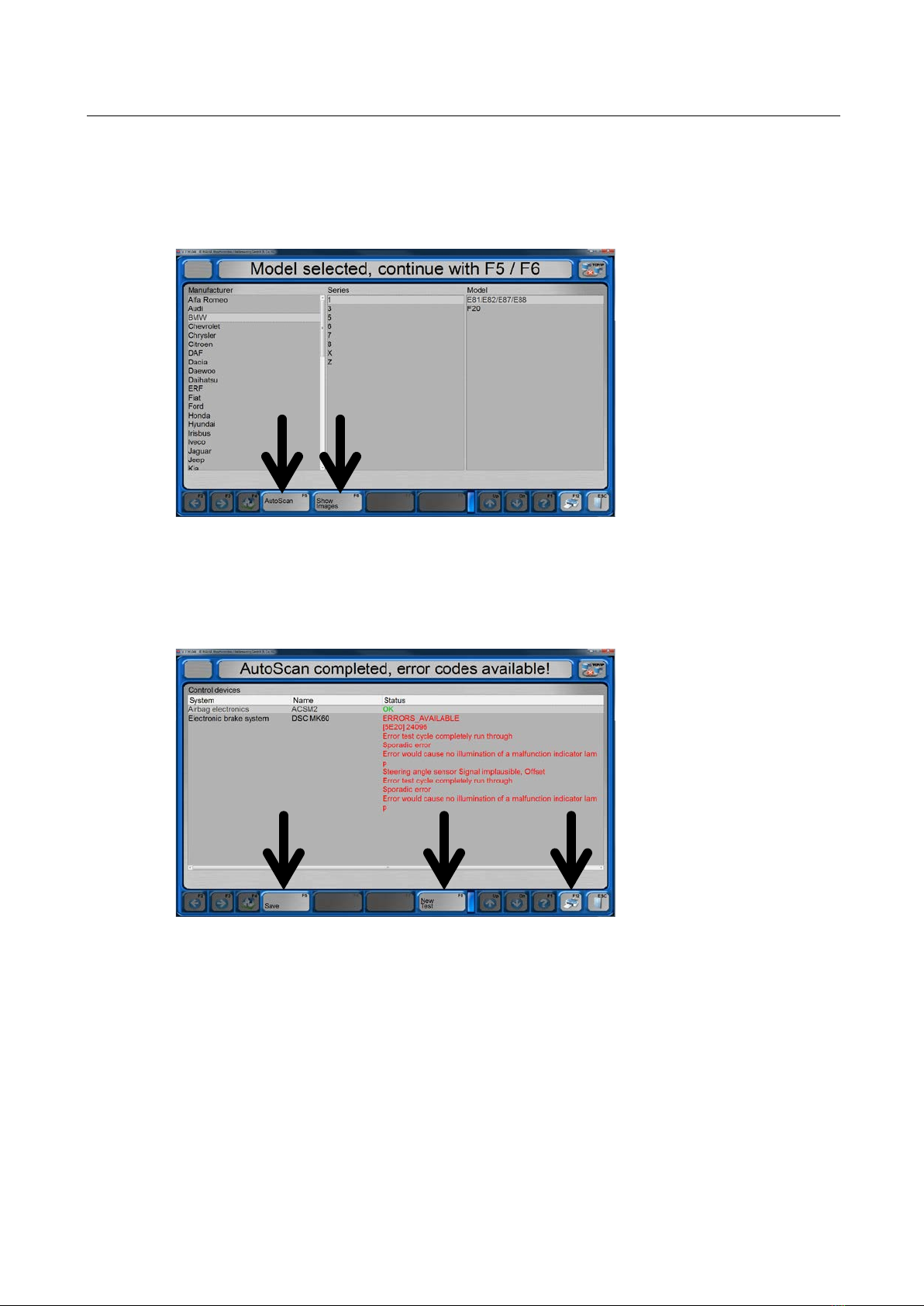
Manufacturer’s Diagnosis: Test Procedure (EUROSYSTEM 7.50)
1 You can start the vehicle diagnosis under Test procedure > PTI Tool.
2 After selecting the manufacturer, series and model you can:
a) start the AutoScan using <F5>.
b) display a picture of the diagnostic interface (if available) using <F6>.
3 After a successful AutoScan you can:
a) save the measurement using <F5>.
b) start a new measurement using <F8>. This will discard previous
measurements.
c) start a printout of the test results using <F12>.
Inhaltsverzeichnis
Sprachen: