
Marsh P2000 Bedienungsanleitung

MARSH SOUND DESIGN
OPERATING MANUAL
P2000
Preamplifier

Marsh
2
The lightning flash with arrowhead, within an equilateral triangle, is intended to alert the user to the presence
of uninsulated “dangerous voltage” within the product’s enclosure that may be of sufficient magnitude to
constitute a risk of electric shock to people.
CAUTION:
To prevent the risk of electric shock, do not remove the cover (or back) . No user-serviceable parts inside.
Refer servicing to qualified service personnel.
The exclamation point within an equilateral triangle is intended to alert the user to the presence of important
operating and maintenance instructions in the literature accompanying the appliance
RISK OF ELECTRIC SHOCK
DO NOT OPEN
Warning
WARNING: TO PREVENT FIRE OR SHOCK HAZARD, DO NOT OPEN OR
EXPOSE THIS APPLIANCE TO RAIN OR MOISTURE.

Marsh
3
Before proceeding with the installation, please read the instructions carefully and completely. If you have
any problems, do not hesitate to contact your retailer or our Service Department.
1. All warnings on the unit and in the operating manual should be followed.
2. Operate the unit only from a power source of the appropriate voltage indicated on the rear panel.
3. Do not use a damaged or deformed power cord as it may cause electric shock. When removing the plug
from the wall outlet, be sure to remove by holding the plug attachment and not by pulling the cord.
4. This unit should not be used near water or in humid conditions.
5. Do not pour or spill liquids of any kind onto this unit.
6. Do not operate this product with any cover removed.
7. Before connecting or disconnecting any cables, always turn off your equipment and disconnect your
entire system from the AC mains.
8. Do not replace any fuse with a value or type other than that specified.
9. Do not overload the wall outlet or extension cord because this can result in a risk of fire or electric shock.
10. Do not push objects of any kind into this product through the openings e.g., ventilation slots, because
they may touch dangerous voltage points or short-out parts. This act could result in a fire or electric
shock.
11. Do not attempt to repair this product because opening or removing covers may expose you to dangerous
voltage or other hazards. If a problem occurs, contact your Marsh retailer.
12. Disconnect your entire system from the AC mains before cleaning.
13. Slots and openings in the cabinet are provided for ventilation and to ensure reliable operation of this
product and to protect it from overheating. These openings must not be blocked or covered.
14. The operating temperature ranges from +5 to +35 degrees C. Operating humidity ranges from 5% to
80%. Do not operate the unit when the temperature and/or humidity are outside of this range.
Important/Precautions

Marsh
4
Thank You for purchasing the MARSH SOUND DESIGN MSD-P2000.
MSD brings you extraordinary components that are true, above all, to the art of music.

Marsh
5
Table of Contents
Important/Precautions..............................................................................................2
Preface.....................................................................................................................6
Unpacking............................................................................................................8
Placement Considerations.........................................................................................9
Functions.................................................................................................................10
Rermote Control......................................................................................................................11
Connections............................................................................................................12
Troubleshooting guide.............................................................................................14
Care & Maintenance...............................................................................................15
Warranty information................................................................................................16
Specifications.........................................................................................................17
Dimensions..............................................................................................................18

MSD's logo comes from an ancient Native American petroglyph pecked in
stone, high in the Sierra Nevada mountain range. Long ago, small, self-
sufficient groups of people moved about the mountains, hunting and
gathering, and celebrating rituals. Leaving behind little about themselves, except for
these rock figures and a few stone tools. The mark we found, created a thousand years
ago, could have been a sun sign, a map, or a symbol of focus and concentration-or yet
some mystery we cannot imagine today.

Preface
Just as a great performer spends years learning his or her instruments, so a master designer spends years
understanding the complexities of audio circuitry and the science of electronics.
The Marsh Sound Design team builds its products to the most exacting standards of design and construction, for
simplicity of use, long life and timeless performance. Your investment in a Marsh product means that you can
forget about the hardware and focus on years of enjoyment.
For more than 30 years, author, lecturer, engineer, and inventor, has shared the art of
perfecting audio circuits with other designers. Now, his goal is to bring you his accumulated experience in the
service of music.
Richard N. Marsh,
So - set your course for the music . . .and leave the rest to us.
Marsh
8
Marsh
Unpacking
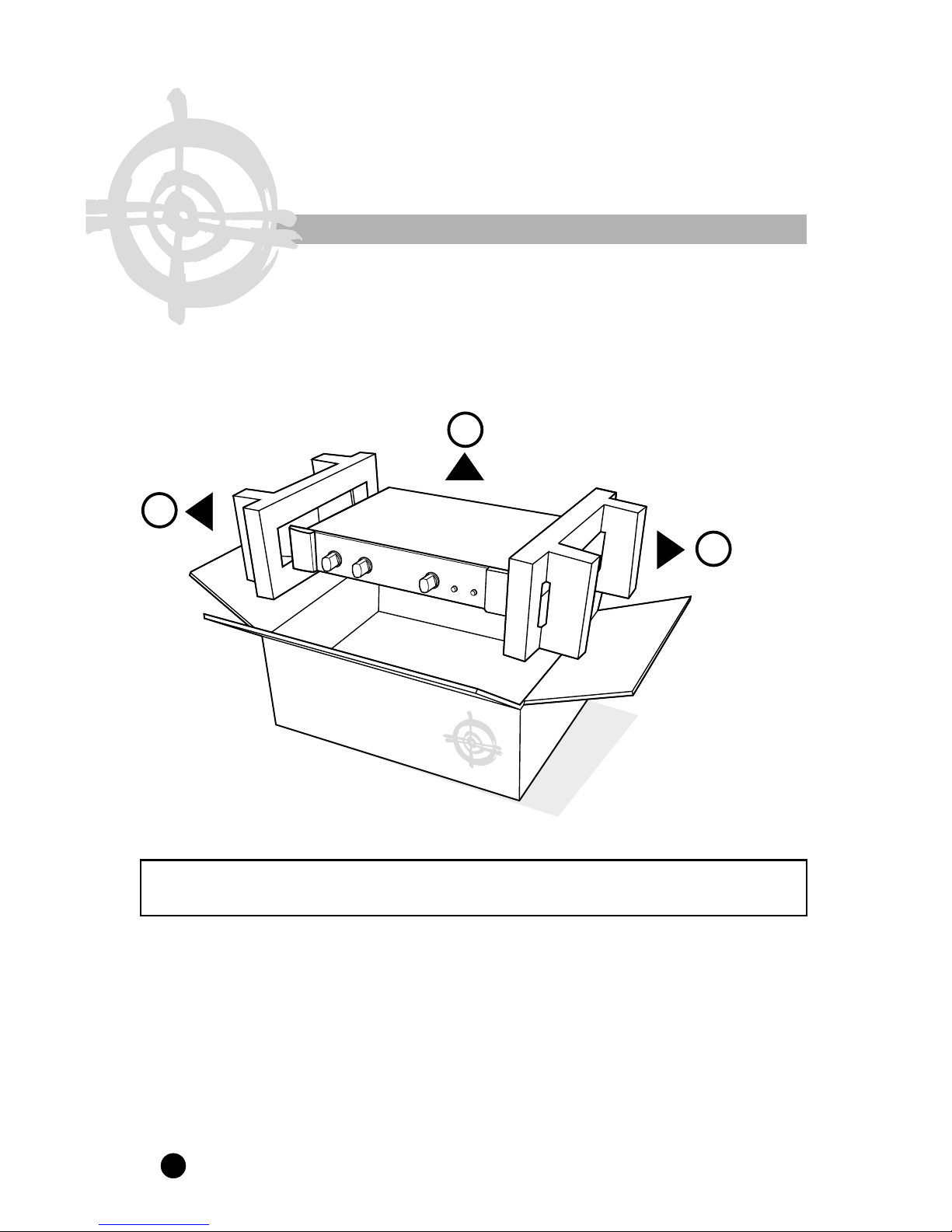
WARNING:
.
PEOPLE WITH BACK PROBLEMS SHOULD NOT UNPACK THIS EQUIPMENT
WITHOUT ASSISTANCE
1. Carefully lift the unit out of the box.
2. Remove the foam packing material.
3. Set up the unit for use.
REMEMBER: Keep all the original packing in case it is necessary to return the unit for servicing.
1
2
2

Marsh
9
Placement Considerations
DO NOT INSTALL THE UNIT IN THE FOLLOWING LOCATION:
1. In a place subject to direct sunlight.
2. In a humid place.
3. In an extremely hot or cold place.
4. In a place subject to vibrations.
5. In a dusty place.
6. In a poorly ventilated place.

Marsh
10
The unit is always in standby mode when the AC power cord is plugged into AC wall outlet. The power LED
will be in dimly BLUE color. The preamplifier does not operate in this state. But the internal circuitry always
has power applied to it all the time.
1. POWER Pressing the POWER button to turn the unit into operation mode. The power
LED will appear brightly BLUE. The unit is fully functioning in this mode.
Press POWER button again to standby mode. The LED will be dimmed blue in this
mode.
2. TAPE Press the TAPE button once to select TAPE input as the source. The green LED will
be lit while in TAPE mode. Press TAPE button again to deactivate TAPE mode.
3. SELECTOR Turn the selector knob to the desired source input.
.
4. BALANCE Turn the balance level knob to adjust the sound balance between two speakers. Leave
it in the center position to give equal output on both channels.
Sometimes in unequal source recording, you may need to adjust the balance level to
get a balanced stereo sound. If the sound weaker on left side, move the knob to left
until you hear equal sound from speakers and vice versa.
5. VOLUME Adjust the output level.
Remark: The MSD-P2000 has an on-off digital control signal (REMOTE) to turn the power amplifier, with
remote turn-on capability, ON/OFF with the preamplifier.
Functions
BALANCEVOLUME
TAP E POWER
DVD VIDEO
TUNER
CD
LINE1
LINE2
Marsh
HR LA
IGH ESOLUTION INE MPLIFIER
Marsh Sound Design MSD- 2000P
54 321
Inhaltsverzeichnis


